Manual campaign work still costs time and introduces error. Recent market reviews and vendor studies show automation can reduce repetitive work by 40–70%, shorten campaign launch time by 30–60%, and measurably improve ROI by letting teams focus on strategy rather than busywork. For example, marketing dashboards and automated analytics are credited with cutting reporting time from days to hours in many SMBs. (OptinMonster)
So the question is not whether to automate, it's how to pick the right tools, plug them into your stack, and measure what matters.
The automation stack: primary categories (and why each matters)
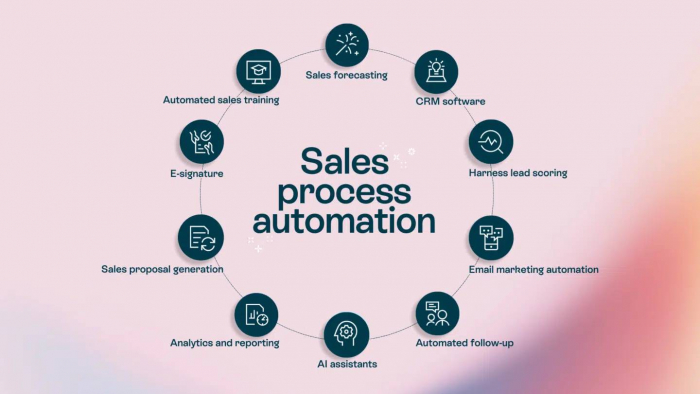
1. Marketing automation / orchestration replaces manual email sequences, lead scoring, segmentation, ad syncing.
2. Email & SMS platforms replace one-by-one message sends, audience segmentation in spreadsheets, and manual A/B testing.
3. Ad management & creative optimization automate bids, creative versions, and cross-platform campaign management.
4. Social scheduling & community tools plan, approve, and publish social content at scale, replacing manual posting and calendar upkeep.
5. CRM with marketing automation unifies lead data and automates handoffs to sales.
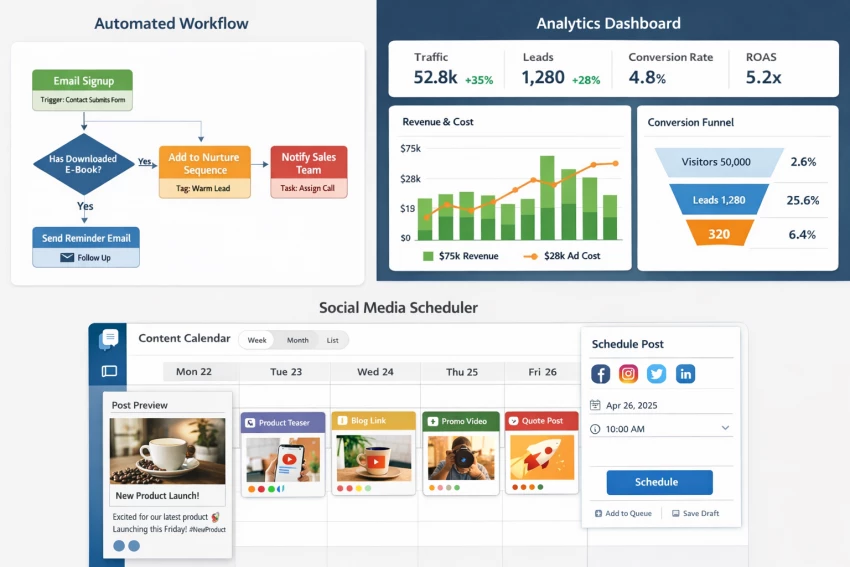
6. Analytics & dashboards replace manual reporting and stitched-together spreadsheets with real-time KPI visualization.
7. Integration & workflow automation glue everything together; replace CSV imports, manual data transfers, and repetitive triggers.
Use cases: lead nurturing flows, triggered transactional emails, multi-platform ad testing, calendarized social rollout, automated weekly performance dashboards.
Top tools in 2026
1) Marketing automation & orchestration
● HubSpot Marketing Hub All-in-one automation, chat, ads, and analytics; strong for teams that want one platform for inbound + campaigns.
● ActiveCampaign Advanced automation builder focused on behavior-driven journeys and automation recipes. Great for B2B and SMBs wanting deep automation without enterprise complexity.
● Ortto (formerly Autopilot) Emphasizes customer journeys and analytics for revenue marketing; useful where event-driven journeys matter.
Why these: They replace manual “if this then that” spreadsheets, allow packaged automation templates, and connect to CRMs and ads saving hours per campaign.
2) Email & SMS marketing
● Klaviyo The standard for eCommerce brands with strong email+SMS automation tied to purchase and behavioral data. (Klaviyo site)
● Brevo (formerly Sendinblue) Affordable automation and multi-channel messaging for SMBs.
● MailerLite / Mailchimp Simpler UIs for teams that need fast campaign setup and landing pages.
Data to monitor: deliverability rates, time-to-first-open, revenue per recipient (RPR), and unsubscribes.
3) Paid-media & ad automation
● Fluency Emerging adtech that runs agentic AI across Google/Meta/TikTok, optimizing creatives and bids across channels. (Notable for cross-platform ad orchestration.)
● Smartly / Kenshoo / Marin (category leaders) Platforms built for scaling and automating programmatic and social ad campaigns (consult current pricing & capabilities).
Why use them: Instead of manually duplicating campaigns across platforms and spreadsheets, these platforms can auto-generate creative variants, shift budgets in real time, and report cross-platform ROI.
4) Social media scheduling & content operations
● Buffer / Hootsuite / Sprout Social / Later Most teams choose one of these to replace manual posting and calendar spreadsheets. Buffer is praised for simplicity; Hootsuite for richer features and social listening. (Buffer)
● ContentStudio / Loomly Great for approval workflows and collaborative content calendars.
KPIs: posts scheduled per month, engagement lift vs baseline, time saved on approvals.
5) CRM + marketing automation (unified)
● Salesforce Marketing Cloud Enterprise-grade, deep integrations; best for large orgs needing scale and custom workflows.
● HubSpot CRM Strong free tier and integrated Marketing Hub; popular where marketing and sales alignment matters. (HubSpot)
● Zoho CRM Cost-efficient alternative with integrated marketing modules for budget-conscious teams.
Why unified CRM matters: Eliminates double-entry, automates lead scoring, and triggers nurture flows when leads reach sales-qualified thresholds.
● Databox Quick dashboarding and automated reporting for marketing KPIs. Useful to replace recurring spreadsheet reports.
● Looker Studio (Google), Mixpanel, Amplitude, Adobe Analytics choose based on product analytics needs vs marketing channel reporting. For GA alternatives and privacy-focused analytics, consider Matomo, Plausible, or Fathom.
Data that matters: CAC, LTV, conversion velocity, channel-level ROAS, and attribution windows automate extraction and visualization and your weekly report becomes one click.
7) Integration & workflow automation
● Zapier Flexible “if this then that” automation across 5,000+ apps (good for replacing manual CSV imports). (Zapier)
● Make (Integromat) Visual workflows for more complex integrations.
● Segment / RudderStack For event streaming and modern data pipes when you need to feed analytics and personalization engines.
Tip: Integration tools are the easiest wins even a few zaps can eliminate daily manual data handling.
A personalized 6-week rollout plan for you with low risks
Here’s a pragmatic approach I’d recommend based on typical small-to-midsize marketing teams in 2026:
Week 1 Audit & prioritize:
● Map current manual tasks: list every CSV export, manual post, weekly slide deck, and campaign synchronization step.
● Tag tasks by impact (hours saved) and risk (customer experience). Pick 3 “low-hanging” tasks that save the most time with the least risk (e.g., email sends, social scheduling, weekly reporting).
Week 2 Choose a pilot tool for each priority:
● Email: pick Brevo or ActiveCampaign (budget vs capability). (EmailTooltester.com)
● Social: choose Buffer or ContentStudio for scheduling & approvals.
● Reporting: build a Databox or Looker Studio dashboard to replace weekly slides.
Week 3 Run a parallel test:
● Keep manual processes running while the tool runs in parallel. Compare results: delivery accuracy, time spent, and any gaps.
Week 4 Iterate & document:
● Fix gaps (e.g., tagging inconsistencies, template tweaks), create playbooks, and write a one-pager for teammates.
Week 5 Expand automation:
● Add triggers (e.g., lead enters HubSpot → start nurture), schedule social calendar automation, and replace manual report emails with scheduled dashboard exports.
Week 6 Measure ROI & scale:
● Measure time saved, error reduction, and campaign impact (CTR, open rate, conversions). Decide the next category to automate (e.g., ad optimization or personalized web experiences).
Data rules: what to measure before & after automation
Automation only pays when you measure it. Track these pre/post metrics:
● Time saved (hours/week) on manual tasks converted to FTE cost saved.
● Adoption metrics how many team members use the new workflows.
Benchmarks: teams often see 30–60% reduction in launch time and a 20–40% improvement in internal efficiency within 3 months of automation.
Common pitfalls and how to avoid them
1. Automating the wrong process: If you automate a broken manual flow, you’ll scale the problem. Fix the flow first.
2. No ownership: Assign a “process owner” for each automation so issues get prioritized.
3. Over-automation = stiffness: Keep human review steps where creativity matters (e.g., final creative approval).
4. Ignoring data hygiene: Automation requires clean tags, consistent UTM usage, and a canonical lead ID to invest in data standards early.
5. Too many tools, poor integration: Prefer fewer, well-integrated tools or invest in a good integration layer (Segment, Zapier).
Real examples (mini case studies)
● E-commerce brand: Replaced manual promo email lists and separate SMS sends with Klaviyo flows. Result: automated cart recovery + post-purchase flow increased repeat purchase rate and reduced manual list maintenance by 6 hours/week.
● B2B SaaS: Moved lead scoring and nurture flows from spreadsheets to ActiveCampaign + HubSpot CRM. Sales-qualified lead handoffs became automatic and SLA response times improved sales closed higher-quality leads faster.
● Agency: Adopted Fluency/adtech and a unified dashboard to manage client ad spend; cross-platform creative testing and automated budget shifts improved campaign efficiency and cut manual bid checks from daily to zero.
How to evaluate a tool quickly
When you’re demoing tools, score each vendor on:
● Integration fit (does it connect to your CRM, ad accounts, analytics).
● Data & reporting (exportable dashboards, raw data access).
● Support & onboarding (SLA, migration help).
● Pricing model fit (per user vs per contact vs per action).
● Security & compliance (GDPR, data residency needs).
If a vendor fails the top two (integration + automation depth), it’s unlikely to replace manual work successfully.
Final thoughts
Automation in 2026 is far from replacing marketing humans. It’s about elevating them, moving people from repetitive chores to strategic thinking. If you (Ina) start with a short list of high-impact manual tasks, pilot tools for 6 weeks, and treat data hygiene as a first-class activity, you’ll free up your team to do better creative work and make decisions faster.