A CRM (Customer Relationship Management) system is software (and a set of processes) that helps your business store customer and lead information, track conversations and deals, and run repeatable workflows across sales, marketing, and service so nothing falls through the cracks.
A CRM typically helps you:
● Keep customer data organized (contacts, companies, notes, emails, calls, tasks)
● Track sales pipelines (where each deal is and what should happen next)
● Improve follow-up (reminders, automation, and consistent processes)
● Measure performance (reports like win rate, sales cycle length, forecast)
Modern CRM ideas grew out of database marketing in the 1980s—using customer data and analysis to target campaigns and manage lifetime value.
● 1980s–1990s: CRM began as contact databases and sales force automation tools.
● 2000s: Cloud-based CRMs like Salesforce made CRM accessible to businesses of all sizes.
● 2010s: Marketing automation and analytics became integral CRM functions.
● 2020s (today): AI and predictive intelligence, mobile access, and integrations with digital channels (social, chat, WhatsApp) are standard parts of modern CRMs.
CRMs are popular because they address an everyday business problem: your customer information lives in too many places (spreadsheets, inboxes, WhatsApp, sticky notes, people’s brains). CRMs reduce chaos and make results measurable.
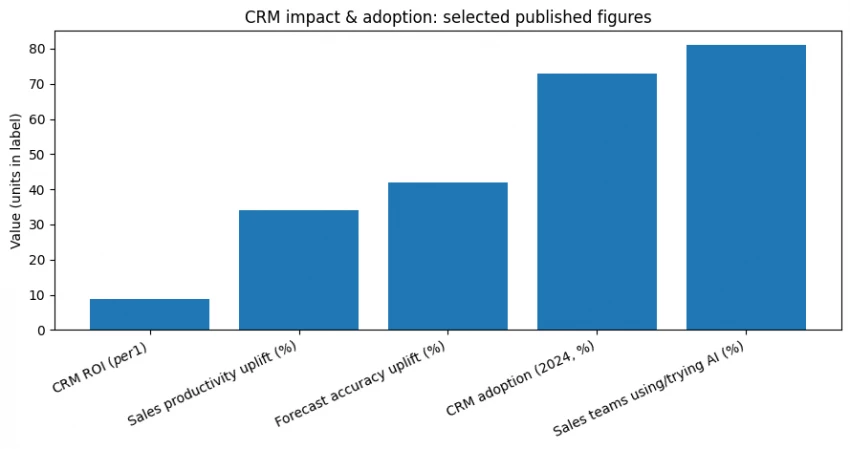
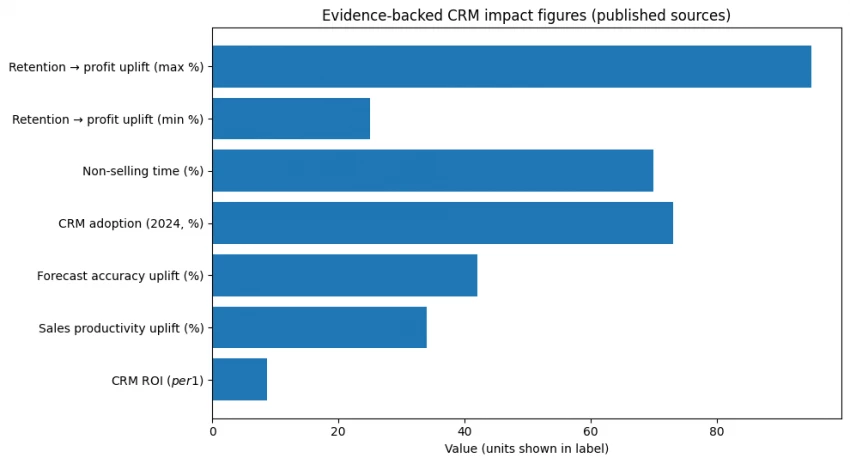
Here are commonly cited outcomes from published research and vendor analysis:
● ROI: A Nucleus Research study reported CRM returns averaging $8.71 for every $1 spent (based on its ROI case study analysis).
● Productivity + forecasting: Salesforce states CRM adoption can improve sales productivity by up to 34% and forecast accuracy by as much as 42%.
● Adoption is widespread: One published CRM stats roundup reports 73% of businesses use CRM software (for 2024) and other adoption figures; treat these as secondary reporting, not a universal census.
● Time drain without systems: Salesforce reports that reps can spend ~70% of their time on non-selling tasks, which is exactly where automation and better process can help.
● Customer retention matters: Bain has reported that a 5% increase in retention can increase profits 25% to 95% (impact varies widely by business).
| Benefit | What it means | Example KPI |
| Better follow-up | CRM reminds reps what to do next | fewer “no response” leads |
| Cleaner pipeline | You can see deals by stage | conversion by stage |
| Faster work | Automation reduces manual tasks | admin time down |
| Better forecasting | More reliable revenue prediction | forecast accuracy |
| Better retention | Consistent support + outreach | repeat purchase rate |
CRM systems can be categorized by how they’re used or what they focus on. The three core types most businesses consider are:
Focus: Day-to-day customer processes
● Automates sales, marketing, and service tasks
● Helps manage leads → sales conversion → service tickets
● Good for teams that want streamlined workflows (ORO INC.)
Focus: Data and insights
● Collects and analyzes customer behavior
● Helps answer questions like which customers are most valuable?
● Ideal for decisions based on data rather than gut feeling (ORO INC.)
Focus: Team alignment and communication
● Shares customer info across departments
● Ensures marketing, sales, and support see the same data
● Helps businesses deliver consistent between teams
Some frameworks also include a Strategic CRM category focused on long-term customer loyalty strategies, but most systems blend into the three categories above.
Below are the “must understand” features, explained simply.
● What it does: Stores people/companies, notes, interaction history.
● Why it matters: A CRM without reliable contact data is just expensive confusion.
Automation (workflows)-
● What it does: Automatically assigns leads, creates tasks, sends follow-ups, moves deals.
● Why it matters: Helps reduce non-selling busywork (a known issue for reps).
Analytics & dashboards-
● What it does: Reports on pipeline health, activity, conversions, forecasts.
● Why it matters: Helps you see what’s working (and what’s quietly failing).
Integrations-
● What it does: Connects CRM to email, calendar, WhatsApp/SMS tools, accounting, ecommerce, support desk, etc.
● Why it matters: You avoid double data entry and missing context.
Mobile access-
● What it does: Lets your team update deals, notes, calls on the go.
● Why it matters: Field sales and busy teams actually use the CRM when it’s convenient.
Security & permissions-
● What it does: Controls who can see/edit what; supports audit logs and governance.
● Why it matters: Prevents data leaks and messy internal conflicts.
AI capabilities-
● What it does: Can help draft emails, summarize calls, score leads, suggest next actions.
● Why it matters: AI can save time, but it should be evaluated like any feature: useful, measurable, adoptable. Salesforce reports many sales teams are experimenting with or implementing AI, and those teams report higher revenue growth compared to teams without AI.
| Feature | Must-have for | “Good sign” when evaluating |
| Contact mgmt | everyone | fast search + clean timeline |
| Automation | teams with repeatable process | clear workflow builder |
| Analytics | managers/owners | pipeline + activity + outcomes |
| Integrations | any stack >3 tools | native integrations exist |
| Mobile | field reps | offline notes / quick updates |
| Security | regulated or larger teams | roles + audit logs |
| AI | time-starved teams | summaries + suggestions you can audit |
This is how you avoid buying a CRM that’s “powerful” but unused.
Pick the highest-impact problems:
● “We lose track of leads.”
● “No one knows the real pipeline.”
● “Support handoffs are messy.”
● “Reporting takes days.”
Basic lifecycle stages (example):
Lead → Qualified → Proposal → Won/Lost → Onboarding → Support → Renewal
List:
● number of sales reps
● managers
● customer success/support
● marketing users
This affects permissions, seats, and workflow complexity.
Choose 3–5 measurable outcomes:
● response time to new leads
● win rate
● sales cycle length
● forecast accuracy (Salesforce cites up to 42% improvement potential)
● retention rate (retention can strongly affect profits)
A CRM budget is not just the subscription:
● subscription seats
● onboarding/training time
● data migration effort
● integrations/consulting (sometimes)
Examples:
● must integrate with Gmail/Outlook
● must have mobile app
● must have role-based permissions
● must export data easily
This process helps you choose a CRM that aligns with your business, not someone else’s.
Here’s a side-by-side CRM comparison of well-known platforms.
| Vendor | Entry pricing shown on official page | Best for | Notes (source-backed) |
| Salesforce | Starter Suite $25/user/month; Pro Suite $100/user/month (billed annually shown) | mid-market to enterprise; complex needs | large ecosystem; multiple clouds |
| HubSpot (Sales Hub) | Free $0; Starter “starts at” $15/seat/month shown | beginners, SMBs, marketing+sales alignment | widely praised for usability + free tier (secondary review) |
| Zoho CRM | ₹800/user/month billed annually shown | budget-conscious teams; Zoho ecosystem | multiple editions; pricing varies by billing term |
| Microsoft Dynamics 365 Sales | Professional ₹5,410/user/month, Enterprise ₹8,735/user/month (paid yearly; GST extra) | Microsoft-heavy environments | licensing varies by market/availability |
| Freshsales (Freshworks) | Free plan $0 for 3 users; Growth $9, Pro $39, Enterprise $59 (per user/month billed annually) | SMBs wanting speed + AI help | pricing + tiers listed clearly on official page |
| monday CRM | CRM starts “from $10/user/month” on CRM pricing page | teams wanting highly visual workflows | pricing is seat-based and plan-based |
| Pipedrive | Official page confirms no hidden costs + implementation conditions, but pricing values weren’t captured in the visible excerpt we retrieved | sales pipeline simplicity | evaluate plan prices directly on the pricing page |
*Pricing approximate based on 2026 sources.
Notes:
● Salesforce and Microsoft are enterprise leaders.
● HubSpot is popular for growth-oriented and inbound teams.
● Zoho and Freshsales are strong choices for smaller budgets.
Use this scoring model to compare CRM candidates objectively:
| Criterion | Weight | What you’re judging |
| Ease of use & adoption | 20 | will the team actually use it |
| Sales workflow fit | 15 | pipelines, tasks, reminders |
| Automation | 15 | routing, sequences, workflows |
| Reporting & insights | 10 | dashboards and visibility |
| Integrations | 10 | email, calendar, other tools |
| Mobile experience | 10 | field updates + usability |
| Security/permissions | 10 | roles, auditability |
| Total cost of ownership | 10 | subscription + setup effort |
● Explain why you’re implementing it (tie to pain points).
● Set a simple rule: “If it’s not in the CRM, it didn’t happen.”
● Managers must use CRM data in reviews, otherwise adoption drops.
● Clean your spreadsheet first (duplicates, missing emails, inconsistent fields).
● Define required fields (email/phone/company/status).
● Import in phases: contacts → companies → deals.
● Train by role: reps learn “how to log activity and move deals,” managers learn reporting.
● Use short sessions + cheat sheets.
● Simple SMB CRM: days to a couple weeks.
● More complex implementations: longer, especially with integrations and custom objects (varies by vendor and scope).
| Mistake | Why It Happens |
| No internal adoption strategy | Teams don’t see value |
| Skipping data cleanup | Leads to inaccurate reporting |
| Choosing feature-rich but complex CRM | People avoid using it |
| Not aligning with processes | CRM doesn’t fit workflows |
Scenario: 10-person online retailer struggling to track customer orders and leads.
Recommended CRM: HubSpot CRM
Why: Free starting tier, easy adoption, strong marketing automation.
Outcome Goal: Improve email campaigns, track customer journey from lead → repeat sales.
Scenario: 50-person B2B firm with long sales cycles but weak forecasting visibility.
Recommended CRM: Salesforce or Microsoft Dynamics
Why: Strong analytics + forecasting, customizable workflows.
Outcome Goal: Reduce sales cycle time and improve pipeline accuracy.
Choosing the right CRM in 2026 means more than picking the most popular vendor. It means matching features, pricing, and support to your specific business goals. Use your business needs matrix and decision framework to make a confident choice that drives growth.
Be the first to post comment!
Introduction: Why Sales Automation Is No Longer OptionalToday’s B2B sales enviro...
Michael Hicklen1 month ago

Image search has quietly become one of the most powerful discovery, research, an...
Michael Hicklen1 month ago
Why Workflow Automation Matters in 2026Automation tools help businesses:● S...
Michael Hicklen1 month ago
1) Foundations :What software review platforms are-Software review platforms are...
Michael Hicklen1 month ago
1. What AI Automation in Daily Work Actually Means?1.1 AI automation in daily wo...
Michael Hicklen1 month ago

When brands think about where to anchor their DNS (Domain Name System) backbone,...
Michael Hicklen1 month ago