Chub Venus AI is a character-based AI chat platform built around interactive personas rather than a single, generic assistant. “Chub” refers to the broader platform ecosystem, while “Venus” has historically been associated with its chat interface branding. At its core, the system allows users to engage in conversations with customizable “characters,” typically constructed using structured prompts, character cards, and layered behavioral instructions. These characters are powered by large language models (LLMs) connected through APIs, meaning the conversational intelligence depends on whichever model provider the user selects.
Platform Purpose and Core Concept
The primary purpose of Chub Venus AI is to create a flexible environment for character-driven interaction. Instead of focusing on productivity, search queries, or task automation, the platform emphasizes immersive dialogue, role-based interaction, and narrative-style conversations. Users can configure personality traits, speaking styles, behavioral rules, and contextual memory, effectively shaping how each character responds over time. This character-centric architecture makes it particularly appealing for users who value structured storytelling or highly customized conversational dynamics.
Target Audience and Common Use Cases
Based on official documentation and community discussions, Chub Venus AI primarily attracts users interested in conversational roleplay and storytelling within a character framework. Many use it for non-graphic, general roleplay scenarios that rely on dialogue depth and personality consistency. The platform also appeals to advanced users who prefer greater control over prompting structures, model selection, temperature settings, and contextual memory management. Additionally, technically inclined users, often described as “tinkerers,”—are drawn to the ability to integrate their own API keys from providers such as OpenAI, Anthropic, Google Gemini, or OpenRouter, allowing them to experiment with different model behaviors and cost-performance trade-offs.
How It Differs from Standard AI Chatbots
Chub Venus AI differs significantly from typical single-provider chatbot applications. Most mainstream AI chat apps operate on one fixed model and provide limited user-level configuration. In contrast, Chub is model-agnostic, meaning users can bring their own API keys and choose which language model powers their characters. The system is also structured around character “cards” and layered prompt components, rather than a single conversational assistant persona. Features such as advanced prompt steering and modular extensions like Stages further differentiate it from standard chat interfaces.
Another defining difference is its relatively low-restriction or “uncensored” positioning, as described in official documentation. While this approach provides greater creative freedom, it also introduces considerations around user responsibility, safety, and policy compliance that may not be as prominent in more tightly moderated AI platforms.
How does the platform work?
Chub Venus AI operates as a character-based AI platform powered by large language models (LLMs) accessed through external APIs. Rather than training a single proprietary chatbot in isolation, the platform allows users to connect their own API keys and choose which model engine powers their characters. This means the conversational intelligence is delivered by third-party LLM providers, while Chub provides the interface, character framework, and control system that shape how responses are generated.
Underlying AI Technologies
At its core, Chub relies on LLMs accessed via APIs. According to its documentation, users can integrate multiple model providers directly inside the platform. Supported sources include OpenAI models via API key, Anthropic’s Claude models, Google’s Gemini models, OpenRouter for routing across multiple providers, Kobold or Oobabooga-style endpoints for local or self-hosted GPU setups, and NovelAI for writing-focused language models. This architecture allows users to switch engines depending on performance, creativity, cost, or content tolerance preferences.
In addition to external integrations, Chub offers a first-party subscription suite called Mars. Mars is described as a paid set of “uncensored” language models designed for users who prefer not to manage external API keys. The documentation states that Mars models are trained using proprietary datasets and explicitly notes that they do not include public or private chats taken from Chub AI.
Character Systems, Memory, and Control
Chub’s conversational behavior is heavily shaped by structured prompt components. The system prompt defines foundational instructions for how a character behaves, while post-history instructions are appended at the end of the prompt to reinforce steering and maintain consistency. An impersonation prompt feature can draft responses in the user’s voice, effectively simulating dialogue from both sides of a conversation.
Generation settings such as temperature and repetition penalties allow users to adjust output style. Higher temperature values typically produce more creative and unpredictable responses, while lower values increase consistency and focus. Advanced configurations include Lorebooks, which function as structured memory tools that help maintain character continuity, world-building elements, or background information across longer interactions.
Stages and Extensibility
Chub introduces a modular feature known as Stages. These are described as software components that can extend functionality beyond simple chat interactions. Stages may add mini-game interfaces, custom prompt handling logic, expression packs, or even integrations with third-party APIs. This makes the platform more extensible than a standard chatbot and positions it closer to a customizable AI environment rather than a fixed application.
Data Handling and Privacy Considerations
The documentation states that email addresses collected during registration are used sparingly, primarily for password recovery and subscription-related communication. By using the platform, users agree to its Terms of Service and Privacy Policy, which are linked within the documentation.
Chub explicitly warns against using reverse proxy services to access models, noting that such setups can expose user data or IP addresses and may involve unauthorized or stolen API keys. The platform recommends using official API keys directly to maintain security and ethical compliance.
Regarding model training, Chub states that the proprietary data used for its Mars models does not include public or private chats taken from Chub AI. However, some detailed policy and subscription information appears to require full browser access due to JavaScript gating, meaning users should review official Terms and Privacy pages directly in a standard browser for complete clarity before subscribing or integrating external APIs.
Features, capabilities, and limitations
Core features
1) Character-based chat powered by connected LLM APIs:
This means Chub/Venus doesn’t rely on just one built-in AI model. Instead, it lets users connect external AI providers (like OpenAI, Anthropic, OpenRouter, etc.) using an API key.
What this enables in real use:
● You can choose different models for different styles (more creative vs more accurate).
● You can switch providers if one model feels too “robotic” or expensive.
● Advanced users can tune the experience heavily.
What to keep in mind:
● If you use your own API key, you may also be responsible for the cost billed by that provider.
● The quality depends on the model you connect.
2) “Uncensored / low restriction” positioning
Chub describes itself as a platform that does not heavily restrict what kind of characters or conversations users can have.
What this means practically:
● Users can explore more open-ended character conversations compared to platforms with strict content filters.
● It may allow more flexible storytelling and roleplay styles.
But it also creates tradeoffs:
● Some users may run into content they personally find uncomfortable.
● It can raise concerns around moderation standards, safety, and age-appropriateness depending on the user and region.
So “uncensored” is both a feature and a risk signal, depending on who is using it.
Stages are like “add-ons” or “modules” that can change how chats work or add extra interaction layers.
What stages can do (in simple terms):
● Add mini UI tools (like interactive prompts, custom buttons)
● Add special behavior for certain characters
● Add external API actions (for advanced setups)
Why this is powerful: It turns the platform from “just chat” into something closer to a customizable system.
Reality check: Stages are more technical and not every user will use them. They’re mainly for builders and advanced users.
Strengths of Chub Venus AI
Chub Venus AI stands out primarily because of the level of control and customization it gives users compared to most AI chat applications. Instead of offering a fixed conversational setup, it allows adjustments across prompt layering, model selection, creativity settings, repetition controls, and advanced character configuration. This makes it particularly attractive for users who prefer fine-tuning their AI experience rather than relying on a preset conversational style.
Another major strength is its provider flexibility. Rather than locking users into a single AI engine, Chub functions more like a hub that supports multiple external APIs along with optional first-party models. This flexibility matters because different models excel at different tasks—some handle logic and structured responses better, while others shine in storytelling or creative dialogue. Speed, cost, and output depth can also vary by provider, allowing users to optimize performance and expenses based on their priorities.
Chub’s positioning as a relatively “uncensored” platform is also a key differentiator. Many users choose it over more restrictive AI chat apps because it typically produces fewer blocked responses and less rigid policy-style refusals. This freedom can improve immersion in roleplay and creative writing contexts. However, it also places greater responsibility on users to engage thoughtfully and safely.
Limitations of Chub Venus AI
The same depth of control that makes Chub powerful can also create a steep learning curve. New users often encounter unfamiliar terms such as tokens, context length, prompt templates, temperature, penalties, and model routing. Instead of feeling like a simple messaging app, the platform can resemble a technical control panel, which may overwhelm beginners who are not familiar with how large language models operate.
Some community discussions have also mentioned billing confusion. Reported issues often stem from misunderstandings between platform subscription tiers and separate external API usage costs when users bring their own model keys. In platforms that combine subscription plans with third-party model usage, this distinction can sometimes create unexpected charges if users are not fully aware of how billing structures interact. While these complaints are user-reported and not universal, they are relevant when evaluating overall trust and transparency.
Operational reliability has also been questioned at times, particularly in relation to service interruptions and publicly acknowledged outage incidents. Because the platform has faced availability disruptions in the past, users who rely on it daily may see downtime as a workflow risk. This does not necessarily indicate poor quality, but it does suggest that the platform operates more like an evolving, community-driven system rather than a fully enterprise-grade infrastructure.
Comparison with similar platforms
Platform
Core model approach
Customization depth
Moderation level (general)
Pricing approach (high-level)
Usability notes
Chub / “Venus” UI
Bring-your-own APIs + first-party “Mars” option
High (prompts, post-history, stages)
“Uncensored” positioning in official docs
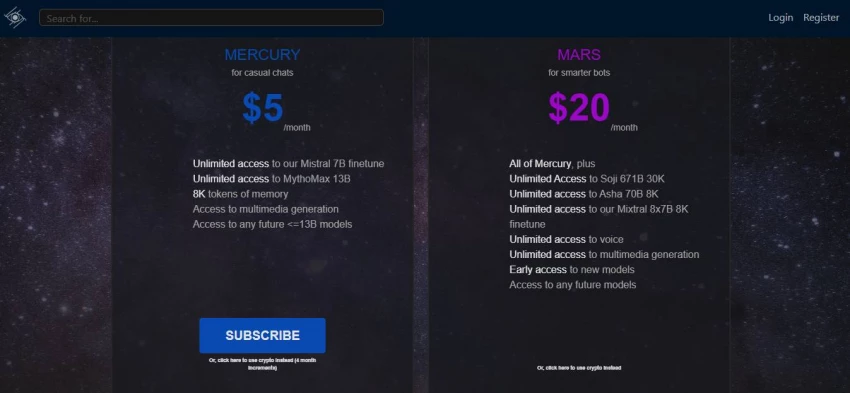
Mercury ~$5/mo; Mars ~$20/mo shown on Chub pricing snippets
Steeper learning curve; many knobs/settings
Character.AI
Primarily first-party hosted
Medium
Generally higher moderation
Freemium/paid tiers (varies over time)
Easier onboarding, less control (platform-driven)
Janitor AI
Often relies on external model routing / APIs (varies by setup)
Medium–High
Typically less strict than CAI (varies)
Often depends on connected provider
Setup complexity varies; community-driven
User reviews and community sentiment
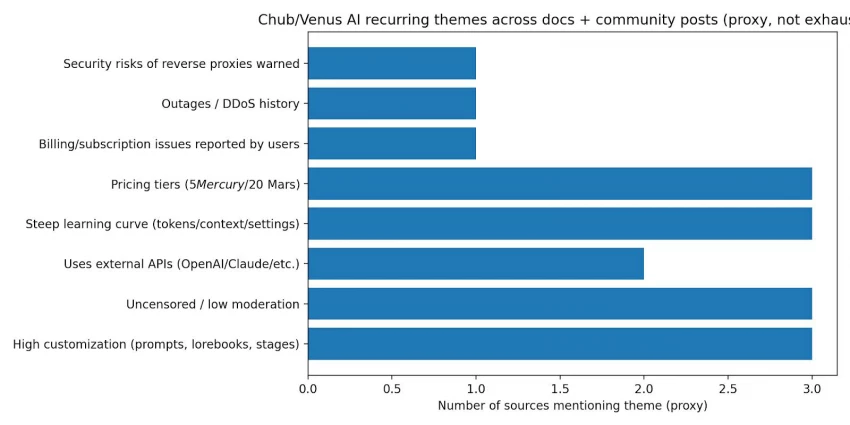
Because there is no single authoritative review score for Chub Venus AI, the most reliable way to evaluate it is by identifying recurring themes across official documentation, community discussions, and independent review blogs. Looking at Chub’s own documentation provides insight into its intended capabilities and positioning, while Reddit threads and user discussions highlight real setup experiences, billing confusion, and platform history. Independent blog posts offer additional perspective, though their depth and credibility vary and should be interpreted cautiously.
Across these sources, several praise themes consistently appear. Many users describe Chub as a “power-user” platform because it offers extensive control over prompts, system instructions, post-history instructions, staged configurations, and advanced customization layers. This level of configurability appeals strongly to technically inclined users who want granular influence over how conversations unfold. Another recurring positive theme is flexibility in model providers. Instead of restricting users to a single AI engine, Chub supports integration with providers such as OpenAI, Claude, Gemini, OpenRouter, and others, allowing users to select models based on quality, speed, cost, or stylistic preference. Additionally, the platform’s relatively low-restriction stance is frequently cited as a reason users choose it over more tightly moderated AI chat services.
At the same time, common concerns also surface. New users often struggle with technical concepts such as tokens, context limits, routing logic, and temperature settings, making the onboarding experience feel complex rather than intuitive. Some Reddit threads mention billing or subscription confusion, especially when platform plans intersect with external API usage costs. There are also reliability and security considerations raised in community discussions, including references to past DDoS-related downtime and warnings about potential data exposure risks when using reverse proxy setups. While these issues are not universal experiences, they are recurring enough in community conversations to merit consideration when assessing the platform.
Legal, ethical, and policy aspects
Chub Venus AI’s documentation openly describes the platform as “uncensored” and states that it does not meaningfully restrict the range of characters or interactions users can create. In practical terms, this means the responsibility for content filtering largely shifts to the user. Without strong built-in guardrails, individuals may encounter material they personally find inappropriate unless they carefully curate their settings and character selections. From a broader compliance perspective, an uncensored positioning can introduce elevated legal and ethical risk depending on local regulations, user age, and the type of content generated. What is permissible in one jurisdiction may raise concerns in another, making personal accountability and awareness particularly important.
Regarding restrictions and enforcement, Chub’s documentation indicates that violations of its Terms of Service or Privacy Policy can result in account limitations or termination. However, detailed enforcement procedures are outlined within policy pages that users must review directly. Like many user-generated content platforms, enforcement appears policy-driven rather than heavily pre-moderated, which means reactive measures may apply after violations are detected rather than before content is generated.
There are also operational and community-reported considerations worth noting. Chub’s own blog has acknowledged past availability disruptions caused by DDoS attacks, which highlights a documented reliability risk even if the incidents were temporary. Community discussions have also mentioned subscription or billing confusion, though these reports are user-generated and not independently verified here. Additionally, the platform warns users against relying on reverse proxy setups due to potential security and ethical risks, including possible data exposure, IP leakage, or compromised API keys. These warnings suggest that while the platform prioritizes flexibility and openness, it also requires users to understand and manage technical and security responsibilities carefully.
Use-case analysis
Chub Venus AI is primarily positioned as a flexible character-based AI platform, and its use cases reflect that creative and experimental foundation. One of the most common applications is entertainment. Many users engage with the platform for character-driven conversations, improvisational dialogue, and roleplay scenarios that extend beyond the limits of standard chatbot interactions. Because users can customize personalities and interaction styles, the experience often feels more immersive than traditional AI chat apps.
Another strong use case is creative writing. Writers frequently use the platform to draft dialogue, explore branching storylines, and maintain character consistency through structured prompts and lore-style memory constructs. The ability to layer instructions and refine conversational tone makes it particularly appealing for long-form storytelling, world-building, and serialized narrative experimentation.
Chub also serves as an environment for AI experimentation. Technically inclined users leverage it to test different language models and providers, compare output styles, adjust temperature and repetition penalties, and evaluate how prompt structures influence responses. In this sense, the platform operates not just as a chatbot but as a sandbox for model tuning and performance comparison.
A further use case involves personal companionship-style interactions. Some users engage with character chats for emotionally engaging or companion-like conversations. Given the platform’s relatively low-restriction positioning, these interactions may include mature themes depending on user configuration. As such, usage should remain age-appropriate and aligned with applicable platform policies and local regulations rather than being assumed safe by default.
Capability vs limitations
Capability
What it enables
Limitation / risk
API connections to major LLM providers
Choose models; swap providers
Requires keys/billing; setup complexity
“Uncensored” positioning
Fewer content filters
Higher exposure to unwanted content; higher compliance risk
Advanced prompting controls
Strong steering of behavior
Easy to misconfigure; can reduce coherence if prompts conflict
Stages extensibility
Interactive experiences and integrations
More complexity; still evolving ecosystem
Reverse proxy option exists (discouraged)
Convenience for some users
Security/privacy risk explicitly warned by Chub
Pricing
From Chub pricing snippets and community references:
● Mercury is presented as $5/month on Chub pricing pages/snippets.
● Mars is presented as $20/month, and the docs describe it as unlimited messaging with integrated models.
Final verdict
Chub Venus AI positions itself as a highly customizable character-based AI platform rather than a standard chatbot. Its strength lies in flexibility, from choosing different language models to controlling prompts, behavior, and interaction depth.
For users who enjoy immersive roleplay, character experimentation, or AI customization, it offers more control than many mainstream alternatives. However, that flexibility also means a slightly steeper learning curve and greater responsibility around content moderation and privacy.
As a complete package, Chub Venus AI is best suited for users who value customization and creative control over simplicity. Understanding its features, pricing structure, and intended use cases helps determine whether it aligns with your expectations.
If you’re exploring AI character platforms beyond basic chat apps, Chub Venus AI is one option worth evaluating carefully.
Frequently Asked Questions (FAQs)
Does Chub AI cost money?
Chub AI operates on a freemium model. Users can access basic features for free, but usage limits apply. Paid plans such as Mercury or Mars tiers unlock extended messaging, better memory handling, and access to more powerful AI models. Pricing structures may change, so checking the official website for current details is recommended.
Is Chub AI censored?
Chub AI is generally positioned as less restrictive compared to mainstream AI platforms. It offers more flexibility in character-based conversations and roleplay scenarios. That said, policies and moderation rules can vary depending on the AI model being used and the platform’s current guidelines.
Is Venus AI unlimited?
The free version of Venus AI typically includes usage limits such as daily message caps or restricted features. Paid plans provide significantly higher or unlimited messaging depending on the selected subscription tier.
Is Venus AI safe?
Venus AI provides privacy controls, but users should still review the platform’s privacy policy and terms of service before use. As with any AI chat service, it is recommended not to share sensitive personal information during conversations.
Is VenusChub a free platform?
VenusChub offers free access with limitations. While users can explore characters and basic chat functionality without payment, premium plans are required to unlock full customization, extended memory, and expanded usage.
Can Chub AI generate video?
Chub AI is primarily a text-based AI chat platform. It focuses on conversational character interactions and prompt customization. It does not function as a dedicated AI video generation platform.