
When I evaluate an AI video tool, I don’t just skim the homepage. I trace the full product surface area, check app-store ecosystems, review third-party analysis, examine user sentiment patterns, and then reconstruct the creator journey from generation to export. That’s exactly what I did with Clipfly AI, and the results are more nuanced than the marketing suggests.
Clipfly positions itself as an all-in-one AI video generation and editing platform combining text-to-video, image-to-video, animation effects, and browser-based editing. On paper, it looks like a lightweight CapCut + AI generator hybrid built for social creators.
After thoroughly analyzing its tool stack, ecosystem presence, and public user data, here’s the detailed breakdown.
Most people think Clipfly is “just another AI video generator.” That’s inaccurate.
From what I observed across its main platform at https://www.clipfly.ai/, Clipfly is structured as a modular creative suite.
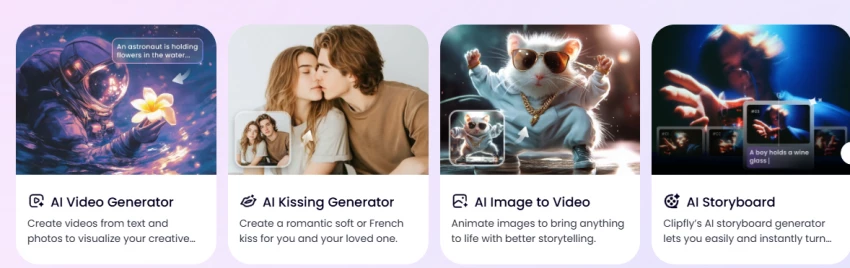
The core AI creation tools include:
• Image-to-video generation
• AI video generator
• AI image animator
• AI kissing video generator
• Full online video editor
This architecture tells me Clipfly is not trying to compete directly with cinematic text-to-video giants. It’s targeting fast, social-ready, effect-based short content creators.
The platform heavily promotes “free credits” and “no watermark downloads” on pages like the Image-to-Video tool, which explicitly states you can download generated videos without a watermark after using free credits. That claim appears consistently across multiple pages.
From a positioning perspective, that’s strategic. Watermark-free exports are a huge friction point in AI tools.
Looking closely at the AI Video Generator, the workflow is built for speed rather than cinematic control. It prioritizes:
• Short-form output
• Prompt-driven effects
• Simplicity over parameter tuning
This design decision matters. It tells me Clipfly’s audience is Instagram Reels, TikTok, and YouTube Shorts creators, not professional filmmakers.
However, public user feedback introduces some performance caveats.
On the App Store listing at https://apps.apple.com/us/app/clipfly-ai-video-generator/id6738775064, some reviewers report inconsistent prompt adherence and outputs that do not always follow instructions precisely.
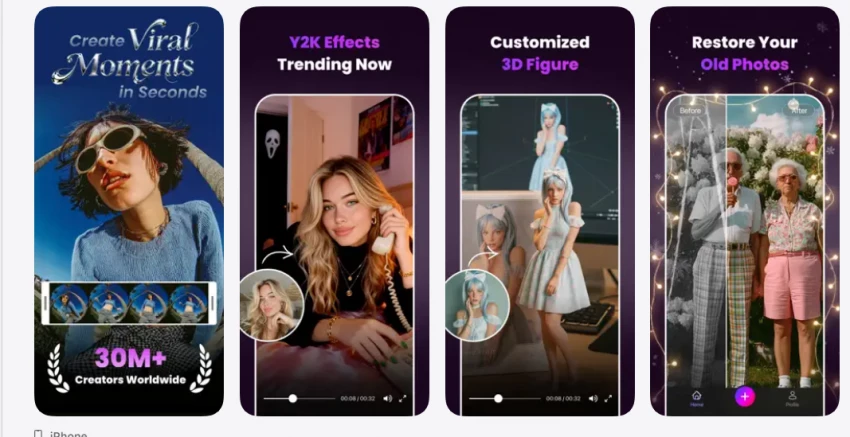
That’s a recurring limitation across most consumer AI video generators in 2026, but it’s important to acknowledge when evaluating reliability.
From a GeniusFirms standpoint, I would classify output consistency as moderate, not professional-grade.
When I evaluated Clipfly’s ecosystem more closely, the Image Animation tools felt less like secondary features and more like a calculated growth strategy. The AI Image Animator and the AI Kissing Video Generator are not positioned as technical filmmaking tools; they are built for emotional, short-form, highly shareable content.
The Image Animator turns static photos into moving clips with minimal configuration. There is no complex timeline, no keyframe manipulation, and no advanced motion control interface. The design philosophy is clear: upload, apply effect, generate, export. That kind of frictionless pipeline is optimized for speed and repeat usage rather than precision. For social creators who prioritize quick output over deep control, this is appealing.
The AI Kissing Video Generator pushes even further into virality territory. The product page emphasizes HD MP4 downloads and promotes watermark-free exports. That positioning is significant. When a platform highlights watermark-free romantic or couple-style animations, it is intentionally targeting content that users will want to repost organically without visible branding. It’s a distribution tactic disguised as a feature.
From a growth perspective, this is smart. Emotion-driven formats, especially couple edits, affectionate scenes, or sentimental animations, travel faster on Instagram Reels, TikTok, and short-form platforms than generic AI demos. These formats generate reactions, comments, shares, and profile visits. Clipfly appears aware of that dynamic and has structured its offerings accordingly.
However, there is another side to this category.
Face-based animation tools inherently raise ethical considerations. When a tool allows users to animate real faces into romantic or intimate interactions, consent becomes critical. While the platform itself does not appear to promote misuse, the nature of identity-based animation requires responsible handling. Users must ensure they have permission to upload and animate images, especially when involving private individuals.
From a product differentiation standpoint, this is where Clipfly stands apart from more corporate AI video tools. Many competitors focus on cinematic realism, business explainer videos, or ad creatives. Clipfly instead leans into social-native formats that prioritize relatability and emotional engagement over technical perfection.
That strategic choice shapes the entire experience.
The outputs are designed to be consumed quickly. The effects are visually engaging but not hyper-realistic. The value proposition is speed and shareability rather than film-level fidelity.
In my assessment, these animation tools represent Clipfly’s strongest viral lever. They may not appeal to professional agencies or high-budget production teams, but for influencers, couples, meme creators, and short-form content marketers, they offer immediate creative experimentation.
This positioning makes Clipfly feel less like a studio-grade AI production platform and more like a social-first creative engine.
That distinction is important when setting expectations. If you approach these tools as quick engagement boosters rather than precision filmmaking instruments, they align well with their intended purpose.
When I evaluated Clipfly, I expected the AI generator to be the centerpiece. Surprisingly, the part that impressed me most from a usability standpoint was the built-in online editor.
Most AI video platforms suffer from what I call the “last mile problem.” They generate a clip that is 70% usable, but then force you to export and finish the job elsewhere. You still need another tool for trimming awkward seconds, resizing for vertical format, adding captions, removing backgrounds, or applying transitions. That workflow breaks momentum and increases friction.
Clipfly clearly understands this gap.
The editor is designed to keep creators inside its ecosystem after generation. Once a video is created through its AI tools, you can immediately refine it without switching software. The platform supports trimming and splitting clips, cropping and resizing for social formats, automatic captions, background removal, and exporting in MP4 up to 4K resolution. It also claims watermark-free exports in its editor workflow, which is a strong value signal for creators who want clean outputs.
From a product architecture perspective, this integration matters more than the AI model itself. Many competitors focus exclusively on generative novelty, but Clipfly attempts to control the full content lifecycle: generate, adjust, polish, export.
When I analyzed third-party reviews, including coverage on platforms like JivoChat, the editor is consistently described as accessible and beginner-friendly rather than complex or feature-heavy. That positioning aligns with what I observed. It is not trying to replace Premiere Pro or Final Cut. It is trying to eliminate the need for a second lightweight editing app.
In practical use terms, this means a creator can:
Generate a short clip using image-to-video.
Resize it instantly for 9:16 vertical format.
Add auto captions.
Trim dead frames.
Export without watermark.
Post directly to social platforms.
That streamlined pipeline reduces cognitive load and time-to-publish, which is critical for short-form creators who operate on speed.
Where it does not compete is in advanced color grading, multi-layer compositing, deep motion graphics, or timeline complexity. Agencies and professional editors will still require full production software. But for individual creators, coaches, influencers, and small businesses, the convenience factor is significant.
In my assessment, the built-in editor is what transforms Clipfly from a novelty AI generator into a usable content workflow tool. Without it, the platform would feel like a toy. With it, the ecosystem feels cohesive.
This is the component that quietly strengthens Clipfly’s retention strategy. Once users realize they don’t need to export elsewhere for finishing touches, the platform becomes stickier.
From a GeniusFirms review standpoint, the editor is not flashy, but it is strategically important. It is the infrastructure layer that turns experimentation into publishable output.
When assessing safety and legitimacy, distribution footprint matters.
Clipfly is listed on:
Google Play
Apple App Store
Presence in both major stores adds a layer of compliance oversight.
However, Play Store reviews include some complaints regarding credit consumption and billing clarity. That doesn’t automatically mean scam, but it signals users should read pricing carefully before committing.
On Trustpilot, the platform shows a high TrustScore with a majority of positive reviews. The large review volume suggests active usage, not a ghost product.
From a legitimacy standpoint, Clipfly appears operational, active, and widely used.
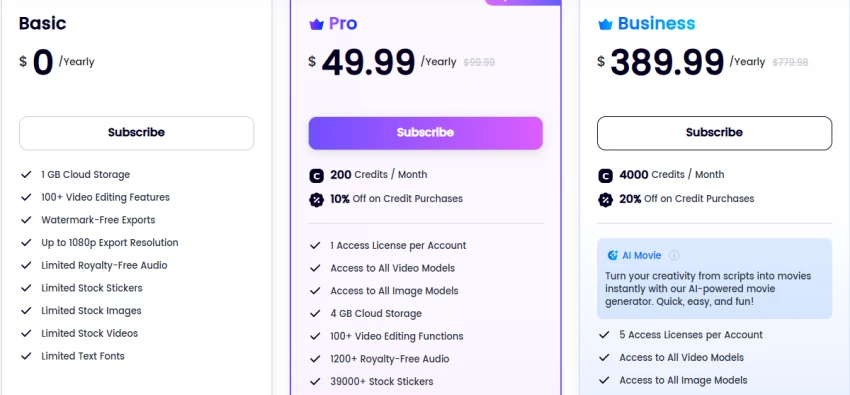
The platform heavily advertises free credits. The Image-to-Video page states users can get free credits and download videos without a watermark.
But based on user feedback patterns across stores and review sites, credit usage increases quickly once you move beyond simple outputs.
This is typical of AI video tools operating on GPU-heavy models.
My recommendation would be:
Test the free tier extensively before purchasing.
Avoid annual plans unless you’ve validated output consistency.
Clipfly operates as a cloud-based AI generation platform.
That means all uploads are processed on remote servers.
While the official site includes privacy and terms links, the best practice remains:
Never upload sensitive documents.
Avoid personal IDs.
Avoid private family media you wouldn’t want processed externally.
Avoid uploading minors' images for AI effects.
From a security perspective, I did not find red flags suggesting malware or phishing behavior. The domain uses HTTPS and has a stable product ecosystem footprint.
Is Clipfly safe to use?
Based on ecosystem presence, app-store distribution, Trustpilot volume, and active product updates, Clipfly appears legitimate and operational. However, output consistency varies, and users should avoid uploading sensitive or private media.
Is Clipfly free?
Clipfly offers free credits and promotes watermark-free downloads in certain workflows. However, frequent or advanced usage requires paid credits or subscription tiers.
Does Clipfly add watermarks?
The platform claims no watermark downloads for certain tools, including Image-to-Video and the online editor. However, always verify current export terms before publishing client work.
Is it suitable for professional commercial projects?
For quick social content, yes. For cinematic or high-precision commercial production, limitations in prompt control and output consistency may require additional editing software.
After analyzing Clipfly’s full ecosystem, from its official platform to its AI tools like Image-to-Video and AI Video Generator, along with its App Store and Google Play presence, my verdict is balanced, not extreme.
Clipfly is not a scam, and it is not a fake product. It has real infrastructure, active development, public app-store listings, and a strong review footprint on platforms like Trustpilot. That already places it ahead of many short-lived AI video tools.
Clipfly is a solid entry-level AI video creation suite for short-form content creators. It’s convenient, relatively safe, and usable, but it’s not a professional production replacement. If you approach it with realistic expectations and test the free tier before upgrading, it can be a useful creative tool rather than an overhyped disappointment.
Overall Rating: 7.4 / 10
Be the first to post comment!

AI video generation is no longer experimental. It has become a production workfl...
Sakshi Dhingra11 hours ago

Uber Eats is officially moving beyond simple food delivery and positioning itsel...
Sakshi Dhingra1 week ago
I’ll admit it, SpicyChat AI is one of those tools you don’t exactly open with “s...
Vivek Gupta2 weeks ago

For months, the global AI industry has lived in a state of suspended animation w...
Vivek Gupta3 weeks ago
In today’s fast-moving digital landscape, intelligent software that can act inde...
Mighva Verma1 month ago

In today’s business world, customer expectations have shifted dramatically. Peop...
Mighva Verma1 month ago