
There’s a very specific frustration that most developers go through at some point. You learn frameworks, complete tutorials, maybe even finish a few courses, but when you sit down to build something from scratch, things don’t connect the way they should. That gap between “knowing” and “building” is where most platforms fail, and that’s exactly the lens I used while evaluating CodingRoom.
After spending time going through the platform structure, project listings, external reviews across sites like G2, Capterra, SaaSWorthy, and reading user discussions, my focus was simple: does this actually make someone job-ready, or is it just another structured tutorial system?
The website itself is straightforward and not overly polished, which initially gave me the impression that this might be a small-scale or early-stage setup. However, once I started exploring the project structure and curriculum, it became clear that the focus is less on presentation and more on execution.
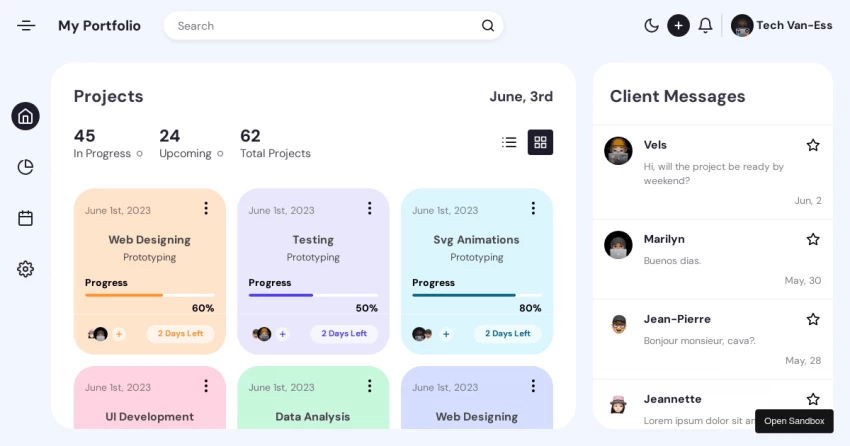
The platform is structured around project-based learning, where each project takes around three to four weeks. This timeline immediately stood out because it mirrors real development cycles instead of the typical “finish in a day” type of assignments you see elsewhere.
Each category is designed to simulate real-world development scenarios, and as I worked through them, I found myself building projects that go beyond tutorials and move closer to production-ready systems.
In this category, I focused on building complete web applications, working on both frontend interfaces and backend logic. It gave me a clear understanding of how full-stack systems come together in real-world products.
Here, I explored how applications interact with servers, manage connections, and handle file transfers. It helped me understand the system-level side of development, which usually gets ignored in basic courses.
While working on these projects, I built tools that automate repetitive tasks and streamline workflows. This gave me practical exposure to how automation is actually implemented in real development environments.
In this section, I worked on applications that require live updates and instant interactions. It pushed me to understand event-driven systems and how real-time features are built for collaborative tools.
Through these projects, I got hands-on experience with authentication, secure access, and handling sensitive data. It helped me think more seriously about application security while building features.
Here, I built communication-driven applications, working on chat interfaces and message handling logic. It gave me a better understanding of how interactive user experiences are designed.
In this category, I worked on presenting data in a structured and visual way. It helped me understand how to convert raw data into dashboards and meaningful insights.
These projects were more focused on solving specific problems. I built small but practical tools, which gave me exposure to the kind of utilities developers often create in real-world scenarios.
This is where CodingRoom genuinely starts to stand out. Instead of repeating basic CRUD-style applications in slightly different formats, the platform focuses on building systems that resemble real-world products. While going through the projects, I came across use cases like a real-time collaborative code editor, file-sharing platforms integrated with AWS S3, REST API development using Django, and even a browser-based image editor.
What made a noticeable difference for me was how these projects are designed. They are not just about completing features but about solving actual engineering challenges. You are required to think through authentication flows, manage application state, handle file storage and transfers, and understand how deployment works beyond just running code locally.
From my perspective, this is one of the strongest parts of the platform. Most learning resources stop at teaching how to build isolated features. Here, the focus shifts toward understanding how complete systems behave in a production-like environment, which is a much closer reflection of what developers face in real-world scenarios.
The stack includes Python, Django, React, Node.js, JavaScript, and PostgreSQL. That combination is not random. It’s essentially the backbone of a modern full-stack developer workflow.
From my experience analyzing similar platforms, when a course includes both Django and Node.js, it usually means the intention is to expose learners to both structured backend systems and real-time applications. That’s a good sign, especially for people targeting product-based companies.
I don’t rely on platform claims, so I checked third-party sources.
Across platforms like G2, Capterra, Crozdesk, and SaaSWorthy, Coding Rooms (the broader product ecosystem) generally falls in the range of:
G2: ~5.0/5
Capterra: ~4.6/5
SaaSWorthy: ~4.3/5
The consistent positive feedback revolves around interactive coding environments, real-time collaboration, and hands-on learning. However, there are also mentions of limitations in UI polish and scalability depending on use cases.
From my interpretation, this aligns with what I saw on the site. The platform prioritizes function over form.
The biggest strength I experienced is that it doesn’t allow you to stay in passive mode. You cannot just watch tutorials and move on. The structure pushes you to build consistently, and that shift from consumption to execution makes a significant difference in how concepts actually stick.
Another aspect that stood out was the time-bound nature of projects. When you are expected to complete something within a few weeks, you naturally start prioritizing delivery over perfection. This closely mirrors real-world development environments where deadlines matter more than endlessly refining small details.
The inclusion of deployment concepts, CI/CD exposure, and cloud integrations adds another layer of depth. It makes it clear that the platform is not limited to just writing code but is trying to bridge the gap between development and real-world production systems, which is something most learning platforms tend to overlook.
At the same time, I wouldn’t call it perfect.
The platform seems heavily dependent on a mentor-driven model, which can be both a strength and a limitation. If the mentorship quality is high, the experience improves significantly. If not, the system could feel less structured compared to large-scale platforms.
There is also limited visibility into advanced scalability scenarios, such as handling large datasets, distributed systems, or microservices architectures. For someone aiming at senior-level roles, this could feel like a gap.
Another noticeable limitation is the absence of a strong community layer. Many modern platforms benefit from peer discussions, forums, and collaborative problem-solving, which are not strongly visible here.
| Pros | Cons |
| Hands-on project-based learning | UI feels basic |
| Real-world project exposure | Limited advanced system design |
| Strong focus on deployment & CI/CD | Mentor-dependent experience |
| Relevant full-stack tech stack | Weak community presence |
| Encourages practical building mindset | Not ideal for complete beginners |
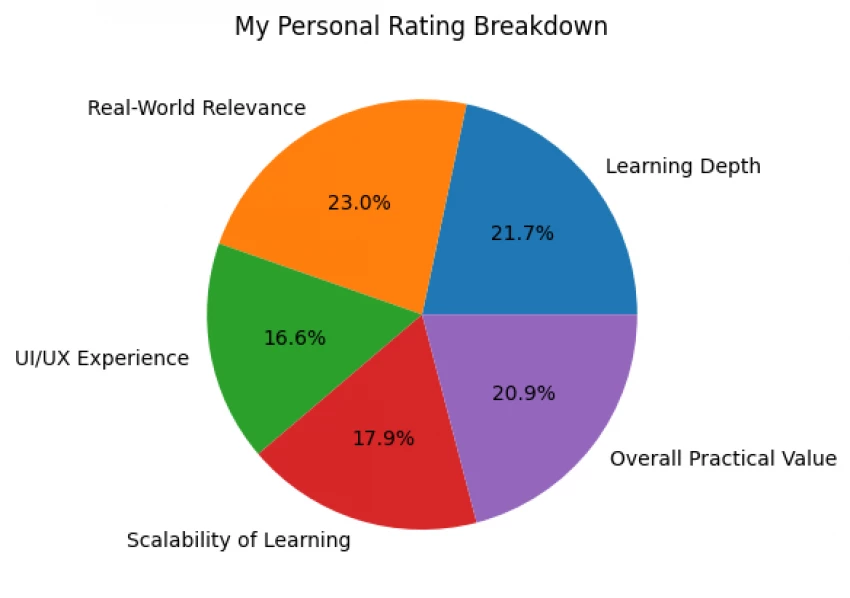
After considering the structure, projects, external reviews, and overall approach, here’s how I would rate it:
Learning Depth: 8.5/10
Real-World Relevance: 9/10
UI/UX Experience: 6.5/10
Scalability of Learning: 7/10
Overall Practical Value: 8.2/10
From my perspective, CodingRoom is best suited for people who are stuck in the loop of watching tutorials but not building anything meaningful. If someone already knows basics and wants to transition into project-driven learning, this can be very effective.
For complete beginners, it might feel slightly overwhelming without proper guidance. For advanced developers, it might not go deep enough into system design or large-scale architecture.
After spending time evaluating CodingRoom, I don’t see it as a typical course platform. It feels more like a guided execution system where the primary goal is to get you to build things that resemble actual products.
That said, it is not trying to be everything for everyone. It focuses on a specific outcome, which is making you capable of building and deploying real-world applications. It does that fairly well, but with some trade-offs in scalability, community, and polish.
If I had to summarize my experience in one line, it would be this:
it pushes you to build more than you consume, and that alone puts it ahead of many platforms, even if it isn’t perfect.
Be the first to post comment!

At first, it doesn’t feel like a tool.It feels like a shortcut you weren’t suppo...
Sakshi Dhingra5 days ago
As a business leader or marketing professional, the constant challenge has alway...
Sakshi Dhingra6 days ago
AI avatar video tools have quickly become one of the fastest-growing categories...
Sakshi Dhingra1 week ago

As a content creator, managing a diverse range of video content is a daily chall...
Sakshi Dhingra1 week ago

The first time I realized something was wrong with my content was late at night...
Sakshi Dhingra1 week ago

Vheer AI is interesting not just because of what it does, but because of what it...
Parveen Verma1 week ago