Software
4 min read
Dezgo: Guide on How to Use and its Pricing in 2026

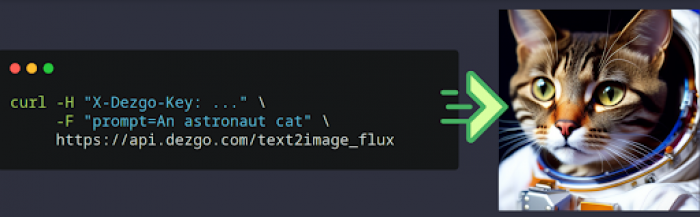
Dezgo is an AI-powered platform designed for text-to-image generation, image editing, and video creation. It enables users to generate images from text descriptions, enhance pictures, remove backgrounds, and even create AI-generated videos. Using advanced AI models like Stable Diffusion XL and ControlNet, Dezgo produces detailed and accurate visuals.
Text-to-Image Generation
Users can enter a detailed prompt and generate images in various styles:
Because Dezgo supports SDXL and multiple model variants, the output quality competes with many subscription-based tools.
Image-to-Image Editing
Upload an existing image and:
The system preserves structure while allowing creative reinterpretation.
AI Upscaling (Real-ESRGAN)
Low-resolution images can be enhanced using AI upscaling.
This is particularly useful for:
Resolution improvements maintain detail rather than simply stretching pixels.
Background Removal
Automatic background removal is built-in, making it practical for:
This reduces the need for third-party editing software.
Text-to-Video (Beta)
Dezgo’s experimental video feature allows short AI-generated clips from text prompts.
While still developing and not yet at cinematic-level consistency, it demonstrates where browser-based AI tools are heading.
Inpainting & Selective Editing
Users can:
This is valuable for fixing generation artifacts or refining creative direction.
ControlNet for Structured Generation
ControlNet enables users to guide composition using structural references.
This is particularly helpful for:
For advanced users, this feature significantly improves output predictability.
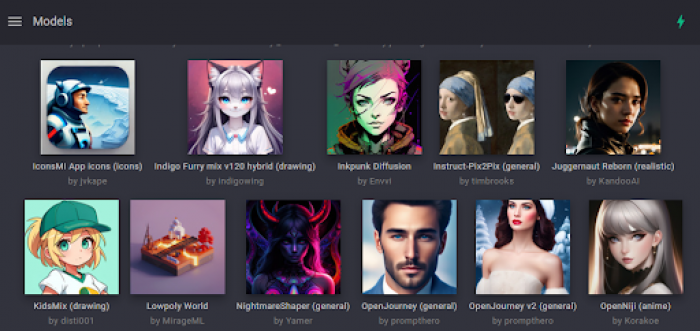
Dezgo offers both free and premium options. Many tools are available at no cost, but Power Mode unlocks additional features for a faster and enhanced experience.
Power Mode offers:
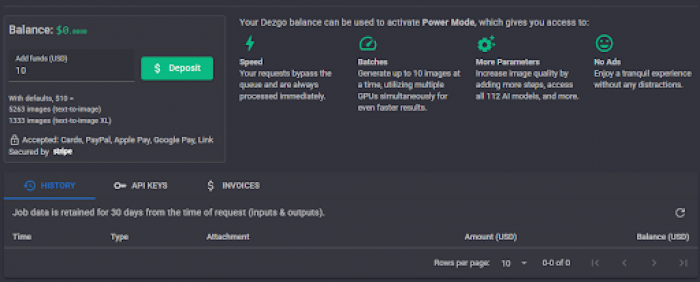
Free Users: Access to basic tools with standard processing time.
Power Mode (Paid): Deposit funds to unlock premium features. Example:
Digital Art & Illustration
Marketing & Advertising
E-Commerce
Content Creation
Game Development
Film & Creative Media
Pros
Limitations
Dezgo makes AI-powered image and video generation simple and accessible. Its tools help users create artwork, enhance images, and generate videos with ease. The platform offers both free and premium options, allowing flexibility based on individual needs. With advanced AI models ensuring high-quality results, it serves artists, marketers, and content creators alike. Dezgo is a practical choice for anyone looking to streamline their creative projects with AI.
When you need to draw something with someone right now, not after sign-ups, not...
Suraj Malik1 month ago

Choosing the right software for your business can feel overwhelming. Every vendo...
Suraj Malik2 months ago

The Allure vs. the RealityIn the crowded world of online dating, SearchingForSin...
Sakshi Dhingra6 months ago
A quick look at Apkek.org shows it isn’t a true APK platform but a general tech-...
Sakshi Dhingra6 months ago
MagicLight AI is marketed as a long-form text-to-video animation platform capabl...
Vaishali6 months ago
The rise of algorithmic trading has changed how retail traders operate. But for...
Vaishali7 months ago
Iron Plane
Apr 22, 2025This guide is incredibly informative! Dezgo's integration of advanced AI models like Stable Diffusion XL and ControlNet offers a versatile suite of tools for creators. The clear breakdown of features—from text-to-image generation to the beta text-to-video functionality—provides a comprehensive understanding of the platform's capabilities. The explanation of the Power Mode's benefits and pricing is particularly helpful for users considering an upgrade. Thanks for demystifying Dezgo's offerings in such an accessible way!