I didn’t start exploring Dzine AI because I was chasing the latest AI trend. I discovered it while trying to solve a practical design problem that kept appearing in my freelance work.
Design is not my full-time profession, but it has been a serious hobby for years. Over time, that hobby slowly turned into occasional freelance projects, social media visuals for small brands, blog thumbnails, e-commerce banners, and sometimes quick concept images for marketing campaigns.
Like many creators experimenting with AI design tools, I had already spent time with platforms such as Midjourney, DALL‑E, and traditional software like Adobe Photoshop. Each of these tools is powerful in its own way, but they all left me with the same workflow frustration.
Prompt-based generators are excellent for producing interesting visuals quickly, but they rarely give precise control over the composition. Traditional editing tools provide full control but require much more manual effort.
Dzine AI appeared to promise something in between: an AI-powered design environment that allows creators to generate images but also refine them through structured editing.
After spending several weeks experimenting with the platform for real design tasks, reading community feedback, and testing its tools across different types of visuals, I developed a much clearer picture of where Dzine performs well and where it still has limitations.

Before diving into features, it is important to understand what Dzine is actually trying to solve.
Most generative image tools today rely heavily on text prompts. The workflow usually looks like this: you type a prompt, the AI produces an image, and if the result is not quite right you regenerate another version.
That process works for inspiration, but becomes inefficient when a specific design outcome is required.
When I design something for a freelance project, I rarely want random variations. I usually have a layout in mind and need to adjust individual elements until the image feels balanced and visually clear.
Dzine approaches AI generation from that perspective. Instead of functioning purely as a prompt engine, the platform operates more like a design canvas that integrates AI generation with editing tools.
The result is a hybrid workflow where the AI assists with image creation while the designer still controls composition, structure, and refinement.
This design philosophy becomes noticeable the moment the interface opens.
One of the first things I noticed when opening Dzine was that it did not resemble typical AI image generators.
Many AI tools provide a simple interface centered around a text prompt field. Dzine instead presents a workspace that feels closer to a simplified design editor.
The screen includes a layered canvas, visual editing panels, style options, and generation controls that interact with the image currently being edited.
For someone who has used traditional design software, this structure feels familiar. Instead of producing an image and then starting over if something looks wrong, the workflow encourages gradual refinement.
During my first few sessions with the platform, I found myself generating an image once and then improving it through adjustments rather than repeatedly regenerating variations.
This approach makes the tool feel less like a generator and more like a collaborative creative environment.
The feature that impressed me most during testing was Dzine’s image-to-image generation system.
Rather than starting every design with a text prompt, the platform allows users to upload a sketch, reference image, or rough visual concept.
The AI then transforms that input into a refined version while preserving the original composition.
I tested this feature by uploading a very basic interior design sketch consisting of simple shapes representing furniture and walls. After running the generation process, the AI produced a visually detailed room scene that maintained the exact layout of the sketch while replacing rough shapes with realistic objects and textures.
This capability becomes extremely useful in several professional design scenarios. Concept artists can convert rough sketches into polished illustrations, interior designers can transform layout drafts into realistic visualizations, and marketers can generate production-ready visuals from simple reference images.
Unlike many prompt-based generators that reinterpret structure unpredictably, Dzine tends to respect the spatial relationships in the input image. That consistency is one of the reasons the tool has attracted attention among designers who need control over visual composition.
Another aspect of Dzine that deserves attention is its use of layer-based editing.
Layers are a fundamental part of traditional graphic design workflows because they allow individual components of an image to be modified independently. For example, a designer might want to adjust the background without affecting the foreground subject or modify lighting effects without altering text overlays.
Most AI generators treat images as single outputs. If a specific element needs to change, the entire image usually must be regenerated.
Dzine introduces partial layer management so that objects and visual elements can be adjusted individually. While the system is not as complex as the layer structures found in advanced design software, it still provides far more flexibility than typical AI art platforms.
During one of my experiments, I created a promotional banner image featuring a product placed on a stylized background. Instead of regenerating the entire image when the background color felt too strong, I was able to adjust the background layer while keeping the product element intact.
This type of control significantly reduces the number of regeneration cycles required during the design process.
Dzine also includes powerful object editing features through AI inpainting and outpainting.
Inpainting allows users to remove or replace specific objects within an image. During testing, I used this feature to modify several generated scenes by removing furniture items and replacing them with different objects. The AI was able to reconstruct the surrounding environment convincingly, maintaining lighting consistency and perspective.
Outpainting extends images beyond their original boundaries. This is particularly useful when converting square images into wider marketing banners or when expanding backgrounds for website layouts.
One example involved extending a landscape image so it could function as a hero banner for a landing page. Instead of stretching the original image, the AI generated additional terrain that blended naturally with the existing scene.
These editing capabilities make Dzine feel closer to a creative editing environment than a traditional AI generator.
Another feature that stands out in Dzine is its style transformation capability.
The platform allows users to apply the visual style of one image to another. Rather than simply applying filters, the AI analyzes lighting patterns, color schemes, and artistic textures before transforming the original image.
I experimented with converting a standard portrait photograph into several stylized forms, including cartoon illustrations and semi-realistic digital paintings. The results looked far more cohesive than typical filter-based transformations because the AI adjusts shading and texture rather than overlaying simple effects.
Dzine also includes tools for transforming text into stylized typography and generating animated design effects that resemble professional branding graphics.
These capabilities make the platform useful for marketing design where stylistic consistency across multiple visuals is important.
Although Dzine began as an image-focused tool, it has gradually expanded into video generation.
The platform now includes experimental features that allow users to generate short video clips or animated scenes from images. These tools are still evolving and should not yet be compared with dedicated video AI platforms.
However, they demonstrate the direction the platform appears to be heading. Dzine is gradually building an ecosystem where static image creation, animation, and design editing exist in the same creative environment.
For creators who frequently experiment with visual storytelling, this expansion could eventually become one of the platform’s strongest differentiators.
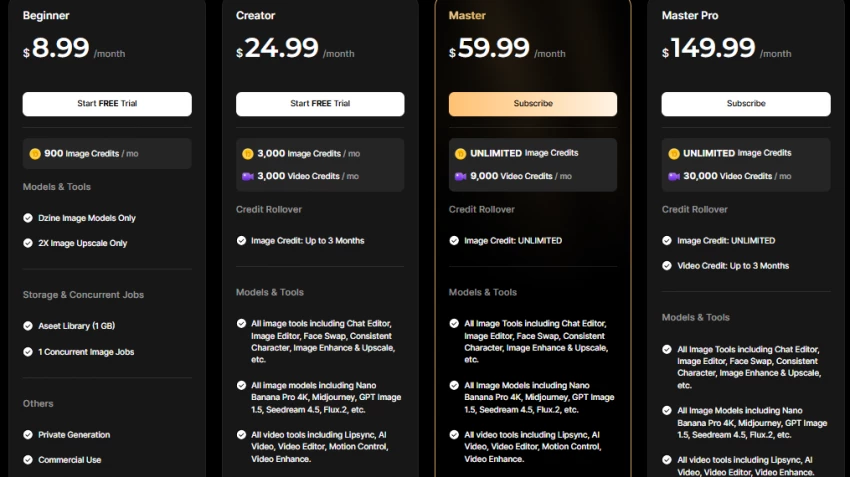
One of the first questions many users ask about Dzine concerns cost.
After testing the platform myself, I also wanted to see how other creators were experiencing it in real-world use. Looking through public reviews and community discussions helped provide a broader perspective on how Dzine AI is being received by designers and creators.
On review platforms like Trustpilot, Dzine generally receives positive feedback from users who appreciate the balance it offers between AI image generation and hands-on editing control. Many reviewers specifically highlight that the platform performs well when it comes to maintaining visual consistency across multiple images, which is a challenge many prompt-based generators struggle with. Designers working on branding assets, game characters, or marketing visuals often mention that Dzine helps them keep objects, characters, and visual styles consistent across several design variations.
Discussions within creator communities on Reddit echo similar observations. Many artists describe Dzine as sitting somewhere between a pure AI generator and a design editing tool. Instead of relying entirely on prompts, the platform allows users to refine images through structured adjustments, which many designers find closer to their normal creative workflow.
At the same time, not all feedback is purely positive. Some users point out that the interface can feel more complex compared with simpler AI art tools that focus only on prompt-based generation. Because Dzine includes multiple editing options and generation settings, beginners sometimes need extra time to understand how the different tools work together.
Overall, the general sentiment across reviews suggests that creators who enjoy iterative design and visual control tend to appreciate Dzine the most, while users looking for instant results from minimal prompts may prefer simpler AI image generators.
Even though my overall experience with Dzine AI was positive, there were a few practical limitations that became clear while using the platform for real design work.
The first challenge is the learning curve of the interface. Dzine is designed to give users more control than typical AI image generators, which means the workspace includes multiple editing panels, style controls, and generation settings. For someone who has experience with design software, this structure eventually feels powerful. However, beginners who expect a simple “prompt → generate image” workflow may initially find the interface slightly overwhelming until they become familiar with how the different tools interact.
The credit-based usage system is another limitation that becomes noticeable during experimentation. Because every action, such as generating images, applying style transformations, or editing objects, consumes credits, it is easy to run out of credits while testing different ideas. During the early stages of learning the platform, I often generated several variations before achieving the result I wanted, which meant credits disappeared fairly quickly.
Another practical limitation relates to input quality and prompt clarity. Dzine performs best when it receives a clear reference image or a well-defined prompt. If the input is vague, the output can become inconsistent, just like with most AI design tools. In my experience, spending a little extra time preparing the reference image or refining the prompt significantly improved the results.
Overall, these limitations did not prevent the tool from being useful, but they do highlight that Dzine works best when users approach it with a structured workflow rather than expecting instant results from minimal input.
After spending significant time exploring Dzine’s capabilities, I would evaluate the platform across several dimensions.
In terms of creative control, the platform performs exceptionally well because it allows designers to refine images rather than regenerate them repeatedly.
When evaluating image quality, the results are competitive with other AI generation tools, particularly when combined with structured editing.
Ease of use is slightly more complex than simple AI art apps, but the additional control justifies the learning curve for serious creators.
Overall, based on my experience as someone who enjoys design as both a hobby and a freelance activity, I would rate Dzine approximately 8.5 out of 10 as a creative AI tool.
Its strongest advantage lies in bridging the gap between generative AI and professional editing workflows.
The rapid growth of AI design tools has created an overwhelming number of options for creators. Many platforms focus exclusively on generating images from prompts.
Dzine takes a different approach. Instead of competing purely on generation quality, it focuses on giving creators the ability to refine and control AI-generated visuals.
For designers who enjoy shaping visuals gradually and maintaining creative control, this hybrid workflow feels surprisingly powerful.
For casual users seeking instant AI art with minimal effort, simpler tools may feel more convenient.
But for creators who see design as a craft rather than a quick output, Dzine represents one of the more interesting developments in the evolving landscape of AI-powered creativity.
What is Dzine known for?
Dzine is known for combining AI image generation with structured editing tools such as layer-based workflows and image-to-image rendering.
Who is the owner of Dzine AI?
Dzine AI evolved from the Stylar AI platform and is operated by the development team behind that design ecosystem.
How much does Dzine AI cost?
Paid plans typically begin around nineteen dollars per month depending on credit limits and features.
Is Dzine AI good for beginners?
Yes, although beginners may need time to become comfortable with its advanced editing features compared with simpler AI art generators.
Be the first to post comment!
The positioning of Promptchan within the AI ecosystem is often misunderstood. Wh...
Sakshi Dhingra1 week ago
A Personal Moment That Made Me Care About Online Coupons AgainA few months ago,...
Parveen Verma1 week ago
Choosing the right software used to be straightforward. You compared features, c...
Suraj Malik2 weeks ago
When I first opened Final Round AI, I wasn’t looking for hype. I’ve seen too man...
Sakshi Dhingra2 weeks ago
There was a time when every company website proudly displayed glowing customer t...
Suraj Malik1 month ago

Imagine choosing a business partner, a SaaS tool, or a digital agency without ch...
Suraj Malik1 month ago