AI video tools are everywhere right now. Every other week, there’s a new platform claiming it can turn text into “cinematic videos” in seconds. Most of them look impressive in demos and fall apart the moment you try real prompts.
That’s why I decided to properly dig into Pika AI, not just skim the features, but actually understand why it’s getting so much attention, how much of that hype is backed by real data, and where it clearly still struggles.
And yes, I’m mixing facts, funding data, and a real review here , because that’s the only way this stuff makes sense.
Pika AI is a generative video platform built by Pika Labs, a startup founded in 2023 by two former Stanford Ph.D. students, Demi Guo and Chenlin Meng. The whole idea behind Pika is simple:
Make video creation fast, accessible, and possible without professional editing skills.
Instead of timelines, keyframes, or heavy software, you just use text prompts or images, and Pika turns them into short video clips.
And unlike some tools that feel half-baked, Pika is very clearly being taken seriously, both by users and investors.
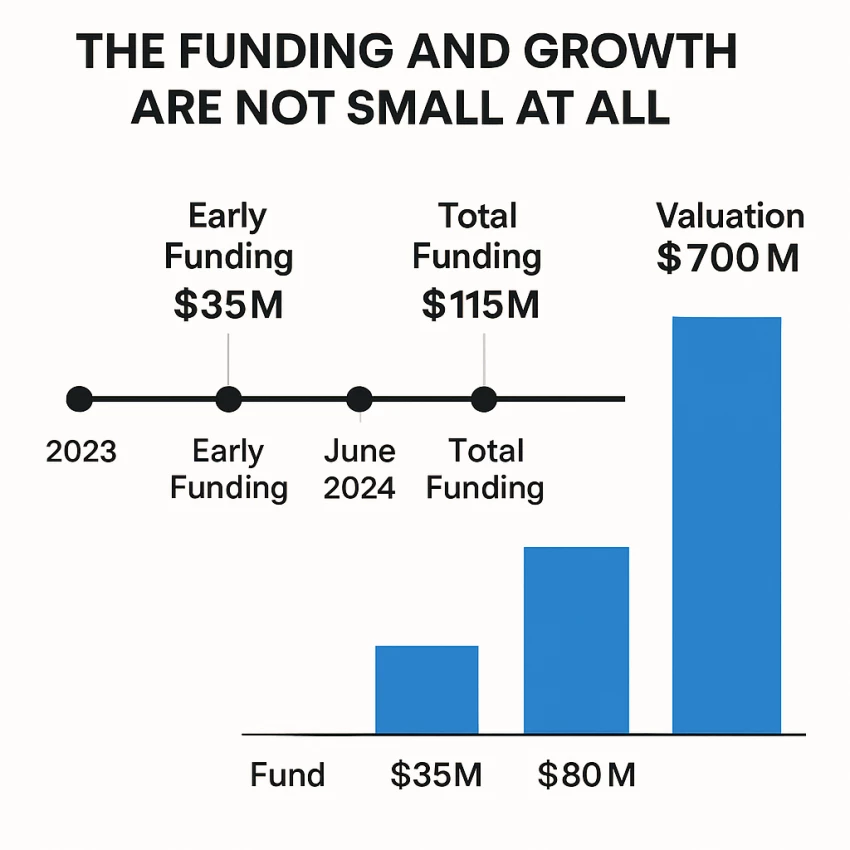
Before even talking about features, the numbers around Pika AI are worth paying attention to.
In barely over a year:
That kind of money doesn’t flow in unless investors believe this space, short-form AI video — is going to explode.
And the user numbers back that up.
Pika didn’t stay a niche research tool for long.
After coming out of stealth:
That matters because tools that can’t handle scale usually show cracks fast. Pika, at least infrastructure-wise, seems built for volume.
This is where almost everyone starts.
You type a prompt — or upload an image — and Pika generates a short video, usually 1 to 5 seconds long. With newer updates, that can stretch up to 10 seconds in 1080p, which is actually solid for social media content.
Here’s the key thing though:
Pika is not trying to make full movies. It’s trying to make short, punchy visuals.
If your goal is:
It works well.
If you’re expecting long scenes with narrative depth… that’s not what this tool is built for.
One of the more fun additions came with Pika 1.5, called Pikaffects.
These are effects like:
They’re not subtle. They’re intentionally exaggerated and playful.
And honestly? That’s kind of the point.
These effects are made to stop scrolling, not to look realistic. They work especially well for social content where attention matters more than realism.
When Pika 2.1 introduced Pikaswaps, things leveled up.
This feature lets you replace:
…inside an existing video, just using text.
Technically, it’s impressive. Practically, it’s something users need to be careful with.
Results depend heavily on:
And ethically? The responsibility is clearly on the user. Pika gives you the power — it doesn’t police how you use it.
One feature I really appreciate is Modify Region.
Instead of regenerating an entire video, you can:
This reduces wasted generations and makes iteration feel more practical — especially important when you’re working with limited credits.
Pika’s partnership with ElevenLabs brought in AI lip-syncing.
It’s a nice addition, especially for:
hyper-realistic lip sync is still inconsistent across the industry. It works best when you don’t push it too hard.
One underrated feature is prompt-based camera movement.
You can literally write:
“Pan left”
“Zoom in”
“Rotate clockwise”
And Pika will try to apply that motion.
It’s not frame-perfect, but for people who don’t want to touch editing software, this is a big win.
Pika runs on a freemium credit system.
The free plan gives you:
Paid plans (like the Standard tier, around £8/month if billed yearly) unlock:
The trade-off? Credits make you think twice before experimenting wildly. That’s good for efficiency, bad for playful exploration.
Pika competes with tools like:
Where Pika shines:
Where it falls short:
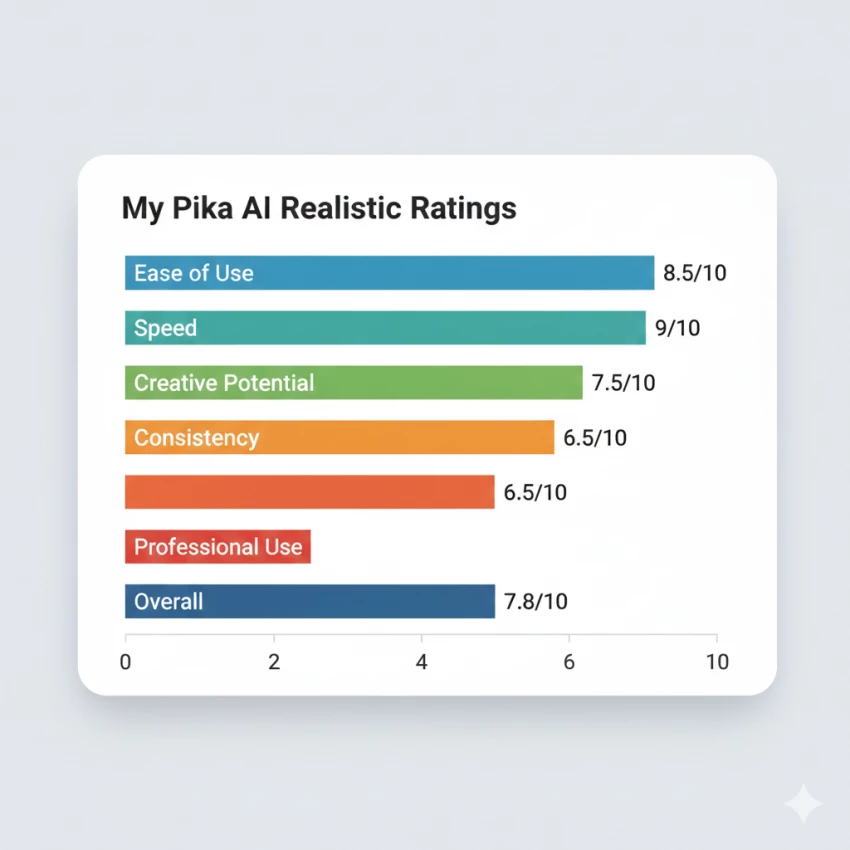
If I had to rate Pika AI realistically:
| Area | Rating |
| Ease of Use | 8.5/10 |
| Speed | 9/10 |
| Creative Potential | 7.5/10 |
| Consistency | 6.5/10 |
| Professional Use | 6/10 |
| Overall | 7.8/10 |
Pika AI makes a lot of sense if you:
It’s not the right tool if you:
At its core, Pika AI isn’t trying to replace video editors. It’s trying to make video creation possible for people who otherwise wouldn’t touch it.
And in that role?
It’s doing a pretty solid job.
Be the first to post comment!
I’ll admit it, SpicyChat AI is one of those tools you don’t exactly open with “s...
Vivek Gupta4 days ago
For months, the global AI industry has lived in a state of suspended animation w...
Vivek Gupta1 week ago

In today’s fast-moving digital landscape, intelligent software that can act inde...
Mighva Verma3 weeks ago

In today’s business world, customer expectations have shifted dramatically. Peop...
Mighva Verma3 weeks ago

Top AI Transcription Tools Designed for TeamsRemote and hybrid teams are drownin...
Mighva Verma1 month ago
In today’s content-saturated world, merely producing more isn’t enough. Smart cr...
Mighva Verma1 month ago