
I didn’t land on Monkeytype because someone told me it was “the best typing site.” I landed on it the same way most serious typists do, by chasing feedback, numbers, and proof that I was actually improving.
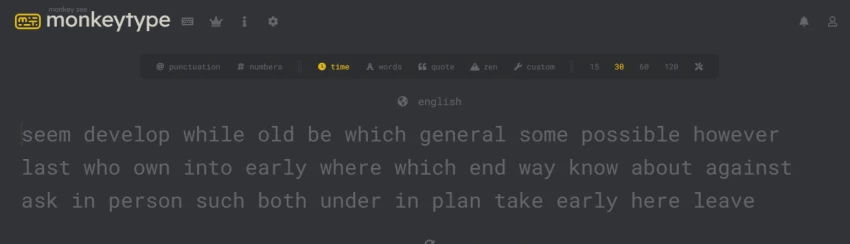
Over time, Monkeytype stopped feeling like a typing test and started feeling like a performance environment. Below is a deep, experience-driven breakdown of why it holds that reputation, where it shines, and where it quietly misleads if you don’t understand its defaults.
Monkeytype’s core strength is restraint.
The site at https://monkeytype.com/ loads instantly, shows almost nothing unnecessary, and gives me control before it gives me noise. There are no ads, no popups, no gamified mascots begging for attention. That minimalist surface hides an unusually deep system underneath.
What stands out to me is intent: Monkeytype isn’t trying to teach typing from scratch. It assumes I already know how to type and asks a harder question, how fast, how accurately, and how consistently can I perform today compared to yesterday?
That intent explains why it resonates more with intermediate and advanced typists than with absolute beginners.

Monkeytype’s usage data tells a story of habit, not novelty.
By early 2026:
~4.85 billion typing tests started
~815 million tests completed
1,284+ cumulative years spent typing
~15.16 million monthly visits (Dec 2025)
These aren’t “try once” numbers. They reflect repeat behavior.
The global footprint is also telling:
United States ~26.8%
India ~20.6%
Philippines ~3.9%
India’s presence is especially important, Monkeytype has become a daily practice tool for students, developers, and competitive typists there, not just a casual test site.
Most typing sites let me choose a theme. Monkeytype lets me rebuild the environment.
From the advanced configuration panel (for example:
https://monkeytype.com/?testSettings=NoIgLglgtgpiA0ICMAmADAgdgVwDa-h30LwJBkwHNcIBnACwH0kBrBcgDwAcYAnMLKQC6QA ),
I can control:
This level of control turns Monkeytype into a measurement instrument, not a toy. The downside is obvious too: with great flexibility comes the risk of self-deception if settings aren’t chosen carefully.
This is the part of Monkeytype that most casual users barely notice, and serious users end up relying on daily.
Yes, Monkeytype tracks WPM, but that’s only the surface metric. What I find far more valuable is how it contextualizes speed over time, instead of treating each test as an isolated event. The platform quietly shifts my attention away from “How fast was that run?” toward “How repeatable is my performance?”
Internally, Monkeytype captures multiple layers of typing behavior at once:
When I log in after a break, the dashboard doesn’t flatter me. If my speed spikes but my consistency drops, that tradeoff is visible immediately. If my accuracy improves while raw speed stays flat, Monkeytype still counts that as progress, and in real-world typing, it absolutely is.
This is where Monkeytype separates itself from sites that reward peak performance. Many typing tools celebrate one lucky fast run. Monkeytype, instead, nudges me toward stable averages. Over time, that changes behavior. I start typing slightly slower, slightly cleaner, and far more predictably. Ironically, that’s what leads to real speed gains later.
The feedback loop is subtle but powerful:
Because the environment is so configurable, I can lock variables and measure improvement honestly. That turns Monkeytype into something closer to a training instrument than a game. Improvement stops being emotional (“that felt fast”) and becomes statistical (“this curve is trending up”).
For me, that’s the real value. Monkeytype doesn’t motivate with streaks or badges. It motivates by making progress visible, measurable, and hard to fake. Over enough sessions, the numbers stop being dopamine hits and start being signals, and that’s exactly when genuine skill improvement happens
The leaderboard at
https://monkeytype.com/leaderboards
adds a competitive edge, but it’s not shallow competition.
World-record speeds (for example, ~317.79 WPM in a 15-second test) are impressive, but they also distort expectations. Monkeytype doesn’t hide this; it simply presents the data and lets users contextualize it.
In my experience, leaderboards motivate benchmarking, not imitation. Most serious users compete against their own historical curve, not against world-record holders.
External sentiment around Monkeytype is unusually consistent.
On Trustpilot, the platform holds around 4.4 / 5, with most criticism aimed not at functionality but at misunderstanding what Monkeytype is for.
Security-wise, profiles highlight a low-risk posture, no forced data collection, no dark patterns, and open-source transparency.
On Reddit, discussions such as:
https://www.reddit.com/r/typing/comments/159emep/monkeytype_or_keybr_overall_which_site_improves/
show a clear pattern: Monkeytype is widely regarded as the gold standard once fundamentals are learned, while tools like Keybr are better for early-stage correction.
From personal use, these advantages hold up over time:
Monkeytype feels built by people who type a lot, for people who type a lot.
The most common misunderstanding comes from defaults.
Out of the box, Monkeytype uses a 200-word English list with no punctuation. This can inflate WPM compared to real-world typing. If I don’t expand the word pool or enable punctuation, my progress can look better on-screen than it actually is in emails, coding, or writing.
It’s not a flaw, it’s a choice. But it requires awareness.
Another limitation is onboarding. Monkeytype doesn’t teach finger placement. Beginners expecting guided lessons are better served by structured platforms before moving here.
Monkeytype works on mobile, but it’s not where it shines.
The Android ecosystem shows mixed reviews mainly due to mobile keyboard constraints. Monkeytype’s design assumes a physical keyboard, and performance metrics make the most sense there.
Monkeytype earns its reputation not by being friendly, but by being honest.
It doesn’t promise to teach me typing from zero. It promises to measure what I already know, precisely, repeatedly, and without noise. If I use it casually, it’s fun. If I use it deliberately, it becomes addictive in the best way: improvement becomes visible.
My personal take:
Excellent for intermediate → advanced typists
Dangerous if misused for ego metrics
Outstanding as a long-term practice tool
Overall Rating : 9.2 / 10
Not because it does everything, but because it does exactly what it claims, and lets the data speak.
Be the first to post comment!

There’s a very specific frustration that most developers go through at some poin...
Sakshi Dhingra1 week ago

At first, it doesn’t feel like a tool.It feels like a shortcut you weren’t suppo...
Sakshi Dhingra2 weeks ago
As a business leader or marketing professional, the constant challenge has alway...
Sakshi Dhingra2 weeks ago
AI avatar video tools have quickly become one of the fastest-growing categories...
Sakshi Dhingra2 weeks ago

As a content creator, managing a diverse range of video content is a daily chall...
Sakshi Dhingra3 weeks ago

The first time I realized something was wrong with my content was late at night...
Sakshi Dhingra3 weeks ago