When I first saw Viggle clips of K-pop dances, football celebrations, and movie scenes with completely swapped faces flooding TikTok, I was curious but skeptical. So I went down the rabbit hole: I tested the app myself, cross-checked details on the official site, Google Play, and read independent reviews and user feedback from AI Mode, Fritz.ai, Tech-Crib, 10Web, Reddit, Quora, MouthShut and the official pricing page.
Viggle AI is a meme-focused, AI-powered video app that lets me:
Under the hood, Viggle uses a video-3D foundation model (JST-1) to do physics-aware motion transfer and animation, which is why the movement often looks more natural than old-school deepfake apps
On top of that, there’s a huge template library, community-driven trends, and now a proper mobile app for quick meme creation.
To understand whether this is just hype, I looked at a few hard numbers:
So from a numbers standpoint, it’s clearly not a niche toy—more like a mainstream viral app that some people love and others really don’t.
In my own workflow, Viggle breaks down into a few steps:
Pick a template or upload a clip
I can choose from thousands of meme templates (dance trends, football highlights, movie moments) or upload my own short video.
Upload a photo (or multiple)
A clear, front-facing, full-body photo gives the best results. The AI tracks pose and facial structure, then maps it onto the template
Let Viggle process the clip
In “relaxed mode” it’s slower and watermarked but free.
In “fast mode” (paid credits), it generates 1080p watermark-free clips.
Download or share
Clips are easy to export or share straight to TikTok, Reels, etc., and there’s heavy emphasis on viral, trend-based use cases.
For many casual users, that’s the whole story: pick template → add face → post meme → repeat.
The “Mix” / template system is Viggle’s core. I can:
It’s very much “plug and play” for meme culture.
Viggle’s Multi feature lets me replace several people in the same video. That’s perfect for:
From the more technical reviews (like AI Mode and Softlist’s breakdowns), Viggle’s JST-1 foundation model actually tries to respect real-world physics—limbs swing, steps land, and spins look less rubbery than older deepfake generators.
In my testing, clean, well-lit source videos look surprisingly natural. Shaky or low-res clips still glitch, but you can see the model trying to keep balance and center-of-mass consistent.
The newer app builds add extra “fun modes”:
As a creator, these modes are where the app starts feeling like a proper content toolkit rather than just a single effect.
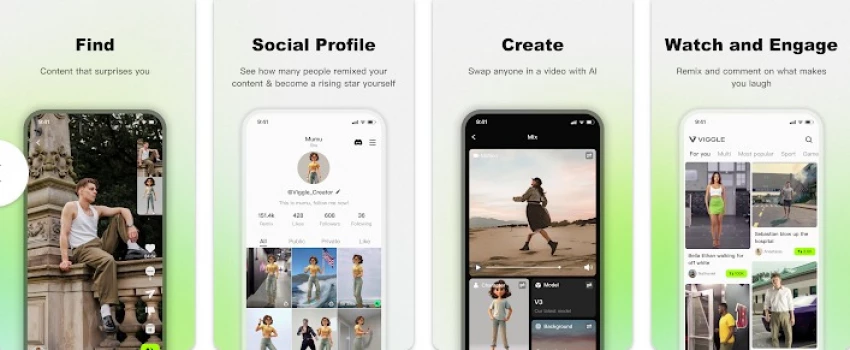
On mobile (Android), Viggle feels closer to TikTok or CapCut than a “serious” editor:
For casual creators, that’s exactly what you want. For professional workflows, you’ll still be exporting and editing elsewhere.
All of the real plan details are on the official Viggle AI pricing page, and this is how it currently breaks down:
Free – $0/month
Pro – $9.99/month
Live – $19.99/month
Max – $79.99/month
Credits are consumed mostly by fast-mode, watermark-free videos and livestream features. For example, 1 credit usually buys up to 15 seconds of generation in standard modes.
From a value standpoint, the Free plan is genuinely usable for casual memes; Pro starts making sense once you need consistent branding and watermark-free 1080p.
Fritz.ai’s hands-on review rates Viggle around 4.7/5, praising it as one of the best free motion-animation tools and highlighting how little setup is required (no mocap suits, no rigging).
Tech-Crib emphasizes customizable templates, text-to-animation, image-to-video and even mentions earning Viggle Points for engagement
10Web focuses on the community angle—a 4M+ creator base, character-motion integration, and real-time collaboration—but flags limited offline functionality and resource demands as cons.
From my own use, those impressions line up: powerful, easy, heavily community-driven—but not a full, pro-grade editor and definitely not offline-friendly.
What I Like
Ridiculously low barrier to entry – I can create a meme-worthy video in under 5 minutes without any editing knowledge.
Template depth & trend-hopping – The template library really does cover most current TikTok / Reels trends.
Physics-aware motion – Compared with older deepfake apps, body movement is smoother and less “rubber puppet”.
Free tier isn’t fake-free – You genuinely can experiment endlessly with watermarked relaxed-mode videos
What Frustrates Me
Credit system feels game-ified – I constantly have to think “Do I really want to spend credits on this 10-second meme?”
Server load issues – During busy times, generations can be slow or fail (also echoed in multiple app reviews).
Not a full editor – No serious timeline, compositing, or audio mixing. I still need another editor for polished content.
Mixed support experience – Some user reviews complain about crashes, payment issues and confusing ad/credit mechanics on mobile.
This is where I’m much more cautious.
A widely shared Reddit post in r/privacy describes a case where:
Someone’s photo was uploaded without consent by a friend.
Even after “deleting” assets from the account library, the direct media links still worked for a while.
Support initially said deletion might take up to 12 months; later they corrected that to 12 hours and eventually one of the files became inaccessible.
This is a single user’s account, not a formal legal finding, but it raises reasonable worries:
Deletion may be logical (removed from your UI) before it is physical (actually removed from storage).
Content may still be used for model training before deletion, depending on the privacy policy and how strictly it’s followed.
My personal stance:
If I needed strict control over likeness rights or legal compliance (e.g., regulated industries), I’d look for a tool with explicit opt-out and stronger deletion guarantees.
From a creator/marketer perspective, here’s where Viggle has genuinely earned a spot in my toolkit:
Social Media Memes & Trends
Fast face-swap into trending templates is perfect for short-life, high-impact content.
Fan Content & Fandom Edits
“Put me in the stadium”, “make me part of this K-pop dance”, “cast me into this movie scene” – Viggle does that with almost no friction.
Lightweight Campaigns & Community Content
For brands targeting younger audiences, I can imagine running challenges (“remix this template with your face”) and collecting UGC.
Concept Prototyping
If I just want to test whether a motion idea or meme format works before investing in a full shoot/edit, Viggle is a cheap sandbox.
Where it doesn’t fit:
Pika Labs / Kaiber / Runway – Better for full text-to-video, filmic sequences, and professional edits; less “plug-and-play meme”.
HeyGen / Synthesia-style tools – Strong for talking-head avatars and corporate explainer videos, but they don’t hit meme culture like Viggle does.
CapCut / Veed / InVideo – More like “classic” editors with AI helpers. Great for polishing; not as strong in raw motion-swap magic.
In short: Viggle is a meme-and-motion specialist, not a general purpose editor.
It’s worth calling out the rating gap:
High ratings on Google Play from users who just want fun memes that “work most of the time”
A relatively low score on MouthShut (2.15/5), where reviewers often share more detailed frustrations (performance, ads, expectations vs reality).
From reading through those, my interpretation is:
If you treat Viggle as a free, viral toy, it feels impressive and fun.
If you expect studio-grade reliability, perfect privacy, or bulletproof support, you’re more likely to be disappointed.
Yes, but only for specific use cases and with eyes open.
I’d happily recommend Viggle AI if:
I’d not recommend it if:
If you do decide to experiment, I’d start on the Free plan, keep everything light-hearted, and treat the app as a meme factory rather than a long-term content archive.
Be the first to post comment!
I’ll admit it, SpicyChat AI is one of those tools you don’t exactly open with “s...
Vivek Gupta2 days ago
For months, the global AI industry has lived in a state of suspended animation w...
Vivek Gupta1 week ago
In today’s fast-moving digital landscape, intelligent software that can act inde...
Mighva Verma3 weeks ago

In today’s business world, customer expectations have shifted dramatically. Peop...
Mighva Verma3 weeks ago
Top AI Transcription Tools Designed for TeamsRemote and hybrid teams are drownin...
Mighva Verma1 month ago
In today’s content-saturated world, merely producing more isn’t enough. Smart cr...
Mighva Verma1 month ago