LuminaBrush AI Review: Honest Breakdown of Its Lighting Capabilities

AI image editing tools have evolved fast, but very few focus on lighting in a meaningful way. When I first explored LuminaBrush AI, I expected a lightweight relighting demo. Instead, I found a tool that sits halfway between a digital painting brush and an AI-powered lighting simulator.

But LuminaBrush isn’t perfect. This review covers both sides, where it genuinely helps, and where it clearly falls short, based on my experience and discussions around the LBM (Latent Bridge Matching) model behind it.

This article avoids hype and focuses on real user expectations.

LuminaBrush AI at a Glance: A Focused Lighting Enhancement Tool

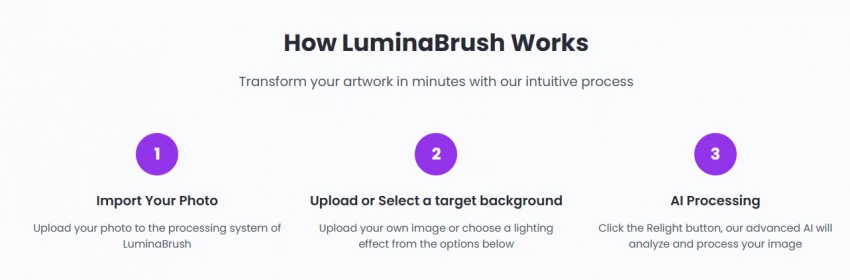
LuminaBrush revolves around one specialty: AI-assisted lighting control. It uses a system called Latent Bridge Matching (LBM) that remaps lighting between images, generating realistic light falloff, highlights, and shadows.

Core Features:

AI-Powered Lighting: Simulates realistic lighting effects based on image context.

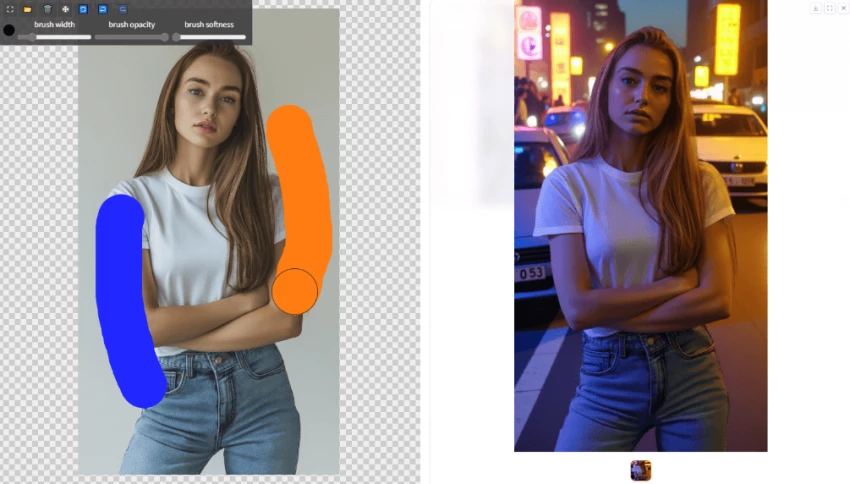
Unique Brush Technology: Brushstrokes behave like controlled beams of light, providing more natural edits.

Real-Time Preview: See your lighting adjustments as you work, speeding up the process.

Advanced Layer System: Allows for non-destructive editing, with separate layers for subjects, background, and highlights.

Customizable Tools: Control the direction and intensity of light with detailed adjustments.

Flux Integration: Ensures consistent lighting across multiple layers.

Two-Stage Framework: Provides more granular control over lighting effects.

All these sound impressive, and some genuinely are, but only in specific situations.

Exploring LuminaBrush’s AI-Assisted Studio-Grade Editing Experience

LuminaBrush uses AI to simulate lighting rather than apply filters. This makes its edits feel more natural than typical “brightness & contrast” tools.

Where the Experience Feels Strong

  • The brushstrokes behave like controlled beams of light
  • Shadows soften realistically without blurring important details
  • The layer system allows separate edits for subject, background, and highlights
  • The real-time preview speeds up experimentation 
  • Flux framework maintains consistent illumination across layers

These strengths help digital painters, portrait editors, and concept artists.

Where the Experience Breaks Down

  • The relighting algorithm struggles with low-quality or noisy images
  • Shadows sometimes look painted instead of photographic
  • Complex lighting setups (multiple light sources) are not handled well
  • Precision masking is limited
  • Not suitable for RAW-level professional workflows

LuminaBrush performs well in the “controlled creative” space but not in demanding commercial retouching.

My Practical Experience Using LuminaBrush Daily

When used repeatedly over days, certain patterns emerged.

Tasks LuminaBrush Handles Well

  • Light enhancement on portraits
  • Correcting mild lighting inconsistencies
  • Adding mood lighting to concept art
  • Adjusting highlights on AI-generated images
  • Softening harsh shadows in studio shots
  • Creating quick lighting variations for thumbnails

Tasks Where It Struggles

  • Correcting complex product photos
  • Handling high dynamic range images
  • Maintaining texture on very dark skin tones
  • Blending subject and background with perfect realism
  • Large-scale commercial editing requiring fine detail

So, while it plays a valuable role, it cannot replace a full professional editor.

Real-World Scenarios Where LuminaBrush Performs Better Than Competitors

I compared LuminaBrush with tools like Photoshop, Lightroom, LuminarAI, and online AI editors.

1. Enhancing Flat AI Art

Many AI images from Midjourney/DALL·E lack depth.
LuminaBrush adds realistic directionality and glow, outperforming other tools.

2. Fixing Mild Studio Lighting Issues

It performs quick lighting repairs better than slider-based editors.

3. Adding Subtle Mood Lighting

Warm, cold, moody, or dramatic tones are easy to apply.

4. Quick Background-Light Matching

Uploading a reference background helps LuminaBrush extract its lighting signature.

5. Fine-Tuning Creative Edits

Artists can use brush-based control for stylistic effects—something most AI tools lack.

In these scenarios, LuminaBrush genuinely excels.

The Strengths and Weaknesses I Found in LuminaBrush

Key Strengths

  • Clean, beginner-friendly interface
  • Brush-based lighting control feels intuitive
  • Fast relighting using LBM
  • Real-time visual updates
  • Layers allow non-destructive workflow
  • Better lighting control than most online editors
  • Good balance between creativity and automation

Clear Weaknesses

  • Not a substitute for Photoshop or Capture One
  • Cannot handle very complex professional lighting scenarios
  • Limited masking and selection tools
  • Results look artificial if pushed too far
  • Mobile interface feels incomplete
  • Requires high-quality input for best output
  • No batch processing for ecommerce teams
  • Minimal preset library compared to other tools

These limitations matter depending on your use case.

The Moments Where LuminaBrush AI Surprised Me Most

Not everything was predictable. A few aspects exceeded my expectations:

1. Lighting Behaves More Naturally Than Expected

The AI respects facial contours and fabric folds surprisingly well.

2. The Brush Feels More Artistic Than Digital

It mimics the movement of soft light rather than pure brightness.

3. Background Colors Influence the Subject

Atmospheric color bleeding is handled intelligently.

4. Performance Was Stable Even With Multiple Layers

No crashing or freezing, unlike many web-based editors.

5. Light Falloff Was Impressively Realistic

It gradually fades instead of abruptly cutting off.

These moments helped me understand where LuminaBrush’s real value lies.

Where LuminaBrush Fits in a Creator’s Workflow 

Good Fit For

  • Concept artists
  • Digital illustrators
  • Midjourney/AI art editors
  • Hobby photographers
  • E-commerce sellers with simple lighting
  • Graphic designers needing mood control
  • Social media creators

Not a Good Fit For

  • Commercial photographers
  • Professional retouchers
  • Anyone working with RAW images
  • Product photographers with strict color accuracy
  • Editors needing flawless subject-background integration

LuminaBrush is a specialized lighting tool, not an all-in-one solution, and its usefulness depends on how much control you need.

Verdict

As someone who constantly experiments with creative tools and is always looking for ways to enhance visual content, LuminaBrush AI has truly impressed me in certain areas. Its ability to control and simulate lighting with the Latent Bridge Matching (LBM) model is innovative, offering real-time brush-based control over light intensity, direction, and mood. For digital artists, concept creators, and AI art editors, this is a fantastic tool for adding depth, realism, and atmosphere to their visuals. The real-time preview feature, combined with an intuitive interface, makes it an excellent tool for quick edits and creative lighting effects.

That said, LuminaBrush is not without its drawbacks. It’s not meant for high-end professional workflows, particularly for commercial photographers or those working with RAW images or complex lighting setups. The lack of advanced masking tools and its struggle with high-dynamic-range (HDR) images or product photography makes it less ideal for commercial-grade retouching. The mobile version also feels incomplete, and for some, the inability to export larger files could hinder its use for professional-level projects.

LuminaBrush is great for creatives who want to add artistic lighting in a simple, controlled way, but not a substitute for a full-featured professional editing suite.

Rating Scorecard:

FeatureRating (Out of 10)Comments
AI-Powered Lighting9/10Excellent for natural lighting effects with real-time preview.
Brush-Based Control8/10Intuitive and artistic, but lacks precision for fine details.
Layer System8/10Good for non-destructive editing, but not as flexible as Photoshop.
Real-Time Preview9/10Speeds up the creative process significantly.
Customizability7/10Allows some customization, but lacks deeper control over fine details.
User Interface8/10Clean and beginner-friendly, but not as advanced as pro software.
Performance (Speed/Stability)9/10Stable with multiple layers; no crashes even with complex edits.
Mobile Version6/10Lacks some desktop features; limited on mobile platforms.
Complex Editing Capabilities6/10Struggles with complex or professional retouching tasks.
Pricing Value8/10Affordable for casual users and creatives, but not ideal for professionals.
Overall7.9/10A solid tool for artistic, creative edits, but not a replacement for professional software.

Final Thoughts:
LuminaBrush AI is an exciting tool for artists and digital creators who want to experiment with lighting in a straightforward way. However, it’s not suitable for those looking for a full-fledged, professional editing suite. Given its strengths in lighting enhancement, it earns a solid score of 7.9/10, with high marks for its intuitive interface and performance. It’s a tool worth considering for anyone in the creative field needing quick, artistic lighting adjustments, but it’s not the go-to solution for high-end, precision work.
Post Comment

Be the first to post comment!