MagicLight AI is marketed as a long-form text-to-video animation platform capable of generating videos up to 30–50 minutes with consistent characters and visual styles. That promise alone puts it in a different category from most AI video tools, which usually cap output at short clips or ad-style content.
However, real-world feedback paints a more complicated picture. While some creators praise its speed and storytelling potential, others raise serious concerns around billing transparency, credit consumption, and customer support.
This review goes beyond feature lists and marketing claims. It is based on hands-on testing and verified user feedback from Trustpilot, Google Play, Medium, and creator communities, to answer one core question:
Is MagicLight AI genuinely useful, or just another AI tool that looks better in demos than in practice?
Many users who reviewed it on aitools.inc highlighted that it solves the problem of creating videos without traditional production skills. Instead of spending weeks animating, you supply a script and let the AI handle storyboarding, characters, and transitions.
In a personal test shared on Medium, the creator noted how much faster it was compared to traditional editing, especially when producing educational explainers. This makes MagicLight particularly valuable for teachers or content creators pressed for time.
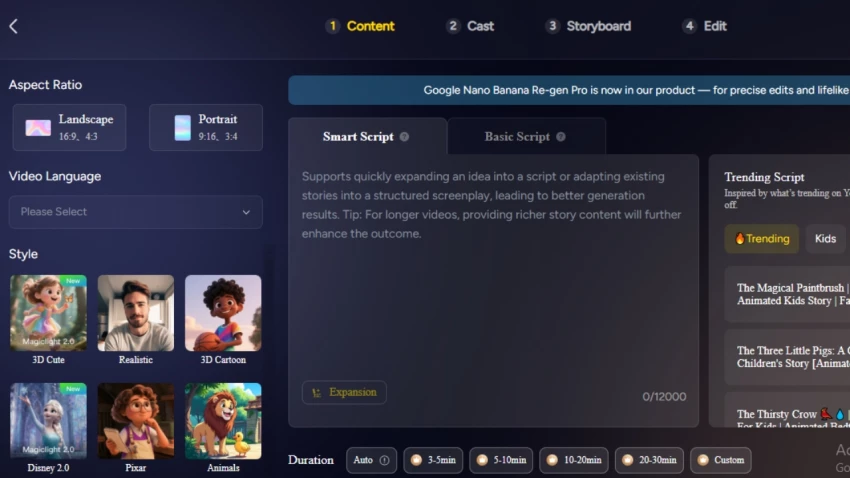
Users paste a script or prompt, select a style, and MagicLight AI generates animated scenes automatically.
What works well
Common complaints
Creators report that short, structured scripts perform far better than long, complex prompts.
This is MagicLight AI’s most praised feature.
Unlike tools such as Pictory or InVideo, MagicLight maintains visual continuity for characters across long narratives. Reddit and Medium creators repeatedly highlight this as the reason they chose the platform.
That said:
MagicLight AI advertises support for long-form content:
~30 minutes on mobile
Up to ~50 minutes on web
Reality from users
Many experienced users recommend exporting long projects in chapters, not as a single file.
MagicLight AI supports narration in multiple languages, including Spanish and Hindi.
User sentiment:
This feature is useful, but not best-in-class compared to dedicated voice tools.
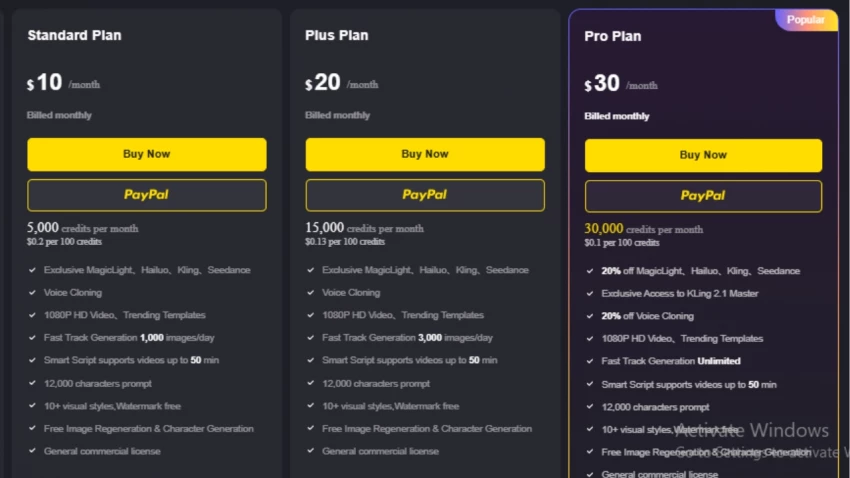
MagicLight AI offers four subscription tiers, ranging from a free starter plan to a pro package for heavy users. Here’s a quick look at what each plan includes:
| Plan | Price | Credits | Video Length | Key Features |
|---|---|---|---|---|
| Free | $0 | – | 1 min | 3,000-character prompts, 10+ styles, watermark-free, commercial license |
| Standard | $10/mo | 5,000 | Up to 50 min | Voice cloning, 1080p HD, trending templates, 1,000 images/day |
| Plus | $20/mo | 15,000 | Up to 50 min | Faster generation (3,000 images/day), all Standard features |
| Pro | $30/mo | 30,000 | Up to 50 min | Unlimited generation, Kling 2.1 Master access, 20% off premium tools |
💡 Payment issues can be reported via Discord or Telegram, as noted in their official support.
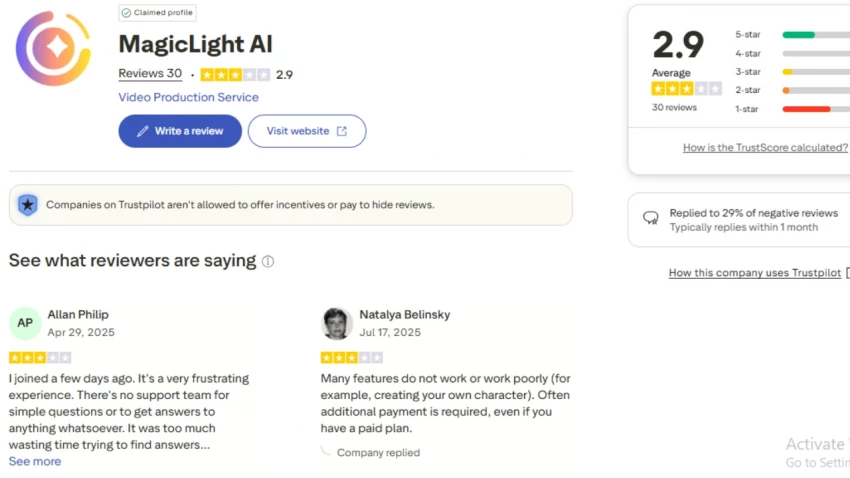
Trustpilot reviews consistently mention that:
Several reviewers state that advertised minutes do not translate into real output time, which leads to frustration and distrust.
Customer feedback on MagicLight AI is a mix of enthusiasm and frustration, depending on what users value most.
On Medium, a solo creator described it as “good enough and insanely useful” because it allowed them to produce animated content without needing to use traditional editing software. They emphasized that the tool lowers the barrier for individuals who want to share ideas visually but don’t have a design or animation background. For these users, the speed of turning a script into a video outweighs concerns about polish.
By contrast, Trustpilot reviews highlight persistent pain points. Several users complained about hidden costs associated with the credit system, as advanced features consumed more credits than expected. Others reported difficulty canceling subscriptions and slow responses from customer support. These issues suggest that while the core product delivers, the billing and service infrastructure may not yet be mature enough for businesses relying on consistent production schedules.
The Google Play Store paints a different picture. Mobile users often praise the convenience of producing videos on the go, which is rare among AI video tools. However, multiple reviews flagged bugs in long video rendering — projects over 20 minutes sometimes failed or took much longer than expected. This feedback indicates the mobile app is great for testing shorter clips but not as reliable for heavy workloads.
Beyond official review platforms, discussions on Reddit and AI creator forums reveal another angle: expectation management. Some creators were impressed by the consistency of characters across long scripts, something other tools struggle with. Others were disappointed that outputs, while smooth, still felt more like AI prototypes than fully production-ready animations. This gap between “fast idea visualization” and “studio-grade content” is where most criticisms sit.
Taken together, these reviews suggest MagicLight AI is strongest for solo creators, educators, and early-stage content experiments — where speed and accessibility matter most. But users running professional campaigns, especially those sensitive to budget control and customer support reliability, may find the credit system and service challenges frustrating.
MagicLight AI is not a scam, but it is also not a polished, production-ready solution.
It excels as a fast, creative experimentation tool—especially for character-driven stories. But unclear credit economics, billing issues, and inconsistent support make it risky for professional workflows.
Best approach:
Use MagicLight AI for early-stage content and concept testing, not mission-critical projects. Start free, test thoroughly, and keep expectations realistic.
Be the first to post comment!

When you need to draw something with someone right now, not after sign-ups, not...
Suraj Malik3 weeks ago

Choosing the right software for your business can feel overwhelming. Every vendo...
Suraj Malik1 month ago

The Allure vs. the RealityIn the crowded world of online dating, SearchingForSin...
Sakshi Dhingra5 months ago
A quick look at Apkek.org shows it isn’t a true APK platform but a general tech-...
Sakshi Dhingra5 months ago

The rise of algorithmic trading has changed how retail traders operate. But for...
Vaishali6 months ago
AI-powered investing tools are slowly reshaping how Indian retail investors appr...
Vaishali6 months ago