I didn’t adopt Wava AI because I was excited about AI video tools.
I adopted it on a week when I had ideas, half-written scripts, and absolutely no energy left to open an editor. The kind of week where you tell yourself, “I’ll edit tomorrow,” knowing tomorrow will look exactly the same.
Wava AI didn’t magically make content creation fun. What it did was remove enough friction that I stopped negotiating with myself every time I wanted to publish.
That sounds small. It wasn’t.
Before Wava AI: Where My Process Quietly Failed Me Every Week
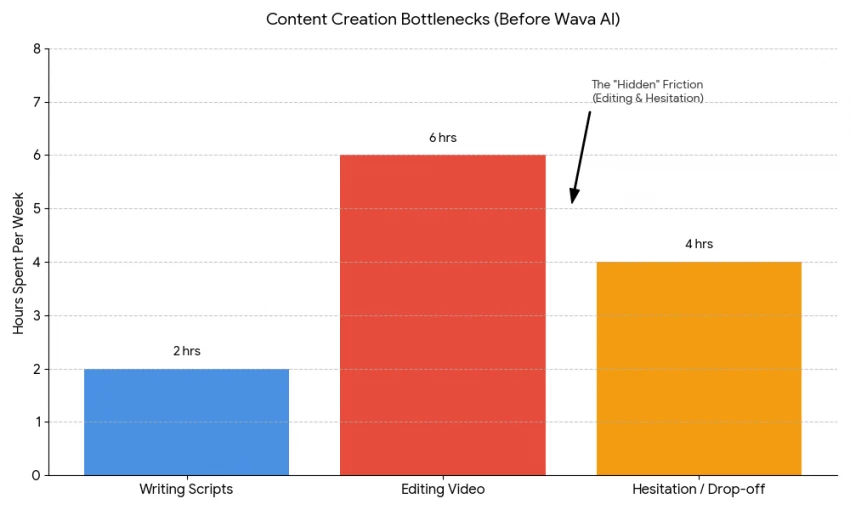
On paper, my old workflow was fine. It looked disciplined, even professional.
But emotionally, it was heavy.
Every step after writing felt like a commitment:
- Opening the editor meant at least an hour
- Finding visuals meant decisions I didn’t want to make
- Captioning meant precision when I was already tired
The result wasn’t fewer ideas — it was fewer finished posts.
The worst part wasn’t time lost. It was momentum lost. Once you skip a few days, posting starts to feel optional instead of natural.
My First Week With Wava AI Felt Uncomfortable
When I first used Wava AI, I didn’t feel relieved. I felt suspicious.
The output was clean, fast, and almost too easy. My instinct was to look for flaws:
“This looks generic.”
“I would have edited this differently.”
“This isn’t how I usually do it.”
What I eventually realized is that I was evaluating the video as a creator — not as a viewer scrolling at speed.
That disconnect mattered more than I expected.
Writing Became the Only Place I Could Hide (And That Changed How I Write)
This was the biggest shift, and it happened slowly.
When editing disappears, weak writing becomes obvious immediately. There’s no montage, no fancy cut, no music choice to rescue a flat sentence.
At first, this was frustrating.
Then it became clarifying.
I started:
- Cutting filler lines
- Writing tighter hooks
- Thinking in spoken language instead of written prose
Wava AI didn’t improve my writing, it exposed it. That pressure made my scripts better over time.
How the Workflow Changed My Posting Rhythm in Real Life
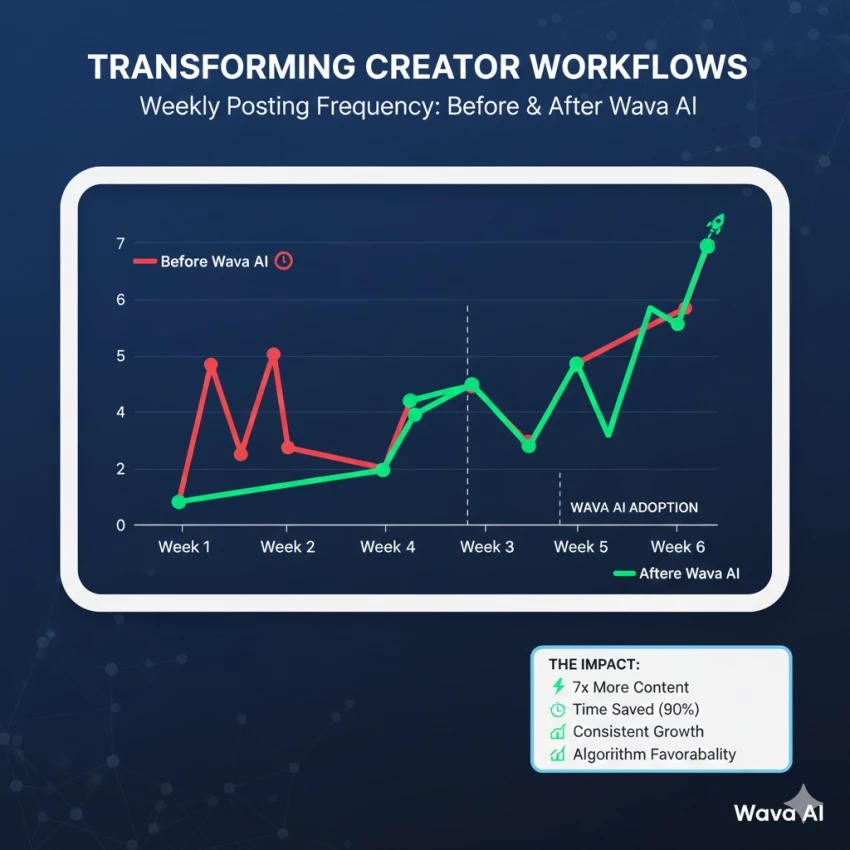
Before Wava AI, posting felt like a task I had to schedule.
After a few weeks with it, posting felt like something that naturally followed writing.
I’d write one script, then think, “I might as well do two more.”
Then suddenly I had five videos exporting while I made coffee.
This wasn’t discipline. It was reduced resistance.
That difference is subtle, but it changes everything.
The Automation Felt Limiting, Until I Realized What It Was Protecting Me From
There were moments where I wanted to step in and tweak things:
- Change a cut
- Adjust pacing slightly
- Replace a visual
Wava AI doesn’t really invite that behavior.
At first, that felt like a loss of control. Later, I realized it was removing a trap I always fell into: over-polishing things that didn’t matter.
I stopped obsessing over micro-details and started focusing on clarity and consistency.
Voiceovers Taught Me Something I Didn’t Want to Admit
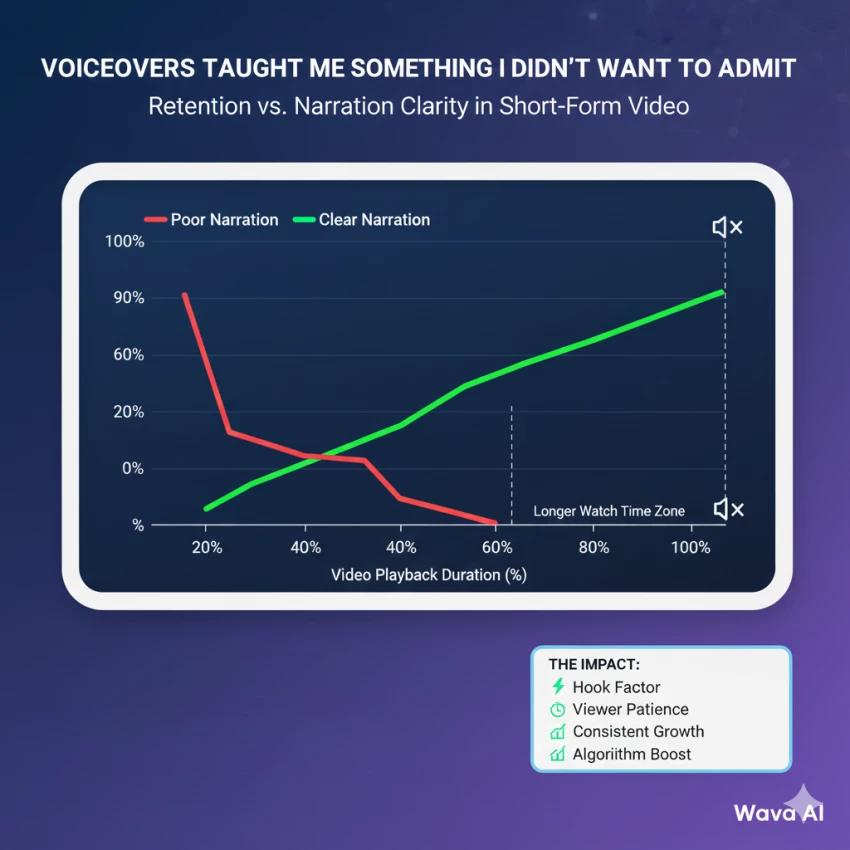
I used to think narration quality was a minor detail.
After watching retention patterns, it clearly wasn’t.
Videos with:
- Clear pacing
- Natural-sounding voice
- No awkward pauses
performed noticeably better than ones without.
Wava AI’s voiceovers weren’t perfect, but they crossed an important threshold: they didn’t distract. That alone kept people listening long enough to absorb the message.
The Repetition Problem Shows Up Slowly, and Then All at Once
After a few weeks, I noticed something subtle.
My videos were working, but they felt familiar, even to me.
Same rhythm.
Same structure.
Same emotional arc.
This is where automation shows its cost.
I had to consciously rotate:
- Script styles
- Emotional tone
- Content purpose
Wava AI won’t do that thinking for you. If you let it run on autopilot, sameness creeps in quietly.
What Wava AI Saved Me From, and What It Didn’t
Wava AI saved me from:
- Editing fatigue
- Caption burnout
- Visual decision overload
It did not save me from:
- Choosing good ideas
- Understanding my audience
- Accepting when content didn’t land
That distinction matters. The tool speeds up execution, not learning.
My Biggest Early Mistake Was Expecting Creativity From the Tool
I initially treated Wava AI like it would “add” something creative.
It doesn’t.
It removes obstacles.
Once I reframed it as a delivery system, not a creative partner, everything made sense.
How My Definition of “Quality” Quietly Changed
Before Wava AI, quality meant:
- Smooth edits
- Perfect pacing
- Visual polish
After using it consistently, quality meant:
- Clear idea
- Strong hook
- Watchable flow
- Consistent presence
This wasn’t lowering standards. It was aligning them with how short-form platforms actually behave.
Who This Workflow Fits, From Lived Experience
Wava AI fits people who:
- Think in words first
- Value momentum over perfection
- Want consistency without burnout
It frustrates people who:
- Enjoy fine-tuning visuals
- Need brand-level uniqueness
- Equate effort with quality
Neither approach is wrong. But the mismatch creates frustration.
What Actually Changed for Me, Long-Term
The biggest change wasn’t output.
It was trust.
I started trusting that I could sit down, write, and publish without draining myself. That confidence compounds.
I stopped negotiating with myself about posting.
I stopped waiting for “the right moment.”
That shift is hard to measure, but it’s real.
Final Reflection
Wava AI didn’t make me more creative, it made me more consistent. By stripping away editing friction, it forced me to focus on ideas, hooks, and clarity instead of perfection. That shift quietly changed how often I show up, and in short-form content, that matters more than polish.
It’s not a magic tool, and it won’t think for you. But if your biggest blocker is execution fatigue, Wava genuinely helps.
My overall rating: 7.8 / 10
My review in one line:
A powerful execution shortcut with real trade-offs, best used deliberately, not blindly.