
Image search has quietly become one of the most powerful discovery, research, and SEO channels on the modern web. Below is a structured, article-style draft you can easily adapt, expand, or localize.
Image search is the process of finding information through images, not just about images. Instead of relying only on text queries, today’s image search systems analyze visual signals (shapes, colors, objects, text inside images) and surrounding context to interpret what an image actually represents.
It matters more than ever because:
● People now search visually more than they type, especially on mobile.
● AI systems can identify objects, text, faces, and scenes inside images.
● Image search influences buying decisions (shopping + discovery).
● It plays a major role in fact-checking and content authenticity.
● Search engines can rank and recommend your images like regular web pages.
Modern image search engines combine computer vision, machine learning, and classic information retrieval to “read” images. To do this, they rely on four broad categories of signals:
● Visual data: pixels, shapes, colors, patterns, textures, edges, and layouts that describe what appears inside the image.
● Recognized entities: objects, faces, logos, landmarks, and scenes identified by trained visual recognition models.
● Metadata: file names, alt text, EXIF details (camera, date, sometimes GPS), structured data, and captions associated with the file.
● Context & behavior: surrounding page content, headings, internal links, and user interaction signals (click-through, dwell time, bounce).
The engine first extracts a compact internal representation of the image (often called an embedding) that encodes its visual characteristics, then matches that representation against a large index of other images. Finally, it ranks results by relevance, quality, and engagement, similar to how text search is ranked but with a heavier visual and contextual component.
There isn’t just one “image search” method; multiple techniques coexist, each optimized for a different kind of query and intent.

This is the classic approach: the user types a text query like “minimalist wooden coffee table,” and the engine returns images that match the query through metadata and page content.
● What it relies on: alt text, file names, captions, nearby paragraphs, page titles, and structured data.
● Best for: inspirational browsing, stock photo discovery, general topic research, and SEO-driven traffic acquisition.
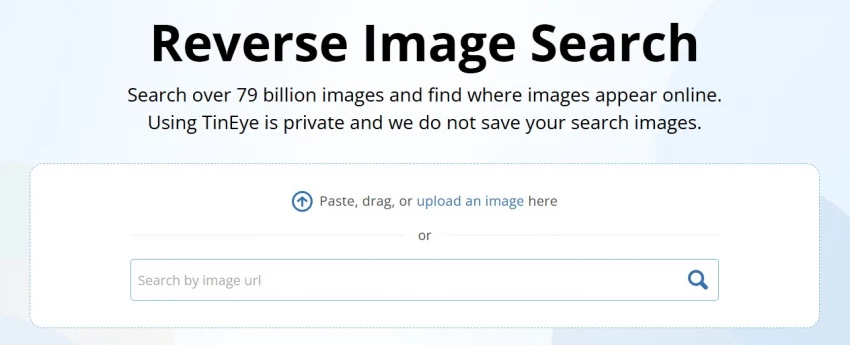
Here the query itself is an image: you upload a file or paste an image URL, and the engine looks for that same image or close variants across the web.
● What it finds: exact duplicates, resized or cropped versions, color-adjusted edits, and pages where the image appears.
● Best for: source tracing, copyright monitoring, fake or misleading image detection, and finding higher-resolution versions.

Visual similarity search looks for images that resemble the query image, even if they are not the same file. For example, uploading a picture of a particular sneaker returns visually similar sneakers—different photos, similar style.
● What it relies on: learned embeddings that capture shape, color, texture, and spatial relationships.
● Best for: eCommerce discovery (fashion, furniture, decor), design inspiration, and “find similar” features in marketplaces and social platforms.
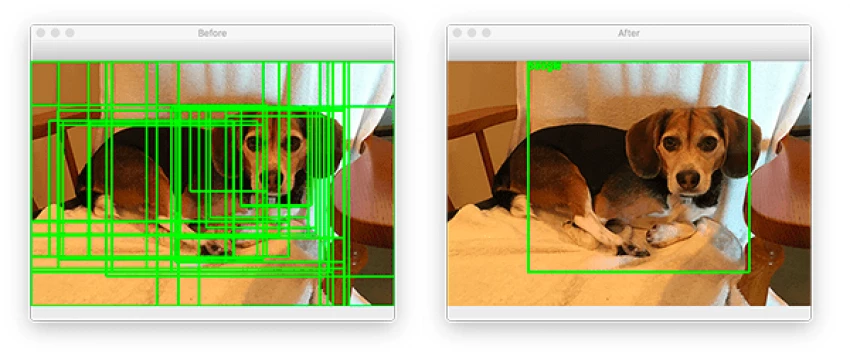
Object recognition allows the engine to detect and label specific elements within an image, such as a handbag, plant, or building. Some tools let users tap or draw around a region (for example, just the shoes in a full-body photo) and search based on that object alone.
● What it relies on: deep learning models trained on large datasets of labeled images and bounding boxes.
● Best for: shopping from photos, identifying species or equipment, and extracting individual products from lifestyle images.
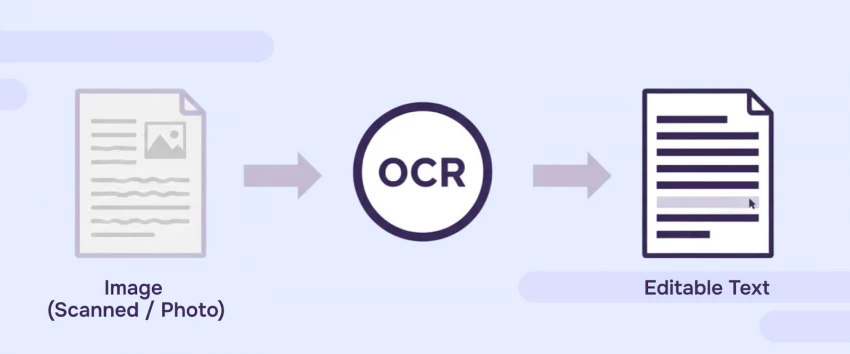
OCR (Optical Character Recognition) extracts text from images, such as screenshots, scanned documents, and photos of signs.
● What it enables: searching by text that appears inside images, indexing screenshots, and turning visual text into searchable content.
● Best for: research workflows, archiving, compliance, and any scenario where screenshots and scans dominate over native text content.
Most guides frame reverse image search as a way to “find the source of an image,” which is only one piece of its potential. In practice, reverse image search supports a wide range of real-world workflows:
● Journalistic fact-checking: tracing when and where a photo first appeared to debunk recycled old images used as “breaking news.”
● Brand and copyright monitoring: finding websites that reuse your product photos, logos, or marketing assets without permission.
● Competitive research: discovering which marketplaces and partners are using a competitor’s visuals or where influencer content is being repurposed.
● Design sourcing: starting from a mood-board image and tracking down original photographers, stock libraries, or manufacturers.
● Catfish and impersonation detection: identifying reused profile pictures across platforms in fraud or impersonation scenarios.
Reverse image search is also invaluable for finding higher-resolution originals when all you have is a low-quality or heavily compressed copy.
AI-driven visual discovery is the next layer on top of traditional image search, focusing less on exact matches and more on understanding intent encoded in pixels. Using deep neural networks trained on billions of images, these systems learn to position similar visuals close together in a shared feature space.
This enables “shop the look” experiences where a user can tap a chair in a catalog photo and instantly see similar chairs in different colors, sizes, and price points. Platforms like Pinterest, Google, and Bing all invest heavily in this mode because it removes the need for the user to know the right descriptive keywords.
Object recognition and OCR extend image search beyond pure “picture matching” into structured understanding and context-aware retrieval.
● Object recognition: identifies entities such as animals, food items, clothing, landmarks, and branded products, often with bounding boxes around each region.
● OCR: extracts text from screenshots, documents, menus, and signs, allowing that text to become searchable and indexable like normal HTML content.
● Contextual search: blends image content with signals like location, time, page theme, and historical user intent to personalize and refine results.
The same image can rank differently on different pages because engines consider the thematic context and metadata around it, not just the pixels themselves. For SEO and UX, this means that how and where you embed an image can be as important as the file itself.
Different tools shine for different use cases, from general-purpose discovery to specialized face and stock-image search.
| Tool / Platform | Core Strength | Typical Use Cases |
| Google Images | General web-scale image index | SEO traffic, product discovery, research, content sourcing |
| Google Lens | Camera-based, object and text recognition | Real-world object lookup, translation, shopping from photos |
| Bing Visual Search | Visual and product search | eCommerce discovery, similar product suggestions |
| Pinterest Lens | Lifestyle and inspiration focused visual search | Fashion, home decor, DIY ideas, style matching |
| TinEye | Reverse image search and image tracking | Copyright monitoring, source tracing, image version history |
| PimEyes | Face-focused reverse image search | Detecting online appearances of a person’s face, brand and impersonation checks |
| Stock site search (e.g., Shutterstock) | License-ready high-quality images | Professional content creation, ads, web design |
For sites competing seriously on visual search, an advanced checklist helps systematize optimization.
● Technical quality
● Use high-resolution but efficiently compressed images (WebP, AVIF where supported).
● Implement responsive images to serve device-appropriate sizes.
● Metadata and semantics
● Unique, descriptive alt text for each important image, aligned with page intent.
● Human-readable file names incorporating primary keywords when relevant.
● Descriptive captions below key images, especially for editorial and educational content.
● Contextual integration
● Place critical images near relevant headings and copy, not in isolated carousels.
● Ensure internal links and anchor text around image-heavy sections support the same topics.
● Discoverability
● Add images to XML sitemaps or use dedicated image sitemaps for large catalogs.
● Avoid blocking image directories via robots.txt unless truly necessary.
● Compliance and UX
● Respect accessibility guidelines, making alt text meaningful for screen readers.
● Avoid text-only images for key information; pair with HTML text for indexing and accessibility.
This level of optimization not only improves visibility in Google Images but also strengthens overall page relevance in standard search results.
Beyond SEO and shopping, image search is an essential tool for research, verification, and brand protection.
● Mis/disinformation detection: verifying whether a viral protest photo is actually from a different country or year.
● Academic and design research: finding original high-quality sources, related visual references, and more accurate diagrams or charts.
● Brand misuse and impersonation: identifying fake profiles or phishing pages that reuse official logos and imagery.
● Reputation management: monitoring where a person’s photos appear and whether they are being used in harmful or misleading contexts.
Many businesses underperform in image search due to a few recurring mistakes.
● Generic or missing alt text: using “image” or stuffing keywords instead of meaningful descriptions reduces accessibility and relevance.
● Low-quality or tiny images: pixelated or very small images often generate weak engagement and fail to stand out in rich results.
● Over-reliance on stock photos: heavily reused stock visuals may struggle to differentiate your page and can look identical across multiple sites.
● Ignoring mobile experience: large unoptimized images that load slowly on mobile can hurt both rankings and conversions.
● Blocking crawlers: disallowing image folders or using lazy-loading without proper markup can prevent indexing.
The future of image search is moving toward multimodal, real-time, and highly personalized experiences.
● Multimodal queries: combining text, images, and even voice in a single query to express subtle intent (“like this dress but in blue and under a lower price”).
● Persistent camera search: using smartphone cameras as a continuous “search lens” to identify, translate, shop, and learn about the physical world.
● AI-generated content detection: distinguishing synthetic images from real photographs to maintain trust and integrity online.
● Personalization: tailoring visual results to a user’s historical preferences, locations, and behaviors, especially in commerce and social platforms.
Image search has evolved from a simple gallery of pictures into a rich ecosystem of visual discovery, research, verification, and commerce. For creators, brands, and publishers, treating images as first-class SEO assets and research tools—not just illustrations—unlocks tangible gains in traffic, trust, and conversions.
Be the first to post comment!

Introduction: Why Sales Automation Is No Longer OptionalToday’s B2B sales enviro...
Michael Hicklen1 month ago

Why Workflow Automation Matters in 2026Automation tools help businesses:● S...
Michael Hicklen1 month ago

1) Foundations :What software review platforms are-Software review platforms are...
Michael Hicklen1 month ago

1. What AI Automation in Daily Work Actually Means?1.1 AI automation in daily wo...
Michael Hicklen1 month ago

1. What Is a CRM?Definition-A CRM (Customer Relationship Management) system...
Michael Hicklen1 month ago

When brands think about where to anchor their DNS (Domain Name System) backbone,...
Michael Hicklen1 month ago