A school gradebook sounds like a simple thing until you watch what happens when it isn’t simple. A student thinks they’re “doing fine” until the report card lands. A parent finds out about missing work only after it becomes a crisis. A teacher is stuck re-explaining the same status update in five different places. And an administrator is chasing spreadsheets that were never meant to be permanent records.
ThinkWave exists for that specific mess. It’s not trying to impress anyone with flashy language. It’s trying to make the everyday mechanics of school, grades, attendance, assignments, and communication, feel less confusing and less delayed.
On the surface, you see a website like ThinkWave’s homepage and you get the headline idea: cloud-based school management software with teacher gradebooks and online access for students and parents.

But the real value of ThinkWave isn’t what it claims it can do. It’s what the system changes in a real school week: how quickly information travels, how clearly “missing work” is seen, and how many hours are saved when report cards stop being a manual compilation project.
ThinkWave is built around consolidation. It wants grades, attendance, assignments, handouts, and messages to live in one ecosystem so you aren’t stitching a school workflow together across multiple tools.
The official school management system overview describes a flow that’s familiar if you’ve ever managed a school system: administrators manage students, classes, schedules, attendance, and custom data; teachers use prepopulated gradebooks to record grades and submit attendance; students and parents log in to track progress, download materials, and submit assignments.
That’s a big deal because the pain in school software rarely comes from “lack of features.” It comes from fragmentation. When grades are in one place, attendance in another, assignments in a third, and messaging split across email threads, the school spends its time translating and reconciling.
ThinkWave’s promise is basically: stop translating. Let the system carry the record.
A lot of schools adopt software because they want “parent involvement,” but the reality is more emotional than that. Parents don’t want involvement; they want clarity. They want the grade to make sense. They want to know what’s missing. They want to understand what “current performance” looks like without waiting.
ThinkWave explicitly builds around that visibility.
On its Grades Online page, ThinkWave says students and parents can access online accounts using a unique access code and view day-to-day results, attendance records, and final grades.
If you’ve worked in education, you already know what that does: it shifts the school-parent relationship from “big reveal” to “continuous awareness.” And that’s not a tech feature; it’s a behavior change. When parents can see attendance patterns and missing assignments early, the conversation becomes smaller, calmer, and more fixable.
ThinkWave also extends this concept in its support documentation for families. On the Students and Parents support page, ThinkWave describes a student dashboard experience where users can view grades across multiple teachers/schools, see assignments by date, and use an access code to add a resource (teacher or school).
That “add a resource” detail matters if your use case includes tutoring, multi-program students, or schools that want one portal experience without forcing families to learn five logins.
Teachers don’t reject school tools because they hate technology. They reject tools because they add steps.
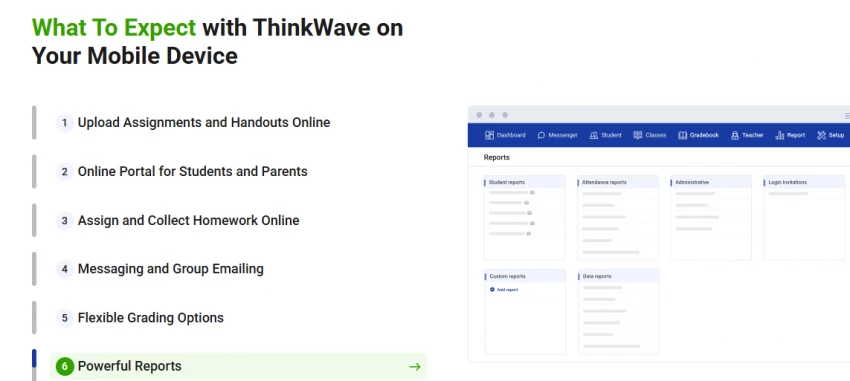
ThinkWave leans hard into “quick learning curve” and “no re-login juggling.” On the ThinkWave Educator page, it says the interface can be learned quickly and that multiple classes can be managed inside a single gradebook without logging in multiple times.
The same page describes a set of practical teacher moves that are more meaningful than generic “LMS features”:
The platform supports uploading homework and handouts (with file size limits that differ between free and premium), distributing assignments, collecting homework uploads from students, and keeping uploaded work organized by assignment and date.
ThinkWave also describes flexible grading methods, points-based systems, letter grades, check/check-plus, custom grades, and weighted assignment types (like tests/homework/projects/participation).
In plain terms, that means the gradebook isn’t rigid. It can reflect how teachers actually grade, which is one of the biggest adoption barriers in classroom systems.
A lot of tools became “distance learning tools” during COVID. But schools didn’t stop needing these workflows afterward. The convenience stayed.
ThinkWave’s main school management overview specifically describes a workflow where assignments and announcements can be delivered electronically, students can upload work, files become instantly available to teachers in the gradebook, and messages can be posted and emailed to students/parents (to all, groups, or classes).
What’s important here is that ThinkWave connects assignments and grading, rather than treating them as separate universes. When the submission pipeline and grade pipeline share the same system, students don’t feel like they’re sending homework into a void.
Schools don’t always realize how expensive report card season is until someone measures it. It isn’t just “printing.” It’s data compiling, double entry, formatting, and correcting.
ThinkWave says it helps schools “save hours compiling report cards and transcripts,” describing how eliminating double entry and making reporting “one-click” improves time and accuracy.
That’s the marketing version, but what’s more convincing is the kind of testimonial you typically only get from small schools that have felt the pain personally.
On ThinkWave’s reviews and featured schools page, one school describes how compiling semester grades used to take staff nearly two weeks, and now takes “a matter of minutes once grades are completed online.”
Even though this is a testimonial on the vendor’s own site (so you should treat it as directional, not scientific), it matches the real-world truth: grade compilation time explodes when records are scattered.
Any system that stores student records triggers a serious question: where is the data and what does “secure” really mean?
ThinkWave’s homepage makes a specific hosting claim: it says ThinkWave is hosted on Google App Engine, and that data is stored in encrypted form in multiple, geographically distributed data centers.
Capterra’s listing adds another detail in the same direction, describing ThinkWave as hosted on secure Google servers and including support and upgrades in subscription plans.
If you’re writing this for your blog, the honest way to frame it is: ThinkWave claims Google-backed hosting and encrypted storage distribution, but schools should still evaluate privacy policies, access controls, admin permissions, and compliance needs based on their region and student data laws.
You shared a Common Sense link, but I wasn’t able to load that page in this session due to an error, so I can’t responsibly quote or summarize it. You can still reference it in your blog as a “further reading” source if you review it directly: Common Sense resource.
ThinkWave is unusually transparent about pricing compared to many education platforms that force you into a call before you see a number.
The official ThinkWave store pricing states that the license includes access for all school administrators, gradebooks for all teachers, and online access for all students and parents, and pricing is based on current enrollment (not cumulative students from prior years).
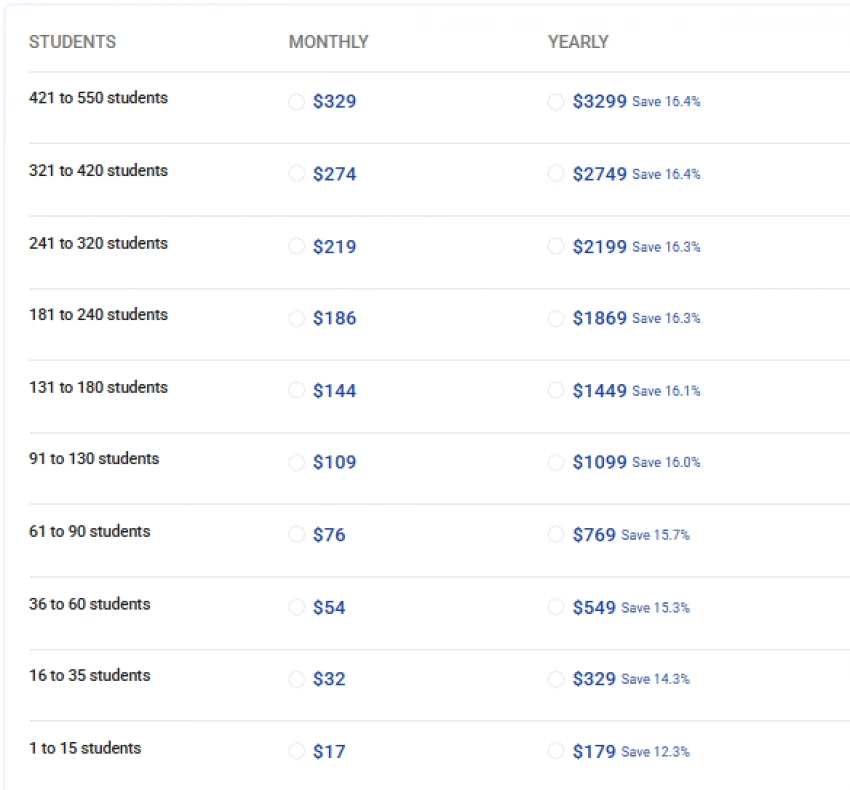
The same page shows tiered pricing examples such as:
For 91–130 students: $109/month or $1099/year
For 131–180 students: $144/month or $1449/year
For 241–320 students: $219/month or $2199/year
For 421–550 students: $329/month or $3299/year
ThinkWave also summarizes the overall range in its blog. In its pricing model explainer, it says pricing ranges from $17/month ($179/year) up to $329/month ($3,299/year) depending on student count, and it claims no long-term contracts, setup fees, cancellation fees, or hidden fees.
SoftwareAdvice also displays a starting price of $17/month for ThinkWave Educator.
The human way to interpret these numbers is this: ThinkWave is trying to stay affordable for small schools while still charging predictably as enrollment scales. If you’re a 100-student school, you can see the bracket. If you’re a 500-student school, you can see it too. That transparency reduces the “sales friction” that makes admins suspicious.
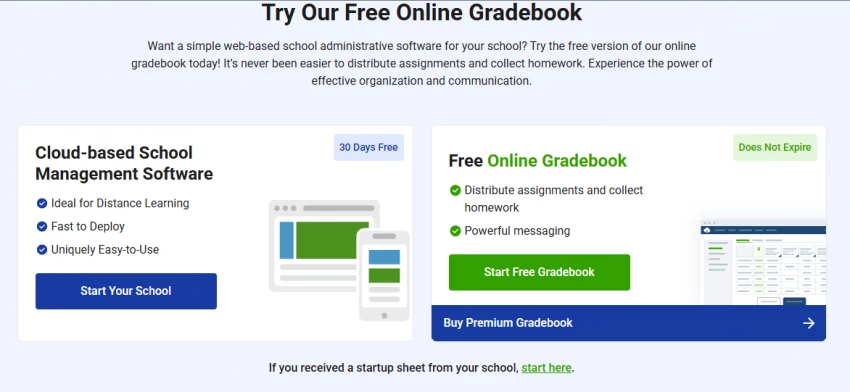
ThinkWave does offer a free gradebook option, and the company is explicit about it.
On ThinkWave Educator and the login page, ThinkWave promotes “Start Free Gradebook Does Not Expire,” alongside its “Start Your School 30 Days Free” trial messaging.
That matters because many education tools say “free trial” but don’t offer anything permanent unless you pay. ThinkWave is saying: solo teachers can keep a basic gradebook for free, while schools that want administration + integrated gradebooks + portals subscribe.
Third-party summaries sometimes add extra nuance. SoftwareConnect says the free gradebook includes ads and notes the lack of a dedicated mobile app as a con.
So if you’re writing this for real users, the fairest framing is: free exists, but it’s a limited gradebook experience and may include ads; the full school-management model is subscription-based.
Most school tools win or lose in the first two weeks. If teachers don’t feel “I can do this quickly,” they stop using it, and the system becomes an expensive record-keeping exercise rather than a living portal.
ThinkWave’s own messaging claims quick learning and multi-class simplicity.
Review platforms partially reinforce that, but they also reveal how experiences differ by expectations.
On Capterra’s ThinkWave Educator listing, ThinkWave shows an overall rating of 4.2 based on 16 reviews.
On G2’s ThinkWave reviews page, ThinkWave shows an overall rating of 2.6 with 6 reviews (at least in the page section captured).
That discrepancy doesn’t mean one is “right.” It usually means the reviewer pool is different: the type of schools leaving reviews, the time period, and whether the reviewers are administrators or end users.
What G2 does show clearly is the theme of support frustration in at least one review, where an admin says it is easy to use but complains “NO support.”
If you’re trying to write a realistic article, that’s the kind of detail you include—not to bash ThinkWave, but to set expectations: usability may be solid for common workflows, but support responsiveness matters a lot when your gradebook becomes mission-critical.
ThinkWave’s design choices point to a target profile: schools that want a clear portal, integrated gradebooks, and manageable admin features without the complexity of enterprise SIS deployments.
SoftwareConnect describes the target market as educational institutions needing a straightforward, user-friendly system for managing grades, assignments, and communication.
ThinkWave itself repeatedly highlights “small schools” in its press narrative, including a quote about bringing cloud computing power to even the smallest schools and offering a free online gradebook for individual teachers.
That’s a strong clue: ThinkWave is often a better fit when you want simplicity and clarity, not a massive district-wide platform with dozens of modules.
You asked “How long has ThinkWave been around?” and this is one of the easiest facts to verify from ThinkWave’s own documentation.
On the ThinkWave Company page, ThinkWave says it was established in 1997 and incorporated in Delaware in 1998, and it claims it was the first to launch online access to grades and attendance for parents and students with one-click publishing for teachers.
Even if you don’t treat “first” as a hard provable claim without independent historical sourcing, the founding timeline matters. A system that has existed since the late 90s has survived multiple shifts in education tech expectations, web portals, cloud hosting, parent communication norms, and mobile-first access.
After reviewing ThinkWave from the official platform pages, pricing disclosures, and multiple third-party review sites, my overall impression is that ThinkWave works best when simplicity is the priority. It is not trying to be a massive enterprise SIS with endless modules. Instead, it focuses on visibility , clear gradebooks, real-time parent access, assignment tracking, and straightforward pricing.
For small to mid-sized schools that want an affordable, cloud-based system without heavy setup or hidden costs, ThinkWave can feel practical and easy to maintain. The long market presence (since 1997) adds stability, and the transparent pricing structure reduces uncertainty.
However, schools expecting deep customization, rapid enterprise-level support, or highly complex grading structures should evaluate carefully. ThinkWave seems strongest when used within conventional grading workflows where clarity and communication matter more than advanced analytics.
In short, ThinkWave isn’t about sophistication for its own sake, it’s about making everyday academic tracking less stressful for teachers, students, and parents.
What is ThinkWave used for?
ThinkWave is used for managing grades, attendance, assignments, messaging, and providing student/parent access to progress information through online accounts and access codes.
Is ThinkWave free to use?
ThinkWave offers a free gradebook that it says does not expire, plus a 30-day free trial for the school management system.
How long has ThinkWave been around?
ThinkWave states it was established in 1997 and incorporated in 1998.
Is ThinkWave easy to learn?
ThinkWave positions its educator gradebook as intuitive and quick to learn, including managing multiple classes in one gradebook without repeated logins; review sentiment across platforms is mixed but includes strong “easy to use” feedback alongside some support complaints.
Be the first to post comment!

The Growing Buzz Around EditPro in the AI Editing SpaceIn 2026, the name “EditPr...
Sakshi Dhingra1 day ago
When I first started deploying large language models, I assumed that choosing th...
Sakshi Dhingra4 days ago
Few software websites have survived as many internet eras as Softonic. Launched...
Suraj Malik3 weeks ago
PDF files are everywhere, from business contracts and academic papers to invoice...
Suraj Malik3 weeks ago
The Xender APK has remained relevant for one simple reason: it solves a very rea...
Sakshi Dhingra3 weeks ago

In January 2026, something happened in AI that didn’t feel like a product launch...
Suraj Malik1 month ago