When I first came across Twin Pics AI, I didn’t think of it as an “AI tool” in the usual sense. There was no promise of cinematic images, no productivity pitch, no claim that it would replace designers or artists.
Instead, it asked a much smaller and more interesting, question:
Can you describe an image well enough that an AI can recreate it?
That framing changes everything. This isn’t about generating pretty pictures. It’s about how humans communicate intent to machines. And that’s where Twin Pics quietly earns its place in the AI landscape.
What Twin Pics AI Actually Is
At its core, Twin Pics AI is a web-based, gamified prompt engineering challenge.
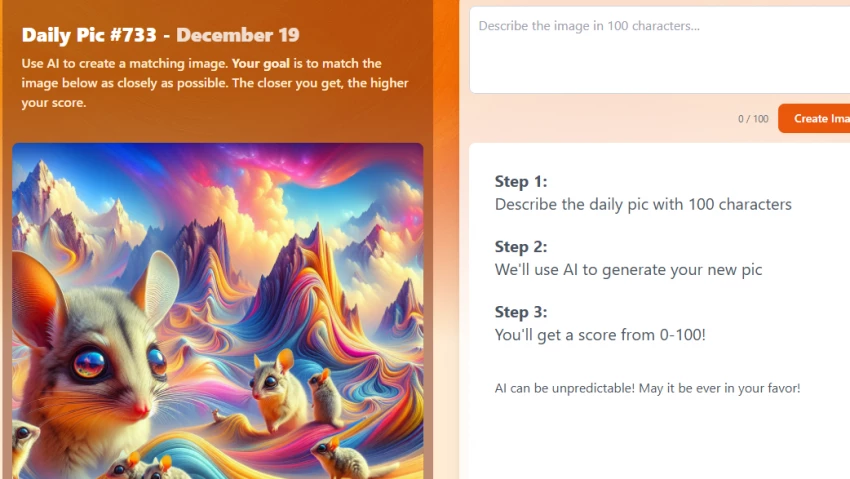
Every day, the platform publishes a single reference image. Your task is simple on paper: write a text prompt that makes the AI generate an image as close as possible to that reference.
The twist? You only get 100 characters.
There’s no canvas, no sliders, no fine-tuning. Just words, and whatever clarity or ambiguity those words carry.
That constraint immediately sets the tone for everything that follows. And once you try a few rounds, you start to realize this isn’t randomness disguised as a game. It’s a controlled experiment in descriptive precision.
Understanding how that experiment works requires a closer look at the mechanics.
The Core Loop: Why the Game Feels Addictive
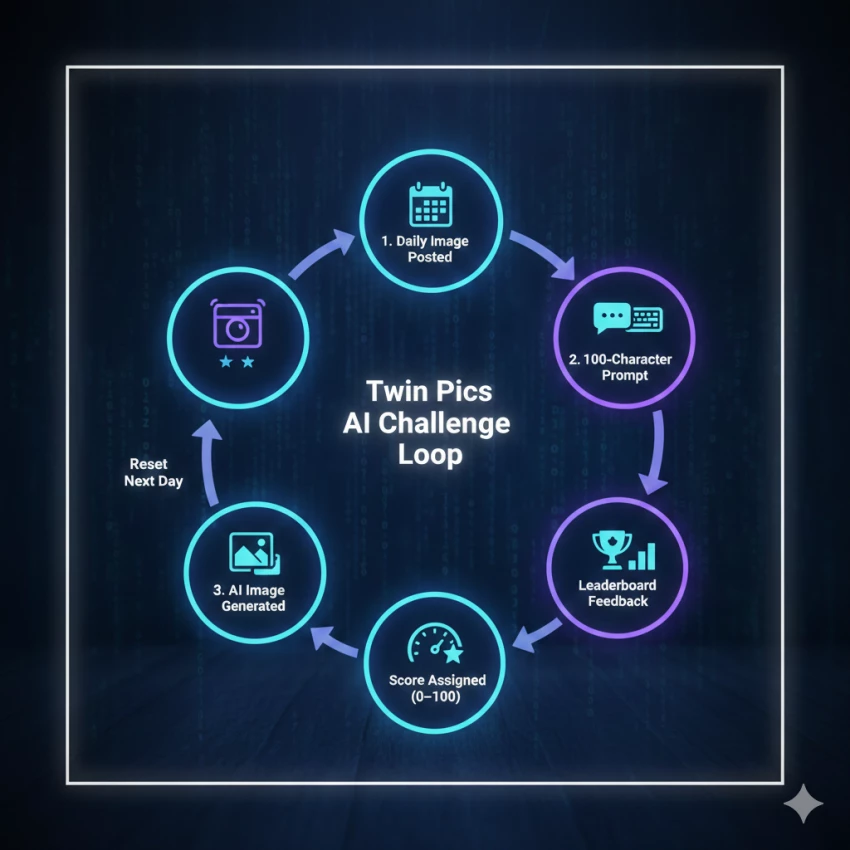
Twin Pics runs on a tight challenge–response–feedback loop:
A new “Daily Pic” is posted every 24 hours
You write a prompt (max 100 characters)
The AI generates an image
A scoring engine compares your result to the reference
You receive a score between 0 and 100
That score is not abstract. It’s immediate feedback on how well your language mapped to visual reality.
The real hook comes from the public leaderboard. High-scoring images are displayed alongside the prompts that produced them. This turns the platform into a live case study of what works, and what doesn’t.
And because the system openly acknowledges the stochastic nature of AI (the same prompt can yield different results), there’s always a layer of uncertainty. Skill matters, but chance never fully disappears.
That balance between control and unpredictability is what makes the experience feel closer to Wordle than to Photoshop.
Once you understand the loop, the next logical question is: who is this actually for?
Who Uses Twin Pics
Twin Pics AI isn’t trying to compete with tools like Midjourney or Adobe Firefly, and that’s deliberate.
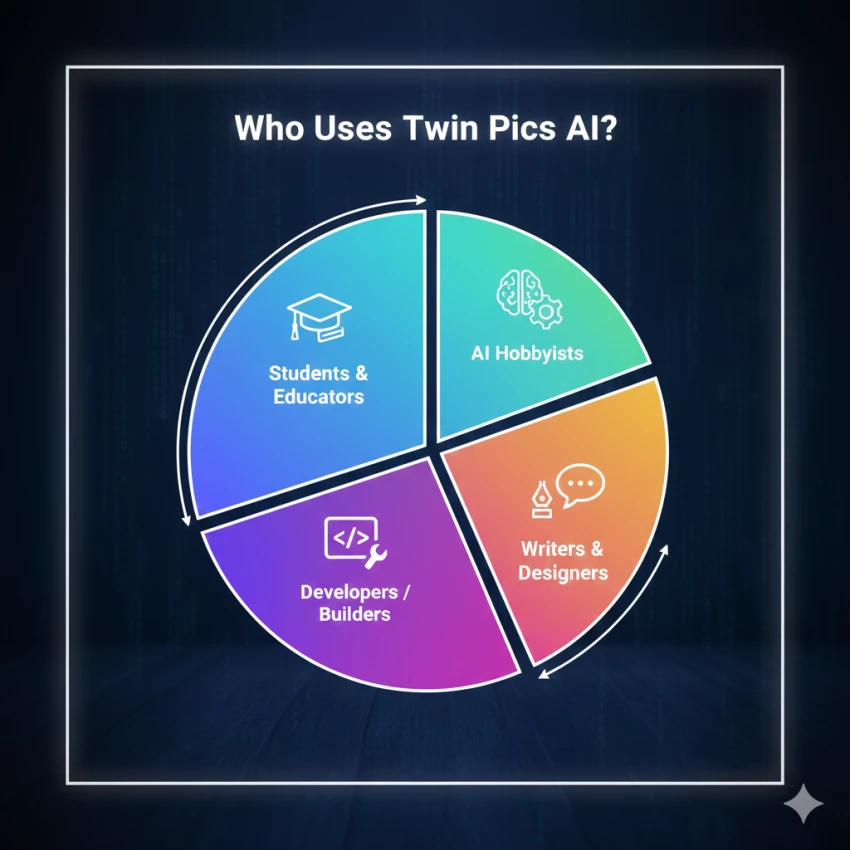
Based on usage patterns and reviews, it resonates most with:
Students and educators learning how prompts influence outputs
AI hobbyists looking to sharpen prompt density
Developers and builders interested in human–AI interaction
Writers and designers who want to understand visual description better
The consistent praise comes from one place: educational clarity.
Teachers often describe it as a way to make abstract AI concepts tangible. Instead of explaining “prompt engineering” theoretically, Twin Pics lets students feel the difference between vague and precise language in seconds.
That educational focus also explains the platform’s pricing choices.
Pricing & Access: Why the Core Experience Is Still Free
As of late 2025, the Twin Pics game itself remains free to play.
Feature
Access
Cost
Daily Challenge
Free
$0
AI Scoring
Free
$0
Leaderboard
Free
$0
Pro Image Generator App
Paid / Waitlist
Varies
Twin AI (Business)
Enterprise
Custom
This split is important.
The game exists primarily to encourage learning, experimentation, and community interaction. Alongside it, the creator has introduced a separate, more traditional AI image generator aimed at professional use cases like higher resolution and faster processing.
That separation keeps the core experience focused, and avoids turning the game into a funnel.
Which brings us naturally to the person behind it.
The Builder Behind the Tool
Twin Pics was created by Chris Sevillano, often known as Chris Sev.
He’s well known in “build in public” and indie developer circles, and Twin Pics reflects that mindset. It’s not a polished enterprise product pretending to be playful. It’s a playful product that happens to demonstrate real AI capabilities.
The project also sits alongside other experiments in his ecosystem, including tools like Video Tap, which focus on transforming content rather than generating it from scratch.
That background explains why Twin Pics feels more like a learning environment than a startup chasing metrics.
Still, no tool is without trade-offs.
Where Twin Pics Works Well, and Where It Doesn’t
Strengths users consistently mention
Clear educational value for prompt engineering
Extremely low barrier to entry (no setup, no UI complexity)
Community learning via shared prompts and scores
Habit-forming structure thanks to daily challenges
Limitations that come up often
No way to refine or edit a generated image
The 100-character limit can feel restrictive for complex scenes
No public API for developers
Not suitable for production-grade image creation
These aren’t flaws so much as intentional boundaries. Twin Pics isn’t trying to be everything. It’s trying to be one thing done clearly.
Which brings us to the bigger picture.
Where Twin Pics Fits in the AI Landscape
Twin Pics AI is not a design tool. It’s not a content engine. And it’s not a replacement for professional creative software.
It’s better understood as a training ground.
A place where users learn:
How language maps to visuals
Why specificity matters
How constraints shape outcomes
Where AI interpretation breaks down
In that sense, it plays a role similar to typing tutors or coding kata platforms. You don’t use them to ship product, you use them to get better.
Final Perspective
What stands out most is restraint.
Twin Pics:
Doesn’t oversell
Doesn’t hide randomness
Doesn’t inflate claims
Doesn’t flood users with upsells
It presents a daily challenge and lets the learning emerge naturally.
In an AI space crowded with hype, that simplicity feels refreshing.
Twin Pics AI won’t replace your creative tools.
But it may quietly make you better at using them.
Frequently Asked Questions
Is Twin Pics AI meant to replace image generation tools like Midjourney or Firefly?
No. Twin Pics AI is not a creative production tool. It is a prompt-training and evaluation platform, focused on how accurately text describes an image rather than producing final artwork.
Is Twin Pics AI suitable for classroom or educational use?
Yes. Its controlled limits, scoring system, and lack of social media exposure make it well-suited for teaching prompt engineering, visual literacy, and AI fundamentals in classrooms.
Does Twin Pics AI store or reuse user prompts?
There is no public indication that user prompts are reused for training large models. Prompts and outputs primarily serve leaderboard display and challenge evaluation, not dataset building.
Can Twin Pics AI be used offline?
No. Twin Pics AI is a fully web-based platform and requires an active internet connection to generate images and calculate scores.