Artificial intelligence has given us plenty of creative tools, but many users feel boxed in by restrictions, filters, and rigid pricing. That’s why platforms like Unlucid AI are gaining attention, they promise “uncensored creativity” with fewer limits.
Reviews, however, tell a mixed story. Some praise the freedom, while others raise eyebrows about safety, trust, and legitimacy. Let’s walk through those reviews in detail to see what’s real, what’s hype, and what kind of user might actually benefit from Unlucid.
First-Time Setup: Is Unlucid Easy to Get Started With?
What Users Report
Fast sign-up with minimal friction
No local installations or GPU setup required
Works directly in the browser
The Problem
Multiple reviewers note region-based access blocks. In some countries, the homepage shows a restricted or unavailable message with little explanation.
Why this matters for trust: Creators question why a global creative platform would limit access without transparent reasoning—raising doubts about long-term stability.
Interface: How User-Friendly is Unlucid AI?
Compared to polished platforms like Runway or Canva AI, Unlucid’s interface is frequently described as functional but basic.
User sentiment highlights:
Easy to understand, minimal learning curve
No clutter or hidden tools
Lacks visual refinement and workflow optimization
For hobbyists and first-time users, this simplicity is a plus. For professionals, the interface feels unfinished and limiting.
Unlucid AI Feature Reviews from Creators
Reviews tend to break the features into three main categories:
Image Editing & Generation
Users highlight:
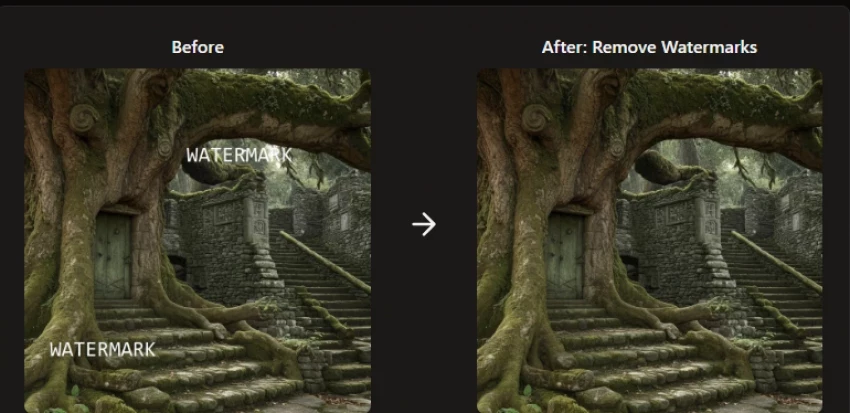
Object removal and replacement
Prompt-based generation with fewer filters
“Good enough” accuracy for social content
Not production-grade, but useful for experimentation.
Video Tools (Mixed Feedback)
Helpful tutorials for beginners
Limited depth for advanced editors
Not competitive with Runway or Adobe Firefly
Best described as intro-level AI video assistance.
Reference Image Support (Most Praised Feature)
This is Unlucid’s standout.
Artists like:
Feeding reference images directly
Getting closer to stylistic matches
More control than Canva’s locked outputs
This flexibility is repeatedly cited as the platform’s biggest strength.
Unlucid AI Performance: Speed and Output Quality
Speed
Faster than some free web tools
Slower than local Stable Diffusion setups
Output Quality
Casual users are impressed
Professionals notice realism flaws, edges, and artifacts
Consensus: Great for drafts, concepts, and social visuals, not always client-ready.
Artist Perspective: Creative Freedom with Fewer Restrictions
This is where Unlucid receives its strongest praise.
Artists report:
Fewer content blocks
Ability to explore surreal or unconventional ideas
Fewer interruptions during generation
However, multiple reviewers caution that less filtering also increases misuse risk, which feeds directly into safety and trust concerns.
Casual Users vs Power Users: Two Very Different Experiences
Casual Users
Enjoy quick experimentation
Like avoiding technical setups (unlike ComfyUI)
Frustrated by how fast Gems run out
Advanced Users
Prefer Stable Diffusion locally
See Unlucid as a shortcut, not a replacement
Rarely adopt it as a primary tool
Safety: Is Unlucid AI Safe for Regular Users?
This is Unlucid’s weakest area.
Common concerns:
Low trust scores on third-party checkers
Unclear ownership and transparency
Limited explanation of moderation practices
Most reviewers conclude:
“Safe enough for creative experiments, not for sensitive or commercial work.”
Privacy: What Happens to Uploaded Content?
Reviewers repeatedly ask: Does Unlucid store your uploads? Do you own the outputs? Unfortunately, the platform doesn’t make it clear. This ambiguity makes some reviewers nervous. In a world where privacy policies matter more than ever, unclear answers are a big minus.
Pricing: Are Gems Worth the Cost?
The Gems model divides reviews sharply. Some like the flexibility of paying only when they need features. Others feel it’s a sneaky way to lock them into micro-payments. Compared to subscriptions like Runway, Gems sound cheaper at first, but heavy users say costs add up quickly.
One reviewer even put it this way: “Great for testing, but if you plan to use it daily, just get a proper subscription elsewhere.”
Community Review Roundup: Reddit, Blogs, and Forums
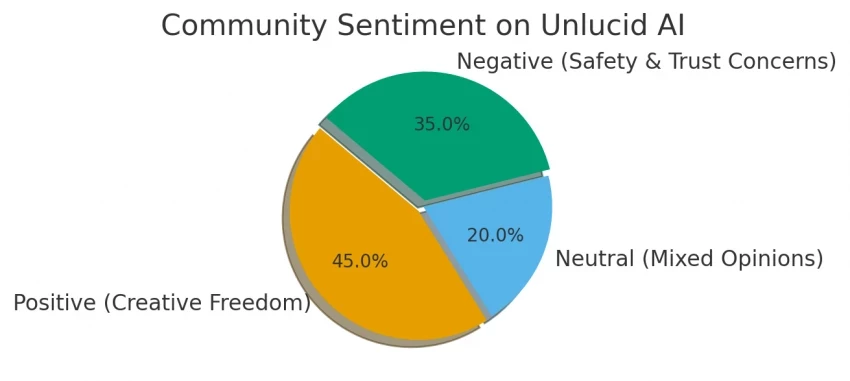
Looking across Reddit, blogs, and AI forums, the pattern is clear:
Positive reviews praise the freedom, simplicity, and creativity.
Negative reviews call out legitimacy issues, lack of transparency, and limited free use.
This polarity makes Unlucid one of those “love it or avoid it” platforms, rarely do users feel neutral.
Unlucid AI vs Runway vs Canva AI
Platform
Strength
Weakness
Best For
Unlucid AI
Creative freedom
Trust & polish
Experimenters
Runway
Pro-grade video
Expensive, filtered
Professionals
Canva AI
Safe & simple
Limited creativity
Mainstream users
Pros and Cons: What Users Really Say
Pros
Cons
More creative freedom
Safety concerns
Easy to start using
Region-blocked access
Supports both images & videos
Gems add up in cost
Good for experiments
Not polished for pro work
Final Verdict: Should You Trust Unlucid AI?
After going through dozens of user reviews, forum discussions, and hands-on impressions, Unlucid AI feels like a tool built for creative curiosity rather than creative certainty.
What it does well, it does surprisingly well. The freedom to experiment without constant content blocks, the ability to use reference images, and the low barrier to entry make it genuinely fun, especially if you’re brainstorming ideas, testing visual styles, or just exploring AI creativity without technical friction.
But here’s the trade-off: freedom comes at the cost of trust.
Unclear ownership, weak transparency around privacy, region-based access issues, and a Gems system that quietly becomes expensive all make Unlucid hard to rely on long-term. It’s not broken, and it’s not fake, but it’s also not something you’d confidently build professional or commercial workflows around.
In short, Unlucid AI feels like a creative playground. Enjoy it, experiment in it, but don’t anchor your work to it.
Unlucid AI Scorecard (Based on User Feedback)
Category
Score
Why
Creative Freedom
⭐⭐⭐⭐☆ (4.5/5)
Fewer filters, strong reference image support
Ease of Use
⭐⭐⭐⭐☆ (4.0/5)
Simple setup, no technical overhead
Output Quality
⭐⭐⭐☆ (3.5/5)
Good for concepts, inconsistent for polished work
Video Capabilities
⭐⭐⭐☆ (3.0/5)
Beginner-friendly, limited depth
Pricing & Value
⭐⭐⭐☆ (3.0/5)
Flexible but Gems add up quickly
Safety & Trust
⭐⭐☆☆☆ (2.0/5)
Weak transparency, unclear moderation & privacy
Professional Readiness
⭐⭐☆☆☆ (2.5/5)
Not reliable for client or commercial use
Overall Rating: 3.2 / 5
Who Unlucid AI Is Best For
Artists experimenting with styles
Casual creators and hobbyists
Users frustrated with over-filtered AI tools
Short-term ideation and concept testing
Who Should Avoid It
Professionals handling client work
Teams needing predictable pricing
Users concerned about data privacy
Anyone seeking long-term platform stability
Bottom Line
Unlucid AI is exciting, imperfect, and risky in equal measure. It’s worth trying, but not worth depending on.
FAQs
Is Unlucid AI reliable? Reviews say it works, but trust signals are weak.
Do reviewers recommend it for professionals? Mostly no, professionals prefer Runway or open-source setups.
How does pricing compare in reviews? Good for light users, expensive for heavy ones.
Are alternatives rated higher than Unlucid? Yes, especially in safety and trust categories.