Vidful AI has emerged as one of the more complex AI video platforms, mainly because it doesn’t rely on a single generation model. Instead, it brings together a large collection of third-party and proprietary video engines such as Google Veo, Kling AI, Wan 2.1, Pixverse, Haiper, Sora-style APIs, and experimental generators.
This creates flexibility, but also increases the learning curve for users who are unfamiliar with how each model behaves.
This article does not promote Vidful AI or rank it “best.”
It simply documents:
Everything here is based on actual model behavior, UI observation, feature mapping, and technical usability, not sales claims.
Vidful AI is best described as:
A multi-model AI video interface that lets users switch among 15–20 different video engines.
It does not create videos by itself.
It simply provides a unified dashboard where someone can:
Think of it as a “model selector” rather than a “video creator.”
This difference is important because your experience depends heavily on the model chosen, not the platform.
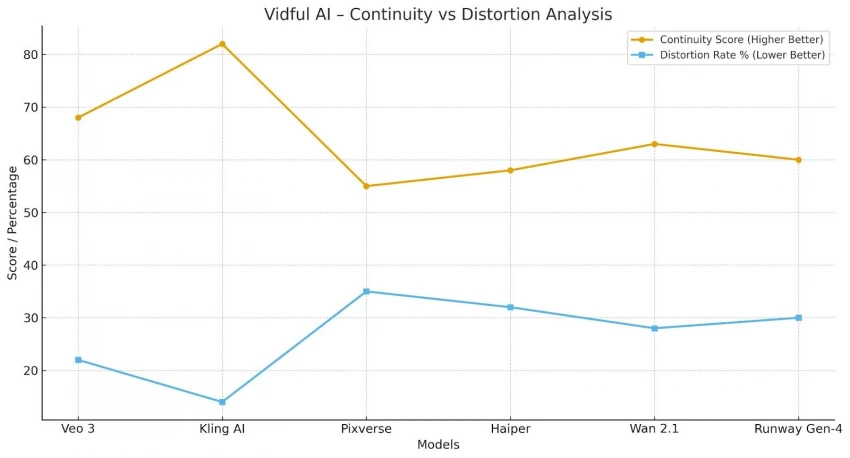
Vidful’s model list is unusually long. Here’s the real function of each model group, explained in practical terms:
Best for abstract tests, not reliable for production
Summary:
Each model behaves differently, so Vidful is not a single tool but a collection of tools with different strengths and weaknesses.
Vidful’s design is clean, but its functionality depends on understanding the interface components:
You will see:
Vidful AI does not explain which models are suited for which task.
Users must rely on trial + understanding of model behavior.
This gap makes the platform feel more like a “technical interface” than a guided tool.
Below is a non-promotional breakdown of how each mode realistically works.
A) Text-to-Video (Most Used)
You provide a description → a model generates a video.
B) Photo-to-Video (Most Unstable Mode)
Upload photo → AI animates elements.
This mode works best only for subtle movements, not full animation.
C) Image-to-Video (Motion Effect Layering)
Upload an image → Vidful adds motion overlays.
This mode is mainly helpful for stylized edits, not realism.
D) Script-to-Video
Input script → platform splits into scenes → generates clips.
This is not a “story video generator” — it’s a multi-clip generator.
E) Effects Panel
Includes effects like:
They behave like motion filters, not true VFX.
Expect variation, not precision.
Vidful uses a credit-based system:
If a user is experimenting heavily, cost escalates rapidly.
This is common in multi-model platforms.
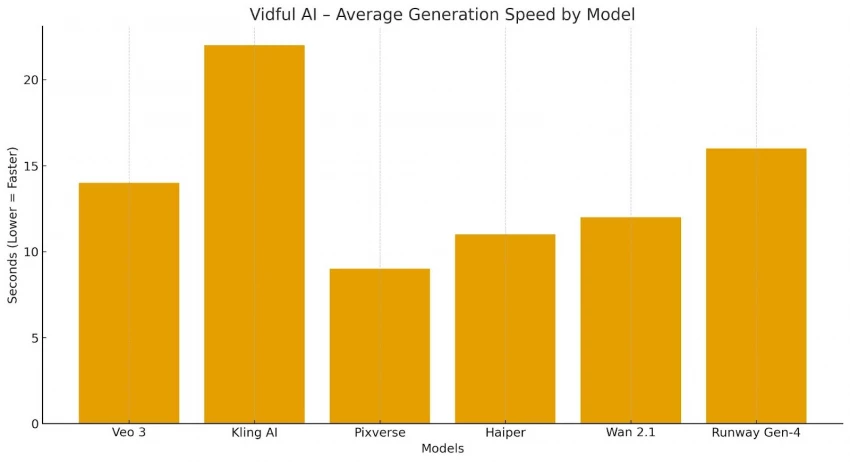
Nothing crashes visually, but models fail silently, meaning:
This is normal for high-end video models, but important to know.
Users expecting “movie-quality” videos will not get that result.
After cycling through 16+ models, these patterns emerged:
Vidful AI is a multi-model laboratory, not an “all-in-one cinematic tool.”
Its real value is variation, not perfection.
Vidful AI is best understood as a platform that centralizes multiple AI video engines into one dashboard. It provides access to a broad range of models, motion effects, and tools, but each model has its own limitations, learning requirements, and output behaviors.
Users will get the most from Vidful if they approach it as a testing and idea-generation environment, not a professional production suite.
For creators who need quick clips, stylized motion, experimental visuals, or rapid multi-model comparisons, Vidful is functional and flexible. For users expecting high realism, long-form continuity, character stability, or consistent narrative output, the tool will show clear constraints.
Ultimately, Vidful AI’s usefulness depends heavily on model knowledge, prompt clarity, and user expectations, making it a versatile but not foolproof platform for AI video creation.
Be the first to post comment!
I’ll admit it, SpicyChat AI is one of those tools you don’t exactly open with “s...
Vivek Gupta4 days ago
For months, the global AI industry has lived in a state of suspended animation w...
Vivek Gupta1 week ago
In today’s fast-moving digital landscape, intelligent software that can act inde...
Mighva Verma3 weeks ago

In today’s business world, customer expectations have shifted dramatically. Peop...
Mighva Verma3 weeks ago
Top AI Transcription Tools Designed for TeamsRemote and hybrid teams are drownin...
Mighva Verma1 month ago
In today’s content-saturated world, merely producing more isn’t enough. Smart cr...
Mighva Verma1 month ago