
Automation tools have quietly become part of everyday work. Whether it’s syncing leads, sending alerts, updating spreadsheets, or routing support tickets, most modern teams rely on automated workflows to keep things moving without manual effort.
But as automation usage grows, pricing becomes a real consideration. In 2026, automation platforms are no longer just about “connecting apps.” They’re about scale, flexibility, AI assistance, and how much control you actually get for the price you pay.
This guide breaks down how Zapier pricing works today, what you get at each level, when it’s worth paying for, and how it compares with modern alternatives, especially AI-first platforms.
Zapier’s pricing model is built around tasks. A task is counted every time an action successfully runs in a workflow. A single automation with multiple steps can consume several tasks in one run.
Plans are structured around:
The free tier is designed for light, occasional automation.
What it typically includes:
This works well for testing automation ideas or running one or two low-frequency workflows. Once you need logic, branching, or regular usage, the limits become noticeable very quickly.
Best for:
Individuals experimenting with automation or running a single simple process.
The Professional tier is where the platform becomes genuinely useful for everyday work. Pricing usually starts around $19.99–$29.99 per month when billed annually, with higher monthly rates if billed month-to-month.
Key upgrades include:
This is the tier most freelancers, creators, and small businesses end up using once automation becomes part of daily operations.
Trade-off:
You gain flexibility, but task-based pricing can still climb quickly as workflows scale.
For teams, pricing jumps significantly, often landing between $69 and $103+ per month, depending on billing and task volume.
What you’re paying for here isn’t just more tasks:
If multiple people depend on the same automations, team plans make sense. For solo users, they’re usually overkill.
Enterprise plans are quote-based and designed for organizations running automation at scale.
Typical features include:
These plans are less about price transparency and more about operational reliability and compliance.
Paying for automation is worth it when:
It becomes less attractive when:
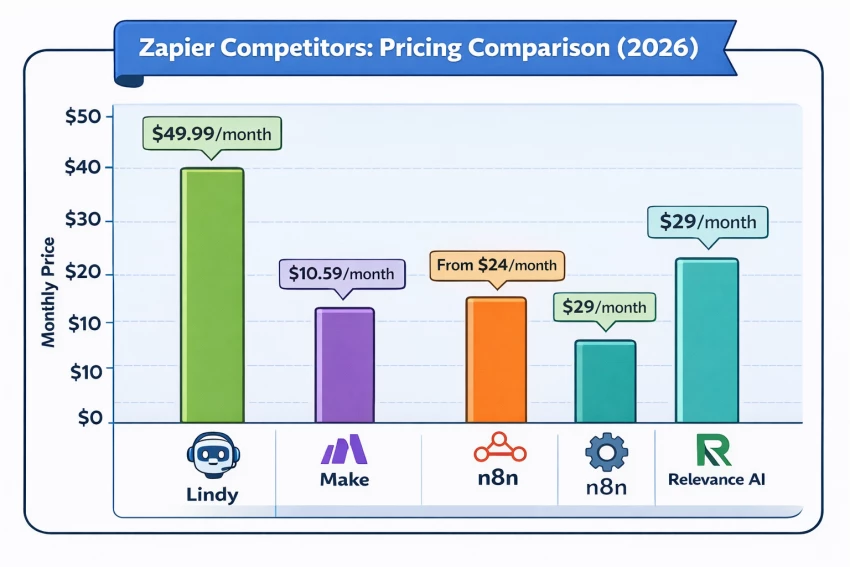
I tested the most common automation alternatives to compare price, flexibility, and automation style. Here’s how the top options stack up:
| Tool | Starting price (billed monthly) | Best for | Key advantage |
|---|---|---|---|
| Lindy | $49.99/month | Teams that want AI agents to handle tasks with context | AI-driven workflows that act on instructions instead of rigid rules |
| Make | $10.59/month | Visual builders who want flexible automation paths | Powerful drag-and-drop canvas with deep control |
| n8n | Open-source, cloud plans from $24/month | Technical users who want full customization | Self-hosting, open source, and deep configuration |
| Relevance AI | $29/month | AI teams building agent-style workflows | Strong AI agent tooling with vector and logic layers |
This bar chart compares the starting monthly prices of popular automation platforms in 2026, highlighting how costs vary based on flexibility, AI capabilities, and target users. It offers a quick visual snapshot to help teams understand which tools deliver the best value at different budget levels.
Zapier remains a reliable, mature automation platform especially for rule-based workflows and mainstream app integrations.
However, in 2026:
If you value stability and simplicity, Zapier still earns its place. If you want more intelligence per workflow, newer platforms may offer better long-term value.
Be the first to post comment!

A school gradebook sounds like a simple thing until you watch what happens when...
Sakshi Dhingra21 hours ago

The Growing Buzz Around EditPro in the AI Editing SpaceIn 2026, the name “EditPr...
Sakshi Dhingra1 day ago

When I first started deploying large language models, I assumed that choosing th...
Sakshi Dhingra4 days ago
Few software websites have survived as many internet eras as Softonic. Launched...
Suraj Malik3 weeks ago
PDF files are everywhere, from business contracts and academic papers to invoice...
Suraj Malik3 weeks ago
The Xender APK has remained relevant for one simple reason: it solves a very rea...
Sakshi Dhingra1 month ago