It was really bad at Susan's coffee shop last Tuesday. She couldn't sell anything because her cash register broke. She lost over $ 3,000 in a single day. This was because her younger nephew was playing a video game at the shop and had used up all the internet data. So the cash register couldn't connect. She had no idea what to do. Then a tech guy showed up to assist her. What he did was set up a "Local Proxy Server"; it didn't take him long. Now she can connect to the internet and also see who is using it, what they are using it for, and what websites they visit. She blocks access to bad websites on the free customer Wi-Fi. Now everything works very fine. No more slow internet connection. No more money is being lost. This is how a local proxy server can help. it's doesn't go deep into your pocket. It can keep your business going smoothly even with a few computers.
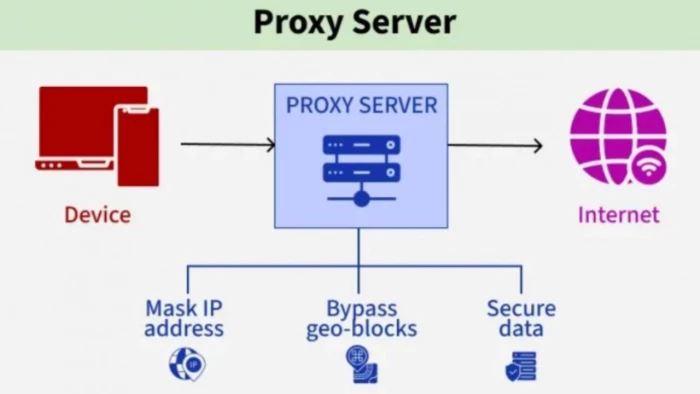
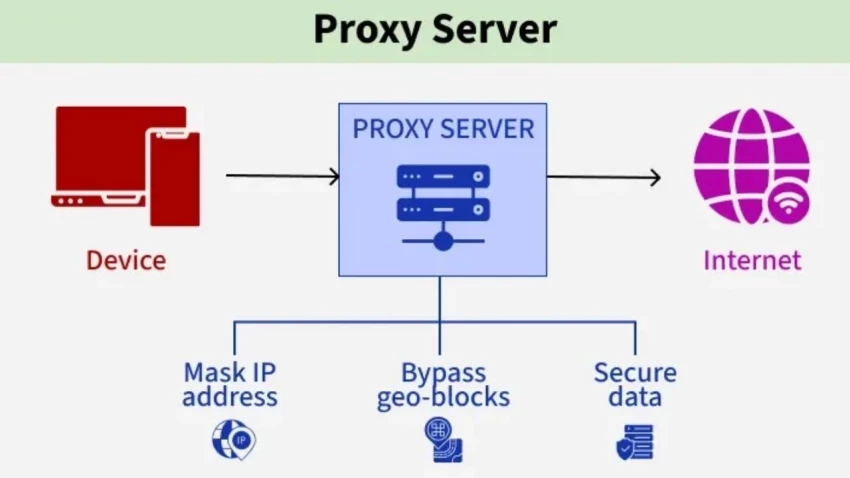
A local proxy server is like a middleman between your computer and the internet. Before you download a file or visit any website, you must first go through the proxy. The proxy checks it to see if it's okay, then gets your request for you. Why is this proxy helpful? The proxy in the middle can make the website faster when you visit again, because it can remember you. It can determine how fast each person uses the internet. It's very important to pay attention to the word 'Local." It's common for small businesses to use an extra computer, a small PC, or even a cheap Raspberry Pi device as their local proxy server. Server-level gear with bright lights and fans that sound like jet engines is not needed.
Small networks don't have much money, many IT staff, or tech guys. They need help doing a better job. That's what a local proxy server does.
1. Speed: You can visit a website several times with the same proxy, but you only need to set it up once. You can save your time and energy that way. The website loads faster, especially when the connection is very slow.
2. Control: What you bring in and what goes out is up to you. You can block social media use during work hours and allow home movies for kids that teach them.
3. Visibility: When you don't have a proxy, online problems are like puzzles. That's possible with a proxy. You can see if a device is using too much data or if a website is causing issues.
4. Cost: Many small networks can manage traffic; they don't need an internet plan upgrade.
5. Simplicity: A good proxy stays out of the way and works in the background. Once in place, it doesn't need to be checked every day.
For a network with 5 to 50 devices, this is the best mix of power and ease of use.
A local proxy server is like a system with an easy part that works as one. It takes more than one box to set up a local proxy. Here are some of its components:
This server could be a small one, a virtual one, or a separate appliance. It handles your requests and runs the proxy program.
Sometimes this refers to the big deal. It makes choices about how the traffic is controlled. Some focus on screening, some on caching, and many do both.
This could include laptops, phones, tablets, and printers that use the proxy.
Firewalls, switches, and routers tell the proxy where to go and ensure it stays on the right track.
"Who is making this request?" is answered here. You can use names, IDs, or network addresses.
Do these things. What shouldn't be seen, what should be let through, when, and for whom.
There needs to be a place for logs and history. This could be space on the proxy server's hard drive.
A simple web page or monitor that lets you see what's going on, see the logs, and change the rules.
Everything works well and as planned when these pieces are the right size for your network.
Setting up a proxy is not "right" in any way. Most of the time, small networks pick from a few tried-and-true methods.
● Direct link
Devices are told to use the proxy right away. You can do this by hand or with an automatic setting file. It is clear and easy to guess. The bad thing is that each gadget takes time to set up.
● Transparent proxy
The proxy is hidden from the devices. Network equipment passes data through it without making a sound. Users will find this easier, but it's harder to set up right.
● Forward proxy
This type is used the most. It handles the data that people send to the internet. This is what most people mean when they say "local proxy."
● Reverse proxy (only useful in small networks)
This is in front of internal computers, not in front of people using them. It's used to protect or speed up a website or app that you run.
● Proxy as a way in
The proxy is also the main way for people to leave the network. It is designed so that all internet traffic goes through it.
A clear or obvious forward proxy is used by most small offices and homes. Which one is best for you relies on how much setup you can handle and how much control you want.
When you know the traffic works, you can fix any technical issue that arises without getting upset.
This is a basic example to show how to do it:
● Your device asks for a website page
● Then, as you requested first, go to the proxy instead of going straight to the internet.
● This proxy will then check to his own rules to see if the website is okay.
● The proxy then checks its cache, if you are allowed, or if you have visited before.
● If it allows you, it will deliver the information back to you.
● If they are not there, it gets the information for you.
All of this happened in a second.
A proxy can protect you, but only if it's set up correctly
● Access Control
Users and devices shouldn't have the same privileges. Keep the staff away from the guests. Keep kids away from their parents. It's best to follow simple rules.
● Proof of Identity
It is better to know who is using your network. Simple user groups can help with holding people accountable.
● Encrypted traffic handling
Most websites use encryption. You can tell the agent to either send it on or look at it. It's more responsible to be inspected because it gives you more power.
● Regular updates
A proxy is a shady chunk of code. Software needs to be updated. The old versions are not very good.
Your business's needs and the way your network is set up should help you decide between local proxy servers and cloud-based proxy options. Each choice has pros and cons, but they do not both work in the same way. You might be able to choose the best one for your network if you know the differences.
1. Faster Access: Because the proxy is on your local network, it's faster to view cached content and doesn't need to be connected to the internet.
2. Complete Control: You have full control over your proxy server, including its security settings, blocked content, and which devices can connect to it.
3. One-time Setup: Once the hardware and apps are set up, you won't have to worry about monthly fees.
4. Data Privacy: You don't have to worry about sharing private data with outside providers because all of your data stays on your local network.
● Maintenance: You need to know a bit about computers and technology to keep the tools and software up to date.
● Limitations on Scalability: If you want to add more users or bandwidth, you'll need more resources, such as new hardware or a larger network.
On the other hand, a service provider runs cloud-based proxies on their own computers. Routers send data from your network to the internet, but not before going through their servers. Firms that want to get things up and running quickly and easily, and grow without worrying about hardware, should consider these options.
Benefits of Cloud-Based Proxy Solutions
1. Easy Setup: The cloud provider handles everything, so you don't have to install or manage any hardware.
2. Scalability: You can easily add more bandwidth and storage to your network as it grows, without having to make actual changes.
3. Access from afar: Cloud proxies are great for companies with employees who work from home because they protect access to the internet from anywhere.
● Costs That Keep Coming Up: Most cloud proxy services have ongoing membership fees that can add up over time.
● Less Control: Because an outside company runs the proxy, you don't have as much say over protection and access.
Small businesses with 5 to 50 PCs often choose local proxy servers because they give them a good balance of control, cost, and speed. It's easy for small teams to keep up with them, and businesses have full control over their traffic and safety. As your needs change, cloud-based proxy services can adapt to meet those needs. However, they may work best for larger, more spread-out networks.
Be the first to post comment!

Managing remote employees is very different from managing people in an office. W...
Sakshi Dhingra1 week ago

A school gradebook sounds like a simple thing until you watch what happens when...
Sakshi Dhingra1 week ago

The Growing Buzz Around EditPro in the AI Editing SpaceIn 2026, the name “EditPr...
Sakshi Dhingra2 weeks ago
When I first started deploying large language models, I assumed that choosing th...
Sakshi Dhingra2 weeks ago
Few software websites have survived as many internet eras as Softonic. Launched...
Suraj Malik1 month ago
PDF files are everywhere, from business contracts and academic papers to invoice...
Suraj Malik1 month ago