Watermarkly’s blur tool helps individuals and teams protect privacy by hiding sensitive visual information such as faces and license plates before publishing photos online. It is designed for journalists, marketplaces, social media users, and compliance workflows. The tool works online in a browser or via API, automatically detecting targets and blurring them with customizable settings.
Key Features:
Multiple image import
Automatic face detection
Automatic license plate detection
Manual blur adjustment
Object selection capability
Adjustable blur shapes
Adjustable blur size
Adjustable blur position
Smooth blurred borders
Customizable export settings
User-friendly interface
Selective blurring
Versatile blurring options
Cannot blur video files.
Limited export format choices.
May over‑blur unintended areas.

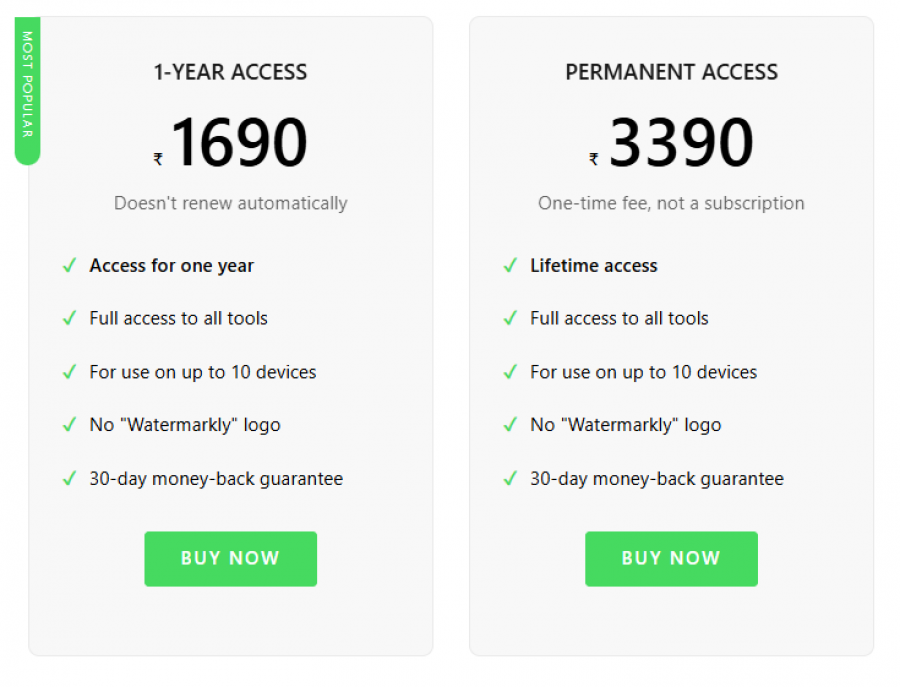
*Price last updated on Mar 16, 2026. Visit watermarkly.com's pricing page for the latest pricing.