Home > Company > WeVideo Education
WeVideo Education

WeVideo Education

The online video editor for all of us

WeVideo Education Overview

WeVideo is a video editing platform that enables users to create, edit, and share videos from any device with an internet connection. Founded in 2011 and headquartered in Mountain View, California, WeVideo offers a range of tools suitable for individuals, educators, and businesses

WeVideo Education Features

Cloud editor Autosave storage Interactive video Stock library Motion titles

Key Features

  • Cloud-Based Editing: Access and edit projects from any device with an internet connection.
  • Multi-Track Timeline: Supports multiple video and audio tracks for complex editing.
  • Green Screen (Chroma Key): Allows background removal for creative effects.
  • Screen and Webcam Recording: Capture your screen or webcam for tutorials and presentations.
  • Stock Media Library: Access to a vast library of royalty-free images, videos, and music .
  • Interactive Video Tools: Create engaging videos with quizzes, polls, and clickable links.
  • Branding Tools: Customize videos with your brand's logo, colors, and fonts.
  • Collaboration Features: Share projects and collaborate in real-time with team members

Cost Information And Plans

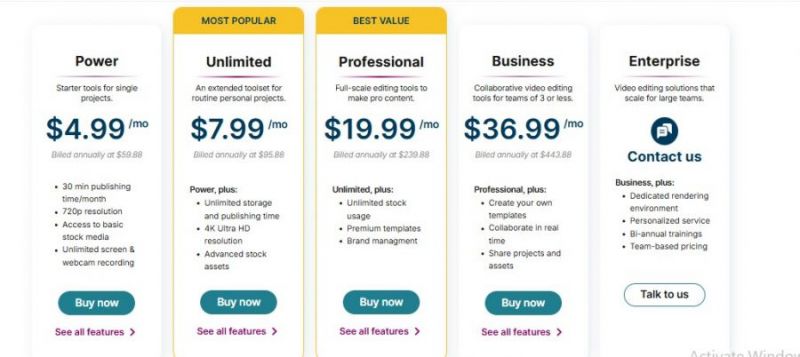
  • Consumer and creator tiers include Power Unlimited Professional and Business with prices around 4.99 dollars to 36.99 dollars per month billed annually.​
  • Creator and Teams plans for organizations start near 20 dollars and 52 dollars per month billed annually with features like 4K exports collaboration and branded templates.​
  • Free tier available with constrained storage resolution and publish time suitable for light personal use or trials.​

Pros & Cons

Pros:

Students grasp green‑screen projects very quickly.​

Chromebook support fits 1:1 school deployments.​

Stock library boosts creativity in history/science lessons.​

Project assignments keep media and rubrics organized.​

Real‑time collaboration supports group video projects.​

Cons:

Some teachers still “don’t know how to use it”.​

New users sometimes lost finding published projects.​

Audio track editing tools feel too basic.​

Limited special effects like reverse and advanced FX.​

Company

WeVideo Education

Contact

NA

Email

CONTACT@WEVIDEO

Headquarter

USA

Follow Us

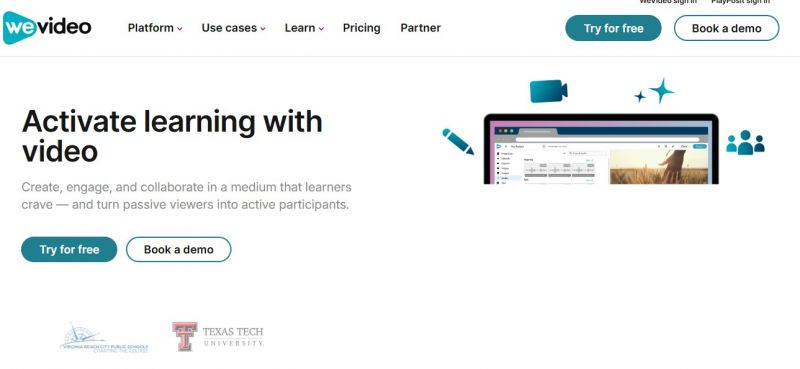
WeVideo Education Demo & Screenshots

WeVideo Education Pricing

WeVideo Education Pricing Screenshot

*Price last updated on Dec 26, 2025. Visit wevideo.com's pricing page for the latest pricing.

WeVideo Education Reviews

WeVideo Education Category

WeVideo Education Alternatives