
Windsurf agents, Cascade, continuously tracks project context, including files, recent edits, and terminal history to deliver suggestions, apply multi-file changes, and execute commands. Users can also leverage plugins for IDEs like VS Code and JetBrains, making Windsurf’s AI capabilities accessible inside existing workflows.
What Sets Windsurf Apart:
Subscription Structure:
Cascade remembers more project context than rivals
Multi‑file edits and refactors feel very natural
Inline AI edits avoid constant tab‑switching
Autocomplete often described as “best I’ve used”
Hard to “rewind” context for earlier questions
Some users report credits consumed on failed runs

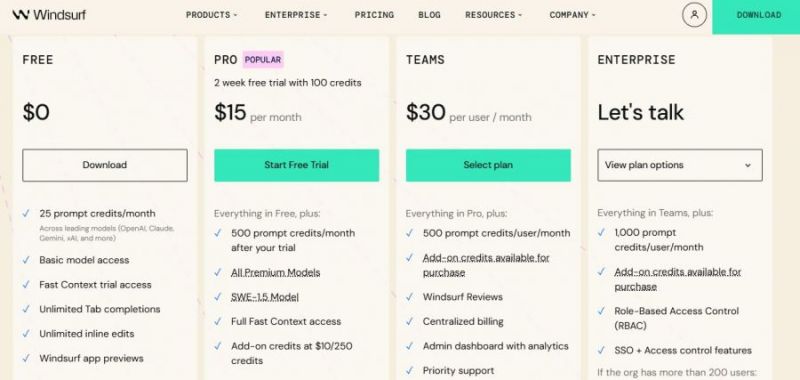
*Price last updated on Feb 2, 2026. Visit windsurf.com's pricing page for the latest pricing.

Posted: Mar 6, 2026
Feels like having another developer sitting next to you. I asked it to fix a bunch of lint errors and it handled most of them automatically. Super satisfying. I also love that it can run terminal commands without me leaving the editor.
Posted: Feb 27, 2026
I tried Windsurf as my AI coding partner the idea is neat, but the autocomplete kept acting stupid and credits drained with errors.
Posted: Feb 6, 2026
It’s the first thing I open every morning when I sit down with coffee. Cascade plus Tab feels like having a senior dev watching the whole repo while a junior does the busywork Windsurf understands my full codebase, proposes multi-file edits, and even runs and fixes failing tests without me babysitting every line. I really like the live preview and the way I can click an element in the preview pane and tell it what I want instead of hunting through files; it’s stupidly good for frontend tweaks that usually break my flow.