Most voice cloning tools sound convincing for the first fifteen seconds. The harder question for a creator is whether the voice still holds up at minute nine of a tutorial, whether it pronounces a product name the same way twice, and whether the plan that looked cheap can actually cover a full month of real output. A creator rarely needs a brand new voice. More often the need is practical: their own voice available when they are traveling, recording in a noisy room, fixing a single missed line, or turning one script into a short, a long video, and a translated version.
That is the job these tools are bought to do. Realism matters, but it is only one input. Consent rules, commercial usage rights, export quality, language coverage, and pricing that does not collapse once production becomes routine all decide whether a tool survives past the trial.
This guide compares five tools on the things that actually shape a creator workflow: voice realism, the cloning process, emotion and pacing control, real use cases, pricing by volume, safety controls, and the patterns that repeat across public reviews. The five are ElevenLabs, PlayHT, Murf AI, Descript Overdub, and Resemble AI. Each is strong somewhere and weak somewhere, and the right pick depends far less on a leaderboard than on the content you make.
| Tool | Best For | Strongest Use Case | Main Limitation | Best Creator Type |
| ElevenLabs | Realistic voice cloning | YouTube narration, storytelling, dubbing | Credit usage can climb with volume | YouTubers, storytellers, faceless channels |
| PlayHT | Long-form narration | Audiobooks, courses, multilingual voiceovers | Less suited to quick social edits | Course and audiobook creators |
| Murf AI | Polished voiceovers | Explainers, business video, tutorials | Cloning gated to higher tiers | Educators, marketers, business creators |
| Descript Overdub | Voice correction | Fixing podcast and video mistakes | Best inside the Descript editor | Podcasters, video editors |
| Resemble AI | Secure, API cloning | Controlled cloning, apps, production | More technical than casual tools | Agencies, developers, advanced creators |
How to read this. If realism is the priority, start with ElevenLabs. For long scripts, courses, and multilingual narration, compare PlayHT. For clean explainer and business video, Murf AI feels tidier. If the real problem is fixing a recorded line rather than generating narration from scratch, Descript Overdub is more practical than a standalone cloning platform. And when cloning needs security, API access, and team control, Resemble AI is the serious option.
I did not rank these tools by feature list alone. I looked at each one through five situations a working creator actually runs into, because a voice that wins a spec sheet can still fail the moment it has to carry a real script.
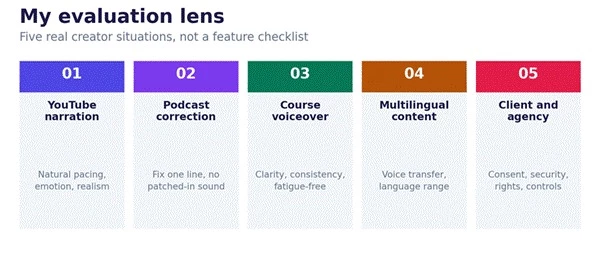
Here is what each situation was meant to surface:
| Test situation | What I checked |
| YouTube narration | Natural pacing, emotion, pronunciation, and overall voice realism |
| Podcast correction | Whether a single line can be fixed without sounding patched in |
| Course voiceover | Clarity, consistency, and whether it stays fatigue-free over minutes |
| Multilingual content | Voice transfer, language coverage, and pronunciation quality |
| Agency and client workflow | Consent, security, commercial rights, and team controls |
A note on method. Where I describe how a tool behaves, I am drawing on each platform's own documentation, current pricing pages, published capabilities, and recurring public review sentiment, rather than claiming a controlled lab test of every feature on every plan. Treat the recommendations as an informed evaluation you can verify against your own scripts before committing.
Each review covers how the tool behaves in production, where it fits, where it does not, and what to verify on the pricing page before you commit. Plan names, prices, and limits change often in this category, so the figures below are starting points to confirm, not fixed quotes.
ElevenLabs is the tool I would open first when realism is the point. It tends to sound less synthetic than basic text to speech, which matters most over the long stretches where a flat voice gets tiring: storytelling channels, faceless videos, long narration, shorts, explainers, and dubbed content. The platform splits cloning into two tiers. Instant Voice Cloning needs only a short sample and is available from the entry paid plan. Professional Voice Cloning, on the Creator plan, trains on longer audio and produces a noticeably more faithful version of your voice, which is the version worth using for anything long form.
The pricing model is the thing to watch. ElevenLabs runs on monthly credits tied to character count, and on the Creator plan and above, usage based overage charges begin once you pass your allowance. For a channel publishing several videos a week, credits disappear faster than the plan names suggest, so the real question is not the sticker price but how many minutes of finished audio you produce each month. The free plan excludes commercial rights and asks for attribution, so treat it as evaluation only, not as a way to publish monetized work.
| Review area | Notes |
| Best for | YouTube narration, storytelling, faceless content |
| Strongest point | Realistic, expressive voice quality across long passages |
| Weak point | Heavy users must watch credits and overage charges |
| Best creator use | Turning scripts into natural-sounding narration |
| Not ideal for | Anyone needing unlimited cheap generation |
| Pricing check | Confirm current plans, credits, and commercial rights on the pricing page |
| Verdict | Best overall when realism is the top priority |
Run three scripts through it: a calm channel intro, an emotional story paragraph, and a fast advertisement read. The tell is whether pacing, pronunciation, and tone stay natural across all three rather than only in the short demo.
PlayHT earns its place when the problem is not one viral short but repeated narration across lessons, chapters, and long form video. It is built around a large voice library and very wide language coverage, which makes it a practical choice for courses, audiobook style narration, product education, and multilingual versions of the same script. Cloning is available on eligible plans and needs only a short sample, which lowers the barrier for quick projects, even if the result can miss some of the finer character that longer training captures elsewhere.
The trade off is flexibility for fast social edits. PlayHT is at its best on longer, consistent narration rather than rapid one off clips, and its plans are organized around character volume, with a higher unlimited style tier that still carries a fair use ceiling. Public reviews are broadly positive on voice range and ease of use, with recurring notes about support response times and billing, so it is worth reading the current terms before locking into an annual plan.
| Review area | Notes |
| Best for | Courses, audiobooks, long YouTube scripts |
| Strongest point | Long-form narration and wide multilingual coverage |
| Weak point | Can feel less flexible for quick social edits |
| Best creator use | Turning long scripts into consistent voiceovers |
| Not ideal for | Creators who only need occasional short clips |
| Pricing check | Confirm current plans, character limits, minutes, and clone access |
| Verdict | Best when the script is long and consistency matters |
Feed it a full lesson script, not a paragraph. Listen for whether the voice stays consistent and easy to follow across several minutes, since that fatigue test is where long form tools either earn their keep or fall apart.
Murf AI is better understood as a polished voiceover workspace than as a cloning tool. For tutorials, explainers, training modules, and business video, its browser editor, broad voice library, and integrations with tools like Canva, PowerPoint, and Google Slides make it quick to go from script to a clean, neutral, on brand voiceover.
The important caveat for anyone shopping specifically for voice cloning: on Murf, custom voice cloning is gated to its higher enterprise level as an add on, requires a long consented recording, and is not part of the entry creator plan. In other words, Murf is excellent at generated voiceover, but if your core need is cloning your own voice on a creator budget, this is the most restricted of the five for that exact task. The free tier is preview only, with no downloads or commercial use, so plan to start on a paid plan if you intend to publish.
| Review area | Notes |
| Best for | Courses, explainers, tutorials, business video |
| Strongest point | Clean, professional voiceover workflow with integrations |
| Weak point | Self-serve voice cloning is gated to higher tiers |
| Best creator use | Polished educational and brand content |
| Not ideal for | Casual creators who want quick, cheap cloning |
| Pricing check | Confirm voice cloning access, export rules, and plan limits |
| Verdict | Best for creators who want professional polish over raw experimentation |
Build one explainer with slides and voiceover end to end. Murf is judged less on raw realism and more on whether it gets you to a finished, presentable asset with minimal fuss, so time the whole workflow, not just the voice.
Descript is the odd one out, and deliberately so. Its value is not large scale synthetic narration but fixing or adding spoken lines inside an editing workflow. You edit the transcript like a document, and Overdub regenerates audio in your cloned voice to match the change. For podcasters, video editors, interview creators, and screen recorders who only notice the mistake after recording, that is often more useful than opening a separate cloning platform.
Overdub needs a stretch of clear recordings to build your voice model, processing takes a while, and lower plans cap how much you can generate and how large a custom vocabulary you can use, so unusual names and jargon can hit limits. The full quality version of Overdub sits on the higher creator tier, and meaningful access generally starts on a paid plan rather than the free one. As a standalone cloning engine it is not the strongest here, but as a repair tool living next to your editor it is hard to beat.
| Review area | Notes |
| Best for | Podcasters and video editors |
| Strongest point | Fixing lines without re-recording the full take |
| Weak point | Less useful as a standalone cloning platform |
| Best creator use | Correcting mistakes inside podcast or video edits |
| Not ideal for | Users who only want large-scale synthetic narration |
| Pricing check | Confirm the Descript plan, Overdub limits, and export options |
| Verdict | Best for creators already editing audio or video regularly |
Record a short clip, then change one sentence in the transcript and let Overdub fill it in. The question is whether the patched line blends in or stands out, because that seam is the entire point of the tool.
Resemble AI is the choice when cloning has to be controlled rather than casual. It is aimed at agencies, developers, and production teams that need API access, security features, speech to speech, and structured voice workflows, and its customer base skews toward that serious end. It can clone from a short sample and supports real time and programmatic use, which is what makes it fit apps, interactive voice systems, games, and client voice projects rather than a quick one off narration.
Two things shape the decision. First, Resemble moved away from flat consumer subscriptions to a pay per use model, which is flexible for variable workloads but means cost tracks your audio volume rather than a predictable monthly fee, so heavy use can climb. Second, it is genuinely more technical than the beginner friendly tools, and public sentiment is polarized: teams that fit its use case rate it highly, while others cite the pricing model and occasional output glitches. It is not where a new YouTuber should start, but for an agency standardizing voice across clients, or a product team embedding AI voice, it deserves a serious look.
| Review area | Notes |
| Best for | Agencies, developers, advanced creators |
| Strongest point | Secure voice cloning and a strong API workflow |
| Weak point | More technical than beginner tools |
| Best creator use | Controlled production workflows and client projects |
| Not ideal for | Beginners who want simple one-click narration |
| Pricing check | Confirm usage cost, clone add-ons, team seats, and API limits |
| Verdict | Best when cloning needs control, security, and scale |
Map your real volume first. Estimate monthly minutes of generated audio, then price it against the pay per use rates and any clone and seat add ons, because the model rewards planning and punishes guesswork.
No single review platform tells the whole story, so the useful move is to read across several and look for patterns that repeat rather than a single loud comment. Below is where to look for each tool and the themes that tend to come up. Treat exact star ratings as something to verify yourself, since they shift over time and some tools have small review counts.
| Tool | Review sources to check | Patterns that tend to repeat |
| ElevenLabs | G2, Trustpilot, Product Hunt, Reddit, creator videos | Praise for realism, recurring caution on credit burn and overage cost |
| PlayHT | G2, Capterra, TrustRadius, creator reviews | Strong on voice range and languages, notes on support speed and billing |
| Murf AI | G2, Capterra, Trustpilot, tech press | Liked for an easy editor, limited by cloning being gated to higher tiers |
| Descript | G2, Capterra, podcast and video creator reviews | Loved as an all-in-one editor, mixed on Overdub naturalness for long passages |
| Resemble AI | G2, Capterra, developer reviews | Polarized: strong where it fits, critical on pricing model and glitches |
How to use this. Summarize repeated themes, not one off comments, and keep three things separate as you read: official claims, hands-on creator testing, and general user sentiment. A tool can be loved by developers and frustrating for a casual creator, or the reverse, so weight reviews from people whose workflow looks like yours.
The cleanest way to decide is to match the tool to the kind of creator you are and the volume you produce.
| Creator type | Best tool | Why |
| YouTuber | ElevenLabs | Realistic narration and expressive voice output |
| Faceless channel creator | ElevenLabs or PlayHT | Natural scripts and repeatable narration |
| Podcaster | Descript Overdub | Fixes spoken mistakes inside the editing workflow |
| Course creator | PlayHT or Murf AI | Better for long-form educational voiceovers |
| Business video creator | Murf AI | Clean, polished, professional voiceovers |
| Agency | Resemble AI | Secure cloning, API, and client workflow control |
| Multilingual creator | ElevenLabs or PlayHT | Stronger for dubbing and multilingual narration |
| Beginner creator | ElevenLabs or Murf AI | Easier starting points than technical tools |
A quick visual scan first, then the detailed breakdown. Stronger color means a better fit for that job, based on the workflow evaluation above.
| Feature | ElevenLabs | PlayHT | Murf AI | Descript | Resemble AI |
| Realistic voice cloning | Strong | Strong | Enterprise | For fixes | Strong |
| Long-form narration | Strong | Strong | Strong | Limited | Good |
| Podcast correction | Moderate | Limited | Limited | Strong | Limited |
| Course voiceovers | Good | Strong | Strong | Moderate | Good |
| Multilingual support | Strong | Strong | Good | Limited | Moderate |
| API access | Strong | Strong | Good | Limited | Strong |
| Beginner friendly | Good | Moderate | Good | Good | Moderate |
| Best workflow | Creator narration | Long scripts | Business video | Editing fixes | Secure production |
The decision comes down to the content you actually make, not the tool with the best demo reel. For realistic creator narration, ElevenLabs is the strongest starting point, with the caveat that you should size your plan to your monthly minutes. For long scripts, courses, and multilingual work, PlayHT is the more comfortable home. Murf AI fits polished explainers and business video, as long as you do not need self serve cloning on a creator budget. Descript Overdub is the smartest pick when the real task is repairing recorded lines inside an edit. Resemble AI is for agencies, developers, and teams that need secure, programmatic cloning and can manage usage based cost.
The safest choice is not simply the most realistic voice. It is the tool that matches your format, respects consent, gives you clear commercial rights, and keeps pricing honest once you are producing every week.
Share your thoughts about this article.
Be the first to post a comment!

The same tool can be a 4.7 on one site and a 3.9 on another. Here is what is rea...
Nitin1 month ago

Here is the number worth pinning above your budget: in Gartner Digital Markets r...
Deepak Mehra1 month ago

What Artlist AI is in 2026Artlist began as a royalty-free music library. By 2026...
Deepak Mehra2 months ago

Most AI tool failures do not announce themselves. There is no crash, no angry em...
Nitin2 months ago

The best AI image generator in 2026 is Nano Banana 2 for speed, FLUX.2 for photo...
Parveen Verma2 months ago

“Useful” is a slippery word for a coding assistant. A tool can be brilliant at o...
Sakshi Dhingra2 months ago