
Most proposals do not fail because the design looks dated. They fail because the client cannot answer four questions fast enough: what exactly is being bought, why it costs what it costs, what happens after approval, and why this person or team is the right choice. A proposal that leaves any of those unclear stalls, no matter how clean the template.
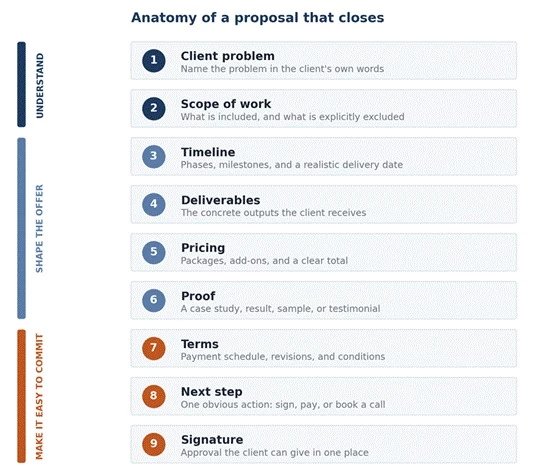
AI proposal tools shorten the distance between a discovery call and a polished, signable document. They standardize structure, pull from reusable content, draft sections from rough notes, and show when a client opens a proposal. What they cannot do is invent a strong offer, set the right price, or understand a specific client's situation. That part stays human.
This guide looks at seven proposal platforms through one lens: how each supports the real work of winning a project, from first draft to signature. Every tool is measured against the same test, profiled for the situation it actually fits, and matched to common proposal types, so the choice maps to how work gets sent rather than to a feature list.
AI shortens the time from a discovery call to a finished document, but it works from what it is given. A vague brief produces a vague proposal faster. The sections that follow assume the offer is sound and focus on which tool turns that offer into a document a client can read, trust, and sign.
Every tool in this guide is judged on the same nine points. They describe what a proposal needs to do, not which features look impressive in a demo.
1. Speed: how quickly a complete proposal goes from notes to ready to send.
2. Personalization: how easily each proposal is tailored to a specific client instead of reading like a template.
3. Design quality: how polished and credible the finished document looks.
4. Pricing clarity: how clearly packages, add-ons, and totals are presented.
5. Client experience: how easy the document is for a client to read, navigate, and act on.
6. E-signature support: whether the client can approve and sign in the same place.
7. Payment or invoice flow: whether payment or invoicing can follow approval without leaving the tool.
8. Tracking and analytics: whether views, time on page, and engagement are visible for follow-up.
9. AI usefulness: whether built-in AI genuinely helps draft, summarize, restructure, or tighten the proposal, rather than adding a token chatbot.
This test is the methodology behind every profile, table, and score below.
A quick orientation before the detailed profiles.
| Tool | Best For | Proposal Style | E- Signature | Payments | AI Usefulness | Best User Type |
| Proposify | Proposal teams | Structured business proposals | Yes | Add-on | Solid (sales content) | Agencies and sales teams |
| PandaDoc | Proposals plus contracts | Sales documents and approvals | Yes | Yes | Solid (draft plus automate) | Consultants, agencies, B2B teams |
| Better Proposals | Fast client proposals | Web-based proposal pages | Yes | Yes | Basic (light assist) | Freelancers and small agencies |
| Qwilr | Interactive proposals | Web-style pitch pages | Yes | Add-on | Solid (content help) | Agencies and consultants |
| Bonsai | Freelance workflow | Proposal, contract, invoice flow | Yes | Yes | Basic (workflow-led) | Freelancers |
| HoneyBook | Client service packages | Creative service proposals | Yes | Yes | Basic (workflow-led) | Creatives and service providers |
| Tome | Visual pitch (see note) | AI pitch decks (legacy) | No | No | Was AI-native | Discontinued; verify status |
Each profile follows the same shape: the situation it solves, what the client actually sees, where AI or automation earns its place, the strongest use case, the watch-out, and a one-line verdict.
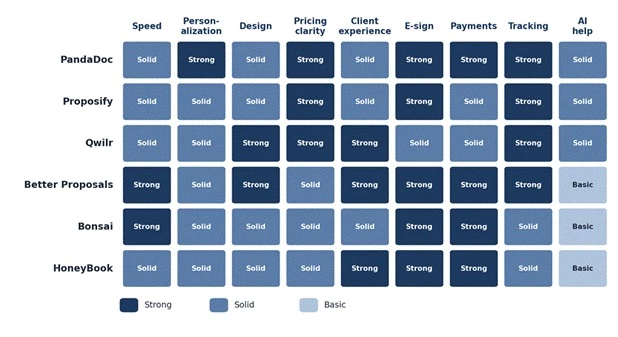
Figure 2. How the six currently available tools map against the nine-point test. Editorial assessment based on each platform's feature set, not vendor ratings. Tome is profiled separately given its status.
Built for teams that send proposals at volume and need the document to stay on brand and on message no matter who builds it. It fits a marketing or sales-led agency where several people send proposals and leadership wants control over wording, pricing, and approvals.
A structured, branded proposal, typically a polished document organized into clear sections with pricing tables and a signature block. The experience is professional and consistent rather than experimental.
A reusable content library lets approved sections such as problem framing, service descriptions, case studies, and terms drop into a new proposal in minutes. Templates handle the repetitive parts, approval workflows keep pricing and claims in bounds, and analytics show when a proposal is opened. AI assists with drafting and tightening copy, although the platform's real strength is governance and consistency rather than heavy generative writing.
A marketing agency that sends monthly SEO, paid media, and content retainer proposals builds each one from reusable sections, swaps in the client's specifics, and keeps every proposal aligned with the brand and pricing rules.
The control and structure that help a team can feel like overhead for a solo freelancer sending the occasional proposal. Pricing is team oriented, and getting full value takes some setup of templates and a content library first.
Verdict. A strong fit for agencies and sales teams that send proposals regularly and need brand control. More than a solo freelancer usually needs.
For people who treat the proposal as one step in a document workflow that also includes quotes, contracts, signatures, and sometimes payment. It fits consultants and B2B teams who want scope, pricing, terms, and approval to live in one flow instead of stitching together a designer, a PDF, and a separate signing tool.
A clean sales document with sections for scope and pricing, often an interactive quote or pricing table, then a legally binding e-signature and, where it is set up, a payment step. The client can read, choose options, sign, and pay without leaving the document.
Content generation drafts first-pass sections, a large template library covers proposals, quotes, and contracts, and configure-price-quote functionality handles more complex pricing. Built-in e-signatures are based on the ESIGN and UETA frameworks in the United States, approval workflows route documents for internal sign-off, engagement tracking shows what the client viewed, and CRM integrations such as Salesforce, HubSpot, and Pipedrive pull deal data in.
A B2B consultant sends one document that lays out the project scope, an itemized pricing table with optional add-ons, the contract terms, and a signature line, then collects a deposit on approval, all in a single client-facing flow.
The breadth that makes PandaDoc powerful can feel like a full sales-document system rather than a simple proposal writer. A freelancer who only needs a clean one-page offer may not use most of it, and the more capable plans are priced for teams.
Verdict. The most complete proposal to signature to payment workflow here, and the default choice when proposals, contracts, and approvals belong together.
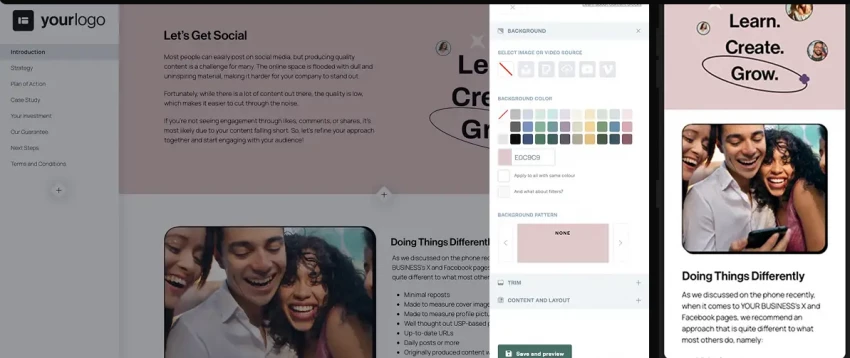
For freelancers and small agencies who want a modern, fast proposal that looks professional without a long build or a steep tool. It fits anyone who sends proposals often enough to want speed and tracking, but does not need enterprise approval chains.
A clean, mobile-friendly web proposal opened from a link rather than a downloaded file: clear sections, a pricing area, and a digital signature, often with a payment button so the client can sign and pay in one sitting.
A library of proposal templates gives a fast starting structure, digital signing and payment integrations close the loop, and tracking shows when the proposal is opened and viewed. AI assistance helps with drafting, although it stays lighter than the generative depth of the larger platforms. The value here is speed and a tidy client-facing page.
A freelance web designer sends a proposal for a five-page business site with a short scope, a clear timeline, three pricing options, and a sign-and-pay button, then sees the moment the client opens it.
A good template still needs strong, specific copy. The clean design will not rescue a vague offer. For very complex or heavily negotiated enterprise proposals, the larger document platforms give more structure and control.
Verdict. A fast, clean choice for freelancers and small agencies who send web proposals and want signing and payment built in.
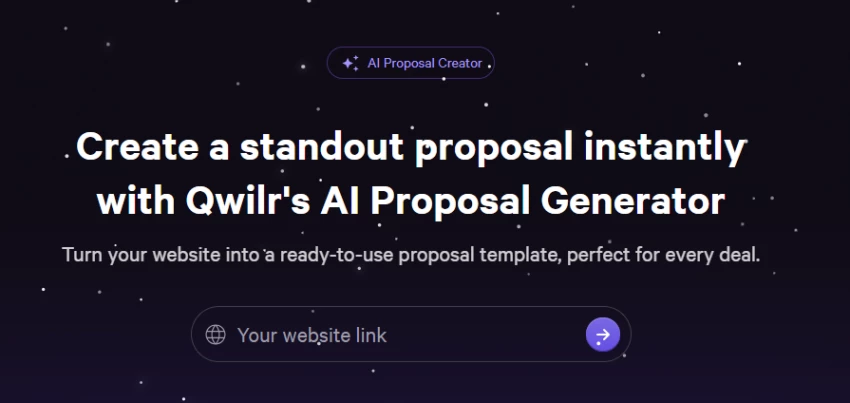
For agencies and consultants whose proposals double as a pitch, where the document itself needs to demonstrate quality. It fits work where presentation is part of the sell: design, marketing, brand, and strategy projects pitched to clients who judge the proposal as a sample of the work.
An interactive web page rather than a static document: sections that scroll like a modern site, interactive pricing the client can adjust, embedded video and case studies, and an e-signature. It reads as a living page, not a file.
Interactive pricing blocks let clients select options and watch totals update, embedded media and case studies build the case in context, detailed analytics show which sections held attention, and CRM integrations connect proposals to the pipeline. AI content help speeds up drafting the page copy.
A strategy consultant sends a pitch page that diagnoses the client's problem up top, lays out a phased plan, shows a relevant case study, and ends with selectable package pricing and a signature, then uses the analytics to see whether the client lingered on scope or on price.
A highly polished page can expose a weak offer rather than hide it; the format raises expectations. Building a page well takes more time than dropping text into a template, and the interactive style is more than a simple freelance quote requires. Plans are priced per seat with team minimums, which matters for solo users.
Verdict. The best choice when the proposal is part of the pitch and design and interactivity help win the work.
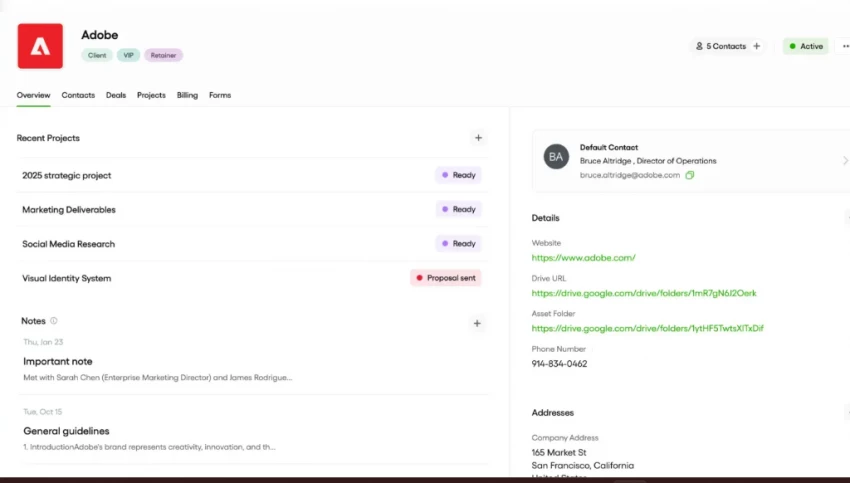
For freelancers who want the proposal connected to everything that follows: contract, invoice, and payment, without running three separate tools. It fits independent writers, designers, developers, and consultants who manage the whole client relationship themselves.
A clean, straightforward proposal that converts naturally into a contract to sign and an invoice to pay. The experience is practical and professional, oriented around getting the freelancer hired and paid rather than around visual spectacle.
Freelance-ready templates for proposals, contracts, and invoices remove repetitive setup, the proposal flows into a signable contract and then into invoicing and payment collection, and client and project management keep the relationship organized. The automation lives in the connected workflow more than in generative writing, which is lighter here.
A freelance copywriter sends a content-writing proposal with scope, word counts, a timeline, and revision terms, gets it signed, and converts the same agreement into an invoice with online payment.
Bonsai is built around the solo freelancer, so it is less suited to agency teams with multiple senders and approval layers, and it is not the tool for a highly visual, design-led pitch.
Verdict. The most practical end-to-end choice for freelancers who want proposal, contract, invoice, and payment in one place.
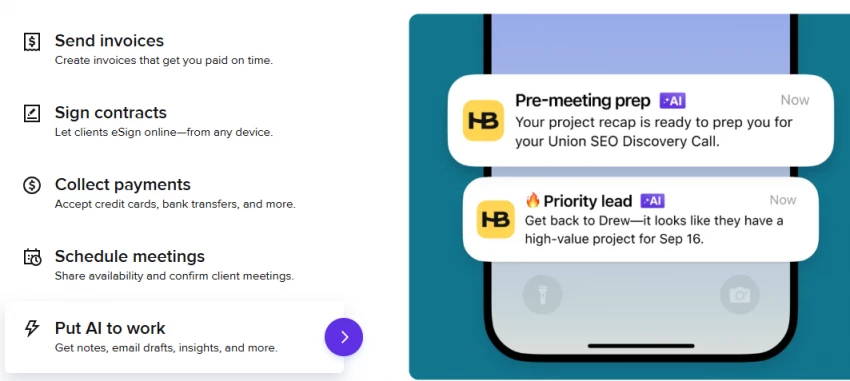
For service providers and creative businesses who book clients through a relationship flow: inquiry, proposal, contract, payment, and onboarding. It fits photographers, designers, planners, coaches, and studios that sell packaged services rather than line-item B2B deals.
A branded client experience: a proposal that often bundles service options, a contract, and an invoice into one flow, plus a client portal for booking and onboarding steps. It feels like a guided, professional intake rather than a one-off document.
Templates and automation move a lead from proposal to signed contract to paid invoice, scheduling and a client portal handle booking and onboarding, and workflow automations chase the steps in between. The strength is the connected client-booking flow; generative AI writing is a smaller part of the picture.
A branding consultant sends a package proposal with tiered service options, a contract, and an invoice, then uses the portal to schedule a kickoff and guide onboarding once the client says yes.
HoneyBook is built for service and creative businesses more than for B2B sales teams, so technical or sales-led consulting proposals may find it less natural than a dedicated proposal or document platform.
Verdict. The best fit for creative and service businesses that want proposals tied to booking, contracts, payments, and onboarding.
Tome built its reputation as an AI-native tool for visual, narrative-driven decks, widely cited as a way to turn a strategy or pitch into a story rather than a static document. That original product has been discontinued. The founding team moved on to a separate sales-intelligence company, and the Tome brand was sold; a different product now markets AI presentation features under a similar name, which has created brand confusion. Anyone evaluating a tool called Tome today should verify exactly what is being offered before relying on it for client work.
The idea behind it remains useful. Some proposals, especially early-stage consulting and strategy pitches, sell better as a visual narrative that walks a client through the problem, the recommended approach, and a roadmap, before any contract is involved.
A visual, slide-like story rather than a formal document, strong for explaining and persuading, but with no native e-signature or payment step even when the original product existed.
Run the visual-pitch stage in a tool that is actively supported, such as Qwilr from this list for an interactive pitch page, or a current AI deck tool, and pair it with a contract and e-signature tool such as PandaDoc or Bonsai to make the agreement official. A visual pitch persuades; a separate signable document closes.
A visual narrative is a pitch, not a binding proposal. It needs a follow-up document for scope, terms, signature, and payment, and Tome's original product did not provide that even when it was available.
Verdict. The visual-pitch approach is worth keeping. Execute it today in a supported tool such as Qwilr or a current deck app, paired with a contract tool, rather than relying on the discontinued original.
The right tool depends less on its feature list than on the kind of proposal being sent.
| Proposal Type | Better Tool Choice | Why |
| Simple freelance service proposal | Bonsai or Better Proposals | Fast to build, clean to read, easy to sign and pay |
| Agency retainer proposal | Proposify or Qwilr | Reusable sections plus polished, on-brand pages |
| Proposal plus contract plus payment | PandaDoc or Bonsai | One connected approval and payment flow |
| Creative service package | HoneyBook | Built for booking, contracts, and onboarding |
| Visual consulting pitch | Qwilr or a current deck tool | Story-led selling, paired with a contract tool to close |
| Enterprise-style sales document | PandaDoc or Proposify | Structured workflows, approvals, and control |
A tool only helps if the work feeding it is in the right order. The sequence below puts judgment first and automation second.
1. Qualify the lead first. Not every inquiry deserves a proposal. A short qualifying conversation filters out poor-fit or non-serious prospects before time goes into a document.
2. Summarize the client problem. Turn call notes or a discovery questionnaire into a clear statement of the problem in the client's words. AI can compress messy notes into a tight summary to confirm with the client.
3. Define the scope. List deliverables and, just as important, exclusions. Clear boundaries prevent scope creep and price disputes later. AI can help rewrite a rough scope into clean, specific language.
4. Build pricing options. Offer a small set of choices, often a basic, standard, and premium tier, so the client picks a level rather than approving or rejecting a single number. AI can draft the descriptions for each tier.
5. Add proof. Include a relevant case study, result, sample, or testimonial that matches the client's situation. Proof does more for trust than any adjective.
6. Make the next step obvious. End with one clear action: sign here, pay the deposit, or book the kickoff call. A proposal with no next step stalls.
7. Track engagement and follow up. Use view and engagement data to time follow-up and address what the client actually paused on, rather than sending a generic check-in.
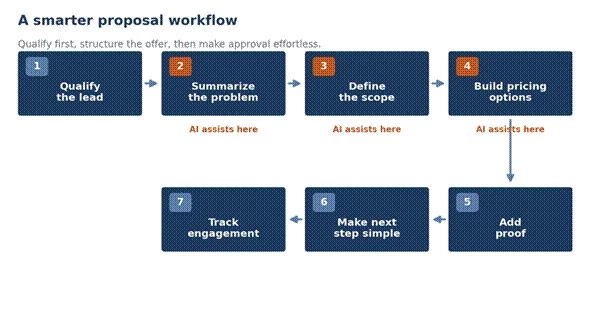
Figure 3. AI earns its place in the middle steps; the first and last steps are judgment and timing.
AI is genuinely useful for summarizing call notes, rewriting scope into clear language, drafting tier descriptions, and tightening wording. It is not useful for deciding who to send a proposal to, what to charge, or which proof will resonate. Those decisions are the difference between a fast proposal and a won one.
What each proposal should contain varies by the kind of work being sold.
| Business Type | Proposal Should Include | Suggested Tool |
| Freelance writer | Scope, word count, timeline, revisions, payment terms | Bonsai |
| SEO consultant | Audit summary, roadmap, deliverables, monthly retainer | Proposify or PandaDoc |
| Web design agency | Sitemap, timeline, milestones, pricing, case study | Better Proposals or Qwilr |
| Branding consultant | Brand strategy, identity package, deliverables, mood direction | HoneyBook, with a visual deck for the pitch |
| Software agency | Technical scope, phases, estimates, change-request terms | PandaDoc |
| Marketing agency | Campaign plan, deliverables, reporting, retainer options | Proposify |
| Business coach | Package options, sessions, outcomes, payment plan | HoneyBook |
These are editorial workflow scores based on how useful each tool is for freelance, consultant, and agency proposals, not official vendor ratings. Tome's original product has been discontinued, so it is not scored for current use.
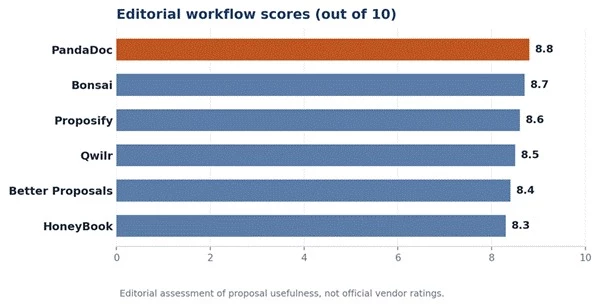
Figure 4. Editorial workflow scores for the six currently available tools. Scores reflect proposal usefulness, not vendor ratings, and no tool was rated perfect.
| Tool | Speed | Proposal Design | Client Approval Flow | AI / Automation Help | Best Fit | Editorial Score /10 |
| Proposify | High | Strong | Strong | Solid | Agencies and sales teams | 8.6 |
| PandaDoc | High | Strong | Strong | Solid | Proposals plus contracts | 8.8 |
| Better Proposals | High | Strong | Strong | Basic | Fast freelance proposals | 8.4 |
| Qwilr | Medium | Strong | Solid | Solid | Visual, interactive pitches | 8.5 |
| Bonsai | High | Solid | Strong | Basic | Freelance end to end | 8.7 |
| HoneyBook | Medium | Solid | Strong | Basic | Creative service flow | 8.3 |
| Tome | n/a | Strong (legacy) | None | Was AI-native | Visual pitch (legacy) | Discontinued |
Before committing to a platform, run through what the work actually requires.
1. E-signatures: required if clients should approve and sign in the same place. All six live tools here support signing; a pure deck tool does not.
2. Payment or invoicing: needed if payment should follow approval without a separate step. Bonsai, HoneyBook, PandaDoc, and Better Proposals handle this directly.
3. Repeatable proposals: if similar proposals go out often, reusable content libraries (Proposify, PandaDoc) save the most time.
4. Client tracking: if follow-up timing matters, choose a tool with view and engagement analytics (Proposify, Qwilr, PandaDoc).
5. Document style: decide between a downloadable, document-style proposal and an interactive web page. Qwilr and Better Proposals lean web; PandaDoc and Proposify suit structured documents.
6. CRM integration: if proposals should connect to a sales pipeline, confirm the tool integrates with the CRM in use (PandaDoc and Qwilr are strong here).
7. Solo versus team: solo freelancers are better served by Bonsai or Better Proposals; teams that need approvals and brand control fit Proposify or PandaDoc. Watch for per-seat pricing and seat minimums on team-oriented tools.
8. Contracts and invoices: if the proposal should flow into a contract and an invoice, an all-in-one (Bonsai, HoneyBook) or a document platform (PandaDoc) fits better than a proposal-only tool.
9. Visual pitch versus formal document: story-led pitches and formal signed proposals are different jobs; a visual pitch usually needs a separate contract tool to close.
10. Pricing against volume: match the plan cost to proposal volume. A high monthly fee is hard to justify for a handful of proposals a year.
Different tools win different jobs. The short version, by use case:
• Best overall proposal workflow: PandaDoc, for combining proposals, contracts, signatures, and payment in one flow.
• Best for agencies: Proposify, for brand control, reusable content, and team approvals at volume.
• Best for freelancers: Bonsai, for proposal, contract, invoice, and payment in one place.
• Best for modern web proposals: Qwilr, for interactive, design-led pitch pages.
• Best for fast client proposals: Better Proposals, for clean web proposals with signing and payment built in.
• Best for creative service businesses: HoneyBook, for proposals tied to booking and onboarding.
• Best for visual pitches: a current, supported deck tool paired with a contract tool, since Tome's original product has been discontinued.
Solo freelancers should start with Bonsai or Better Proposals. Agencies should start with Proposify, PandaDoc, or Qwilr. Consultants who sell strategy visually should build the pitch in Qwilr or a current deck tool and close with PandaDoc or Bonsai. In every case the tool is the delivery mechanism; the offer, the pricing, and the client-specific insight decide whether the proposal is signed.
Share your thoughts about this article.
Be the first to post a comment!

The same tool can be a 4.7 on one site and a 3.9 on another. Here is what is rea...
Nitin1 month ago

Here is the number worth pinning above your budget: in Gartner Digital Markets r...
Deepak Mehra1 month ago

What Artlist AI is in 2026Artlist began as a royalty-free music library. By 2026...
Deepak Mehra2 months ago

Most AI tool failures do not announce themselves. There is no crash, no angry em...
Nitin2 months ago

The best AI image generator in 2026 is Nano Banana 2 for speed, FLUX.2 for photo...
Parveen Verma2 months ago

“Useful” is a slippery word for a coding assistant. A tool can be brilliant at o...
Sakshi Dhingra2 months ago