
A Product Listing Should Not Look Like It Was Built in a Rush
A seller can have a genuinely good product and still end up with a listing that quietly underperforms. The photo carries a distracting background, the description reads flat, and the title skips the exact words shoppers type into a search bar. None of that means the product is weak. It usually means the listing was assembled in a hurry, somewhere between packing orders and answering messages.
AI tools can close that gap, but only the right kind of tool for the right part of the job. Some are built to fix and generate images. Some are built to write product copy at scale. A few are aimed at catalog teams managing thousands of SKUs, while others suit a solo seller who simply needs cleaner photos by tonight. No single tool handles the entire listing problem well, and any roundup that claims otherwise is overselling.
The seven tools below sit on either side of that line: four for product photos and visuals, three for product descriptions and listing copy. Each section explains the specific listing problem the tool solves, where it fits in a seller’s day, what it costs, and where it comes up short.
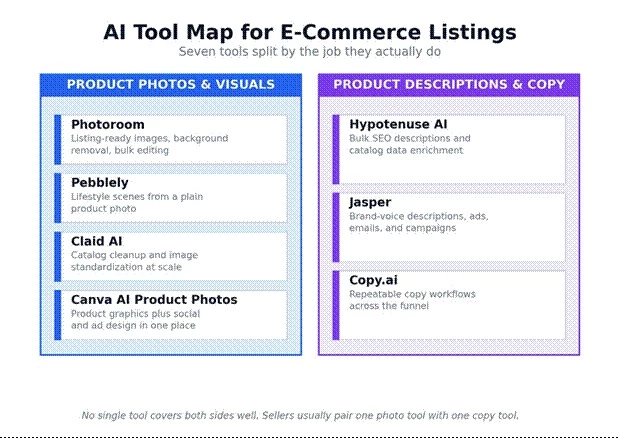
Figure 1. The seven tools split into image tools and copy tools.
This first table is the fast version of the whole article. It is enough to shortlist two or three tools before reading the detailed sections.
| Tool | Best for | Main workflow | Pricing snapshot | Best seller type | Main limitation |
| Photoroom | Listing-ready product photos | Background removal, product visuals, bulk editing | Free; Pro from ~$12.99/mo, Max ~$34.99/mo, Ultra+ higher | Marketplace and D2C sellers | API billed separately; export and batch caps by tier |
| Pebblely | Lifestyle product photos | AI backgrounds, product scenes, bulk generation | $9 / $19 / $39 per month | Small sellers and social commerce | Monthly image limits per plan |
| Claid AI | Catalog image cleanup | Upscaling, compliance, background edits, API | Free trial; Essentials ~$9/mo, Professional ~$39/mo, Business custom | Larger catalogs and marketplaces | More technical and business focused |
| Canva AI Product Photos | Easy product graphics | Prompt-based product photos inside Canva | Tied to the Canva plan (Free / Pro / Teams) | Beginners and social sellers | Less specialized than photo-only tools |
| Hypotenuse AI | Bulk product descriptions | SEO titles, descriptions, attributes, enrichment | Flexible / custom; catalogs quoted by sales | Catalog-heavy stores | Can be enterprise focused for tiny sellers |
| Jasper | Brand-consistent product copy | Product descriptions, campaigns, SEO copy | Pro $69/mo monthly or $59/mo yearly; Business custom | Marketing teams and brand stores | Higher cost for small sellers |
| Copy.ai | GTM and content workflows | Product copy, campaign workflows, automation | Free; self-serve paid from ~$49/mo; Enterprise custom | Teams needing repeatable workflows | Broader GTM platform, not ecommerce only |
Tool names matter less than the problem on the screen. The table below maps the everyday listing problems sellers run into to the type of tool that solves them, and then to the specific tools worth trying first.
| Listing problem | Better tool type | Recommended tools |
| Plain product image | AI product photography | Pebblely, Photoroom, Canva AI Product Photos |
| Messy background | Background remover or editor | Photoroom, Claid AI, Canva |
| Marketplace image compliance | Catalog image editing | Claid AI, Photoroom |
| Lifestyle product scene | AI scene generator | Pebblely, Canva AI Product Photos |
| Weak product description | AI copywriting or product content | Hypotenuse AI, Jasper, Copy.ai |
| Large SKU catalog | Bulk content and attribute enrichment | Hypotenuse AI, Claid AI |
| Brand voice consistency | Marketing copy system | Jasper, Hypotenuse AI, Copy.ai |
| Social product visuals | Easy design workflow | Canva AI Product Photos, Photoroom |
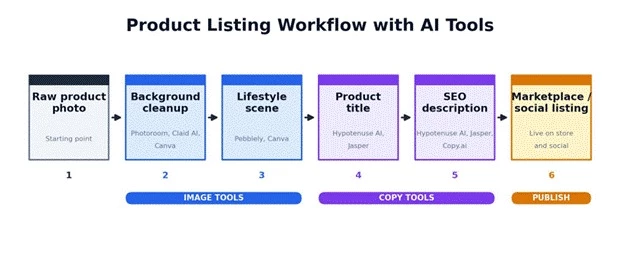
Figure 2. A typical listing flow, with the tool types that handle each step.
These four tools handle the visual side of a listing: turning a raw, uneven photo into something that looks like it belongs on a store page or in a feed. They overlap on background work, then separate by who they are really for, from a solo seller to a marketplace operations team.

Best workflow fit marketplace listings, Shopify product images, background cleanup, bulk editing, and keeping a catalog visually consistent.
Photoroom fits the moment when a product photo already exists but is not store-ready. It removes backgrounds, cleans up uneven shots, generates fresh product visuals, and exports marketplace-ready images without a designer in the loop. The useful pieces for sellers are background removal, AI product photo generation, batch editing, brand-consistent visuals, and an export flow built around e-commerce formats rather than general design.
Photoroom positions itself as an AI visual solution for e-commerce and says it helps sellers create listing-ready visuals at scale, citing more than 300 million downloads across its apps. Those figures are the company’s own.
Seller example: A Shopify store with 80 skincare SKUs can run them through Photoroom to strip mismatched backgrounds, produce clean white-background marketplace images, and spin off social-friendly product shots, all without reshooting a single bottle.
Pricing Photoroom runs on Free, Pro, Max, Ultra, and Enterprise tiers. On the official pricing page, Pro starts around $12.99 per month on monthly billing and less on annual, Max sits around $34.99 per month, and Ultra scales upward across higher-volume tiers, with Enterprise quoted custom. Prices shift by region and promotion, so the live page is the real source of truth. One detail worth checking before paying: API access and credits are billed separately from the Pro, Max, and Ultra subscriptions, and batch limits, export caps, and commercial-use terms vary by tier.
| Editorial workflow rating | Score |
| Product photo cleanup | 4.5 / 5 |
| Beginner friendliness | 4.4 / 5 |
| Bulk workflow usefulness | 4.1 / 5 |
| Description writing | 1.5 / 5 |
| Best fit: Product images, not copy | |
Mini verdict- Photoroom is strongest when the photo already exists and simply needs to look cleaner, more consistent, and ready for a store shelf or marketplace. It does almost nothing for product copy, and it is not pretending to.

Best workflow fit lifestyle product scenes, social visuals, hero images, ad creative, launch shots, and seasonal campaigns.
Pebblely is the tool for the seller who wants a product to look like it belongs in a campaign photo rather than a plain catalog upload. It generates AI backgrounds and product scenes from a single cutout, with a library of more than 40 background themes, custom prompts, reference images, bulk generation, and export sizes tuned for social platforms.
Pebblely describes itself as an AI product photography tool for creating product photos without Photoshop skills, and its site reports more than 25 million images generated by creative companies worldwide. That figure is Pebblely’s own.
Pricing- Pebblely keeps it simple, with three monthly tiers and roughly 20 percent off on annual billing.
| Plan | Monthly price | Image limit |
| Lite | $9 / month | 30 images / month |
| Basic | $19 / month | 200 images / month |
| Pro | $39 / month | 500 images / month |
Seller example: A candle seller can upload one plain product photo and generate cozy desk, bathroom, festive, and gift-themed scenes for Shopify banners, Instagram posts, and ad creative, without booking a studio.
| Editorial workflow rating | Score |
| Lifestyle product scenes | 4.5 / 5 |
| Social media usefulness | 4.4 / 5 |
| Catalog compliance | 3.2 / 5 |
| Description writing | 1.0 / 5 |
| Best fit: Product scenes and creative visuals | |
Mini verdict- Pebblely is one of the most practical options for a seller who already has clean product cutouts and needs polished lifestyle photos quickly. It writes nothing, and its image caps mean heavy users watch the monthly counter.
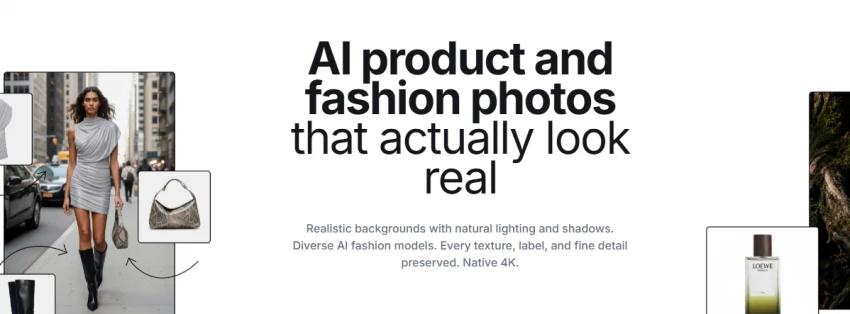
Best workflow fit large catalogs, marketplace onboarding, fashion and on-model photos, image standardization, compliance checks, and API-based editing.
Claid AI is the operations-minded option rather than a casual creative generator. It leans toward enhancement, upscaling, background editing, marketplace requirement checks, API workflows, and keeping a large catalog visually consistent, including fashion and on-model use cases.
Claid AI positions itself as an AI product photography and catalog editing platform for e-commerce. It claims an 80 percent reduction in editing costs, editing to platform requirements in 2 to 3 seconds, and onboarding that is 5 times cheaper than traditional editing services. Those are Claid’s own claims rather than independently verified results.
Seller example: A marketplace accepting hundreds of seller uploads can use Claid AI to standardize background, lighting, resolution, and image quality before product pages go live, so listings from different sellers do not look wildly inconsistent.
Pricing- Claid AI offers a free trial, then self-serve tiers (Essentials around $9 per month and Professional around $39 per month) plus a custom Business plan. Because higher usage runs on image credits and API calls, the real cost at scale is effectively quote-based, so the official pricing page and credit terms should be checked before committing.
| Editorial workflow rating | Score |
| Catalog image consistency | 4.6 / 5 |
| Enterprise workflow | 4.4 / 5 |
| Beginner friendliness | 3.5 / 5 |
| Creative lifestyle scenes | 3.6 / 5 |
| Best fit: Catalog image operations | |
Mini verdict- Claid AI is the better pick for a seller or marketplace handling image quality at volume, not for a beginner who only needs a handful of pretty lifestyle shots.
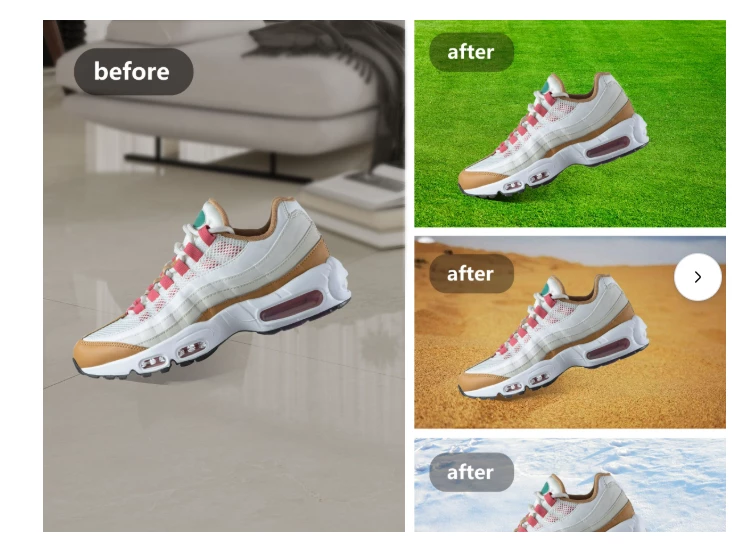
Best workflow fit social commerce, product banners, Instagram and Pinterest posts, Etsy visuals, launch graphics, and quick ad creative.
Canva AI Product Photos is the easiest all-rounder for a seller who already lives in Canva for banners, posts, thumbnails, and store graphics. The app lets a seller upload a product image, type a prompt, and generate product photography images in seconds, while the wider Canva AI and Magic Studio toolkit adds AI-generated design elements, templates, brand kits, and editable AI layouts in the same editor.
Canva’s AI Product Photos app describes a simple flow: upload a product image, enter a text prompt, and create product photos in seconds. Canva AI more broadly bundles design, writing, and creative tools inside the editor and can turn AI designs into editable layouts.
Seller example: A handmade jewelry seller can generate product scenes, drop on a sale label, resize the same graphic for Instagram and Pinterest, and hold one set of brand colors across all of it, without leaving Canva.
Pricing Access depends on the Canva plan (Free, Pro, or Teams), the region, the team size, and any AI usage limits attached to the app. There is no single Canva AI Product Photos price to quote, so current Canva plan pricing and AI usage caps should be confirmed directly.
| Editorial workflow rating | Score |
| Ease of use | 4.7 / 5 |
| Social product visuals | 4.5 / 5 |
| Marketplace-ready photos | 3.6 / 5 |
| Advanced catalog automation | 2.8 / 5 |
| Best fit: Small sellers and social creatives | |
Mini verdict- Canva AI Product Photos is best for the seller who wants product visuals, captions, banners, and social graphics in one simple workspace. It is a generalist, so it trails the photo-only specialists on strict marketplace output and offers little for serious catalog automation.
These three tools move from pixels to words. They cover titles, descriptions, and the surrounding copy, and they differ mostly in scale and intent: one polished description at a time, a few thousand SKUs at once, or a repeatable system that turns product data into copy again and again.

Best workflow fit large product catalogs, SEO product descriptions, attribute enrichment, bulk SKU content, and brand-voice consistency across a store.
Hypotenuse AI is built for stores with many SKUs, not for someone writing a single product description. It generates SEO-optimized titles and descriptions in a chosen brand voice, enriches missing product attributes, standardizes product data, and bulk-generates thousands of unique descriptions, with the stated ability to handle catalogs from a few thousand to millions of products through bulk workflows.
On data handling, Hypotenuse AI states that customer data is not shared with third parties or used to train public AI models, and it references SOC 2 Type II compliance. Those are the company’s own statements about its controls.
Seller example: A fashion store with 4,000 products can use Hypotenuse AI to standardize titles, fill in missing material and style attributes, and generate descriptions that all follow the same brand format, instead of editing each listing by hand.
Pricing- The official pricing page leads with flexible, custom pricing and a sales conversation for ecommerce catalogs, which fits its catalog-scale positioning. Lower-end self-serve content tiers do exist, roughly $19 to $29 per month for marketing and SEO word limits, but for real catalog work the pricing is effectively custom or contact-sales. The official page should be checked for current numbers, and smaller sellers may find the entry points narrow.
| Editorial workflow rating | Score |
| Bulk product descriptions | 4.7 / 5 |
| SEO content workflow | 4.3 / 5 |
| Product data enrichment | 4.5 / 5 |
| Beginner affordability | 2.8 / 5 |
| Best fit: Catalog-heavy e-commerce teams | |
Mini verdict- Hypotenuse AI is strongest when product copy is not a one-page task but a catalog-scale workflow. For a tiny store with a dozen products, it is more machine than the job needs.
Best workflow fit product descriptions, ad copy, landing pages, email campaigns, SEO copy, brand voice, and multi-channel marketing.
Jasper reads less like a pure product-listing tool and more like a marketing content system. It supports product description generation, campaign copy, SEO content, team collaboration, and multi-channel marketing, all anchored to a defined brand voice.
Jasper positions itself as an AI marketing platform for campaigns, SEO, personalization, and e-commerce. Its product description page frames the core need plainly: e-commerce and retail teams need accurate, on-brand descriptions across every channel, format, and market.
Pricing Jasper’s official pricing lists a Pro plan and a custom Business plan.
| Plan | Price |
| Pro (monthly) | $69 / month |
| Pro (annual) | $59 / month, billed yearly |
| Business | Custom pricing |
Seller example: A D2C skincare brand can use Jasper to produce product descriptions, launch emails, Instagram captions, ad variations, and landing-page sections in one consistent voice, so the copy on the product page matches the copy in the campaign.
| Editorial workflow rating | Score |
| Product description quality | 4.2 / 5 |
| Brand voice support | 4.5 / 5 |
| Campaign content | 4.6 / 5 |
| Product photo support | 1.5 / 5 |
| Best fit: Brand-focused content teams | |
Mini verdict- Jasper suits the seller who needs more than descriptions. It earns its price when product copy has to connect with ads, emails, landing pages, and brand campaigns, and it is hard to justify for a solo seller who only needs a few listings cleaned up.
Best workflow fit product copy workflows, marketplace listing drafts, sales emails, ad variations, and repeatable go-to-market content systems.
Copy.ai is most useful when a seller or team wants a repeatable content workflow rather than writing each description by hand from scratch. The emphasis is on workflow automation, product copy drafts, campaign content, sales and marketing messaging, team collaboration, and processes that can be run over and over.
Copy.ai positions itself as a go-to-market AI platform for unifying data, teams, workflows, and content processes, rather than only a simple writing tool. That broader framing is the point: it is built around repeatable systems, not single outputs.
Seller example: A marketplace team can build one workflow that turns raw product attributes into titles, descriptions, email snippets, social captions, and ad variations, then run the same flow across every new batch of products.
Pricing- Copy.ai offers a free tier (around 2,000 words per month), a self-serve paid plan starting near $49 per month on monthly billing and less annually, a higher workflow and team tier for multi-seat automation, and a custom Enterprise plan. Plan names and limits have shifted more than once, so the official pricing page should be the reference rather than older third-party plan names.
| Editorial workflow rating | Score |
| Repeatable copy workflows | 4.3 / 5 |
| Product description support | 3.9 / 5 |
| Team workflow value | 4.2 / 5 |
| Product photo support | 1.0 / 5 |
| Best fit: GTM and content automation | |
Mini verdict- Copy.ai fits teams that care less about any single description and more about a repeatable workflow that produces copy at scale. As a one-off product-description generator it is fine but not distinctive, and it does nothing for images.
Read down a column to compare one capability, or across a row to size up one tool. The scores are directional, meant to speed up a shortlist rather than rank tools to a decimal.
| Tool | Photo creation | Background editing | Product descriptions | Bulk catalog support | Best overall use |
| Photoroom | 5 / 5 | 5 / 5 | 1 / 5 | 4 / 5 | Listing-ready images |
| Pebblely | 5 / 5 | 4 / 5 | 1 / 5 | 3.5 / 5 | Lifestyle product photos |
| Claid AI | 4 / 5 | 4.5 / 5 | 1 / 5 | 5 / 5 | Catalog image consistency |
| Canva AI Product Photos | 4 / 5 | 3.5 / 5 | 3 / 5 | 2.5 / 5 | Social product visuals |
| Hypotenuse AI | 2 / 5 | 2 / 5 | 5 / 5 | 5 / 5 | Bulk product content |
| Jasper | 1 / 5 | 1 / 5 | 4.5 / 5 | 3.5 / 5 | Brand-led product copy |
| Copy.ai | 1 / 5 | 1 / 5 | 4 / 5 | 4 / 5 | Repeatable content workflows |
Editorial workflow scoring from hands-on assessment, not public user ratings.
The same tool can be perfect for one seller and overkill for another. This table matches common seller profiles to a sensible first choice.
| Seller type | Best tool | Reason |
| Solo Shopify seller | Photoroom | Fast listing image cleanup |
| Etsy seller | Canva AI Product Photos | Product graphics and social visuals in one place |
| Beauty or skincare seller | Pebblely | Lifestyle product scenes work well |
| Marketplace operator | Claid AI | Catalog image standardization |
| Large fashion catalog | Hypotenuse AI | Bulk descriptions and attributes |
| D2C brand team | Jasper | Brand voice and campaign copy |
| GTM or content operations team | Copy.ai | Repeatable workflows |
| Seller with both photo and copy needs | Photoroom + Jasper, or Pebblely + Hypotenuse AI | Better to combine specialized tools |
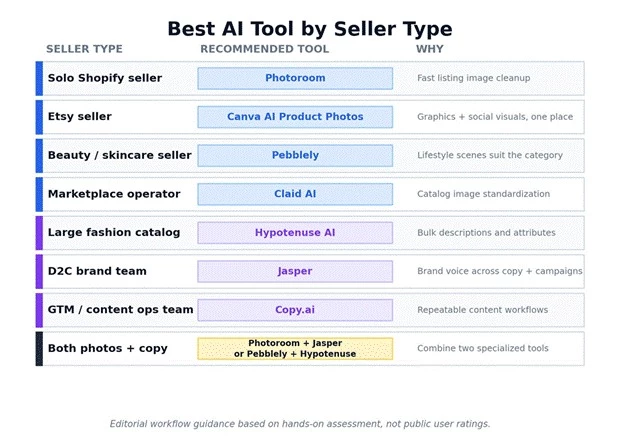
Figure 3. A quick read on which tool suits which kind of seller.
Photo tools cluster at the affordable end, copy platforms cost more, and the heaviest catalog tools move to custom pricing. The chart shows the lowest published monthly starting price for the tools with fixed self-serve plans; tools with custom or plan-dependent pricing sit in the note beside it.
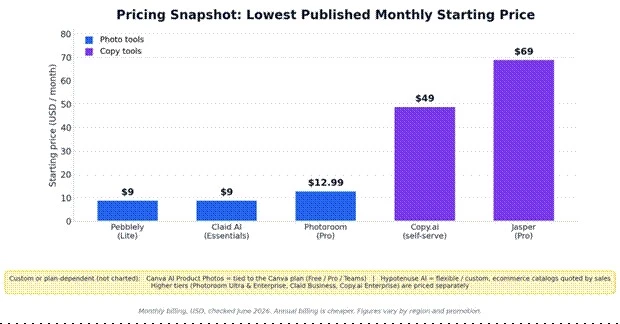
Figure 4. Lowest published monthly starting prices, with custom-priced tools called out separately.
| Tool | Public pricing snapshot | Pricing confidence | Main cost caution |
| Photoroom | Free; Pro ~$12.99/mo, Max ~$34.99/mo, Ultra+ higher (monthly billing) | Medium (tiers, region, promotions vary) | API and credits billed separately; batch, export, and commercial-use terms by tier |
| Pebblely | $9 / $19 / $39 per month (30 / 200 / 500 images) | High (official page) | Monthly image caps; annual saves about 20% |
| Claid AI | Free trial; Essentials ~$9/mo, Professional ~$39/mo, Business custom | Medium (credit and API usage matters) | Higher tiers credit based; scale pricing is custom |
| Canva AI Product Photos | Tied to the Canva plan (Free / Pro / Teams) | Medium | AI and app usage limits; region and team-plan differences |
| Hypotenuse AI | Flexible / custom; entry content tiers from about $19 to $29/mo, ecommerce custom | High for custom positioning | Catalog-scale plans quoted by sales; can be enterprise priced |
| Jasper | Pro $69/mo monthly or $59/mo yearly; Business custom | High (official page) | Higher cost for small sellers; per-seat add-ons |
| Copy.ai | Free; self-serve paid from ~$49/mo; workflow and team tier higher; Enterprise custom | Medium (plan names have changed over time) | Broader GTM platform; verify current plan names |
Most sellers do not need one perfect tool. They need two kinds of help: one for product visuals and one for product copy. Forcing a copy tool to fix photos, or a photo tool to write descriptions, is usually where the disappointment starts.
A seller who only needs cleaner images does well with Photoroom. A seller chasing lifestyle scenes tends to prefer Pebblely. A catalog team standardizing thousands of images leans toward Claid AI, and a team standardizing thousands of descriptions leans toward Hypotenuse AI. A brand-led store often gets more from Jasper, because the same voice has to carry descriptions, emails, and campaign copy. Copy.ai fits teams that care less about any single description and more about a workflow that produces copy again and again.
A practical way to choose:
• For beginners: Canva AI Product Photos or Photoroom
• For product scenes: Pebblely
• For image operations at scale: Claid AI
• For bulk descriptions: Hypotenuse AI
• For brand copy: Jasper
• For workflow automation: Copy.ai
The strongest setup for a small store is usually a simple two-tool stack: one image tool plus one copy tool, matched to the size of the catalog and the way the brand sells. That pairing tends to lift a listing faster than any single all-in-one promise.
Share your thoughts about this article.
Be the first to post a comment!

The same tool can be a 4.7 on one site and a 3.9 on another. Here is what is rea...
Nitin1 month ago

Here is the number worth pinning above your budget: in Gartner Digital Markets r...
Deepak Mehra1 month ago

What Artlist AI is in 2026Artlist began as a royalty-free music library. By 2026...
Deepak Mehra2 months ago

Most AI tool failures do not announce themselves. There is no crash, no angry em...
Nitin2 months ago

The best AI image generator in 2026 is Nano Banana 2 for speed, FLUX.2 for photo...
Parveen Verma2 months ago

“Useful” is a slippery word for a coding assistant. A tool can be brilliant at o...
Sakshi Dhingra2 months ago