Akool is an AI video generation platform designed to simplify how digital content is created, translated, and personalized. Instead of relying on traditional filming, editing, and production workflows, it uses generative AI to produce face-swapped videos, talking avatars, and multilingual video content at scale.
What makes Akool stand out is not just one feature, but its combination of tools that sit across video generation, identity transformation, and real-time avatar interaction.
However, as with most AI video platforms, the real question is not what it can do — but how well it performs in actual production workflows, and whether it justifies its pricing and complexity.
This review breaks down Akool in real usage terms: how it works, where it fits, where it struggles, and whether it is actually worth using in 2026.
Akool is a professional-grade generative AI video platform built primarily for:
At its core, Akool focuses on identity-aware video generation—meaning it doesn’t just generate visuals, it preserves faces, voices, lip movements, and realism at a level most competitors still struggle with.
Founded in 2022 (some sources trace early R&D to 2021) and headquartered in Palo Alto, California, Akool is led by Jiajun (Jeff) Lu, a former technical lead at Google and Apple with a Stanford PhD. That engineering background shows clearly in the product.
Their stated mission, “democratize visual storytelling”, sounds generic, but the execution is anything but.
Official site: https://akool.com/
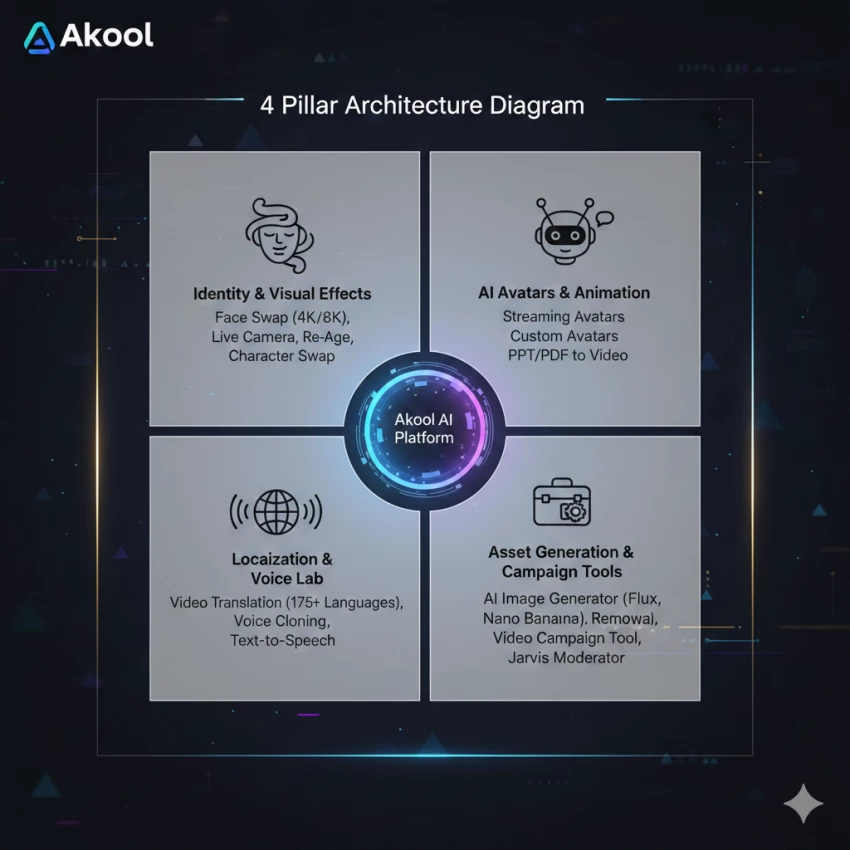
Akool organizes its platform into four functional pillars. I’ll walk through each the way I experienced them.
1. Identity & Visual Effects (Akool’s Strongest Area)
This is where Akool is genuinely best-in-class.
Face Swap (Images & Video)
I’ve used many face-swap tools that fall apart when:
Akool holds up far better, especially in marketing-grade footage.
Live Camera (Launched May 2025)
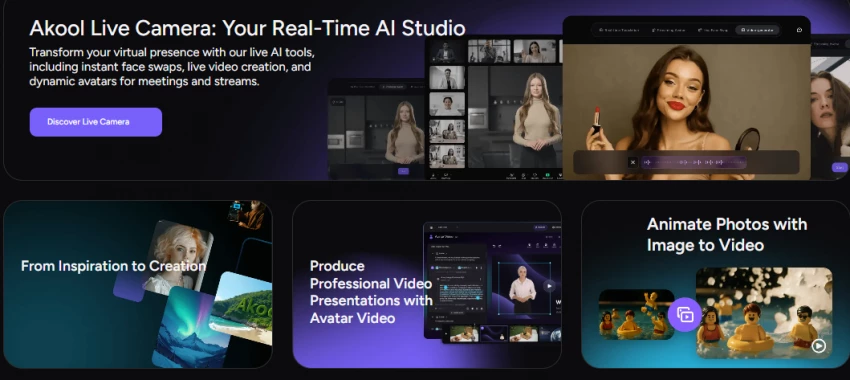
This feature surprised me.
Akool’s Live Camera allows:
during Zoom, Teams, or livestreams.
It’s one of the few AI tools I’ve seen that actually works live, not just in post-production.
2. AI Avatars & Animation
Akool’s avatar system is built for scale, not gimmicks.
Streaming Avatars
Real-time interactive digital humans
Used as:
These aren’t stiff cartoon avatars. They’re designed to be “good enough” for enterprise environments where consistency matters more than cinematic perfection.
Talking Photos
You upload:
Akool turns it into a speaking video with believable facial movement. For internal training, announcements, or quick marketing assets, this saves hours.
Custom & Stock Avatars
60+ stock avatars
Ability to fine-tune avatars to resemble real executives or brand representatives
I’ve seen this used for:
3. Localization & Voice Lab (Globalization at Scale)
This is where Akool quietly dominates.
Video Translation with Lip Sync
Akool doesn’t just dub audio.
It:
Supported languages:
This is why brands like Qatar Airways used Akool for campaigns like “AI Adventure”, reportedly increasing viewer engagement by 60%.
Voice Cloning
Used responsibly, this is incredibly powerful. Misused, it’s also why Akool invests heavily in moderation.
4. Asset Generation & Campaign Tools
Akool isn’t just about faces.
AI Image Generator
Background Removal & Change
One-click background replacement for:
Video Campaign Tool
This is clearly enterprise-focused:
Think hundreds of personalized videos for email or ads, generated in minutes.
Jarvis Moderator
An underrated but important feature:
AKOOL AI is not just a creative tool for generating videos, it is increasingly used as a production system across marketing, education, and enterprise communication. Its combination of face swap technology, AI avatars, and video translation makes it suitable for multiple industries where scalable content creation is important.
Below are the most practical and real-world use cases where AKOOL is actively applied.
AKOOL is widely used in digital marketing to create multiple variations of ad creatives without reshooting content. Marketers can swap faces, change presenters, or modify languages to target different audience segments.
This is especially useful for A/B testing campaigns where brands need different video versions to compare engagement performance. Instead of hiring multiple actors or producing separate shoots, teams can quickly generate variations using AI.
In performance marketing, this significantly reduces production time while increasing creative output speed.
Content creators use AKOOL to produce videos without appearing on camera. AI avatars and face swap tools allow them to maintain anonymity while still producing engaging video content.
This has become particularly popular for short-form content on platforms like YouTube Shorts, Instagram Reels, and TikTok, where consistency and speed matter more than traditional production quality.
Creators can also repurpose a single script into multiple visual formats, increasing content volume without additional filming.
E-commerce brands use AKOOL to generate product explanation videos and spokesperson-style demonstrations. Instead of hiring presenters or recording studio sessions, brands can create AI-generated presenters who explain product features.
This improves product page engagement and helps customers understand products more clearly through video instead of static images.
It is especially useful for fast-scaling online stores that frequently update product catalogs.
In enterprise environments, AKOOL is used to create training modules, onboarding videos, and internal communication content. AI avatars can deliver standardized messages across departments without requiring repeated recording sessions.
This ensures consistency in training materials and reduces dependency on human presenters or trainers for repetitive communication tasks.
It also allows companies to quickly update training content whenever policies or workflows change.
One of AKOOL’s strongest use cases is video translation for global audiences. Businesses can take a single video and convert it into multiple languages while maintaining lip-sync accuracy and voice consistency.
This is particularly valuable for companies operating in multiple regions, as it eliminates the need for separate production teams in each market.
It also helps brands maintain a unified identity while adapting content for local audiences.
AKOOL’s real-time AI avatar feature is used in live environments such as webinars, virtual meetings, and online presentations. Users can appear as AI-generated presenters instead of using live camera feeds.
This is useful for professionals who want to maintain a polished, controlled appearance during live communication or for brands hosting virtual events.
It also opens possibilities for fully AI-hosted presentations in the future.
Educators and course creators use AKOOL to build structured learning content without needing to record themselves repeatedly. AI avatars can deliver lessons in a consistent format, making course production faster and more scalable.
This is particularly useful for online learning platforms that require frequent updates or multilingual course delivery.
Some creators use AKOOL for experimental storytelling, meme creation, and creative video production. Face swap and avatar tools allow them to create unique visual narratives that would otherwise require complex editing or production setups.
While not its primary enterprise use case, this creative flexibility makes it appealing to independent creators and digital artists.
Akool uses a credit-based system, which is powerful but not cheap.
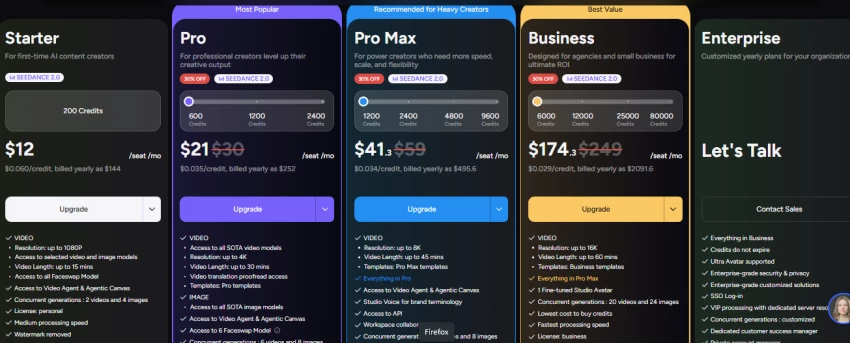
| Feature | Free | Pro / Pro Max | Business / Enterprise |
| Max Resolution | 720p | 4K | 8K / 16K |
| Video Length | 5 mins | 30–45 mins | 60+ mins |
| API Access | No | Pro Max only | Full |
| Collaboration | No | Limited | Role-based |
| Processing Speed | Slow | Fast | Priority / Instant |
This pricing makes sense for teams, but small creators may feel squeezed.
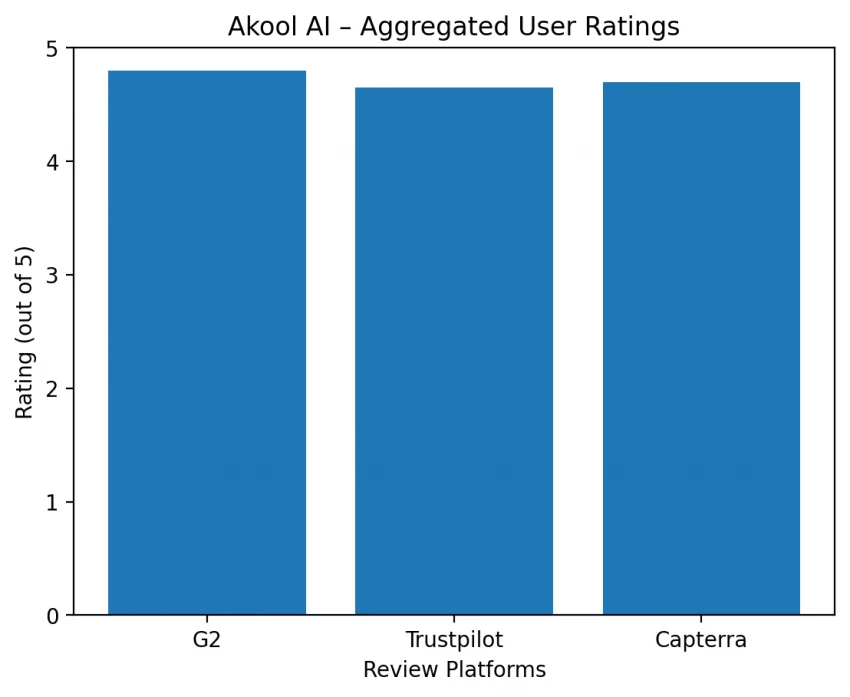
G2: 4.8 / 5 (450+ reviews)
Trustpilot: ~4.5–4.8 / 5
Capterra: https://www.capterra.in/software/1055752/akool
Exceptional face realism
Time savings for marketing teams
Surprisingly low learning curve
Credit costs for heavy usage
Slower rendering with 8K or large batches
Occasional AI artifacts (e.g., distorted fingers in generated images)
Those complaints align with what I’ve personally noticed—nothing hidden or misleading.
| Pros (Trust Strengths) | Cons (Trust Concerns) |
|---|---|
| Legitimate AI company with real-world adoption in marketing and enterprise workflows | Limited clarity on exact credit consumption per feature before rendering |
| Uses secure cloud-based infrastructure for video generation and processing | Ethical risks exist due to realistic face swap and identity replication capabilities |
| Widely used for commercial content creation and localization tasks | Transparency around data handling and content usage policies can feel abstract for new users |
| No evidence of it being a scam or unreliable platform | Users must self-regulate usage to avoid deepfake misuse concerns |
| Actively used in production environments, not just experimental tools | Output responsibility is fully on the user, not tightly restricted by platform safeguards |
AKOOL is generally safe to use as a cloud-based AI platform, but its safety depends heavily on how users handle identity-based tools like face swap and avatars. The platform itself operates with standard cloud security practices, but it does not fully eliminate misuse risks associated with synthetic media generation.
Because the tool can generate highly realistic human likenesses, responsible usage is essential to avoid misleading or unethical content creation.
AKOOL is a legitimate AI SaaS platform used by creators, marketers, and businesses worldwide. It is not a scam tool and provides real functional outputs in video generation, avatar creation, and translation systems.
Its legitimacy is reinforced by its adoption in marketing workflows and enterprise-level use cases, especially in content localization and automation.
AKOOL provides functional documentation and a structured credit-based system, but transparency varies when it comes to deeper operational details like cost predictability per render or fine-grained credit usage breakdown.
While the company is real and the tool is stable, users may need time to understand how pricing and credits translate into actual production cost.
Akool AI sits in an interesting position in the AI video landscape, it is not just a face swap tool, and it is not purely an avatar generator either. It behaves more like a full AI content production system, built for people who need speed, scale, and multi-language video output without traditional filming setups.
If your work revolves around marketing content, social media videos, product explainers, or localized campaigns, Akool can genuinely reduce production effort and unlock a level of output that would normally require an entire video team. Its biggest strength is not just quality, but how quickly it lets you produce variations of the same idea for different audiences.
However, it is not a tool for everyone. If you are a solo creator working with limited budgets or you prefer full creative control over every frame, Akool can feel restrictive due to its credit system and structured workflow. It is also a tool that demands responsible usage, especially when working with face-based generation features.
Overall, Akool is best seen as a production accelerator rather than a creative playground. When used with clear intent, especially in marketing, education, or business communication, it performs strongly and can replace multiple tools in a single workflow. But if you are looking for a lightweight, low-cost, or highly artistic video editor, it may not be the right fit.
In short, Akool is most valuable when your goal is not just to create videos, but to systematize video creation at scale.
Share your thoughts about this article.
Be the first to post a comment!

AutoDraft AI looks appealing on the surface. It promises consistent cartoon char...
Muskan Kansay3 months ago

Are you tired of spending hours creating invoices for your clients? I was,...
Sakshi Dhingra4 months ago
How I approached this review: I researched Wegic AI through its public site, pri...
Sakshi Dhingra4 months ago
A 56% Wake-Up Call for Every StudentTL;DR — Perplexity wins for fact-finding, ci...
Sakshi Dhingra4 months ago
There's a moment every editor knows. You're three hours into a 78,000-word manus...
Sakshi Dhingra4 months ago

This Didn’t Feel Like a Tool. It Felt Like a System Trying to Build for Me.Most...
Sakshi Dhingra5 months ago