AutoDraft AI looks appealing on the surface. It promises consistent cartoon characters, story scenes, and full 2D animations from plain text prompts, and it markets itself hard to YouTubers and beginners. The real question this AutoDraft AI review tries to answer is whether it can deliver usable visuals without constant retries, and whether the experience matches the marketing.
That last part matters here more than usual. The promotional pages and tool directories are glowing. The reviews from people who actually paid are far more mixed, especially around speed, errors, and support. This review keeps both pictures in view.
Quick Take: Is AutoDraft AI Worth It?
Short version: AutoDraft AI is interesting for creators who need fast cartoon and character drafts on a small budget, and its character consistency idea is genuinely useful. It is harder to recommend for anyone who needs reliable, fast, finished output, because the most common complaint from paying users is that generation can be slow or fails outright.
The rating below is an editorial assessment built from the public evidence, not from a personal scoring session.
Review point
Verdict
Overall rating
3.3 / 5 (based on aggregated public evidence)
Best for
Cartoon characters, story scenes, webtoon and YouTube concept visuals
Not ideal for
Photoreal work, strict brand visuals, or deadline-critical production
Biggest strength
Custom model training aimed at keeping a character consistent across scenes
Biggest weakness
Reported slow generation, server errors, and slow email-only support
Pricing comfort
Reasonable if you generate regularly; the free tier works as an extended trial
How This AutoDraft AI Review Was Done
The review was developed by examining AutoDraft’s live website, pricing information, product tutorials, published creator examples, feature documentation, available demonstrations, and verified customer feedback.
Rather than repeating AutoDraft’s marketing language, each major feature was assessed against a practical production question.
Feature
Practical question used for evaluation
Character generation
Can the same identity be reused across several scenes?
Background generation
Can environments match the story and visual style?
Animation tools
Do they create usable movement or only simple motion?
Voice generation
Can dialogue be produced without another platform?
Video editor
Can scenes be assembled into a finished sequence?
Credit system
Is the likely production volume clear before subscribing?
Custom model training
Does it offer value for recurring characters and branded projects?
Export options
Can outputs be used in monetised or commercial content?
This approach gives a more useful picture than assessing AutoDraft as another general AI image generator.
What Is AutoDraft AI?
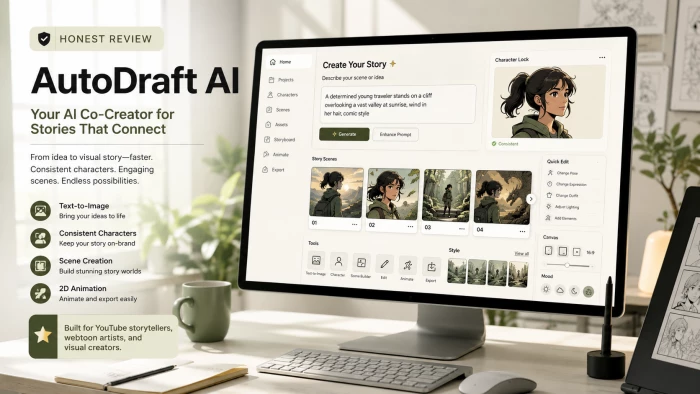
AutoDraft AI is a generative content platform built around animation, cartoons, comics, and visual storytelling.
Its official website positions the product as an AI animation tool for YouTubers. It combines character creation, backgrounds, voice generation, music, image generation, scene animation, and editing tools. The company also highlights examples of YouTube channels that it says have used AutoDraft in monetised animation workflows.
The platform is particularly focused on creators producing:
children’s stories;
horror stories;
educational cartoons;
animated explainers;
short-form social videos;
comic panels;
webtoons;
and recurring YouTube series.
The central idea is to reduce the number of separate applications needed to move from a written story to a visual video.
Dashboard and First Impression
Signup is straightforward and the free tier does not require a credit card, which lowers the barrier to a first look. The interface is built around templates plus a prompt box, with editing tools layered on top for poses, backgrounds, and touch-ups.
Beginner friendliness is a repeated theme in user feedback, helped by a large library of tutorial videos that shortens the learning curve. The trade-off shows up later: the deeper animation and voice controls take time to master, so the gap between a quick first image and a polished finished video is wider than the marketing suggests.
One specific point worth setting expectations on is speed. Multiple users describe waiting several minutes for a single generation, and some report a warm-up delay before the tool will generate at all. That is not a layout problem, but it shapes the whole first impression, so test the generation speed on your own account before you commit.
The AutoDraft AI Workflow
A typical project can move through the following stages:
Production stage
AutoDraft function
Story planning
Prepare a script and divide it into scenes
Character creation
Generate or train recurring characters
Environment design
Produce backgrounds for each location
Scene creation
Combine characters, poses, objects, and backgrounds
Voice production
Generate dialogue or narration
Movement
Animate scenes or character actions
Audio
Add background music and sound elements
Editing
Arrange scenes on the timeline
Export
Render the final video
The workflow is attractive because it reflects how a cartoon story is actually built. It does not begin and end with a single image prompt.
The difficulty appears when a creator needs to revise one small detail. AI-based production can generate scenes quickly, but maintaining continuity during repeated revisions may still require several attempts and additional credits.
Character and Scene Output: What to Expect
Output is where an AI art tool earns or loses trust, so it helps to stress-test it with a prompt that demands consistency and detail rather than a vague one. A useful prompt to try:
"Create a young detective character in a modern Indian city, semi-realistic cartoon style, standing under neon lights, cinematic mood, consistent face, detailed jacket, story poster look."
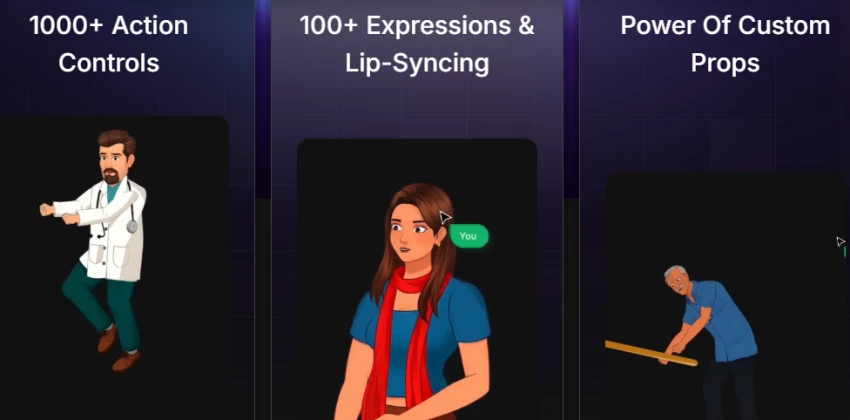
Based on the documented evidence, a first generation of a single character can look decent for a draft. The harder test is consistency across multiple scenes, and that is exactly what AutoDraft AI tries to solve with custom model training, where you train the AI on your own character images so the face and style hold up across many panels.
The caution is that the consistency feature is also where some buyers ran into trouble. Reports include character training that sat on an in-progress status for a long time without finishing, and image-to-image results that did not resemble the source image closely. So treat the table below as a starting expectation and confirm it with your own run.
Test area
Likely result
Note
Prompt understanding
Average to good
Handles clear, descriptive prompts better than broad cinematic ones
Character quality
Average
Decent for drafts; fine detail and faces can need cleanup
Background detail
Average
Acceptable for concepts; complex scenes may need retries
Consistency
Varies
Custom model training targets this; some users report training stalls
Editing needed
Medium
Usable as a base, often not final without touch-ups
The honest issue to flag is reliability of the consistency workflow. One strong image is easy. Keeping the same character recognizable across a full story is the real job for comic and webtoon creators, and that is the part where AutoDraft AI is least predictable today.
Features That Matter Most in Real Use
Character Creation
Character creation is the headline use. For drafts, mascots, thumbnails, and story leads it can produce workable results, and the custom-trained models are the mechanism meant to keep a character on-model across scenes. The weak spot is predictability, since consistency depends on training completing cleanly.
Cartoon and Illustration Styles
Cartoon and 2D styles are the tool's comfort zone, and they tend to look more usable than its attempts at realism. Expect to tune prompts to lock a style, and expect some drift between generations if you are not using a trained model.
Story Scene Creation
For turning a story beat into a scene, it can set a mood and a background well enough for storyboards and concept work. Tightly art-directed compositions, with exact placement and emotion, are harder and usually take retries.
Text-to-Image Workflow
Going from prompt to image is simple enough for beginners, especially with templates as a starting point. Clear, specific prompts get better results than short ones, so a little prompt-writing skill still pays off.
Editing and Regeneration
Inpainting, background swaps, object removal, and upscaling give you ways to refine an output rather than start over. The thing to watch is credits, since retries consume them and the exact deduction per action is not clearly documented, which makes heavy iteration hard to budget.
Feature
Real use case
Works well for
Limitation
Character generation
Story leads and mascots
Creators, comic artists
Consistency can vary
Cartoon visuals
Posts and thumbnails
YouTube, Instagram, blogs
Style may need prompt tuning
Story scenes
Storyboards and concepts
Writers, storyboard artists
Complex scenes need retries
Text-to-image
Fast concept drafts
Beginners, marketers
Output is rarely final-ready
Editing tools
Refining a result
Light cleanup, swaps
Retries spend credits
AutoDraft AI Pricing and Plan Value
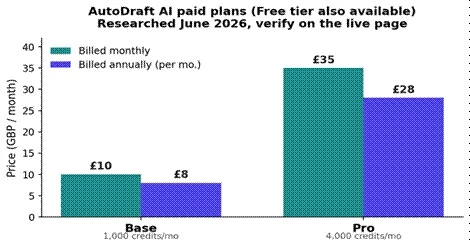
Pricing verified in June 2026 against the live page and recent listings. Always re-check before publishing, because one third-party source listed different figures, and prices change.
AutoDraft AI offers a free tier plus two paid plans, Base and Pro, with cheaper effective rates when billed annually. The free tier advertises access to most features with unlimited downloads and no card required, but free exports carry a watermark and generation is slower. Paid plans add unlimited 4K cloud downloads, the AI character generator, premium assets, and the full audio and video toolset.
Sourced from the live pricing page and recent listings, June 2026. Figures in GBP per month.
Plan
Price
Credits
Best for
Main concern
Free
GBP 0
Most features, watermark
Testing the tool
Watermark and slower speed
Base (monthly)
GBP 10 / mo
1,000 / month
Casual creators
Credits go fast with retries
Base (annual)
GBP 8 / mo (96 / yr)
12,000 / year
Steady light use
Annual commitment upfront
Pro (monthly)
GBP 35 / mo
4,000 / month
Regular creators
Cost depends on volume
Pro (annual)
GBP 28 / mo (336 / yr)
50,000 / year
Weekly publishers
Worth it only with volume
On value, the math favors regular use. If you generate character and concept visuals often, the credit allowances and unlimited downloads make Base or Pro reasonable, and the prices undercut heavier animation suites. If you only need an image or two a month, the free tier or a pay-as-you-go competitor will feel like a better fit.
Two practical notes before paying: the support is email-only, and the credit deduction per action is not spelled out. Given the speed and reliability complaints below, it is worth confirming current support responsiveness before committing to an annual plan.
User Reviews and Market Feedback
The clearest pattern in the feedback is a split between marketing-style coverage and buyer experience. Tool directories and the official pages describe a beginner-friendly, all-in-one studio. People who paid, particularly on AppSumo, describe a rockier reality.
On the critical side, recurring themes include painfully slow generation, generation and server errors, a warm-up delay before generating, character training that did not finish, and image-to-image output that missed the source. Several reviewers reported slow or absent email replies and asked for refunds, and some raised the familiar lifetime-deal worry about a product feeling abandoned.
On the positive side, supporters point to low cost, the generous free tier, mobile apps on Android and iOS, commercial rights to what you create, and the character-consistency concept as a genuine edge over generic image tools for video creators.
Source
Positive feedback
Common complaint
Writer's take
Official site
Broad feature claims, free tier
Marketing-heavy, light on limits
Useful for scope, needs verifying
AppSumo (buyers)
Cheap lifetime access
Slow generation, errors, refund requests
Loudest and most consistent signal
G2 and directories
Saves time and design cost
Limited depth, learning curve
Helpful but often promotional
Reddit and social
Good for cartoon and kids content
Speed and support frustration
Matches the reliability theme
Does this match a personal test? No personal generation run was done for this review, so the fairest thing to say is that the speed and support complaints are consistent enough across independent buyers to take seriously, while the upside is real for the specific cartoon and character use cases the tool is built around.
Where AutoDraft AI Looks Strong
• Custom model training is the standout, because it targets the one thing generic image tools struggle with: keeping the same character looking the same across many scenes.
• The all-in-one scope is convenient, since images, inpainting, upscaling, voiceover, music, and animation live in one place instead of across several subscriptions.
• Mobile apps on Android and iOS are a real advantage for creators who want to work away from a desktop, which several competitors do not offer.
• Commercial rights plus a low entry price make it accessible, and the vendor states you can monetize what you generate, which matters for YouTube and freelance work.
• It is approachable for beginners, with templates and a large tutorial library that get a first result out quickly.
Where AutoDraft AI Falls Short
• Generation speed is the biggest practical problem, with multiple buyers reporting several minutes per image and a warm-up delay before it will generate.
• Reliability is inconsistent, including reports of generation and server errors and character training that stalled without completing.
• Image-to-image fidelity drew specific criticism, with at least one buyer saying the result did not resemble the source image.
• Support is email-only, and several reviewers described slow or missing replies, which is risky when you hit a billing or generation issue.
• Credit usage is hard to budget, because retries consume credits and the per-action deduction is not clearly documented.
• Output is often a starting point rather than a finished asset, so plan for cleanup before anything is publish-ready or brand-approved.
AutoDraft AI Pros and Cons
Pros
Cons
Built specifically for cartoons and visual storytelling
Generation may be slow or fail
Strong focus on recurring character consistency
Consistency is not flawless
Includes characters, backgrounds, voices, animation, and editing
Advanced movement control remains limited
Custom model training is available
Custom workflows may require higher plans
Suitable for YouTube storytelling formats
Credits can be consumed by unsuccessful attempts
Low-cost entry plan
True cost depends on usable outputs
Useful for storyboards and concept development
Not a full replacement for professional animation software
Verified users generally rate it positively
Public review volume is still limited
Supports commercial-content workflows
Current licence terms should be checked before publishing
May reduce dependence on several separate tools
Relying on one platform creates workflow dependency
AutoDraft AI vs Alternatives
AutoDraft AI sits in an unusual spot, between simple image generators and full animation suites. Here is how it compares to tools creators often weigh against it.
Tool
Better for
Where it beats AutoDraft AI
Where AutoDraft AI feels better
Vyond
Corporate and explainer animation
Polish, templates, track record
Lower price and AI character generation
Animaker
Template-driven animation
Bigger template library
Custom character consistency focus
Midjourney
Artistic still images
Stronger visual quality
Built for character and story video
Canva AI
Social media design
Editing and template ecosystem
More focused on story characters
Leonardo AI
Creative control over images
More advanced image settings
Simpler, animation-oriented workflow
After comparing the alternatives, AutoDraft AI feels less like a universal image generator and more like a tool for creators who want fast cartoon and character drafts with an attempt at consistency, and who can tolerate some rough edges to get a low price.
Best Use Cases for AutoDraft AI
It is strongest when the output is a creative starting point rather than a final, pixel-perfect asset. The use cases where it makes the most sense:
• YouTube story and kids content, where consistent cartoon characters drive the channel.
• Webtoon and comic concepts, character references, and storyboards.
• Thumbnail and social-post concepts that you will polish afterward.
• Children's story visuals, blog illustrations, and pitch or deck imagery for early drafts.
It is least convincing when an image must be final, photoreal, or brand-approved without editing, or when a deadline cannot absorb slow generation and the occasional error.
Who Should Skip AutoDraft AI
Being honest about fit builds more trust than overselling. You should probably look elsewhere if you are:
• A professional illustrator who needs precise, full control over every element.
• A brand that needs strict visual consistency or clear, documented legal and licensing terms.
• Someone who only needs one image occasionally, where a paid plan is hard to justify.
• On a tight deadline that cannot tolerate slow generation, retries, or email-only support.
• Expecting photoreal output, since cartoon and stylized work is the real strength.
As a concrete example, if you need the same character across twenty scenes with identical clothing, face, and proportions, expect to lean on custom model training and budget extra time for retries until it behaves.
Is AutoDraft AI Safe to Use?
AutoDraft is a functioning commercial platform with an official website, pricing system, company presence, public tutorials, and customer reviews.
Users should still apply normal precautions.
Do not upload confidential client assets, personal records, unreleased intellectual property, or copyrighted reference material without permission. Review AutoDraft’s current privacy policy, ownership terms, commercial licence, and data-handling information before using it for sensitive projects.
Custom model training requires particular care because the training images may represent a person, branded character, artist’s work, or protected intellectual property.
Is AutoDraft AI Legit?
AutoDraft AI appears to be a legitimate creative software product rather than an anonymous or non-functional service.
It has an active website, documented plans, public company profiles, creator demonstrations, verified AppSumo reviews, G2 feedback, and commercial-use information.
Legitimacy does not guarantee that every generation will work or that the tool will fit every animation workflow.
The more relevant question is whether its combination of output quality, credit usage, speed, and editing control is suitable for your production style.
Editorial Rating
Category
Rating
Assessment
Character creation
4.1/5
Well aligned with cartoon and story workflows
Character consistency
4.0/5
A meaningful feature, although manual correction is still needed
Background generation
3.8/5
Useful for building recurring environments
Animation quality
3.3/5
Suitable for simple movement, but limited for complex action
Voice and audio tools
3.6/5
Convenient for an integrated workflow
Ease of production
3.9/5
Accessible to creators without formal animation experience
Speed and reliability
3.0/5
Public complaints about slow or failed generations reduce confidence
Credit value
3.5/5
Competitive pricing, but retries affect the true cost
Editing control
3.2/5
Enough for basic assembly, not advanced production
Overall rating
3.7/5
A useful animation assistant for recurring content, but not a full studio replacement
Final Verdict
AutoDraft AI is worth trying if your goal is fast visual ideas, cartoon characters, and story scenes without hiring an illustrator for every draft. The free tier makes that low-risk, and the character-consistency idea is a real reason to look closer if you publish character-driven video.
The biggest reason to use it is the combination of a low price, an all-in-one toolset, and a serious attempt at character consistency. The biggest reason to hesitate is the steady stream of buyer complaints about slow generation, errors, and slow support, which are the things that quietly wreck a content schedule.
Recommendation: start on the free tier and run your own consistency test before paying. If generation speed and support feel acceptable for your workflow, Base or Pro can be good value for regular creators. If you need finished, reliable, photoreal output on a deadline, choose a more polished tool instead.
 (1)_1781688246.webp)