I went into this expecting one “best” AI animation tool. What I found instead is that animation splits into different jobs, and each job rewards a different tool. If I want quick 2D explainer-style scenes, I reach for a template-first animator. If I want consistent 3D characters, I need an avatar-and-animation library. If I want realistic movement, I need AI motion capture. If I want music-driven generative visuals, I need audio-reactive video AI.
I used the community discussion in this Reddit thread, which names tools and explains why creators pick them, as a starting point. Then I verified capabilities on official product pages and compared them against independent roundups.
When I pick an animation tool, I judge it by whether it can hold style consistency, whether it can hold character consistency, and whether it helps me finish, not just generate. That last part matters because a lot of AI tools can create “a clip,” but they struggle when I need scene continuity, pacing, text overlays, brand look, and export formats.
I also treat “AI animation” as three buckets that rarely overlap perfectly: scene-based explainer animation, character-based animation, and motion-based animation. Independent roundups frame the space similarly by distinguishing between different creator needs and tool categories.
This is where I start when I want 2D cartoons without a pipeline
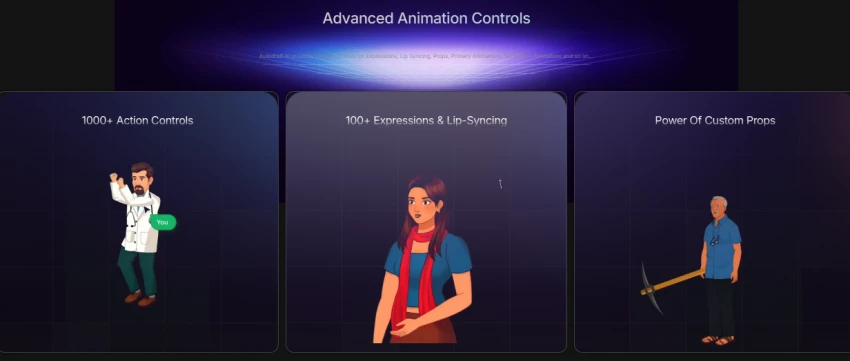
When I need fast 2D animation assets and a workflow that feels built for social content, I look at AutoDraft. It positions itself as an AI-first cartoon and 2D animation maker that helps me generate characters, backgrounds, and animated scenes without having to draw frame-by-frame.
What makes AutoDraft useful in practice is that it doesn’t stop at “generate.” It tries to act like a toolkit. When I read their feature pages, they emphasize character animation workflows and credit-based generation tied to plans, which is how most “creator-first” AI suites structure usage.
On pricing, I used the official pricing page rather than third-party directories, because pricing changes often. AutoDraft publicly lists a free tier and paid tiers on its site.
Where AutoDraft can disappoint me is when I expect studio-grade rigging control. It’s built to reduce complexity, so I treat it like a fast production system for shorts, explainers, and content marketing cartoons, not a replacement for a full animation studio.
This my pick when I need “explainer video energy” with templates, characters, and voice in one place
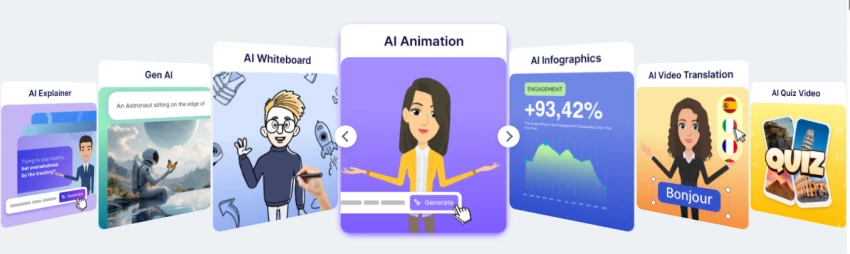
When my goal is a business animation that looks clean, consistent, and brand-ready, I check Animaker because it’s designed around drag-and-drop scenes, character creation, and a deep library of assets. Animaker itself highlights a large stock asset library and a broad feature suite that supports end-to-end production rather than just generation.
I like Animaker for consistency because template-based systems naturally keep typography, scene composition, and timing coherent. That matters more than “AI wow” when I’m building marketing content that needs to look stable and professional.
On the free plan question, Animaker explicitly says it offers a free-forever plan, and its cartoon maker page repeats the same claim. That makes it easy for beginners to test, but in my experience with tools like this, the real limitation is usually watermarking, resolution, export limits, or premium assets that quietly define the production ceiling.
For pricing, I looked at both Animaker’s pricing interface and an independent pricing summary that lists a free plan plus paid tiers, because Animaker’s pricing can be presented inside an app flow.
The limitation I factor in is that template-driven animation can feel “stock” if I don’t customize aggressively. If I want a unique visual identity, I need to bring my own characters, brand kit, and design discipline into the project.
This the fastest way I found to go from text to an animated explainer, but I treat the free plan as a demo
When I want speed, I explore Renderforest’s AI animation generator because the company positions it as “text in, animation out” for business outcomes like explainers and product demos. Renderforest also explicitly says I can use the AI animation generator for free, which makes it accessible for testing.
The key trade-off is what “free” means in export terms. Renderforest states that its free plan exists but exports on the free plan may include a watermark or lower resolution, which is the normal pattern for template platforms.
When I checked its subscriptions page, Renderforest also frames free access as “always free to try” and explicitly mentions watermarking on free exports. That’s why I treat the free tier as a workflow test, not a delivery tier
If my output is client-facing, I plan for a paid export path. If I’m prototyping, I happily use the free tier to validate script and pacing.
This the tool I reach for when I want consistent 3D characters and a library of animations
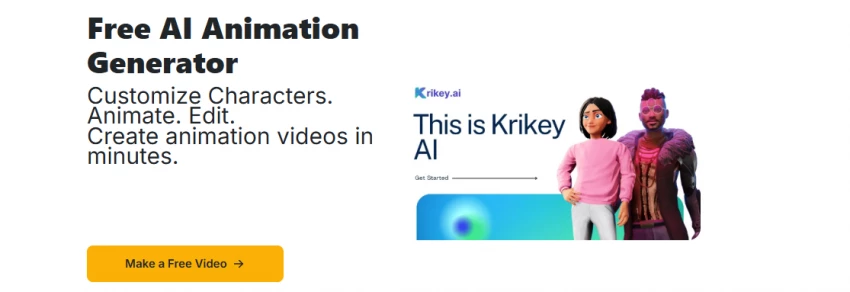
If my project needs a consistent 3D avatar who can act across multiple scenes, I look at Krikey. Krikey describes itself as an all-in-one studio for AI animation with 3D character creation, animation, and voice tools.
The reason Krikey stands out to me is that it leans heavily into character continuity. When I read their “AI animation maker” documentation, they emphasize custom avatars, camera angles, facial expressions, and gestures, which are exactly the controls I need to keep a character feeling “the same” from scene to scene.
Pricing is unusually transparent compared to many creator tools. Krikey’s pricing page lists a free plan with a one-time credit grant and a Pro plan that replenishes monthly credits, and it explains how credits work.
The limitation I keep in mind is that “3D avatar libraries” can sometimes create a samey look across creators unless I customize character design, environments, and camera language. It’s powerful, but I still need taste.
It is not a cartoon maker, but it’s the fastest way I found to get real human motion into 3D animation
When my problem is movement realism, not scene creation, I use AI motion capture instead of forcing a video generator to “guess” physics. That’s why I research DeepMotion as a motion layer.
DeepMotion describes a workflow that converts video into 3D animations in a browser, which is the exact value proposition for small teams that don’t want suits, markers, and a mocap stage.
On the Animate 3D page, DeepMotion lists features like face and hand tracking, physics simulation, foot locking, and motion smoothing. Those are not marketing fluff; those are the specific details that determine whether a walk cycle looks believable and whether feet slide across the floor.
Where it can fail me is when the source video is low quality or badly shot. DeepMotion publishes capture guidelines that make it clear it expects human or humanoid motion and gives practical capture constraints. If I ignore those, I get noisy animation.
If I’m building animation for games or 3D shorts, I often pair a character tool like Krikey with a mocap layer like DeepMotion, because that combination gives me consistent characters and believable motion.
They are the creative weapons when I want music-driven, generative animation aesthetics
When I’m making animation that lives inside music visuals, lyric videos, trippy loops, or audio-reactive motion, I stop thinking like a cartoon director and start thinking like a motion artist. That’s where tools like Kaiber and Neural Frames show up in independent roundups.
With Kaiber’s Superstudio, the platform describes storyboarding, motion refinement, and music-reactive visuals. That is exactly what I need when a video must “feel synced,” even if it’s abstract.
Pricing for Kaiber is tricky to verify because I hit a desktop-only gating message on the official pricing page. That means I can’t responsibly quote current official prices from that page in this environment.
For Neural Frames, the product is explicit about audio reactivity and music workflow. Their own page explains that it analyzes tempo and structure, supports guided style direction, and exports in 4K, which is the kind of specificity I want for music pipelines.
I treat these tools as “aesthetic engines.” They can look incredible, but if I need character acting and dialogue blocking, I go back to Krikey or Animaker.
It stays relevant because hand-drawn animation is still the cleanest path to true character consistency
AI tools still struggle with perfect character consistency across complex motion unless I constrain the problem. If I want 100% character control, I often return to frame-based 2D animation apps, and FlipaClip remains popular for that reason.
FlipaClip claims large-scale adoption and provides a feature-rich drawing workflow with layers and sound. That aligns with why creators keep using it even as AI grows.
Now to your question about whether it’s “100% free.” I cannot call it 100% free because FlipaClip’s own public support content describes a subscription product called FlipaClip Plus and specifically mentions a 7-day free trial for premium features, which implies that premium features are paid.
The Play Store listing also includes developer responses that explain why some features are subscription-based.
So I treat FlipaClip as free to start, paid to scale.
It is the simplest bridge when I already have footage and I want to animate it with keyframes
This is the tool people overlook because it’s “video editing,” not “animation,” but if my goal is motion graphics, zooms, pans, animated overlays, and dynamic movement on a timeline, CapCut’s keyframe animation is a real answer.
CapCut positions keyframes as a way to create animated movements and smooth motion inside edits, and it markets the feature as free to download and use without a credit card, which makes it accessible for creators.
I use CapCut when the “animation” I need is motion design on top of images or clips. It’s not where I build characters from scratch, but it’s where I make content feel alive.
If I want fast explainer animations, I prioritize Animaker or Renderforest because templates and structure help me finish.
If I want 2D cartoon generation and creator-style assets, I explore AutoDraft.
If I want consistent 3D characters who can act, I choose Krikey because it’s built around avatars and animation libraries.
If I want realistic motion, I layer in DeepMotion because it converts real human movement into usable 3D animation.
If I want music-driven generative visuals, I consider Neural Frames or Kaiber, because they’re designed for audio-reactive aesthetics rather than dialogue scenes.
That’s how I keep the recommendation accurate: I match the tool to the job instead of pretending one tool wins everything.
Which AI animation tool is best?
I don’t pick a single winner because “best” depends on what I’m animating. For explainer-style animation, I lean toward Animaker because it’s template-driven and designed for end-to-end production. For fast text-to-animation, I test Renderforest’s AI Animation Generator and only upgrade if the workflow fits, because the free plan can carry watermarks or lower resolution. For consistent 3D characters, I pick Krikey because it’s built around avatars and animation libraries.
Is FlipaClip 100% free?
I don’t call it 100% free. I can start for free, but FlipaClip’s own support pages describe FlipaClip Plus as a subscription with premium features and a 7-day free trial, which implies paid access after the trial.
Can ChatGPT make animations?
ChatGPT helps me write scripts, storyboards, prompts, and even animation code, but it doesn’t automatically “become an animation studio” by itself. In practice, I use it as the planning brain, then I execute the animation in tools like Animaker, Renderforest, Krikey, FlipaClip, or CapCut. A lot of creators follow this “ChatGPT for scripting, another tool for visuals” workflow.
Can I animate in CapCut?
Yes, I animate inside CapCut using keyframes. CapCut explicitly positions keyframes as a way to create animated movement, smooth motion, and motion graphics-style effects in edits.
Be the first to post comment!
When I started digging into Lenso.ai, I didn’t want surface-level claims. I want...
Sakshi Dhingra15 hours ago
Motion graphics is no longer “only After Effects.” Today I can generate motion s...
Sakshi Dhingra2 days ago
Blaze AI presents itself as an all-in-one AI marketing platform built specifical...
Sakshi Dhingra2 days ago
AI video generation is no longer experimental. It has become a production workfl...
Sakshi Dhingra3 days ago
When I evaluate an AI video tool, I don’t just skim the homepage. I trace the fu...
Sakshi Dhingra3 days ago
Uber Eats is officially moving beyond simple food delivery and positioning itsel...
Sakshi Dhingra1 week ago