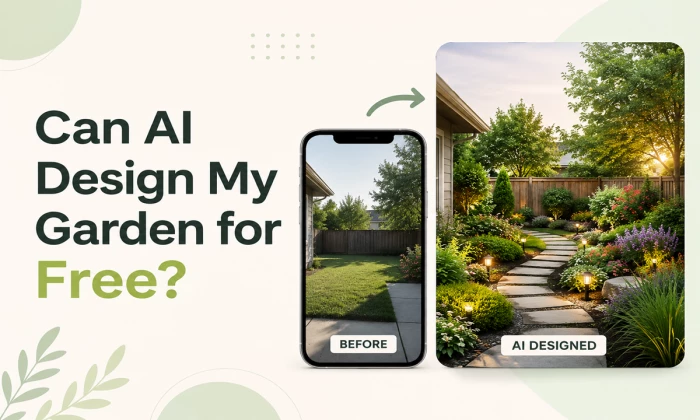
The honest answer, the tools that actually cost nothing, the traps that don't, and where a real human still earns their fee
You are standing in your yard, phone in hand, wondering whether you really need to pay someone thousands to tell you where the roses should go. It is a fair question, and the numbers behind it are eye-watering. Hiring a professional landscape designer in the US costs around $4,571 on average, and most homeowners end up paying somewhere between $1,944 and $7,213 according to cost data published by Angi and HomeAdvisor. Even before any real design work begins, an initial consultation alone runs $100 to $200, and after that designers typically bill $50 to $150 per hour. Want a 3D model of the plan instead of a flat drawing? That is another $400 to $500 on top. Complex plans can climb to $15,000.
So when free AI garden design tools promise a full yard makeover from one photo, in under a minute, without spending anything at all, it sounds almost too good. And here is the honest truth: it is partly true and partly marketing. Some of these tools are genuinely free and genuinely useful. Others hand you one watermarked image and then ambush you with a paywall. And a few things AI simply cannot do at any price, no matter what the app store screenshot promises.
Yes, AI can design your garden for free, but only up to a specific point. Here is the honest three-part split that the rest of this article unpacks:
Free AI handles concepts and visuals brilliantly: Upload a photo of your yard, pick a style like Japanese, Mediterranean, cottage, or xeriscape, and tools like Neighborbrite or REimagine Home hand you a photorealistic redesign of your own space in seconds. This part costs nothing and works surprisingly well.
Free AI does not give you a build-ready plan: Exact measurements, soil-matched plant lists, drainage decisions, irrigation layouts, and realistic mature plant sizing are either locked behind paid tiers or, more importantly, beyond what these tools can reliably do at all.
The smart move is a mix: Use free AI to explore looks, settle on a direction, and build a to-scale layout. Then, only if your project involves digging or drainage, spend roughly $100 to $600 on a human sanity check instead of the full $4,500 design package.
To understand why that split exists, it helps to look at what is actually happening inside these tools when you hit the generate button. The technology explains both the magic and the failure points, so that is where we go next.
Nearly every free AI garden tool, whatever its branding, runs the same four-stage pipeline. The diagram below shows it end to end, and knowing this pipeline is the single most useful piece of knowledge in this article, because every strength and weakness discussed later traces straight back to it:
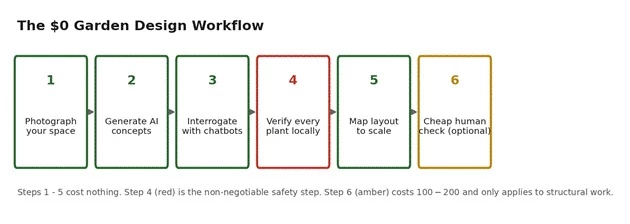
Figure 1: The four-stage pipeline behind virtually every photo-to-render garden tool in 2026.
1. Photo intake. You upload a picture of your yard, balcony, terrace, or front garden. This photo is the entire universe the AI knows about your property. It cannot see around corners, under the soil, or across the seasons, and it does not know whether the photo was taken in the one hour a day that corner gets sun.
2. Structure separation. The AI runs image segmentation to separate the fixed elements (your house, boundary walls, fences, driveway) from the changeable landscape. Tools like AI Yard Design advertise proprietary composition algorithms built specifically to keep your home's structure untouched while everything green gets reimagined. This is why renders look believable: your actual house stays exactly where it is.
3. Style-guided generation. You pick a style, and a diffusion-based image model repaints the changeable zones with plants, paths, lighting, and hardscape matching that style's learned visual patterns. The model has seen enormous numbers of garden images and knows what a cottage garden looks like, statistically. It does not know what a cottage garden needs, horticulturally.
4. Render delivery. You get a photorealistic image back, usually in 10 to 60 seconds. Some tools generate several concepts per upload so you can compare directions side by side, and a few add an AI editor for follow-up tweaks.
Notice the red line at the bottom of the diagram, because it is the key to this entire topic: measurements, soil data, sunlight tracking, climate verification, and plant availability are all missing from the pipeline. The output is an image, not a blueprint.
The image is genuinely valuable because you are reacting to your actual yard instead of scrolling Pinterest photos of someone else's garden. But an image cannot tell your contractor how deep to dig, and it cannot promise that the gorgeous hydrangea it painted will survive your summer. Keep that in mind as we look at what you are saving, because the savings are real even with that limitation.
Before judging what free tools can do, look at what they are replacing. The chart below plots the verified 2026 cost ranges for every route to a garden design, from a quick consultation to a full professional package:
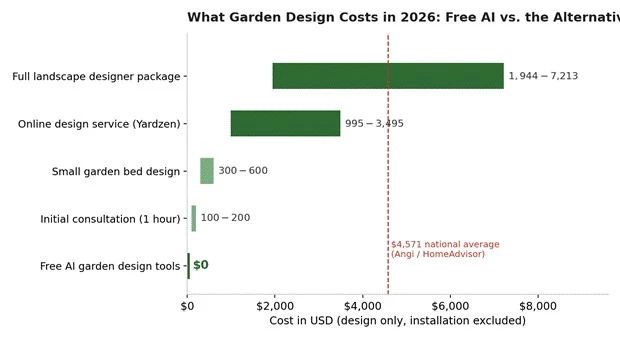
Figure 2: Verified design-only cost ranges. Sources: Angi, HomeAdvisor, HomeGuide, LawnStarter cost guides and Yardzen package pricing (2026).
A few details behind those bars are worth spelling out, because they define exactly what the free tools are competing against:
The full package: The $1,944 to $7,213 range covers a designer's site visit, 2D or 3D plans, plant lists, and revisions. Designers charge hourly ($50 to $150), flat fees, or a percentage of the total project, and cost guides estimate design fees at 15% to 20% of a project's total cost. On a $30,000 landscaping project, that is $4,500 to $6,000 for design alone.
The middle option: Online services like Yardzen use human designers working behind software and charge $995 to $3,495 per package with a typical 5 to 10 day initial turnaround. Cheaper than most local pros and genuinely build-ready, but still four figures.
The small stuff: Even a single garden bed design from a nursery horticulturist, covering a consultation, plant list, and basic sketches for a 600 to 1,000 square foot garden, costs $200 to $600. A landscape architect, the licensed tier above designers, starts at $100 to $250 per hour.
Now look at that $0 bar at the top of the chart. Even if free AI only handles the visualization and inspiration stage, that stage is exactly what a large chunk of the designer fee pays for. If a $0 tool gets you to a confident 'this is the look I want', you have already saved real money, and you walk into any paid conversation far better prepared. The question becomes which free tools actually deliver, and that is a messier question than the app store listings suggest.
Independent testing roundups in 2026 kept finding the same thing: 'free' in this category comes in three flavors, and only one of them deserves your photo uploads. We will map those flavors visually later in the article; for now, every tool profiled below sits firmly in the genuinely free category, with its exact allowance verified against current pricing pages:
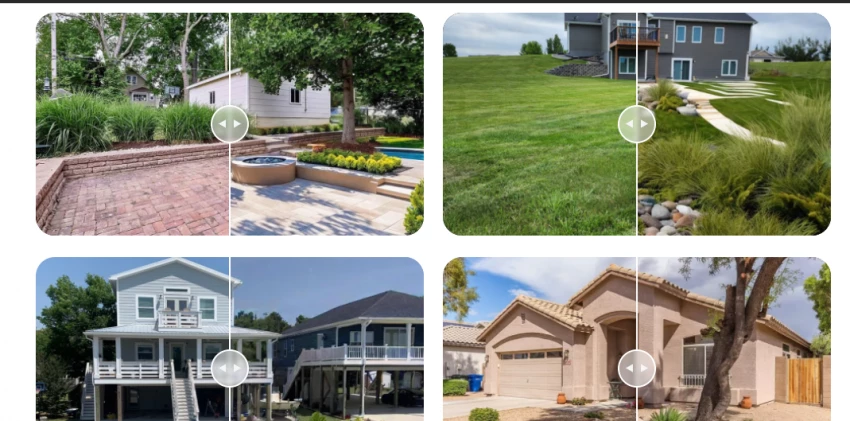
Neighborbrite is the tool most independent testing guides crown as the best genuinely free option, and it is easy to see why. You upload a yard photo, pick from a range of garden styles, and get AI renders back at no cost, with no card required. Two things set it apart in the free bracket. First, it lets you customize specific elements like trees and fire pits rather than only swapping whole styles. Second, it optimizes plant suggestions based on your location and climate, which most free render tools skip entirely. Its own positioning is refreshingly honest: it is aimed at people who cannot afford landscape architects, and user reviews echo exactly that, with one new homeowner describing a completely unlandscaped property that finally felt possible to tackle after seeing the renders.
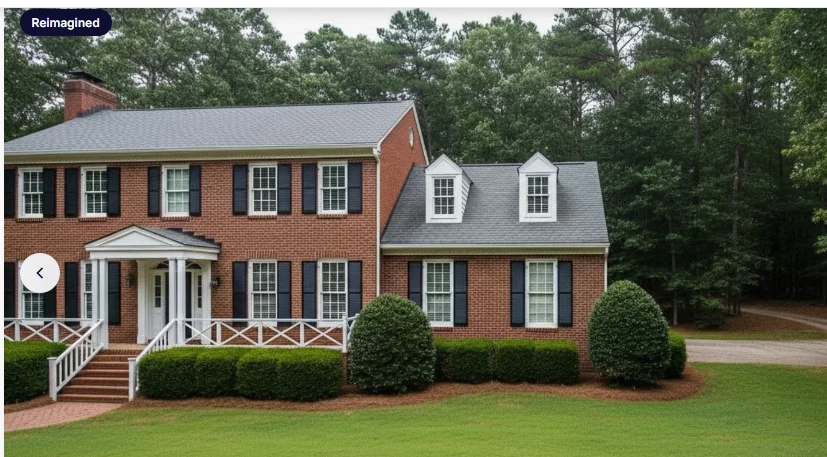
REimagine Home is a fast, photo-first restyle tool covering both interiors and exteriors. New users get 3 free designs plus a trial with no credit card required, which makes it the perfect second opinion after Neighborbrite. The trade-off is depth: because it is a general home-design AI rather than a garden specialist, it does not carry climate-aware plant lists, and its strength is broad restyling rather than a buildable planting plan. Reviewers consistently describe it as the best free, low-commitment first look, and thinner than garden-focused tools if you try to ride it all the way to a planted garden. If you outgrow the free designs, the Essential plan starts at $14 per month for 30 credits.
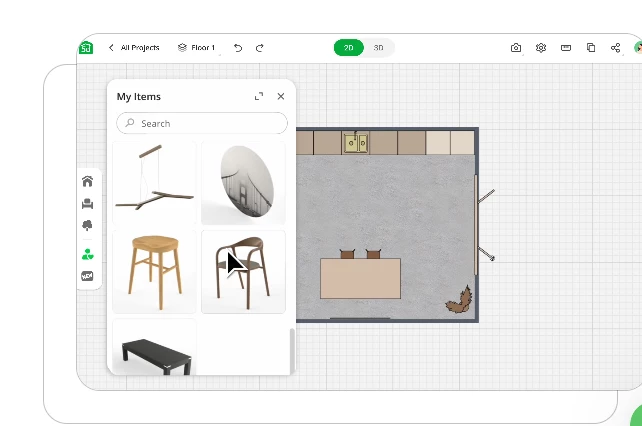
Planner 5D attacks the problem from the opposite end. Instead of repainting a photo, it gives you a free drag-and-drop editor for building 2D and 3D landscape plans with real dimensions: yards, patios, decks, pathways, pools, fences, and terrain features, with an AI assist that can generate a layout from an uploaded sketch or a template. You can adjust materials, lighting, and textures, then render the plan in a hand-drawn or photorealistic style to share with whoever is doing the work. This is the tool that converts a pretty AI render into something with measurements, and its free tier covers a complete home garden plan.

SketchUp's free browser version is a full 3D modeling tool for personal, non-commercial use, and it is the strongest free option the moment your garden involves anything structural. A deck, a pergola, raised beds, or a retaining wall can be modeled to exact dimensions, and the 3D Warehouse gives you access to millions of free user-created models of plants, furniture, and structures. The 2026 update brought a rewritten graphics engine and improved terrain features. The honest caveats: there is a learning curve, and it has no garden-specific intelligence, meaning no plant databases, no growth simulation, and no planting calendars. Paid tiers start at $129 per year for Go, but the free browser version handles a home project fully.
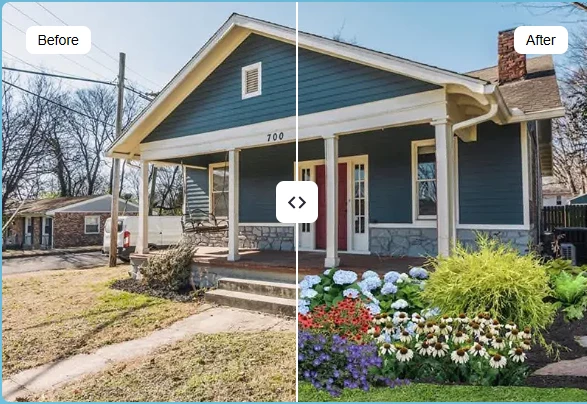
iScape flips the AI script: instead of the machine deciding, you place plants, paving, and hardscape onto a photo of your yard by hand. The free plan includes basic elements and up to 2 saved designs. It takes more time than one-click AI generation, but you control every element, which suits people with a clear vision and the patience to build it piece by piece. Two practical notes from testing: the deeper 2D and 3D features are iOS-first, and the Pro tier at $29.99 per month (or $299.99 per year) is aimed mostly at professional landscapers, complete with a proposal tool.
The general-purpose chatbots do not render your yard, but their free tiers cover everything around the render: shortlisting plants for your climate, explaining sun and spacing requirements, comparing maintenance loads, and sanity-checking a layout idea before you commit. Gemini adds a genuinely useful trick: its live video mode can look at your garden through your phone camera in real time, identify existing plants, and suggest replacements for problem areas. In one documented test, it quickly produced multiple suitable plant options for a sunny border receiving six hours of direct light, and its conversational mode let the tester refine the list on the fly. The same testing also surfaced real limits, which get their own section shortly.
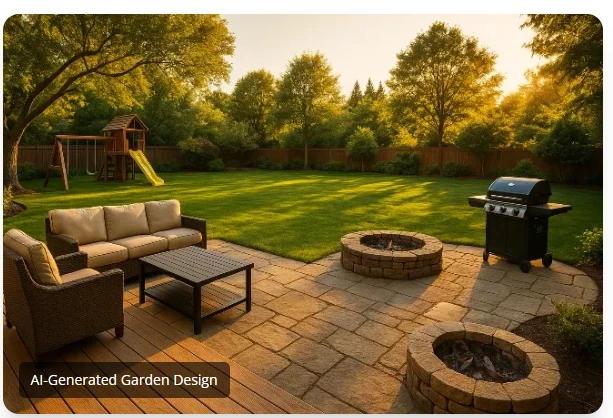
A web-only photo-to-design tool that gives 3 free generations every month rather than a one-time allowance, which makes it handy for slow, ongoing experiments across seasons. The catch: you get renders only, no plant list. The Pro plan is $9.99 per month, the cheapest paid upgrade in the category.
Here is the whole free landscape compressed into one view, so you can match a tool to the stage you are at:
| Tool | Verified Free Tier | Paid Upgrade | Strongest At |
| Neighborbrite | Free renders, style options, climate-based plant suggestions | Optional paid features | First concepts, truly free |
| REimagine Home | 3 free designs, no credit card | From $14/month (30 credits) | Quick second-opinion restyles |
| Planner 5D | Free 2D/3D layouts, drag-and-drop, AI assist | Paid catalog items | Measured beds and patios |
| SketchUp Free | Full browser 3D modeling, personal use | Go at $129/year | Decks, pergolas, raised beds |
| iScape | Basic elements, 2 saved designs | Pro at $29.99/month | Manual phone-based design |
| ChatGPT / Gemini | Free-tier chat; Gemini live video garden analysis | Optional paid plans | Plant research and Q&A |
| myGardenGPT | 3 free generations per month, renders only | Pro at $9.99/month | Ongoing monthly experiments |
A pattern worth noticing before moving on: the photo-to-render tools (Neighborbrite, REimagine Home) are free at the inspiration stage, while the measurement tools (Planner 5D, SketchUp) are free at the planning stage. No single free tool covers both ends well. That is exactly why the workflow later in this article chains them together instead of relying on one app.
Most readers of this article never need to pay anything. But for context, this is what the paid upgrades verified in 2026 actually cost per month, plotted against the cheapest possible hour of a human designer's time:
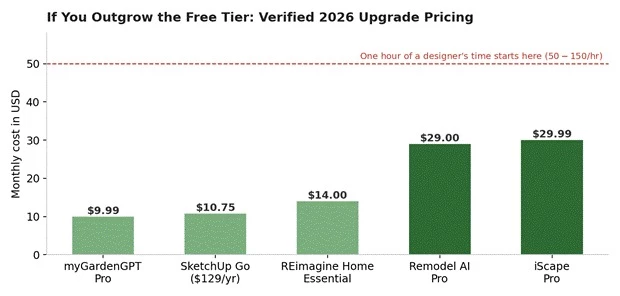
Figure 3: Verified monthly upgrade pricing, 2026. SketchUp Go shown as its $129/year plan divided across 12 months. The dashed line marks the bottom of the $50 - $150/hour designer rate range.
Read the gap between the bars and the dashed line: even the most expensive subscription here, iScape Pro at $29.99, costs less per month than a single hour at the bottom of the designer rate range. Three full months of it cost less than one hour at the top of that range. That ratio is the economic backbone of the mixed approach this article recommends. But before recommending any approach, you need the raw material every tool depends on, and it is not an app. It is your photos.
Remember the pipeline in Figure 1: your photo is the entire universe the AI knows about your property. Every weak render traces back to a weak photo, so five minutes of care here upgrades every result downstream:
1. Shoot in flat daylight. Overcast midday light is ideal. Harsh shadows get interpreted by the segmentation stage as objects or terrain features, and dusk shots produce muddy renders.
2. Capture the full space in each frame. Stand back far enough that the AI can see where the yard starts and ends. Cropped photos make the tool guess your boundaries, and it guesses badly.
3. Take at least three angles. One from the house looking out, one from the far end looking back, and one of any problem area like a dead patch, a slope, or an awkward corner. Different tools favor different angles, and you want options.
4. Include the house facade for front yards. Front yard tools explicitly work best when the shot shows the home's face plus the lawn, driveway, and walkway, because the style engine coordinates the garden with the architecture.
5. Clear the clutter first. Bins, hoses, and parked bikes get segmented as permanent fixtures and can survive into your dream garden render. Move them before shooting, not after.
With good photos on your phone, the actual design work begins, and it follows a fixed order for a reason: each free tool hands off to the next one.
This is how to take your garden from 'blank yard' to 'plan I trust' spending nothing, using the tools profiled above in the order each one is strongest. The diagram shows the whole journey at a glance, and the numbered steps below explain each stage:
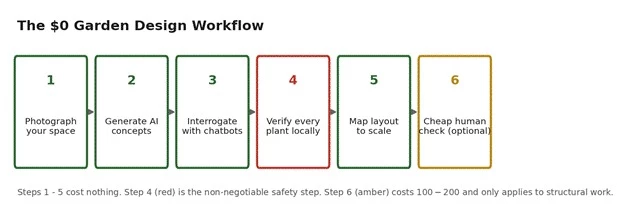
Figure 4: The six-stage workflow. Only the final stage involves any spending, and only for structural projects.
1. Photograph your space properly. Apply the five photo rules from the previous section. Every render you generate later inherits the quality of these shots.
2. Generate style concepts. Run your best photo through Neighborbrite, then spend your 3 free REimagine Home designs on 3 genuinely different styles rather than variations of one. Within 15 minutes you will have 6 or more versions of your own yard to compare. React honestly: which one would you actually sit in on a Sunday evening?
3. Interrogate your favorite with the chatbots. Take the winning render to free ChatGPT or Gemini and ask practical questions: which plants in this style suit my city's climate, how much sun does each need, how much maintenance does this style demand month to month, roughly what does it cost to establish. Gemini's live video mode can even look at your existing garden through the camera and identify what is already growing there.
4. Verify every plant independently. This is the red step in the diagram, and it is non-negotiable for reasons the limitations section documents in detail. Cross-check every AI plant suggestion against your local nursery, agricultural university resources, or extension gardening guides before spending anything on plants. A later figure prices exactly what skipping this step costs.
5. Map the layout to scale. Rebuild the concept in Planner 5D or, for structural elements like pergolas and raised beds, SketchUp Free, with real measurements: bed widths, path clearances, distances from walls, gate swing room. This step converts a pretty picture into something a gardener or contractor can actually quote against.
6. Get one cheap human check (only if needed). If the project involves digging, drainage, slopes, retaining walls, or anything expensive, a $100 to $200 consultation catches mistakes that cost multiples of that to fix later. For a few flower beds and planters, skip this step entirely. This is the amber step: optional, targeted, and still roughly 96% cheaper than the full package.
Steps 1 through 5 cost you nothing but an afternoon. So what do you actually get for that afternoon, and what do you not get? The next three sections take that question apart: first the genuine wins, then a side-by-side scorecard, then the documented failures.
It is easy to write AI garden tools off as toys once you have seen the limitations list, so let us be fair first. Measured against the workflow above, free AI is legitimately strong at four things:
All four strengths share one property: they sit at the front of the project, before anything is bought or built. The weaknesses sit at the back, exactly where mistakes get expensive. The scorecard below shows the two halves side by side, and it is worth a long look before the detailed failure list.
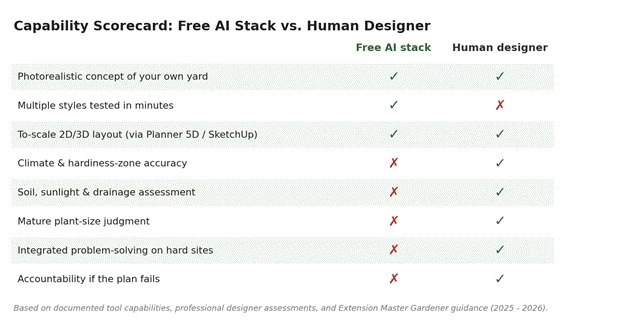
Figure 5: Where the free AI stack matches a professional and where it cannot. The stack refers to the chained tools from the workflow, not any single app.
Two things jump out of this grid. First, the free stack actually beats the human on one row: no designer on earth turns around multiple full-style concepts in minutes. Second, and more importantly, every red cross in the AI column sits below the line where decisions start costing money. Climate accuracy, soil and drainage judgment, mature sizing, integrated problem-solving, and accountability are precisely the capabilities that stop a garden from failing in year two. The next section documents each of those crosses with sources, because they are not hypothetical.
The renders look convincing, which is exactly what makes their weaknesses dangerous. These failure points are not speculation; each one is documented by professional designers, Extension Master Gardener programs, academic surveys of AI in landscape architecture, or hands-on testers:
It invents plants that do not exist: Extension Master Gardener volunteers have publicly warned that AI can hallucinate photos of non-existent plants and produce garden designs that are physically impossible to implement. If you cannot confidently name a plant in your render, it may not be purchasable anywhere on earth.
It cannot see your soil or your sun: AI does not test soil, track how sunlight moves across your yard through the day, or notice the corner that stays waterlogged every monsoon. Professional designers stress that conditions vary even within a single yard, and unless you feed the tool precise site data, it fills the gaps with broad assumptions.
Read that list again and notice something: not one of these failures happens at the concept stage. Every single one happens when an unverified AI output gets treated as a final answer. And treating it as final has a very specific price tag, which the next chart puts in dollars.
Step 4 of the workflow, verifying every plant against local sources, earned its red border in the diagram because plant mistakes are the one AI failure you pay for directly. These are HomeGuide's verified 2026 installed costs for common plantings, which is to say, the replacement bill every time an AI-suggested plant turns out to be wrong for your site:
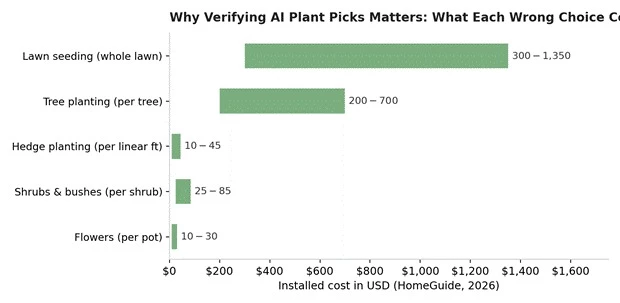
Figure 6: Verified installed planting costs (HomeGuide, 2026). Each wrongly chosen item costs this much again to replace, plus the season you lose waiting.
Run the arithmetic on a modest mistake. An AI render sells you on three trees and a hedge line that do not suit your soil: that is $200 to $700 per failed tree and $10 to $45 per linear foot of failed hedge, plus removal labor, plus a lost growing season. A single bad tree choice can exceed the $100 to $200 consultation that would have caught it, which is the entire logic of the mixed approach in one sentence. Speaking of which, it is time to price the three approaches side by side.
There are really three ways to get a garden design in 2026, and the cost gap between them is dramatic enough to deserve its own chart:
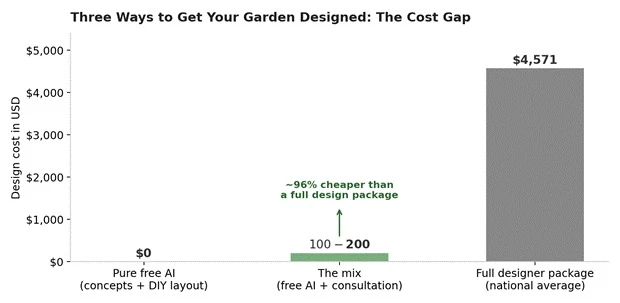
Figure 7: Design-cost comparison across the three approaches. The mix delivers professional risk-checking at roughly 4% of the full-package average.
Reading the three bars honestly:
Pure free AI ($0): Right for container gardens, balcony makeovers, a few new beds, or any project where the worst-case mistake is a dead plant priced at the small end of Figure 6. You carry the verification burden yourself, but the stakes are low.
The mix ($100 to $200, up to $600 for a designed bed): Right for most real projects: you do steps 1 through 5 free, then buy one or two hours of professional eyes on the plan, or a nursery horticulturist's bed design at $200 to $600. You are paying only for the judgment AI cannot provide, not for the visualization it already gave you free.
The full package ($4,571 average): Still right for complex sites: significant slopes, drainage problems, retaining walls, full-property redesigns, or anywhere a failed plan means torn-up hardscape. On these projects the designer fee is insurance, and cost guides note that designs altering drainage or involving extensive hardscaping may even need an architect or engineer's approval.
For everyone in the middle bar, which is most people reading this, the arithmetic is blunt: the mix preserves about 96% of the money while removing most of the risk. There is just one more way to lose money in this game, and it is not the designers charging for it. It is the 'free' apps that are not.
Since the whole premise of this article is spending nothing, protect that premise. 2026 category testing, which involved downloading and testing every app claiming to be free, sorted the claims into three distinct flavors:
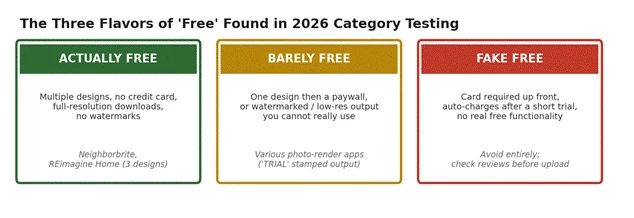
Figure 8: The three flavors of 'free' identified in 2026 hands-on category testing. Only the left column deserves your photo uploads.
Testing found only a handful of apps meet the 'actually free' bar. Beyond the three flavors, five specific catches recur across the category and are worth checking before you invest an afternoon in any tool:
Total caps, not monthly caps: Some tools grant 3 free designs total, forever, not 3 per month. Spend them on genuinely different styles, never on tiny variations of one idea. myGardenGPT is the notable exception with a monthly reset.
Credit card trials: Any 'free' tool demanding card details up front is signaling an auto-charge, with documented cases charging within 3 days. The genuinely free options in this article ask for no card at all.
Watermarked or crushed downloads: Generate one test image and check the export quality before committing time. If the download carries a trial stamp or drops to low resolution, the tool belongs in the middle column of Figure 8.
Paywalled saves: At least one well-known 3D garden app is free to download and build in, but charges when you try to save your design. Confirm the save and export policy before you start building.
Plant lists behind the paywall: Several render tools show the picture free but sell the plant list. Since this article has already established that you must verify plants independently anyway, this particular paywall is usually skippable.
Pulling everything above together, here is the decision table. Find your row, and the whole article compresses into one recommendation:
| Your Situation | Recommended Route | Expected Design Cost |
| Balcony, terrace, or container garden | Pure free AI: Neighborbrite concepts + chatbot plant research | $0 |
| A few new beds or borders | Free AI concepts + independent plant verification | $0, or $200-$600 for a horticulturist's bed design |
| Full yard refresh, no structural work | The full 6-step workflow + one consultation | $100-$200 |
| Deck, pergola, or raised-bed build | AI concepts + SketchUp Free model + consultation | $100-$200 |
| Slopes, drainage issues, retaining walls | AI for inspiration only; hire a designer or architect | $1,944-$7,213 (avg. $4,571) |
| Want it done for you, mid budget | Online human service such as Yardzen | $995-$3,495 per package |
Notice how the free and near-free routes cover the top four rows, which describe the overwhelming majority of home garden projects. The expensive rows exist for good engineering reasons, not because designers overcharge hobbyists. With that map in hand, the remaining questions are the quick-fire ones.
So, can AI design your garden for free? For the part of design most people are actually stuck on, seeing what their own yard could look like and turning that vision into a measured plan, yes, completely and genuinely free. Neighborbrite and REimagine Home cover the concepts, free ChatGPT and Gemini cover the research, and Planner 5D and SketchUp Free cover the measurements. Chained together in the six-step workflow, they replace the visualization and drafting work that makes up a real share of a $4,571 designer package, and Figure 5's green ticks mark exactly how much of the job that is.
For the part of design that decides whether the garden survives, correct plants for your exact soil and light, integrated problem-solving on difficult sites, drainage and structural judgment, and accountability when something fails, no. The Master Gardener programs, working designers, and academic surveys cited throughout this article converge on the same conclusion: AI addresses factors one at a time, while real gardens demand all factors solved at once, on a site the AI has only ever seen in one photograph. Figure 5's red crosses mark that boundary just as clearly.
The winning play is the mix this article has built section by section: let the $0 tools do the expensive-looking work of visualization, iteration, and layout, verify everything they claim against local sources before money changes hands, and redirect a small fraction of the thousands you did not spend into a targeted consultation and better plants. Your garden gets designed, your wallet barely notices, and every decision along the way was tested on a picture of your actual yard before a single hole was dug.
• Free AI garden design is real: photo-to-render tools genuinely cost $0 for concept work, with Neighborbrite the strongest truly free option.
• A professional designer averages $4,571 (range $1,944 to $7,213); free AI replaces the visualization portion of that fee, not the expertise portion.
• Every tool runs the same four-stage pipeline, and everything missing from that pipeline (soil, sun, climate, sizing) is exactly where AI fails.
• Chain tools by stage: render tools for looks, chatbots for research, Planner 5D or SketchUp Free for real measurements.
• Always verify AI plant suggestions against local, research-based sources; a single wrong tree costs $200 to $700 to replace, more than the consultation that would have caught it.
• For structural or drainage work, a $100 to $200 human consultation is the cheapest insurance available, roughly 96% cheaper than a full design package.
• Watch the three flavors of free: only tools with no card requirement and unwatermarked downloads deserve your photo uploads.
Share your thoughts about this article.
Be the first to post a comment!

If you have ever watched a room full of students go from slumped-over-their-desk...
Deepak Mehra2 weeks ago

Blockchain is no longer just about Bitcoin or Ethereum. While its roots lie in p...
Vaishali11 months ago