Chub Venus AI sits in a slightly unusual part of the AI chatbot market.
It looks like a character-chat platform on the surface, but calling it simply another Character.AI alternative misses much of what makes it different. Chub gives users much more control over the machinery behind a conversation: the character definition, model, system instructions, context, Lorebooks, APIs and even extensions that can change how a chat behaves.
That flexibility is also the reason Chub can feel confusing.
For someone who simply wants to choose a character and start chatting, there are easier platforms. For someone who cares about model choice, roleplay consistency, prompt control or building more complicated fictional worlds, Chub starts making considerably more sense.
Research note: This update is not presented as a hands-on laboratory test. We reviewed Chub’s current product documentation, character-creation documentation, live subscription information, Terms of Service, privacy information and recent community discussions. Product facts below are separated from our editorial observations wherever possible
Quick Verdict: Is Chub Venus AI Worth It?
Review Factor
Verdict
Best for
Advanced AI chat users, roleplay users, writers, and prompt tinkerers
Not best for
Complete beginners, children, or users who want a simple filtered chatbot
Main strength
Deep customization and flexible model/API options
Main limitation
Setup can feel technical and confusing
Pricing clarity
Needs careful checking because platform plans and API costs may be separate
Safety level
Requires user caution because of low-restriction positioning
Overall rating
7.4/10
Bottom line: Chub Venus AI is useful if you want more control over AI character chats than mainstream chatbot apps usually provide. But it is not the easiest or safest option for every user. Beginners should take time to understand settings, pricing, privacy, and content limits before using it seriously.What is Chub Venus AI?
What Is Chub Venus AI?
Chub Venus AI is a character-focused AI chat platform built around interactive personas. Instead of using a single assistant like a normal chatbot, users can browse or create characters with their own personality, tone, memory, background, greeting message, and behavior rules.
The platform works through large language models. In many cases, users can connect external AI providers through API keys. This means the quality, speed, cost, and style of replies can change depending on which model is being used.
A simple way to understand it:
Term
Simple Meaning
Chub AI
The broader platform for AI characters and chat
Venus / Venus Chub
The chat interface or older naming people still use
Character card
The saved personality, instructions, and background of a character
API key
A private key used to connect an external AI model provider
Mars
Chub’s first-party paid model/subscription option
Mercury
Lower-cost subscription tier often mentioned by users and pricing snippets
Lorebook
A memory/world-building tool used to keep details consistent
Stages
Advanced add-ons or modules that can extend how chats work
Chub Venus AI is different from a basic chatbot because the user has more control over the experience. You are not only chatting; you are also adjusting how the AI behaves.
How does the platform work?
Chub Venus AI operates as a character-based AI platform powered by large language models (LLMs) accessed through external APIs. Rather than training a single proprietary chatbot in isolation, the platform allows users to connect their own API keys and choose which model engine powers their characters. This means the conversational intelligence is delivered by third-party LLM providers, while Chub provides the interface, character framework, and control system that shape how responses are generated.
Underlying AI Technologies
At its core, Chub relies on LLMs accessed via APIs. According to its documentation, users can integrate multiple model providers directly inside the platform. Supported sources include OpenAI models via API key, Anthropic’s Claude models, Google’s Gemini models, OpenRouter for routing across multiple providers, Kobold or Oobabooga-style endpoints for local or self-hosted GPU setups, and NovelAI for writing-focused language models. This architecture allows users to switch engines depending on performance, creativity, cost, or content tolerance preferences.
In addition to external integrations, Chub offers a first-party subscription suite called Mars. Mars is described as a paid set of “uncensored” language models designed for users who prefer not to manage external API keys. The documentation states that Mars models are trained using proprietary datasets and explicitly notes that they do not include public or private chats taken from Chub AI.
Character Systems, Memory, and Control
Chub’s conversational behavior is heavily shaped by structured prompt components. The system prompt defines foundational instructions for how a character behaves, while post-history instructions are appended at the end of the prompt to reinforce steering and maintain consistency. An impersonation prompt feature can draft responses in the user’s voice, effectively simulating dialogue from both sides of a conversation.
Generation settings such as temperature and repetition penalties allow users to adjust output style. Higher temperature values typically produce more creative and unpredictable responses, while lower values increase consistency and focus. Advanced configurations include Lorebooks, which function as structured memory tools that help maintain character continuity, world-building elements, or background information across longer interactions.
Stages and Extensibility
Chub introduces a modular feature known as Stages. These are described as software components that can extend functionality beyond simple chat interactions. Stages may add mini-game interfaces, custom prompt handling logic, expression packs, or even integrations with third-party APIs. This makes the platform more extensible than a standard chatbot and positions it closer to a customizable AI environment rather than a fixed application.
Data Handling and Privacy Considerations
The documentation states that email addresses collected during registration are used sparingly, primarily for password recovery and subscription-related communication. By using the platform, users agree to its Terms of Service and Privacy Policy, which are linked within the documentation.
Chub explicitly warns against using reverse proxy services to access models, noting that such setups can expose user data or IP addresses and may involve unauthorized or stolen API keys. The platform recommends using official API keys directly to maintain security and ethical compliance.
Features, capabilities, and limitations
Core features
1) Character-based chat powered by connected LLM APIs:
This means Chub/Venus doesn’t rely on just one built-in AI model. Instead, it lets users connect external AI providers (like OpenAI, Anthropic, OpenRouter, etc.) using an API key.
What this enables in real use:
● You can choose different models for different styles (more creative vs more accurate).
● You can switch providers if one model feels too “robotic” or expensive.
● Advanced users can tune the experience heavily.
What to keep in mind:
● If you use your own API key, you may also be responsible for the cost billed by that provider.
● The quality depends on the model you connect.
2) “Uncensored / low restriction” positioning
Chub describes itself as a platform that does not heavily restrict what kind of characters or conversations users can have.
What this means practically:
● Users can explore more open-ended character conversations compared to platforms with strict content filters.
● It may allow more flexible storytelling and roleplay styles.
But it also creates tradeoffs:
● Some users may run into content they personally find uncomfortable.
● It can raise concerns around moderation standards, safety, and age-appropriateness depending on the user and region.
So “uncensored” is both a feature and a risk signal, depending on who is using it.
Stages are like “add-ons” or “modules” that can change how chats work or add extra interaction layers.
What stages can do (in simple terms):
● Add mini UI tools (like interactive prompts, custom buttons)
● Add special behavior for certain characters
● Add external API actions (for advanced setups)
Why this is powerful: It turns the platform from “just chat” into something closer to a customizable system.
Reality check: Stages are more technical and not every user will use them. They’re mainly for builders and advanced users.
Strengths of Chub Venus AI
1. Strong Customization
The biggest strength is customization. Users can control character behavior, prompts, memory, model choice, and response settings.
This makes the platform useful for people who do not want a fixed chatbot experience.
2. Flexible Model Options
Users are not locked into only one model provider. They can test different models and choose based on cost, creativity, speed, or output quality.
3. Useful for Creative Writing
Writers can use Chub Venus AI to test dialogue, build characters, create scenes, and explore story ideas.
It is not a replacement for writing skill, but it can work as a creative brainstorming tool.
4. Better for Power Users
People who enjoy tweaking settings will likely enjoy the platform more than casual users.
5. Large Character Ecosystem
The character-focused ecosystem gives users many options to explore, though quality can vary because many characters are user-created.
Limitations of Chub Venus AI
1. Not Beginner-Friendly Enough
New users may struggle with API keys, tokens, model settings, context length, temperature, prompts, and memory tools.
The platform can feel more technical than expected.
2. Possible Pricing Confusion
Users may not understand the difference between platform subscription pricing and external API billing. This can lead to unexpected costs.
3. Quality Depends on Setup
The quality of conversations depends on the character card, model, settings, and prompt structure. Bad setup can produce bad results.
4. Safety and Content Concerns
Because the platform is positioned as low-restriction, users may encounter mature, uncomfortable, or unsuitable content. It is not a platform I would recommend for children.
5. Privacy Risk With External Tools
Users should avoid sharing private information in chats. They should also be careful with unofficial proxies, unknown API services, or third-party setups.
Comparison with similar platforms
Platform
Core model approach
Customization depth
Moderation level (general)
Pricing approach (high-level)
Usability notes
Chub / “Venus” UI
Bring-your-own APIs + first-party “Mars” option
High (prompts, post-history, stages)
“Uncensored” positioning in official docs
Mercury ~$5/mo; Mars ~$20/mo shown on Chub pricing snippets
Steeper learning curve; many knobs/settings
Character.AI
Primarily first-party hosted
Medium
Generally higher moderation
Freemium/paid tiers (varies over time)
Easier onboarding, less control (platform-driven)
Janitor AI
Often relies on external model routing / APIs (varies by setup)
Medium–High
Typically less strict than CAI (varies)
Often depends on connected provider
Setup complexity varies; community-driven
User reviews and community sentiment
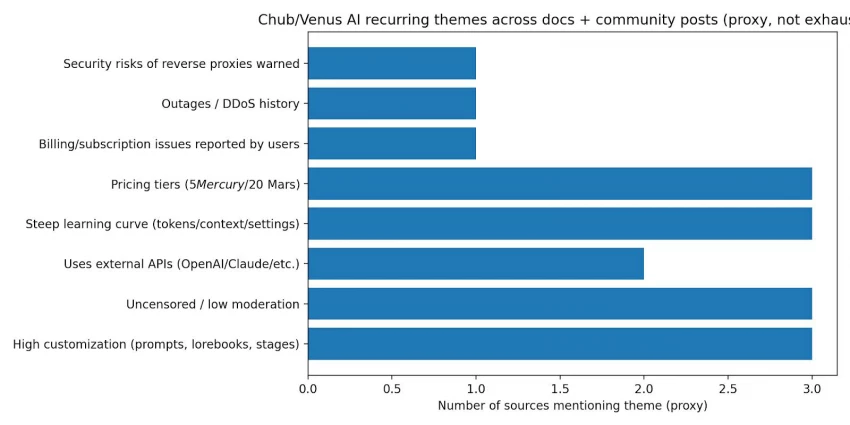
Because there is no single authoritative review score for Chub Venus AI, the most reliable way to evaluate it is by identifying recurring themes across official documentation, community discussions, and independent review blogs. Looking at Chub’s own documentation provides insight into its intended capabilities and positioning, while Reddit threads and user discussions highlight real setup experiences, billing confusion, and platform history. Independent blog posts offer additional perspective, though their depth and credibility vary and should be interpreted cautiously.
Across these sources, several praise themes consistently appear. Many users describe Chub as a “power-user” platform because it offers extensive control over prompts, system instructions, post-history instructions, staged configurations, and advanced customization layers. This level of configurability appeals strongly to technically inclined users who want granular influence over how conversations unfold. Another recurring positive theme is flexibility in model providers. Instead of restricting users to a single AI engine, Chub supports integration with providers such as OpenAI, Claude, Gemini, OpenRouter, and others, allowing users to select models based on quality, speed, cost, or stylistic preference. Additionally, the platform’s relatively low-restriction stance is frequently cited as a reason users choose it over more tightly moderated AI chat services.
At the same time, common concerns also surface. New users often struggle with technical concepts such as tokens, context limits, routing logic, and temperature settings, making the onboarding experience feel complex rather than intuitive. Some Reddit threads mention billing or subscription confusion, especially when platform plans intersect with external API usage costs. There are also reliability and security considerations raised in community discussions, including references to past DDoS-related downtime and warnings about potential data exposure risks when using reverse proxy setups. While these issues are not universal experiences, they are recurring enough in community conversations to merit consideration when assessing the platform.
Use-case analysis
1. Roleplay and Character Chat
This is the most common use case. Users can chat with fictional characters or create their own.
2. Creative Writing
Writers can use it for dialogue practice, story scenes, character testing, and brainstorming.
3. AI Model Testing
Advanced users can compare different models and see how each one responds to the same character setup.
4. Prompt Engineering Practice
Because Chub allows deep prompt control, it can be useful for learning how prompts affect AI behavior.
5. World-Building
Lorebooks and memory tools can help users build fictional worlds and keep details more organized.
Pros and Cons of Chub Venus AI
Pros
Cons
Highly customizable AI character chats
Can feel confusing for beginners
Supports different model/API options
External API costs may apply
Useful for roleplay and storytelling
Not ideal for children
Strong prompt and memory controls
Quality depends on setup
Good for advanced users
Safety and privacy need caution
Flexible alternative to more restricted platforms
Pricing may not be clear enough for new users
Pricing
Chub’s live subscription page currently advertises a $20/month subscription offering unlimited access to its LLMs, including Soji, along with unlimited voice, multimedia generation and early access to new models.
Recent Chub community announcements also reported that the Mercury tier had been removed.
Current pricing point
Status
Paid subscription shown by Chub
$20/month
LLM access
Advertised as unlimited under the subscription
Voice
Included as unlimited
Multimedia generation
Included as unlimited
Older Mercury references
Still visible in older docs/discussions, but Mercury has reportedly been discontinued
External APIs
May create separate costs depending on the provider
Privacy Depends Partly on Your Setup
Chub’s privacy situation is more nuanced than simply asking whether “Chub reads chats.”
The platform has its own privacy policy, but Chub can also interact with third-party services and model providers. Chub itself notes that it is not responsible for the privacy practices of third-party sites and services linked through the platform.
That means users should think about privacy at two levels:
The Chub layer: your account, platform activity and the information handled by Chub.
The model-provider layer: any external API or AI service receiving data to generate the response.
If privacy matters to you, review the policy of every provider in the chain rather than checking only Chub's policy.
The safest general practice is still simple: do not enter passwords, financial information, confidential business data, private documents or other sensitive personal information into a character-chat system
Chub Venus AI vs Character.AI vs SillyTavern
The three services overlap, but they are designed around different priorities.
Platform
Best description
Setup difficulty
Model flexibility
Best suited to
Chub AI
Hosted character platform with deep customization
Medium–High
High
Advanced roleplay and character customization
Character.AI
Polished mainstream character entertainment platform
Low
Lower
Users who value simplicity and a large mainstream ecosystem
SillyTavern
Highly configurable interface for external/local LLMs
High
Very high
Power users who want maximum backend control
Character.AI currently offers a polished free experience plus c.ai+, which is listed at $9.99 per month or $94.99 annually at standard pricing.
Its philosophy is considerably more consumer-oriented than Chub's.
SillyTavern sits further in the opposite direction. Its documentation describes it primarily as an interface that connects to cloud or self-hosted language models. It supports character cards and numerous AI backends, but setup can be much more technical.
Chub sits somewhere between those two extremes.
It provides the convenience of a hosted character platform while still exposing many controls that appeal to users who might otherwise move toward tools such as SillyTavern.
Final verdict
Chub Venus AI positions itself as a highly customizable character-based AI platform rather than a standard chatbot. Its strength lies in flexibility, from choosing different language models to controlling prompts, behavior, and interaction depth.
For users who enjoy immersive roleplay, character experimentation, or AI customization, it offers more control than many mainstream alternatives. However, that flexibility also means a slightly steeper learning curve and greater responsibility around content moderation and privacy.
As a complete package, Chub Venus AI is best suited for users who value customization and creative control over simplicity. Understanding its features, pricing structure, and intended use cases helps determine whether it aligns with your expectations.
If you’re exploring AI character platforms beyond basic chat apps, Chub Venus AI is one option worth evaluating carefully.
Frequently Asked Questions (FAQs)
Does Chub AI cost money?
Chub AI operates on a freemium model. Users can access basic features for free, but usage limits apply. Paid plans such as Mercury or Mars tiers unlock extended messaging, better memory handling, and access to more powerful AI models. Pricing structures may change, so checking the official website for current details is recommended.
Is Chub AI censored?
Chub AI is generally positioned as less restrictive compared to mainstream AI platforms. It offers more flexibility in character-based conversations and roleplay scenarios. That said, policies and moderation rules can vary depending on the AI model being used and the platform’s current guidelines.
Is Venus AI unlimited?
The free version of Venus AI typically includes usage limits such as daily message caps or restricted features. Paid plans provide significantly higher or unlimited messaging depending on the selected subscription tier.
Is Venus AI safe?
Venus AI provides privacy controls, but users should still review the platform’s privacy policy and terms of service before use. As with any AI chat service, it is recommended not to share sensitive personal information during conversations.
Is VenusChub a free platform?
VenusChub offers free access with limitations. While users can explore characters and basic chat functionality without payment, premium plans are required to unlock full customization, extended memory, and expanded usage.
Can Chub AI generate video?
Chub AI is primarily a text-based AI chat platform. It focuses on conversational character interactions and prompt customization. It does not function as a dedicated AI video generation platform.
I’ve tested a lot of AI chat tools, and this one actually feels different once you set it up properly. The characters don’t just give generic replies, they stay consistent and feel more real over time. It does take a bit of effort in the beginning, but once everything is configured, the experience is honestly worth it.
What I really liked is the level of control you get here. You’re not stuck with pre-built personalities, you can tweak characters, responses, and even the tone. It’s not something you figure out in 5 minutes, but if you enjoy customizing things, this gives way more flexibility than most tools out there.