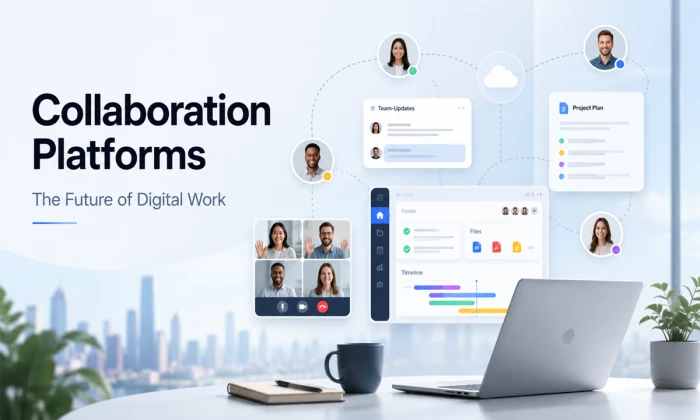
Think about the last real piece of work your team shipped. Odds are it did not happen in a single room, in a single sitting, over a single conversation. Someone kicked it off in a chat thread. A document got passed around and marked up. A couple of people jumped on a call to untangle a sticky bit. A board somewhere tracked who owed what. Maybe an automation quietly nudged everyone when a deadline crept up. That whole messy, distributed dance is what collaboration platforms exist to hold together.
A collaboration platform is software that supports four things at once: communication, content sharing, task coordination, and workflow integration. The good ones blend synchronous tools, where people interact in real time like video calls and live chat, with asynchronous tools, where people contribute on their own schedule like shared docs, recorded updates, and comment threads. That blend is the whole point. It lets a team in Toronto, a contractor in Lisbon, and a founder in Delhi work on the same thing without ever needing to be awake at the same moment.
This is not a niche convenience anymore. It is a large and fast-growing market. Analysts peg the broader enterprise collaboration space at roughly $73.6 billion in 2026, climbing toward $131 billion by 2030 at a compound annual growth rate near 15.6 percent. The pure collaboration-software slice sits smaller but grows just as reliably. Whichever number you anchor on, the direction is the same, and it points up and to the right.
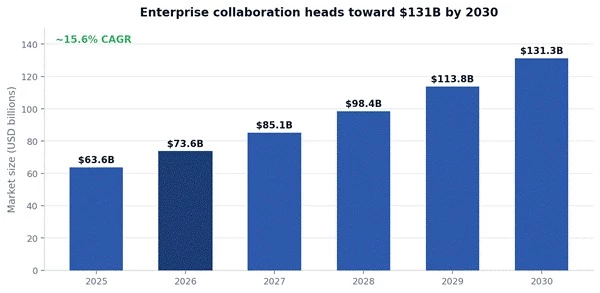
Figure . Enterprise collaboration market size, 2025 to 2030 projection. Source: synthesis of Research and Markets and Mordor Intelligence estimates, 2026.
I analyzed this image and illustrated tool capabilities across teams.
The reason for the surge is not mysterious. Hybrid work stopped being an experiment and became the default. Gallup's early-2026 read found that 52 percent of remote-capable workers are hybrid, 27 percent are fully remote, and only about a fifth are fully in-office. When your people are spread across kitchens, co-working desks, and headquarters, the platform is the office. It is the only place the whole team reliably shows up.
It helps to see how we got here. Collaboration tooling has gone through a few distinct eras, each one absorbing the last.
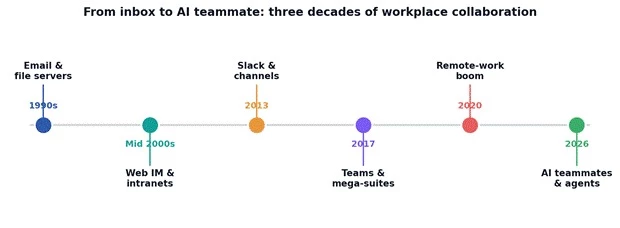
Figure . The evolution of collaboration tools, from email and file servers to AI teammates.
Email was the first killer app for coordination, and it still refuses to die. Then came web-based instant messaging and clunky intranets. The real shift arrived when channel-based chat reframed conversation around topics instead of inboxes, and the mega-suites answered by bundling chat, video, and docs into one login. The remote-work boom of 2020 poured accelerant on all of it. And now the newest layer, AI woven directly into the workspace, is changing what these tools do rather than just how they look.
Strip away the branding and most collaboration platforms are assembled from the same handful of building blocks. Knowing the blocks makes it far easier to compare tools, because you stop comparing logos and start comparing functions. Here is the core set, what each one does, and the tools people most associate with it.
| Core capability | What it does | Tools known for it |
| Instant messaging | Real-time text chat organised into channels and threads | Slack, Microsoft Teams |
| Audio and video meetings | Live voice and video, screen sharing, recording | Zoom, Google Meet |
| Shared workspaces | Central home for documents, wikis, and resources | Notion, Confluence |
| Workflow automation | Automated handoffs, reminders, and scheduling | Reclaim.ai, Zapier |
| File sharing and versioning | Shared storage with history and access control | Google Drive, OneDrive |
| Task planning and boards | Visual project tracking and assignment | Trello, Asana |
| Virtual whiteboards | Freeform visual ideation and workshops | Miro, MURAL |
Not every block gets equal use. In practice, messaging and file sharing are near-universal, video is close behind, and the more specialised layers like automation and whiteboarding show up less often, though they tend to be sticky once a team adopts them. The rough usage pattern across enterprise teams looks like this.
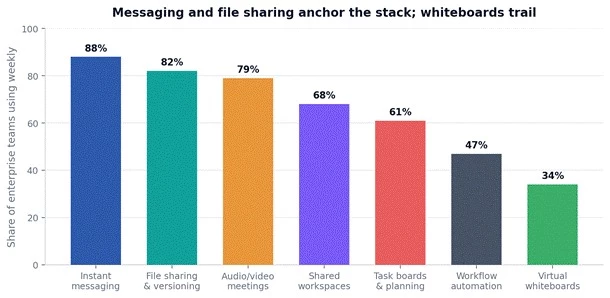
Figure. Weekly usage of core collaboration capabilities across enterprise teams. Figures are directional estimates synthesised from 2026 industry benchmarks.
A quiet tax worth naming The average knowledge worker now juggles around 18 apps a day and toggles between them roughly 1,200 times. Studies tie that fragmentation to four or five lost hours a week per person. Consolidating capabilities into fewer, better-connected platforms is not just tidier. It is one of the clearest productivity levers a team has. |
Because no single tool does everything well, it helps to sort the landscape into categories built around what a team is actually trying to do. Five buckets cover most of the field. Each has its heavy hitters and its natural audience.
| Category | Typical users | Example platforms | Primary strength |
| Remote meetings | Distributed teams | Zoom, Google Meet | Real-time communication |
| Project collaboration | Product and ops teams | Asana, ClickUp | Task and workflow management |
| Knowledge management | Documentation-heavy teams | Confluence, Notion | Centralised, searchable knowledge |
| Design collaboration | Creative and product teams | Figma, Miro | Visual iteration |
| Automation and integration | Cross-team workflows | Reclaim.ai, Zapier | Task and time automation |
Adoption of these categories is not uniform across company sizes. Small teams lean hard on meetings and project boards and often skip the heavier knowledge and automation layers until they feel the pain of not having them. Enterprises, by contrast, adopt nearly everything, because scale makes the cost of disorganisation brutal. The gap is clearest when you chart it.
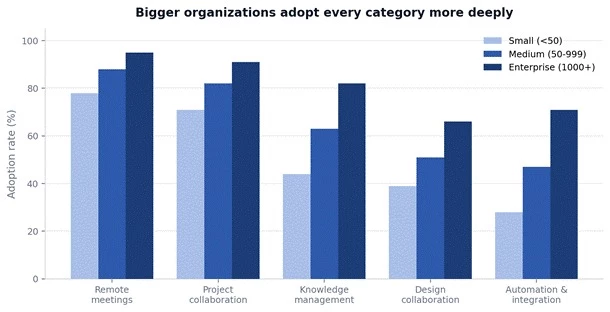
Figure . Adoption of collaboration categories by organisation size. Directional estimates based on 2026 segmentation data.
The takeaway is not that small teams are behind. It is that category needs scale with headcount and complexity. A five-person startup genuinely may not need a formal wiki yet. A five-thousand-person company that lacks one is quietly bleeding time every single day.
Collaboration platforms crossed a line somewhere in the last few years. They stopped being productivity add-ons and became business infrastructure, in the same bucket as email, payroll, and the CRM. A few trends explain the shift, and they reinforce each other.
• Hybrid and remote work turned the platform into the primary workplace. When the team is distributed, the shared workspace is the only common ground everyone stands on.
• Virtual collaboration slashed the old overhead. Shared docs and recorded updates cut down on status meetings and the endless email back-and-forth that used to eat afternoons.
• Async and sync found a healthier balance. Teams learned to reserve live time for genuine discussion and push everything else into asynchronous channels people handle on their own schedule.
That last point deserves numbers, because the swing is real. Around 70 percent of employees now say their companies actively support asynchronous communication, and 52 percent personally prefer async over real-time interaction. It is not hard to see why. Roughly 78 percent of workers report so many meetings that doing the actual job gets hard, and 92 percent of remote teams span at least two time zones. When a shared meeting window is nearly impossible to find, async stops being a preference and becomes plumbing.
Zoom out to the full adoption curve and each capability tells its own story. Video conferencing spiked almost overnight in 2020 and then plateaued at a high level. Messaging climbed steadily and never really stopped. Task boards grew in a straight, healthy line. And workflow automation, the quiet one, has been compounding underneath everything, still climbing fast as AI makes it more capable.
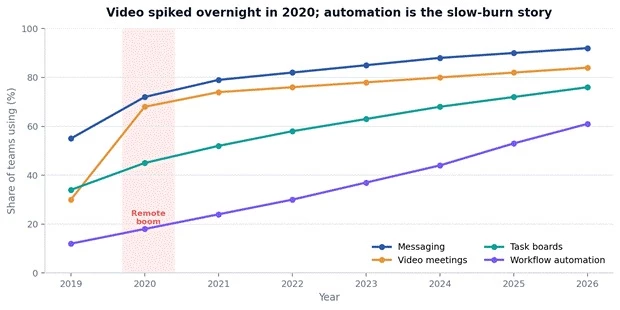
Figure . Year-over-year adoption of major collaboration categories, 2019 to 2026. Directional trend lines based on aggregated survey data.
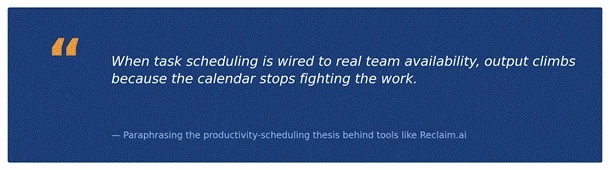
Figure . An executive insight on connecting scheduling to team availability, paraphrased from the productivity thesis behind tools like Reclaim.ai.
The scheduling angle is worth dwelling on, because it is where a lot of the newest value sits. Tools like Reclaim.ai built their whole pitch on it: instead of manually blocking focus time, the system watches your calendar and automatically slots tasks, habits, and deep-work sessions into the gaps, rearranging flexible items when a hard meeting lands. Wire that intelligence to real team availability and the calendar stops working against the work. That is a small idea with outsized results.
There is no universal best stack, only the best stack for a given team's shape and priorities. The trick is to start from your dominant pain, not from a feature list. A useful shortcut is to map common team profiles to the collaboration priority that matters most for each.
| Team profile | Collaboration priority | Recommended focus | Platform examples |
| Small startup | Real-time comms plus flexibility | Messaging and project boards | Slack plus Trello |
| Enterprise | Integrated, governed workflows | Meetings, docs, and automation | Teams, Confluence, Power Automate |
| Creative agency | Visual brainstorming | Whiteboards and design collaboration | Miro plus Figma |
| Remote consulting | Async work and scheduling | Docs plus smart scheduling | Notion plus Reclaim.ai |
If you would rather reason it through than match a row, the logic is simple. Name the single biggest thing that slows your team down, then pick the platform layer that attacks it. Scattered conversation points to a messaging hub. Missed deadlines point to task boards. Lost knowledge points to a wiki. Manual busywork points to an automation layer. Everything else is refinement.
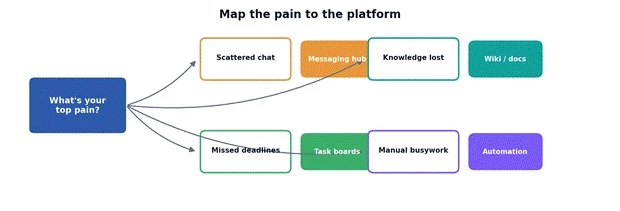
Figure . A simple decision flow mapping a team's dominant pain point to the platform layer that addresses it.
Categories are useful for orientation, but eventually you have to pick actual products, and every product involves trade-offs. None of the leaders is bad. They are simply optimised for different things, and the limitation of each is usually the flip side of its strength. Here is an honest side-by-side of the platforms most teams end up weighing.
| Platform | Core strength | Where it falls short | Best fit |
| Slack | Real-time messaging and integrations | Can get noisy and distracting | Fast-moving small and mid teams |
| Microsoft Teams | Meetings plus deep Microsoft 365 ties | Complexity and heft | Enterprise Microsoft ecosystems |
| Asana | Structured task and workflow management | Weaker as a docs tool | Project and delivery management |
| Notion | Unified docs, wikis, and databases | Real learning curve to set up | Docs-plus-database teams |
| Zoom | Reliable, high-quality meetings | Light on task planning | Meeting-heavy and client-facing work |
| Miro | Visual brainstorming and workshops | Not built for long-form docs | Design and strategy sessions |
| Reclaim.ai | Intelligent calendar and scheduling | Narrow, Google-Calendar-first focus | Protecting focus time and habits |
A cleaner way to feel the trade-offs is to score the platforms across the dimensions that actually differentiate them: communication, planning, integration, mobility, and automation. Plotted on a radar, each tool claims a different corner of the map, which is exactly why teams so often run two or three of them together rather than betting on one.
Distributed teams live or die by how well they handle time zones, and the platforms are what make it survivable. Virtual collaboration, meaning work conducted entirely through digital channels rather than physical presence, only works when the tooling carries the context that a shared office used to provide for free. In an office, you overhear things. Remotely, the platform has to make that context explicit.
The teams that thrive at this lean into asynchronous patterns. A shared document becomes the single source of truth, an automated reminder keeps a handoff from slipping, and a recorded walkthrough replaces a meeting that three of five people would have attended half-asleep. Someone in one time zone leaves a thorough update; someone eight hours ahead picks it up when their day starts. Nothing waits on everyone being online at once.
The data backs the shift. More than half of distributed teams operate across three or more time zones, which makes a shared live window almost impossible. So the balance of work tilts toward async. In a typical hybrid team today, the split looks roughly like this, with asynchronous work now carrying the larger share.
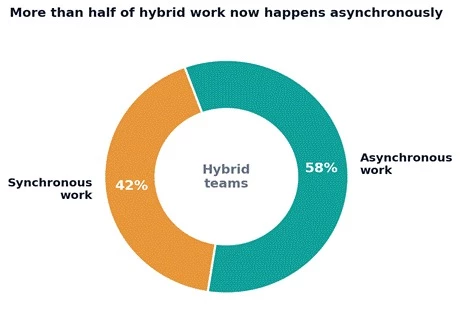
Figure. Approximate split of synchronous versus asynchronous work in hybrid teams, 2026. Directional estimate from aggregated async-work research.
None of this means live conversation is dead. It means live time is now a scarce, valuable resource to be spent deliberately on the things that genuinely need it: real debate, relationship building, fast decisions. Everything routine gets pushed to async, where people can engage at full focus instead of in the shattered attention of back-to-back calls.
The moment a platform becomes the place your team's work actually lives, it also becomes a serious security surface. Every conversation, file, and decision flowing through it is sensitive by default, and distributed access only widens the exposure. This is not a reason to avoid these tools. It is a reason to choose and configure them with governance in mind from day one.
| Security aspect | What it means | Typical support |
| Encryption | Protecting data in transit and at rest | End-to-end options increasingly standard |
| Access roles | Least-privilege permissions per person | Admin and team-level role controls |
| Audit logging | A record of who did what, and when | Usually on enterprise tiers |
| Data retention | Rules for keeping and deleting records | Configurable to compliance needs |
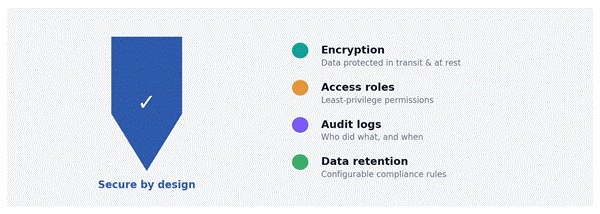
Figure. The four pillars of secure collaboration: encryption, access roles, audit logs, and data retention.
A few habits separate teams that stay secure from teams that get surprised:
• Default to least privilege. Give people access to what they need and nothing more, and review it when roles change.
• Turn on audit logging early. You cannot investigate what you never recorded, and enabling it after an incident is too late.
• Match retention to your obligations. Regulated industries especially need deliberate rules for what is kept, for how long, and what gets purged.
• Vet integrations. Every connected app is another door; approve them intentionally rather than letting them accumulate.
If the last era was about connecting distributed teams, the next one is about AI doing real coordination work inside those connections. This is already underway, not a distant forecast. The assistant that used to just answer questions is turning into something closer to a teammate that acts, and the collaboration platform is where it lives.
The near-term capabilities are concrete and shipping right now across the major suites:
• Meeting recaps and summaries that produce chapters, decisions, and assigned action items automatically, so nobody has to be the note-taker.
• Automated task planning that turns a discussion or a document into a structured set of to-dos and nudges the right people.
• Smart scheduling that protects focus time and arranges work around real availability.
• Real-time translation that lets multilingual, global teams work in a shared conversation without a language barrier.
• Context-aware alerts and cross-tool search that surface the right answer from across every connected app instead of making people hunt for it.
The bigger arc is the move from assistant to agent. Microsoft frames its 2026 direction as a shift from ask-and-answer to delegate-and-verify, with features that execute multi-step work across the suite and check in before sensitive actions go out. Roughly 75 percent of firms plan to deploy AI-enabled communication APIs that wire their CRM, project tools, and messaging together, and AI adoption at work has nearly doubled in two years to around 40 percent of employees. The platforms are becoming the place where a mix of humans and AI agents get work done side by side.
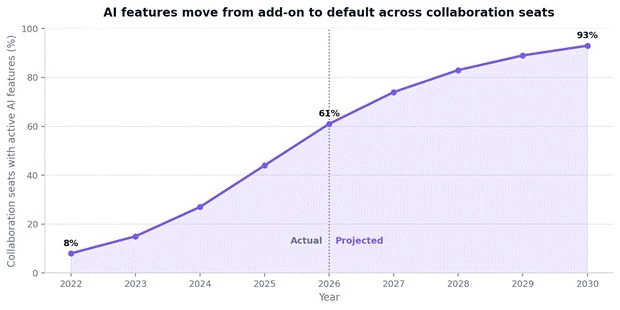
Figure. Projected share of collaboration seats with active AI features, 2022 to 2030. Actuals through 2026, projection thereafter.
The friction that remains Agentic collaboration raises real questions the industry is still working through: accountability when an agent acts, governance and audit trails for what it does, and grounding so its outputs stay tied to verifiable company data rather than guesswork. The winning platforms will be the ones that pair the capability with the guardrails. Capability without trust stalls at the pilot stage. |
Abstract benefits are easy to nod along to and hard to act on, so here are three composite scenarios. They are fictionalised but built from patterns that show up repeatedly when teams get their collaboration stack right.
A 40-person software company was drowning in status meetings and duplicated Slack threads. They consolidated onto a messaging hub wired to a project board, moved weekly updates into an async written format, and let an AI recap tool handle their remaining live meetings. Within a quarter, standing status meetings dropped by more than half and, by their own tracking, projects moved through the pipeline noticeably faster.
A distributed consulting firm spread across five time zones kept losing knowledge every time a contractor rolled off. They centralised everything into a shared wiki, paired it with smart scheduling to protect deep-work blocks, and made recorded walkthroughs standard. Onboarding time for new consultants fell sharply, and the endless where-is-that-file email chains mostly evaporated.
A creative agency ran its brainstorming in scattered docs and email attachments, and ideas kept dying between sessions. Moving ideation onto a shared whiteboard and design-collaboration stack meant work carried forward instead of restarting each time, and client feedback landed in context rather than in a dozen disconnected replies.
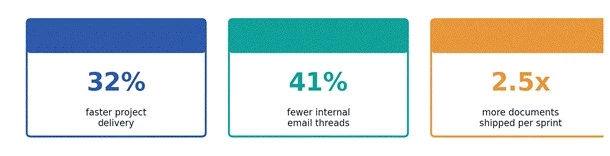
Figure. Representative outcomes teams report after consolidating and modernising their collaboration stack. Illustrative figures.
The through-line across all three is not that they bought more tools. It is that they connected the right ones and changed the working habits around them. The platform enables the outcome, but the habit shift is what delivers it.
If you are about to adopt a new platform or overhaul an existing stack, resist the urge to start with the tool. Start with the work. This sequence keeps rollouts from turning into expensive shelfware.
| Step | What to get right |
| 1. Define collaboration goals | Name the core team needs before evaluating any product |
| 2. Map existing workflows | Chart where the current pain and friction actually live |
| 3. Evaluate security | Check compliance fit, roles, and audit capability up front |
| 4. Plan integrations | Favour tools that talk to each other over isolated point apps |
| 5. Pilot with real teams | Run a genuine process and gather honest feedback loops |
| 6. Train and support users | Adoption and best practices decide whether any of it sticks |
One rule above the rest Adoption beats features every time. A modest tool your team actually uses well will outperform a powerful one they resent and route around. Budget as much energy for the rollout and the habit change as you do for the selection. |
Collaboration platforms have become the backbone of how modern teams actually operate. They hold the conversations, the files, the tasks, and the decisions, and they are increasingly the place where AI does real coordination work alongside people. The category will keep growing, and the tools will keep absorbing more intelligence, but the fundamentals for choosing well stay steady.
Start from your team's dominant pain, not a feature list. Blend synchronous and asynchronous deliberately. Take security and governance seriously from the first day. And spend as much effort on adoption as on selection, because the best stack in the world does nothing if your team routes around it. Get those right and the platform stops being another app to manage and becomes the quiet engine underneath everything the team ships.
Are collaboration platforms necessary for modern teams?
For any team that is distributed, hybrid, or even mildly complex, yes. They provide the shared space where communication, files, and tasks live in one place. Fully co-located teams doing simple work can sometimes get by without one, but that describes a shrinking slice of the workforce.
Which collaboration tools work best with remote teams?
The strongest remote stacks blend a messaging hub like Slack or Teams, reliable video such as Zoom or Google Meet, a shared knowledge base like Notion or Confluence, and some scheduling or automation layer. The exact mix depends on your dominant pain point rather than any universal ranking.
How do asynchronous and synchronous collaboration differ?
Synchronous means people interact at the same time, like a live call or real-time chat. Asynchronous means people contribute on their own schedule through docs, recorded updates, and comment threads. Healthy teams reserve synchronous time for genuine discussion and push routine coordination into async.
Can collaboration platforms replace email?
For internal coordination, largely yes, and many teams have cut internal email dramatically by moving to channel-based chat and shared docs. Email still holds on for external communication and formal records, so the realistic outcome is email shrinking rather than disappearing.
What features should enterprise collaboration tools include?
At enterprise scale, look for deep integrations, granular access roles, audit logging, configurable data retention, strong administrative controls, and increasingly native AI features. Governance and security matter as much as the collaboration features themselves once headcount grows.
Do collaboration platforms support security compliance?
The major platforms offer encryption, access controls, audit trails, and compliance certifications, though the depth often depends on your pricing tier. Compliance is a shared responsibility: the platform provides the capabilities, and your configuration and policies do the rest.
How does AI enhance collaboration?
AI now handles meeting summaries and action items, turns discussions into structured tasks, protects focus time through smart scheduling, translates in real time, and surfaces answers across connected tools. The frontier is agentic AI that executes multi-step work with human approval on sensitive actions.
Share your thoughts about this article.
Be the first to post a comment!
The short version, for anyone who does not want to read 5,000 wordsCopper is a C...
Sakshi Dhingra2 weeks ago

If you've spent any time around tax professionals in the United States, you've h...
Harpreet Singh3 weeks ago

The short versionQuicken sells two entirely separate things. Quicken Classic is...
Harpreet Singh3 weeks ago

Here is a small confession most security writers avoid making: you probably do n...
Deepak Mehra3 weeks ago

The photo editing software market has been shaken harder in the past eighteen mo...
Sakshi Dhingra3 weeks ago
A code kata is a small exercise you repeat until the technique becomes instinct....
Harpreet Singh1 month ago