There's a moment every editor knows. You're three hours into a 78,000-word manuscript, the writer's voice is finally starting to click, and then a software suggestion stops you cold: "Consider rewording this sentence for clarity." The sentence in question? A deliberate, voice-driven fragment the author chose for rhythm. You sigh, dismiss it, and twelve minutes later the same tool flags it again.
Which tool you're using when that happens, Grammarly or ProWritingAid, actually matters more than people make it sound.
I've spent the last six months using both as my primary editing assistants. Manuscripts, blog posts, academic edits, marketing copy, the occasional cover letter for a client. Some days I'd run the same document through both just to compare. What I found wasn't the easy "Tool A is better than Tool B" story most reviews push. It's messier than that, and it depends almost entirely on what kind of editor you are.
Here's what I actually learned.
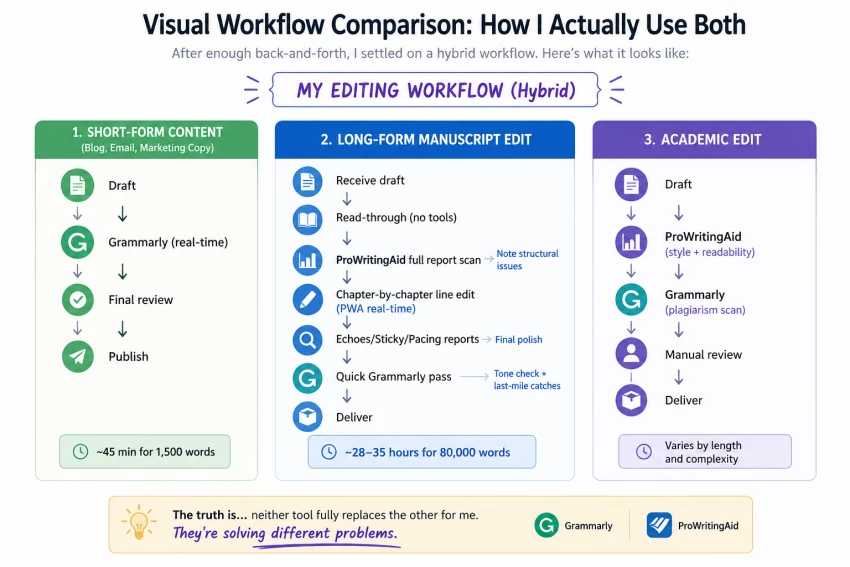
If you mostly edit business writing, blog posts, emails, and short-form digital content, Grammarly will probably make you faster.
If you edit manuscripts, academic papers, fiction, or any long-form work where prose-level analysis matters, ProWritingAid is the better tool, and it's not particularly close.
If you do both? You'll probably end up paying for both. I did.
Before the comparison, the boring-but-important part: a comparison only matters if the methodology was real.
I'm a freelance editor, about seven years in, mostly developmental and line edits for indie authors, plus a steady stream of B2B content for two SaaS clients. Over six months I ran:
Each document went through my normal workflow first. Then I'd test what each tool flagged, how long it took, and, this is the part that gets skipped in most reviews, whether the suggestions actually held up after I sat with them.
I had Grammarly Pro and ProWritingAid Premium Pro running simultaneously, and I tracked time-on-task for both.
You feel the difference within the first ten minutes of using each.
Grammarly is the polished one. The interface is clean, the suggestions appear instantly, and the design language is reassuring in a corporate-software-that-knows-what-it's-doing way. When you open a document, it greets you with a confidence score. The suggestions are short, direct, and visually pleasant.
ProWritingAid is the studious one. The interface is busier, less elegant, and absolutely packed with information. There are 25+ reports tucked into menus. The first time I opened the desktop app I felt mildly overwhelmed, there's a "Pacing" report, an "Echoes" report, a "Sticky Sentences" report, a "Cliché" report, and that's just the first column. After a week, that overwhelm flipped into something else: I want to know everything this thing is checking for.
It's the difference between a smart assistant and a domain expert. Both have their place.
Before getting into the experience details, here's the at-a-glance breakdown of what each tool actually does.
| Feature | Grammarly Pro | ProWritingAid Premium Pro |
| Real-time grammar/spelling | Excellent | Good (slightly slower) |
| Style suggestions | Strong, polished | Strong, more granular |
| Tone detection | Yes (very good) | Limited |
| Plagiarism check | Yes (built-in) | Add-on (paid credits) |
| AI rewriting | 2,000 prompts/month | 50 Sparks/day |
| Long-document handling (50k+ words) | Slows noticeably | Built for it |
| Writing reports | Basic dashboard | 25+ detailed reports |
| Manuscript analysis | No | Yes (via Story Credits) |
| Fiction-specific tools | No | Yes (pacing, dialogue tags, sensory) |
| Microsoft Word integration | Yes | Yes (deeper) |
| Google Docs integration | Yes | Yes |
| Scrivener integration | No | Yes |
| Custom style guides | Pro/Enterprise | Yes |
| Browser extension | Yes (excellent) | Yes (good) |
| Desktop app | Yes | Yes |
| Mobile app | Yes (iOS, Android) | No dedicated mobile app |
| Lifetime purchase option | No | Yes |
A few things stand out from this list, but the one that ended up mattering most for my work was Scrivener integration and the depth of reports, because most of my manuscript clients write in Scrivener, and a tool that doesn't talk to it adds friction I don't want.
Reading a feature list is not the same as using a tool. Here's what actually happened in practice.
The first thing I noticed about Grammarly during real work was the speed. I'd paste a 2,000-word blog post into the editor and suggestions would populate in maybe two seconds. For short-form content, this is genuinely useful. I could blow through a stack of LinkedIn posts in an afternoon.
The tone detector is also surprisingly good. I edit emails for a couple of executive clients, and Grammarly's tone read, "this comes across as confident but slightly impatient", was consistently accurate enough to flag things I would have otherwise missed. That's not a small thing.
But after about three weeks, what started becoming frustrating was Grammarly's confidence in suggestions that were contextually wrong. The tool would aggressively rewrite voice-driven sentences in fiction. It flagged passive voice in academic writing where passive voice was the correct register. It "corrected" technical terms in SaaS copy. The suggestions are well-intentioned but they treat all writing as if it should sound like a polished business memo.
Dismissing suggestions takes one click, which is fine. Dismissing the same suggestion 47 times across a manuscript starts to feel like a workout.
The first time I ran a 90,000-word manuscript through ProWritingAid, it took about 90 seconds to generate the full report. My initial reaction was "this is slow." My reaction by the end of the same evening was "oh, this is thinking."
The reports are where ProWritingAid earns its keep. The Echoes report alone, which finds repeated words and phrases within a configurable window, saved me probably four hours across one manuscript. Authors don't realize how often they reach for the same image; the tool surfaces it ruthlessly. The Sticky Sentences report flags sentences with too many "glue words" (it, that, of, in, etc.) that drag pacing. The Pacing report literally maps your manuscript's rhythm visually.
For fiction editors, these are not nice-to-haves. They're the reason you'd pay for the tool.
The trade-off: ProWritingAid is noticeably slower in real-time mode. On documents over 60,000 words, the desktop app occasionally lagged when I switched chapters. Not catastrophic, but real. And the UI, while improved over the last few years, still has the feel of software designed by people who care more about features than about how those features look.
Let me show you what I mean. I took an actual paragraph from a manuscript I worked on (lightly modified for client privacy) and ran it through both tools cold.
The kitchen was old but it had character. Mara stood at the window and watched the rain falling on the back garden, watching it pool in the dips of the path. She had stood here a thousand times before. Tonight it felt different.
Grammarly's suggestions:
Change "watching" to avoid repetition with "watched"
Consider replacing "but" with a stronger conjunction
Tone: "Reflective, slightly melancholic"
ProWritingAid's suggestions:
Echo flag: "watched/watching" within 8 words (high priority)
Echo flag: "stood" appears twice in 3 sentences
Sticky sentence flag on sentence 2 (43% glue words)
Sentence variety report: 4 of 4 sentences begin with subject
Pacing: slow (consistent with surrounding context, flagged as intentional)
Cliché check: "felt different" , borderline
You can see what's happening. Grammarly noticed the obvious "watching/watched" repetition. ProWritingAid noticed it plus the "stood" repetition, the sentence-start uniformity, the glue-word density, and the pacing context.
For an editor, that second list is the one you want.
I tracked load and analysis times across documents. Here's the rough picture:
GRAMMARLY — Speed by Document Length
─────────────────────────────────────
500 words ▓░░░░░░░░░░░░░░░░░░░ ~1s
2,500 words ▓▓░░░░░░░░░░░░░░░░░░ ~2s
10,000 words ▓▓▓▓░░░░░░░░░░░░░░░░ ~5s
50,000 words ▓▓▓▓▓▓▓▓▓▓░░░░░░░░░░ ~15s
100,000 words ▓▓▓▓▓▓▓▓▓▓▓▓▓▓░░░░░░ ~25s + slowdowns
PROWRITINGAID — Speed by Document Length
─────────────────────────────────────
500 words ▓▓░░░░░░░░░░░░░░░░░░ ~2s
2,500 words ▓▓▓░░░░░░░░░░░░░░░░░ ~4s
10,000 words ▓▓▓▓▓░░░░░░░░░░░░░░░ ~10s
50,000 words ▓▓▓▓▓▓▓▓░░░░░░░░░░░░ ~45s (full reports)
100,000 words ▓▓▓▓▓▓▓▓▓▓▓▓░░░░░░░░ ~90s (full reports)
A few honest caveats: these times come from a 2022 MacBook Air on stable Wi-Fi. Slower hardware widens both gaps. Also, ProWritingAid's longer times produce a much richer analysis, it's not slower because it's worse, it's slower because it's doing more.
For short-form work, Grammarly's speed advantage is meaningful. For long-form, it stops mattering, you're going to take a coffee break anyway.
After six months, here's how I'd rate the actual quality of suggestions:
| Category | Grammarly | ProWritingAid |
| Grammar accuracy | ★★★★★ | ★★★★½ |
| Spelling | ★★★★★ | ★★★★★ |
| Punctuation | ★★★★½ | ★★★★½ |
| Style for business writing | ★★★★★ | ★★★★ |
| Style for fiction | ★★ | ★★★★★ |
| Style for academic writing | ★★★ | ★★★★½ |
| Tone analysis | ★★★★★ | ★★★ |
| Catching repetition | ★★★ | ★★★★★ |
| Catching pacing issues | ★ | ★★★★½ |
| Suggestions that hold up | ★★★½ | ★★★★ |
| False positives | Frequent on creative work | Fewer, more contextual |
The "suggestions that hold up" row is the one I think about most. After dismissing or accepting a suggestion, did I still feel good about that decision a week later when I reread the work? Grammarly's suggestions are more numerous but a meaningful portion of them I'd reverse on second pass. ProWritingAid's suggestions are fewer per page but felt more durable.
This is the chart I wish someone had handed me when I started.
| Editor Type / Use Case | Grammarly | ProWritingAid | Winner |
| Blog post editor | Excellent | Good | Grammarly |
| Email/business comms editor | Excellent | Adequate | Grammarly |
| Academic editor (essays, papers) | Good | Excellent | ProWritingAid |
| Fiction line editor | Limited | Excellent | ProWritingAid |
| Developmental editor | Limited | Strong (with reports) | ProWritingAid |
| Copy editor (marketing/SaaS) | Excellent | Good | Grammarly |
| Technical editor | Good | Strong | ProWritingAid |
| Newsletter editor | Excellent | Good | Grammarly |
| Self-editing author | Good for short pieces | Excellent for manuscripts | Depends |
| Editor working in Scrivener | No integration | Native integration | ProWritingAid |
| Editor working across mobile devices | Strong mobile app | No mobile app | Grammarly |
| Editor needing tone analysis | Best in class | Limited | Grammarly |
| Editor charging by the project (manuscript) | Limited utility | High utility | ProWritingAid |
Pricing is where this gets interesting, because the headline numbers don't tell the full story.
| Plan | Monthly Cost (annual billing) | Total Annual | Key Features |
| Free | $0 | $0 | Basic grammar, spelling, tone (limited) |
| Pro | $12/mo | $144 | Full features, 2,000 AI prompts/mo, plagiarism |
| Pro (quarterly) | $20/mo | $60/quarter | Same as Pro, shorter commitment |
| Pro (monthly) | $30/mo | $360 | Same as Pro, no commitment |
| Enterprise | Custom | Custom | Team features, SSO, style guides |
| Plan | Monthly Cost (annual billing) | Total Annual | Lifetime Option |
| Free | $0 | $0 | — |
| Premium | $10/mo | $120 | $399 one-time |
| Premium Pro | $12/mo | $144 | $699 one-time |
| Premium (monthly) | $30/mo | $360 | — |
| Premium Pro (monthly) | $36/mo | $432 | — |
On annual pricing, the two tools are roughly even, $144/year for either. But two things tilt the value calculation:
ProWritingAid's lifetime plan is genuinely valuable. $399 for Premium lifetime breaks even against the annual plan in just over three years. For a working editor planning to use this for the next decade, that's real money saved.
Grammarly's plagiarism check is built-in; ProWritingAid's costs extra. If you do a lot of academic work, Grammarly's bundled plagiarism scan saves you both clicks and dollars.
If I had to pick the better long-term value for a serious editor, ProWritingAid edges it on price-per-feature, but only if you actually use the deep reports. If you don't, you're paying for capacity you'll never tap.
Grammarly has almost no learning curve. If you've used Microsoft Word, you can use Grammarly. The hover-suggestion model is intuitive, the dashboard is self-explanatory, and the browser extension just works. I was at full speed within an hour.
ProWritingAid has a real learning curve, and anyone who tells you otherwise is selling you something. The 25+ reports take time to understand. The configuration options are deep — you can adjust echo distance, sticky-word thresholds, dialogue handling, document-type rules. The first week, I was missing features because I didn't know they existed. By week three, I was customizing it to my workflow. By month two, it felt indispensable.
If you're an editor who likes to dig into a tool and bend it to your needs, ProWritingAid rewards that. If you want something that just works out of the box and gets out of your way, Grammarly does that better.
This is the section I'd want to read before paying for either.
The suggestions can be aggressive about voice. I lost count of the times Grammarly tried to "fix" intentionally fragmented sentences in fiction. After a while it feels like arguing with a well-meaning intern who keeps overstepping.
The Pro tier's value depends entirely on how often you use AI rewrites. The 2,000 monthly prompts sound generous until you realize most of what you actually need (grammar, spelling, basic style) is in the Free tier. The gap between Free and Pro is narrower than the marketing suggests.
No Scrivener integration. This is a deal-breaker for some editors and a non-issue for others, but for me it meant constant copy-pasting on manuscript work.
Auto-renewal can sting. Grammarly auto-renews at the standard rate without much warning. If you signed up during a discount, the renewal notice can be a small jump.
The desktop app's UI looks dated. Functional, yes. Pretty, no. Compared to Grammarly's interface it feels a generation behind.
Real-time checking can lag on long documents. On chapters of 8,000+ words, the suggestion-update cycle gets sluggish. Not unbearable, but noticeable.
The reports can be overwhelming at first. Genuinely. There's a temptation to obsess over every flagged sticky sentence when, in context, plenty of them are fine. New users sometimes over-edit because the tool surfaces so much.
Plagiarism checks are nickel-and-dimed. $10 for ten checks, $40 for a hundred. For academic editors, this adds up fast and feels stingy compared to Grammarly's bundled offering.
No mobile app. Hard to overstate how much this matters if you're an editor who reviews work on the go.
Fastest real-time checking on the market
Best-in-class tone analysis
Built-in plagiarism detection
Polished, intuitive UI
Excellent mobile app
Browser extension works almost everywhere
Limited depth for long-form/manuscript work
Aggressive with creative or stylistic writing
No Scrivener integration
No lifetime pricing option
Free vs. Pro gap is narrower than advertised
25+ detailed analytical reports
Built for long-form manuscripts
Scrivener, Word, Docs integrations
Lifetime purchase available
Customizable rules and document types
Genuinely better for fiction/academic work
Steeper learning curve
Slower on very long documents
Plagiarism check is paid add-on
No mobile app
UI feels older than Grammarly's
After six months of real use, here's where I'd land:
| Criterion | Grammarly | ProWritingAid |
| Ease of use | 9.5/10 | 7/10 |
| Editing depth | 7/10 | 9.5/10 |
| Speed | 9/10 | 7.5/10 |
| Accuracy | 8.5/10 | 8.5/10 |
| UI/UX | 9/10 | 7/10 |
| Integrations | 8/10 | 9/10 |
| Long-form support | 6/10 | 9.5/10 |
| Short-form support | 9.5/10 | 8/10 |
| Value for money | 7.5/10 | 9/10 |
| Customization | 6.5/10 | 9/10 |
| Customer support | 8/10 | 8/10 |
| Overall | 8.0/10 | 8.4/10 |
For editors specifically, which is the angle of this review, ProWritingAid edges it. For general writers and short-form professionals, the verdict would flip.
If you do mostly long-form editing, manuscripts, academic papers, anything where prose-level analysis matters, buy ProWritingAid. The reports alone justify the price, and the lifetime plan turns it into a one-time business expense rather than a subscription.
If you do mostly short-form editing, emails, blog posts, marketing copy, business communication, Grammarly is the better daily driver. Speed matters more than depth in your work, and Grammarly's tone detection is genuinely useful.
If you do both (like I do), here's my honest take: start with ProWritingAid Premium lifetime ($399), and add Grammarly Free for the tone check and mobile use. You'll cover 95% of what you need without paying two subscriptions.
The one configuration I'd avoid: Grammarly Pro alone, if you're editing book-length work. You'll outgrow it within a few months.
Software like this is genuinely useful, and it's also seductive in a way editors should be careful about. The best editing decisions I made this year weren't ones either tool flagged. They came from sitting with a paragraph, knowing the writer's voice, and trusting my own ear.
Both Grammarly and ProWritingAid are good at the mechanical layer of editing. Neither is good at the layer that matters most. Use them as the assistants they are, not as the editor you're being paid to be, and either one will earn its keep.
For my money, ProWritingAid is the editor's tool. Grammarly is the writer's tool. There's room in most workflows for both, and there's wisdom in knowing when each one is the right hand to reach for.
Share your thoughts about this article.
Be the first to post a comment!

AutoDraft AI looks appealing on the surface. It promises consistent cartoon char...
Muskan Kansay3 months ago
Are you tired of spending hours creating invoices for your clients? I was,...
Sakshi Dhingra3 months ago
How I approached this review: I researched Wegic AI through its public site, pri...
Sakshi Dhingra3 months ago
A 56% Wake-Up Call for Every StudentTL;DR — Perplexity wins for fact-finding, ci...
Sakshi Dhingra4 months ago

This Didn’t Feel Like a Tool. It Felt Like a System Trying to Build for Me.Most...
Sakshi Dhingra4 months ago

There’s a very specific frustration that most developers go through at some poin...
Sakshi Dhingra5 months ago