
Most creators do not need a full design suite. They need one good featured image, one cleaner product photo, one app icon mockup, one professional-looking headshot, or one social post graphic, and they need it without a long detour through professional software.
That is the practical reason to look at Hotpot AI. It gathers many small creative tasks, including image generation, headshots, photo cleanup, app graphics, templates, and writing help, into one place. The appeal is not a long feature list; it is whether the output is actually usable for the job in front of you.
Most people testing it are not professional designers. They want fast visual assets, and an AI tool only saves time when the result needs little cleanup. So the useful way to judge Hotpot AI is by real creative tasks rather than by how many tools it lists. One thing matters before anything goes public: credits and commercial-use rules vary by tool, so check them on the official pages before you publish or sell a design.
| Fast Answer: Hotpot AI is a creative AI platform that helps users generate images, create AI headshots, edit photos, make app graphics, design social visuals, and produce quick marketing assets. It is most useful for beginners and creators who need fast visual drafts without advanced design skills. Before using outputs commercially, users should check Hotpot's latest credit costs, license rules, privacy terms, and export limits on the official site. |
A compact orientation before the task-by-task detail below.
| Area | Practical Detail |
| Main use | AI images, headshots, graphics, photo edits, app assets |
| Best audience | Creators, marketers, bloggers, app developers, small businesses |
| Skill level | Beginner to intermediate |
| Strongest value | Many small creative tools in one platform |
| Main caution | Pricing, credits, and commercial-use rules vary by tool |
| Must-check before publishing | License, attribution, watermark, export quality, privacy |
| Best first test | Blog image, social post, headshot, or background removal |
| Last updated | [Add date] |
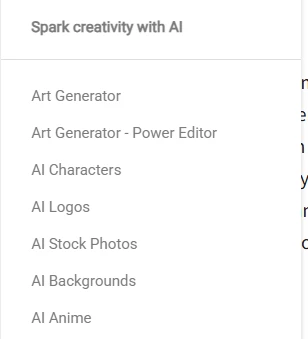
The clearest way to understand Hotpot AI is by the jobs it can take off your plate. The tool directory below is the place to confirm what is currently available; the sections after it walk through the most common creative tasks.
For publishers, Hotpot can produce featured image drafts, concept visuals, blog category graphics, thumbnail ideas, and clean editorial visuals without logos. These are usually good enough as a starting point; the things to watch are aspect ratio, any garbled text in the image, and whether the look is original rather than generic.
Creators can use it for Instagram posts, Pinterest graphics, LinkedIn post images, YouTube thumbnail concepts, and campaign visuals. It works best for quick concepts and drafts; brand consistency across a full campaign still needs a human eye.
The headshot tools target LinkedIn profile photos, author bio images, team pages, and resume or profile use. Because this usually means uploading personal photos, privacy is the central concern here: read how uploads are stored and deleted before you use it, and treat the realism check in a later section as essential.
For app developers and early-stage founders, Hotpot can help with app icon concepts, Google Play feature graphics, app screenshot or mockup visuals, landing page imagery, and early creative drafts. Treat icons as concepts to refine rather than final, trademark-ready marks.
On the editing side, it covers background removal, object removal, old photo restoration, colorization, image enhancement, and upscaling. These are handy for fast cleanup; results are strongest on simple images and should be compared closely with the original on detailed or historical photos.
The table below pairs each creative job with the Hotpot tool that fits and the single thing most worth checking in the output.
| Creative Job | Hotpot AI Use | Output to Check |
| Blog featured image | Generate editorial-style cover images | Aspect ratio, text artifacts, originality |
| Social post | Create quick marketing graphics | Brand fit, layout, export size |
| Headshot | Generate professional-looking portraits | Face realism, privacy, over-editing |
| App icon | Create visual concepts | Originality, trademark safety |
| Product photo cleanup | Remove background or objects | Edge quality, shadow accuracy |
| Old photo repair | Restore or colorize images | Skin tone, artifact control |
| Marketing asset | Create campaign visuals | Commercial-use permission |
Instead of a flat feature list, it helps to map each need to the right tool, the output you can expect, and the risk to keep in mind. The diagram shows that path at a glance; the table repeats it in detail.
Match the need to the tool, then check the noted risk. Confirm current tools on the official tools page.
| User Need | Hotpot AI Tool Area | Practical Output | Risk to Check |
| Need a blog image | AI image generator | Featured image draft | Text artifacts and licensing |
| Need a LinkedIn photo | AI headshots | Professional portrait | Privacy and realism |
| Need app branding | App icon or graphic tools | Icon or feature graphic | Trademark originality |
| Need cleaner product photos | Background or object tools | Product-ready image | Edge accuracy |
| Need old photo repair | Restore or colorize tools | Repaired image | Historical accuracy |
| Need quick copy | Writing tools | Caption or short copy | Generic wording |
| Need social design | Templates | Post or ad visual | Brand consistency |
AI headshots can look polished, but they can also quietly change facial features, so they need a closer look than other outputs. A professional headshot should still read as the real person; if it looks like someone else, it is not doing its job, and using an altered face to mislead anyone is not acceptable.
Two practical rules: never upload someone else's photo without their permission, and check how Hotpot stores, processes, and deletes uploaded face images before you use the tool. Package pricing and usage rights for headshots should also be verified on the official pages. The table below is a quick way to judge a result.
| Headshot Check | Good Sign | Warning Sign |
| Face similarity | Still looks like the person | Looks like a different person |
| Skin texture | Natural and clean | Plastic or over-smoothed |
| Clothing | Professional and realistic | Warped collars or buttons |
| Background | Clean and simple | Strange artifacts |
| Privacy | Terms explain image handling | Data handling is unclear |
| Usage rights | Commercial or profile use is clear | License is vague |
Hotpot may use credits depending on the tool, the settings, and whether the output is for commercial use. The amounts are not fixed across the platform, so the safe approach is to verify the specific items below before you spend or publish.
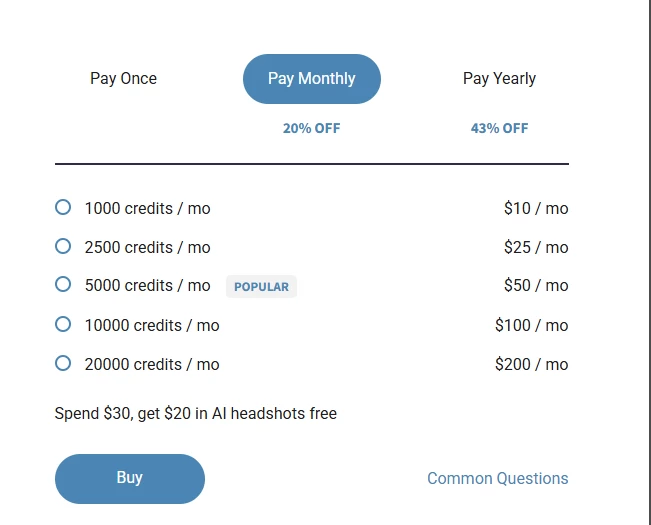
• Free exploration may not equal commercial rights.
• Commercial use may require credits.
• Advanced settings may cost more.
• Different tools can have different pricing.
• Headshots may use package pricing.
• Check the license before client work.
• Check download and export rules.
• Verify refund rules before buying.
| Item to Verify | Reason |
| Credit cost per output | Avoid surprise spending |
| Free vs paid output rights | Free use may have limits |
| Commercial license | Needed for business or client use |
| Attribution requirement | May affect publishing |
| Watermark rule | Important for final assets |
| Export resolution | Affects website and social use |
| Headshot package terms | Prevents wrong expectations |
| Refund or cancellation policy | Important before payment |
Rather than quote a single review, it is more reliable to read feedback as patterns across sources and to note what each source is good and bad at showing. Use the table below as a guide when you check current discussions yourself; it does not stand in for that research.
| Source | Feedback Pattern | Helpful For | Caution |
| Product Hunt | Creator and startup reactions | Early user sentiment | May be launch-biased |
| Pricing, output quality, privacy concerns | Real user friction | Anecdotal | |
| YouTube demos | Workflow visibility | Seeing actual outputs | May be sponsored |
| Trustpilot | Billing and support signals | Buyer confidence | Review count may be limited |
| Creator forums | Practical quality comments | Professional use cases | Subjective opinions |
Hotpot AI fits best where speed matters more than perfection. The chart below ranks common situations by fit, and the table explains the reasoning for each.
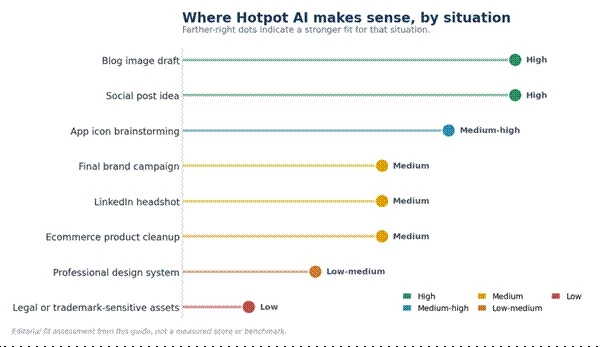
Editorial fit assessment from this guide, not a measured score.
| Situation | Fit Level | Reason |
| Blog image draft | High | Fast and low-friction |
| Social post idea | High | Useful for quick concepts |
| Final brand campaign | Medium | Needs human review |
| App icon brainstorming | Medium to high | Good for concepts, not final trademark work |
| LinkedIn headshot | Medium | Depends on realism and privacy comfort |
| Ecommerce product cleanup | Medium | Works better on simple backgrounds |
| Professional design system | Low to medium | Needs more manual control |
| Legal or trademark-sensitive assets | Low | Requires specialist review |
A few situations call for extra caution. The safer approach for each is simple once you know to look for it.
| Risk Area | Safer Approach |
| Real faces | Get consent and check privacy |
| Logos | Use only as a concept, then verify trademark |
| Client work | Confirm license and usage rights |
| Product visuals | Do not misrepresent the real product |
| Text in an image | Add final text manually in design software |
| Sensitive industries | Add human or legal review |
| Public ads | Check commercial-use terms |
No single tool wins every task. The table below maps common needs to the workflow that tends to serve them best, including where a specialist beats an all-in-one platform.
| Workflow Need | Hotpot AI | Better When You Need |
| Full design layout | Quick drafts and utilities | Canva or Adobe Express for templates, brand kits, team design |
| High-end AI art | Usable but not the focus | Midjourney or Leonardo AI for visual control and style depth |
| Commercial creative ecosystem | Standalone tasks | Adobe Firefly for Adobe integration and brand workflows |
| Product background removal | Works on simple images | Photoroom or Remove.bg for ecommerce-focused cleanup |
| Professional AI headshots | Quick experiments | HeadshotPro or Aragon AI for a dedicated headshot workflow |
| Manual image editing | Limited control | Photoshop or Pixlr for layer-level control |
| Text-heavy graphics | Weak in-image text | Canva, Kittl, or Ideogram for better text and layout |
Hotpot AI makes the most sense when a creator needs a fast starting point: a blog image, app graphic, social visual, headshot experiment, or cleaned-up photo. The smart way to use it is not to generate randomly, but to test one workflow, check the credit cost, confirm the license, and decide whether the output saves enough time to be worth using.
In short, judge it by workflow rather than by tool count. Expect some outputs to need editing, treat headshots and commercial assets as requiring extra privacy and license checks, and start with one real task before buying credits. For serious brand, legal, or client work, human review still matters.
| Bottom line: Use Hotpot AI as a creative shortcut for drafts and everyday assets. Test one task, confirm the credit cost and license, and keep a human in the loop for anything high-stakes. |
Share your thoughts about this article.
Be the first to post a comment!

The same tool can be a 4.7 on one site and a 3.9 on another. Here is what is rea...
Nitin4 weeks ago

Here is the number worth pinning above your budget: in Gartner Digital Markets r...
Deepak Mehra4 weeks ago

What Artlist AI is in 2026Artlist began as a royalty-free music library. By 2026...
Deepak Mehra1 month ago

Most AI tool failures do not announce themselves. There is no crash, no angry em...
Nitin1 month ago

The best AI image generator in 2026 is Nano Banana 2 for speed, FLUX.2 for photo...
Parveen Verma1 month ago

“Useful” is a slippery word for a coding assistant. A tool can be brilliant at o...
Sakshi Dhingra1 month ago