
Anyone who has managed content for a small business knows the drill. Social media planning eats entire afternoons, the output looks different every month, and the plan usually lives in a document nobody opens twice.
I have felt that pain across multiple client projects, so when I came across Mexty AI, a platform that turns a single prompt into a structured, interactive course-style plan, I wanted to see whether it could actually replace my usual planning routine.
Mexty is an AI-native learning platform built by a French edtech startup founded in Paris in April 2024, and it launched its full e-learning suite in mid-2025. Instead of spitting out a wall of text, it packages your plan as slides, activities, and assessments that can be shared, tracked, and even exported to a learning management system. I recently explored Mexty AI to streamline my social media strategy for an optical business, and here is exactly how the experience unfolded, screen by screen.
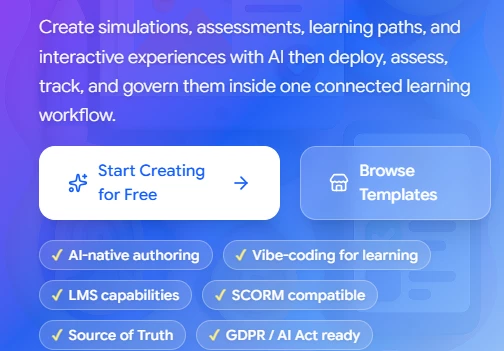
The Mexty homepage promises AI-native authoring, LMS capabilities, and SCORM compatibility in one workflow.
I analyzed this landing screen and noticed that Mexty positions itself well beyond a content generator. The badges for AI-native authoring, LMS capabilities, SCORM compatibility, and GDPR / AI Act readiness told me this tool is aimed at people who need to deploy and govern learning content, not just draft it.
Sign-up took me under two minutes, which set the tone for the rest of the session. Mexty uses passwordless authentication, so instead of creating yet another password I only had to enter my email address and accept the terms.
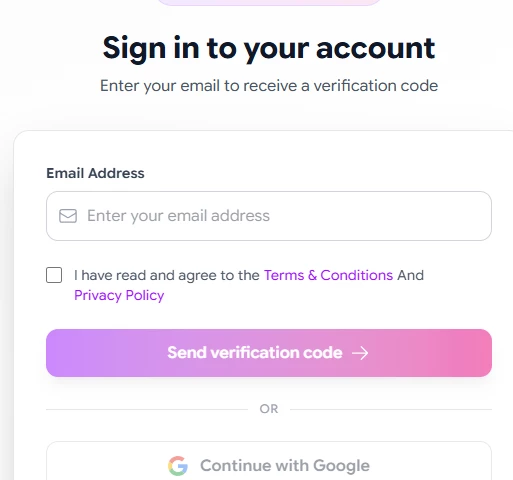
The sign-in screen asks only for an email address, with Google sign-in as an alternative.
I analyzed this image and could see that Mexty keeps onboarding friction deliberately low. A single email field with a verification-code flow, plus a Google option, means there is no password to manage from day one.
Seconds after submitting my email, a six-digit verification code arrived in my inbox. The code expires in ten minutes, which is a sensible security window for this kind of flow.

The verification email delivers a six-digit login code that expires in ten minutes.
Looking at this email, I noticed the code-based login doubles as account verification, so there is no separate confirmation step slowing things down.
Once the code was accepted, Mexty walked me through a short workspace setup. I entered a full name, confirmed the auto-generated workspace name, chose between personal and pro use, and picked a role from a dropdown. I selected Content Editor since that matched what I was there to do.
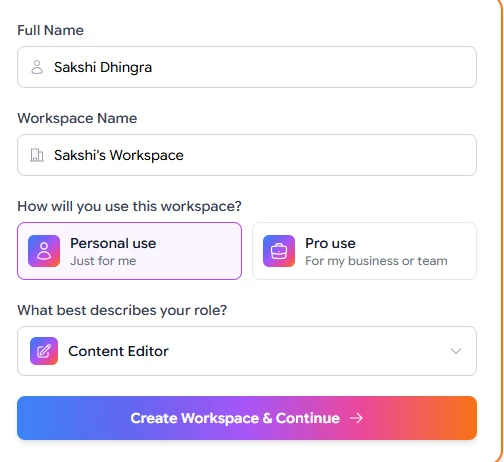
Workspace setup asks for a name, usage type, and role before creating the workspace.
I analyzed this screen and could see that Mexty automatically creates a personalized workspace around your answers. The role selection is not cosmetic; it shapes how the platform organizes campaigns and suggests content later, which helps you stay organized from the first session.
Before generating anything, I spent time in the template library because the variety here directly determines what your final plan can look like. At the time of my session, the library showed 40 courses, 174 templates, and 48 ready-to-use experiences, with featured community creations rotating at the top.
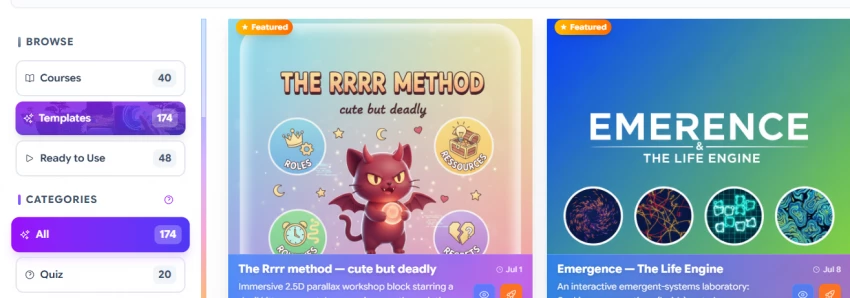
The browse view lists 40 courses, 174 templates, and 48 ready-to-use experiences, with featured community builds.
From this visual, I noticed Mexty emphasizes interactive learning paths rather than static decks. Featured templates like an immersive 2.5D parallax workshop and an emergent-systems laboratory signal that the platform expects creators to build experiences, which is excellent for engagement.
The category sidebar breaks those templates into distinct interaction styles. Quizzes dominate the library, but the presence of 3D sandboxes, gamified assessments, and role-play formats is what separates Mexty from a typical slide generator.
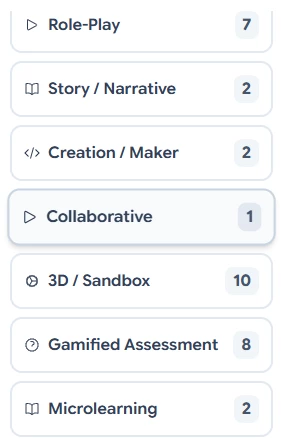
Template categories range from role-play and story formats to 3D sandboxes and microlearning.
I analyzed this category list and realized the counts tell a story about the platform's priorities. Assessment-heavy formats lead the library, while collaborative templates are still rare, which suggests multiplayer learning is an area Mexty is only beginning to build out.
Here is how the visible categories break down, along with where I think each one fits best in a real workflow:
| Template Type | Count | Best Use Case |
| Quiz | 20 | Knowledge checks after each plan module |
| 3D / Sandbox | 10 | Simulation-based learning and exploration |
| Gamified Assessment | 8 | Engagement-focused evaluation |
| Role-Play | 7 | Team training and client-scenario practice |
| Story / Narrative | 2 | Brand storytelling walkthroughs |
| Creation / Maker | 2 | Hands-on content creation exercises |
| Microlearning | 2 | Quick standalone lessons |
| Collaborative | 1 | Group workshop activities |
Plotting those counts makes the skew obvious. Assessment and simulation formats account for the bulk of the library, which fits a platform built around measurable learning outcomes.
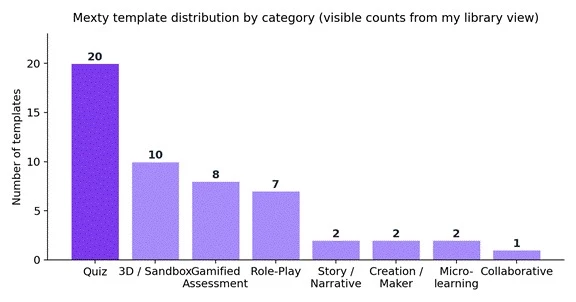
Template counts by category, based on the numbers visible in my library sidebar.
This chart confirmed my impression from the sidebar. Quizzes and 3D sandboxes together make up more than half of the visible categories, so if your plan needs interactivity, you will find plenty of raw material, but purely collaborative formats remain thin.
Mexty also organizes its solutions menu by role, use case, and benefit, which helped me confirm the platform was not education-only. Corporate training, compliance training, and customer training all appear as first-class use cases alongside teaching.
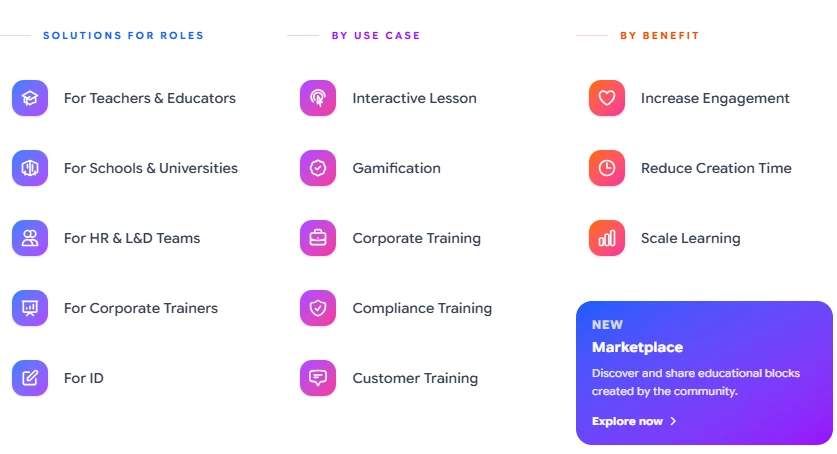
The solutions menu targets teachers, HR and L&D teams, corporate trainers, and instructional designers.
From this visual, I could see that a marketing plan is a slightly unconventional but entirely legitimate use of the platform. The corporate training and engagement categories map almost perfectly onto what a social media plan needs, and the new community marketplace hints at a growing library of shared blocks I could borrow from.
With the setup done, I moved to the part that mattered. The generation flow follows four simple steps, and each one took less time than I expected:
• I opened the Mexty chat interface, which offers tabs for General, Activities, Course, Evaluations, and Learning Paths.
• I typed my project goal in plain language: create a social media plan for an optical business.
• Mexty asked how I wanted to receive the plan, and I chose a multi-slide course over a text-based reply.
• I let the AI generate the full course structure, then watched the slides render one by one.
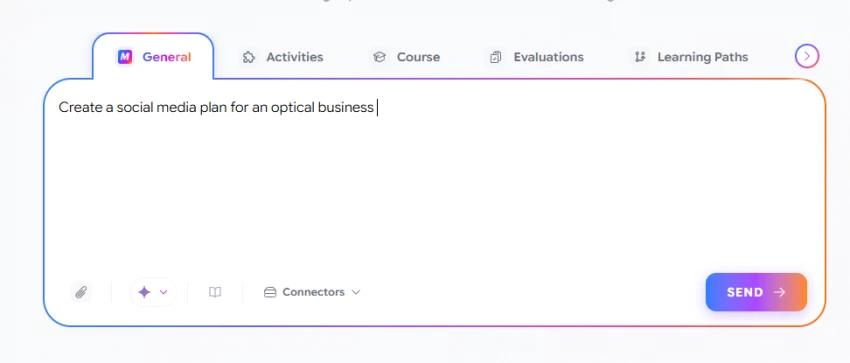
The chat interface accepts a plain-language prompt, with tabs for activities, courses, evaluations, and learning paths.
I analyzed this interface and appreciated that the chat is mode-aware. The tabs across the top mean the same prompt can produce a course, an activity, or an evaluation depending on context, and the connectors dropdown suggests external data sources can feed the generation.
Instead of immediately generating, Mexty paused to ask a clarifying question about output format. This small step matters more than it looks, because it prevents the classic AI failure of producing the wrong deliverable confidently.
Looking at this prompt, I noticed the open text field beneath the two options. You are never locked into the AI's framing, which is a thoughtful piece of interaction design for edge cases.
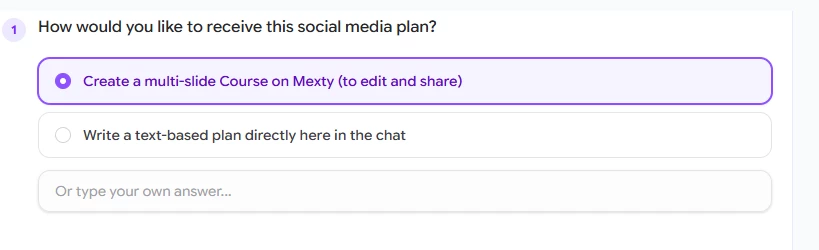
I selected the multi-slide course option so the plan would be editable and shareable.
I chose the course format here because a plan I can edit, share, and track beats a chat reply I would have to copy into another tool. That single click is what turns Mexty from a chatbot into a production workflow.
After I confirmed, the generation kicked off with a visible progress state. The interface shows a thinking indicator and a live percentage, so you are never staring at a frozen screen wondering whether anything is happening.
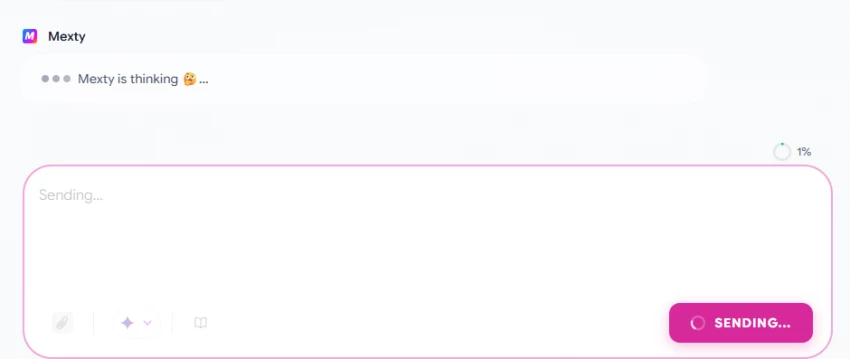
Mexty shows a thinking state and a live progress percentage while it works.
I analyzed this image and could see Mexty generating content dynamically while keeping me informed. The one percent counter at the start looks slow, but the whole outline arrived in well under a minute in my session.
The first thing Mexty produced was not slides but a specification. It proposed a topic, audience, difficulty level, learning objectives, and tone, and asked me to pick between a slides format and a scrollable pages format. This spec-first approach is exactly how a good instructional designer would work.
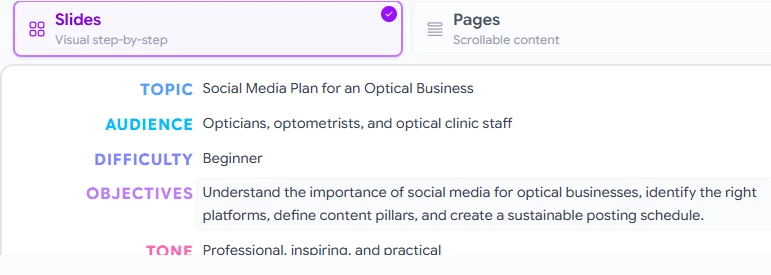
The generated course spec defines topic, audience, difficulty, objectives, and tone before any slides exist.
I analyzed this spec and was genuinely impressed by the audience inference. I never mentioned opticians or clinic staff in my prompt, yet Mexty correctly targeted the plan at opticians, optometrists, and optical clinic staff, set the difficulty to beginner, and chose a professional, inspiring, and practical tone.
From the spec, Mexty built an editable outline. Each block is labeled by function, starting with an opening slide and moving into content modules, and every block can be reordered, renamed, or deleted before generation begins.
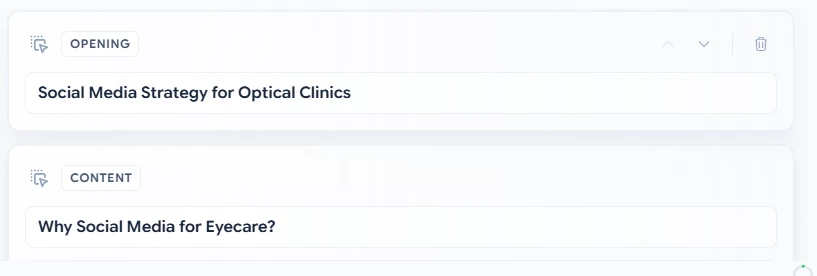
The outline labels each block by function, starting with the opening and the first content module.
Looking at this outline, the block labels stood out. Because Mexty tags slides as opening, content, or exercise, the structure survives edits, and the AI knows what job each slide performs when it fills in the details.
Mexty then attached visual templates to the outline. My course body was matched to a marketing and communication template, and hovering over the tag showed a live preview of the styled slide before anything was locked in.
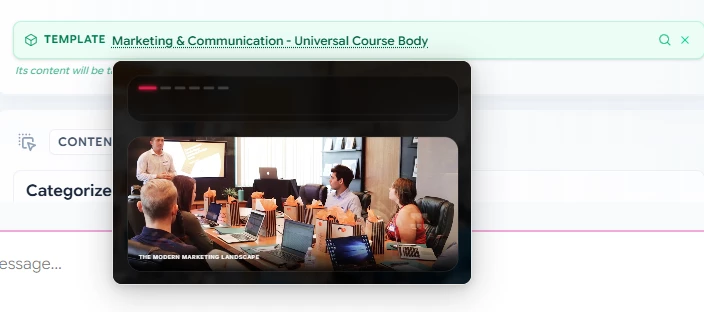
A marketing and communication template is applied to the course body, with a hover preview of the styling.
I analyzed this preview and could see the template system doing real work. The content I generated is poured into a professionally designed layer, so the output looks art-directed without me touching a design tool.
The outline closed with a synthesis activity called Your 30-Day Launch Plan and a matching course conclusion template. Ending a plan with an execution exercise, complete with goals and team responsibilities, is the kind of touch that makes the output actionable rather than theoretical.
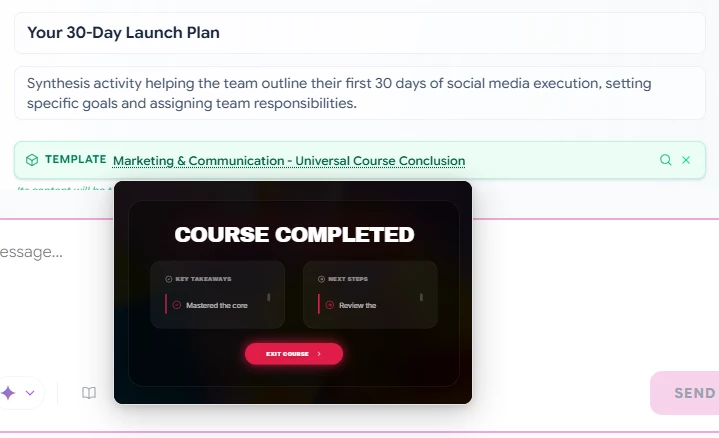
The final block is a 30-day launch plan activity, paired with a course completion template.
From this visual, I could see the workflow clearly supports learning and execution simultaneously. The conclusion slide summarizes key takeaways and next steps, so whoever completes the course walks away with an actual launch checklist.
Here is how the generated modules mapped to their purpose in my plan:
| Module | Purpose | Notes |
| Opening | Introduce the campaign | Sets context with the strategy title slide |
| Content slides | Deliver the detailed plan | Platform choice, audience, and content pillars as actionable steps |
| Exercises | Drive engagement and learning | Optional interactive components chosen per block |
| Conclusion | Define next steps | Summarizes takeaways and the 30-day launch plan |
Once I validated the outline, the real generation began. The center panel rendered each slide while a side panel filled with finished thumbnails, and Mexty even wrote its own image prompts, requesting a clean, modern optical boutique interior for my opening background.
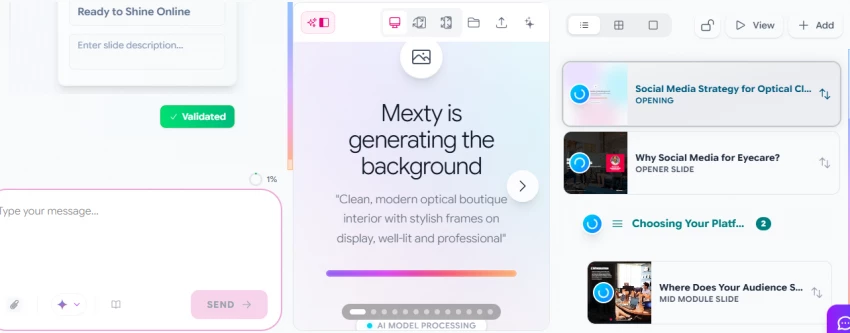
Slides generate in real time, with finished thumbnails stacking in the right-hand panel.
I analyzed this image and could see Mexty generating slides dynamically while maintaining a professional tone throughout. The self-written background prompt matched my niche precisely, which told me the context from my original request was flowing through every layer of the build.
While slides rendered, Mexty offered to enrich the course with activities. I could build a custom activity from a prompt, let the AI choose one, pull from my own library, or adapt something from the community marketplace. For my plan, the AI suggested a matching exercise pairing content types like new frame arrivals and dry eye info with the right platform.
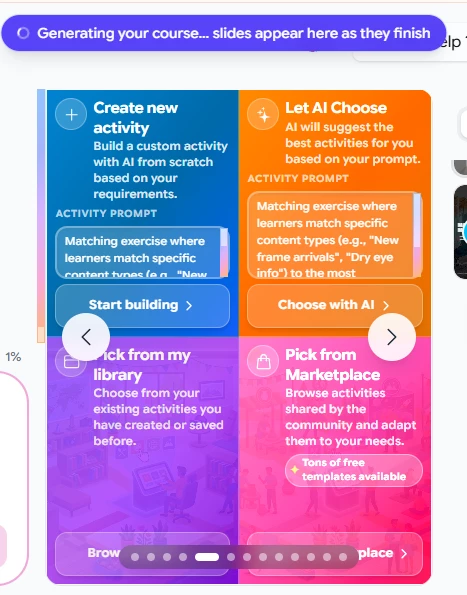
The activity picker offers custom builds, AI suggestions, personal library items, and marketplace templates.
Looking at this picker, I noticed the AI suggestion was already tailored to eyewear content categories. That level of contextual carry-through is where Mexty outperforms generic chat tools, which forget your niche the moment you switch screens.
A plan only matters if the team can access it, and this is where the course format paid off. The share panel let me keep the course private to my organization, publish it to the public marketplace, or copy a direct share link.
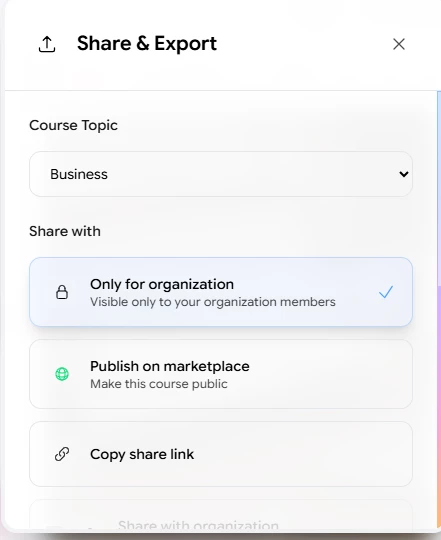
Sharing options include organization-only access, marketplace publishing, and direct links.
I analyzed this panel and could see that governance is built in rather than bolted on. Defaulting to organization-only visibility is the right call for internal strategy documents like a social media plan.
The export path surprised me most. Mexty packages courses as SCORM, the interoperability standard used by corporate learning systems, and the export dialog lists Moodle, Blackboard, TalentLMS, D2L Brightspace, SAP Litmos, and a dozen other platforms as one-click targets.
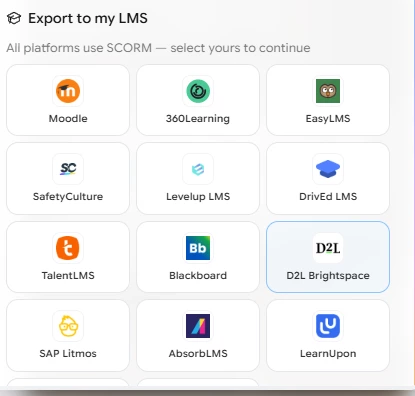
SCORM export supports Moodle, Blackboard, TalentLMS, D2L Brightspace, SAP Litmos, and more.
From this visual, I realized my social media plan had quietly become a training asset. An agency could build one plan and deploy it as an onboarding module across any client's LMS, which is a distribution channel no ordinary planning document has.
After completing the full workflow, a few things stood out about the AI itself. These are my personal observations from this single project, so treat them as a practitioner's field notes rather than benchmark data:
• Speed impressed me most, since the outline arrived in under a minute and full slide generation with backgrounds finished within a few minutes.
• Content suggestions were context-aware from start to finish, from the inferred audience of clinic staff to the eyewear-specific activity examples.
• Customizability is genuine, because every block, template, and activity can be swapped or edited before and after generation.
• Accuracy was solid for strategy structure, though I would still verify any platform statistics the AI includes before publishing a plan to a client.
Mexty runs on a credit system, where AI generations consume credits and each tier bundles a monthly allowance. I tested on the free tier, and here is how the four plans compared on the pricing page during my session:
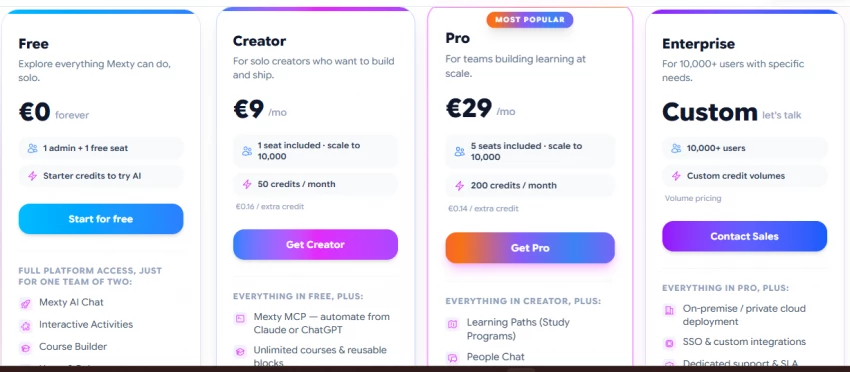
Four tiers span a free plan, Creator at 9 euros, Pro at 29 euros, and custom Enterprise pricing.
From this visual, I could see that the Free plan provides limited starter credits for exploration, while Pro unlocks the team features like learning paths and people chat that make full multi-slide course workflows sustainable. The extra-credit pricing also drops from 0.16 to 0.14 euros per credit as you move up.
| Plan | Price | Key Features | Credits | Seats |
| Free | €0 forever | Full platform access for one team of two, including AI chat, interactive activities, and the course builder | Starter credits | 1 admin + 1 free seat |
| Creator | €9 / month | Everything in Free plus Mexty MCP automation from Claude or ChatGPT, unlimited courses and reusable blocks | 50 / month (€0.16 per extra) | 1, scalable to 10,000 |
| Pro | €29 / month | Everything in Creator plus learning paths, study programs, and people chat for teams | 200 / month (€0.14 per extra) | 5, scalable to 10,000 |
| Enterprise | Custom | Everything in Pro plus on-premise or private cloud deployment, SSO, custom integrations, and dedicated support with SLA | Custom volumes | 10,000+ users |
The credit math is the real story here. Creator quintuples the free allowance for the price of two coffees, while Pro quadruples Creator again and adds the team layer.
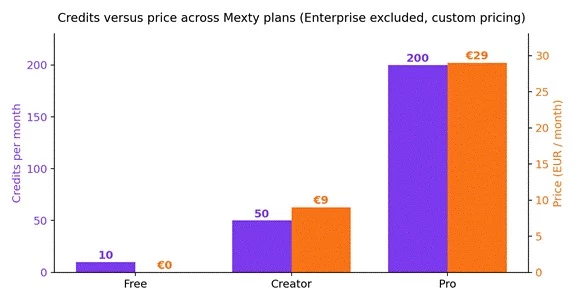
Monthly credits against price for the three fixed-price tiers, using the 10 starter credits Mexty advertises for free accounts.
This chart made my recommendation obvious. The jump from Creator to Pro delivers four times the credits for roughly three times the price, so heavy users get better per-credit economics the higher they go, and the falling extra-credit rate reinforces that pattern.
One detail worth flagging for anyone in my line of work: the Creator plan includes Mexty MCP, which lets you automate course creation directly from Claude or ChatGPT. For content teams already running AI pipelines, that single feature could justify the subscription on its own.
No tool survives a real project without trade-offs, and Mexty is no exception. Here is my honest tally after one complete build:
| Pros | Cons |
| Multi-slide generation is fast, with a full outline in under a minute | The free plan's starter credits run out quickly with heavy use |
| The template library spans 174 options across eight interaction categories | Complex custom workflows still need manual adjustment after generation |
| Interactive and gamified activities are first-class citizens, not add-ons | I spotted minor formatting quirks in previews that needed a second look |
| The AI infers audience, tone, and structure with surprising accuracy | First-time users face a learning curve around blocks, credits, and templates |
| SCORM export turns any plan into a deployable LMS training asset | Collaborative template options are limited, with only one visible in my library |
Mexty AI did something my usual planning stack cannot do. It turned a one-line request into a structured, styled, shareable course with built-in exercises and a 30-day execution plan, and it did so in a single sitting. Here is how I score the experience after this project:
• Ease of use earns a 9 out of 10, because the guided chat flow and labeled blocks make the platform approachable even on a first session.
• Output quality earns an 8.5 out of 10, since the structure and tone were professional, with only small formatting issues to clean up.
• Speed earns a 9 out of 10, as the outline-to-slides pipeline moved faster than any comparable tool I have used.
• Flexibility earns an 8 out of 10, because everything is editable, though deeply custom workflows still take manual effort.
• My overall rating lands at 8.5 out of 10.
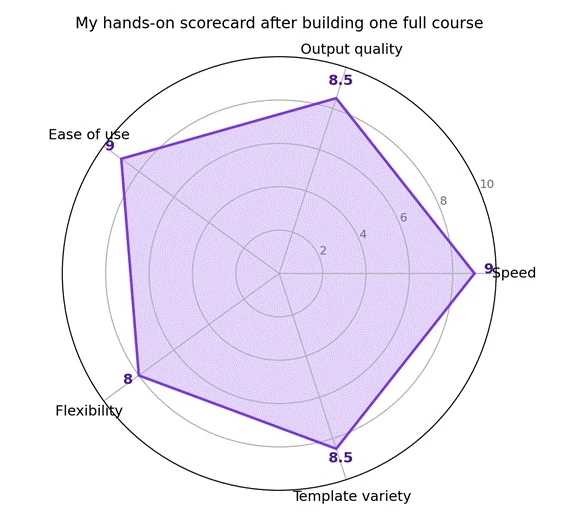
My scorecard across five dimensions after building one complete course on the free tier.
Plotting my scores this way exposed the platform's shape at a glance. Mexty is strongest exactly where planning tools usually fail, in speed and usability, and its softer edges sit in flexibility and collaboration, which matter less for a solo creator like me.
My recommendation splits by user type.
Solo creators and freelancers should start free to validate the workflow, then move to Creator at 9 euros once the starter credits run dry, especially if the MCP automation fits an existing AI pipeline.
Marketing teams and agencies should go straight to Pro, because learning paths, five seats, and 200 monthly credits are what make client-facing production realistic. If I were running this for the optical business full time, Pro is the plan I would pick.
Share your thoughts about this article.
Be the first to post a comment!

What Artlist AI is in 2026Artlist began as a royalty-free music library. By 2026...
Deepak Mehra23 hours ago

Most AI tool failures do not announce themselves. There is no crash, no angry em...
Nitin4 days ago

How this assessment was carried outFindings come from primary sources: the publi...
Deepak Mehra5 days ago

Joyland AI won its audience on one promise: an anime character library that keep...
Deepak Mehra5 days ago

Character AI logs around twenty million monthly active users who spend close to...
Deepak Mehra6 days ago

“Useful” is a slippery word for a coding assistant. A tool can be brilliant at o...
Sakshi Dhingra6 days ago