
Choosing an AI tool sounds simple until the options start looking the same. One tool promises content, another promises automation, another promises sales outreach, and another says it can do everything. The real question is not which AI tool is trending. The real question is which tool solves a specific business problem without creating more confusion, cost, or risk.
The right tool is not always the most popular or the most expensive one. The best tool is the one that solves a clear problem, fits how your team already works, saves measurable time or cost, protects your data, and gets used consistently after the novelty wears off. This guide gives you a practical way to make that decision: assess the need, understand the categories, evaluate properly, test on real work, price the return, check the data risk, and roll it out so it actually sticks.
| Quick Answer: The right AI tool for a business should solve a specific problem, fit the team's workflow, integrate with existing software, protect sensitive data, and deliver measurable value. Before choosing, compare tools by use case, features, pricing, ease of use, security, support, scalability, and real output quality. Start with a small test before committing to a paid plan or long-term contract. |
The first step is not browsing AI tools. It is naming the business problem you want to fix. Almost every useful AI tool maps to one of these areas:
| Business problem | AI tool type to consider | Example outcome |
| Too much time spent writing content | AI writing tool | Faster drafts and content briefs |
| Slow customer replies | AI chatbot or support tool | Faster first responses |
| Manual reporting | AI analytics tool | Automated dashboards and insights |
| Repetitive admin tasks | AI automation tool | Fewer manual workflows |
| Poor sales follow-up | AI sales assistant | Better lead tracking and outreach |
| Too many documents to review | AI document analysis tool | Faster summaries and extraction |
| Need more product visuals | AI design or video tool | Faster creative production |
If the business problem is unclear, the tool choice will be unclear too. A good AI buying decision starts with one sentence: “This tool should help us reduce, improve, or automate [specific task].” Once you can finish that sentence, the rest of the process is just comparison.
Here is the whole decision, start to finish, before we go deep on each step:
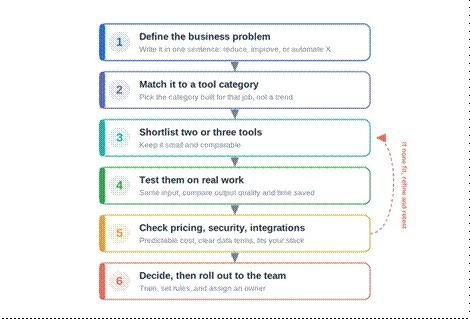
Figure 1: the decision in six steps. Start with the problem, match it to a category, shortlist a few tools, test them on real work, check pricing, security, and integrations, then decide and roll out. If nothing fits, refine and retest rather than settling.
Most tools fall into a handful of categories. Knowing them helps you shortlist quickly instead of comparing things that do completely different jobs.
For blogs, emails, product descriptions, ads, social posts, and content briefs. Great for speed, but the output almost always needs an editing pass for accuracy and brand voice.
For chatbots, ticket replies, help-desk automation, and self-service. These are only as good as the knowledge base behind them, so the content has to be accurate first.
For lead scoring, email personalization, call summaries, and follow-ups. Useful for keeping deals moving, as long as you avoid spammy, mass-automated outreach that hurts your reputation.
For dashboards, forecasting, customer behavior, and business intelligence. They need clean, well-organized data to produce insights you can trust.
For connecting apps, triggering workflows, and cutting repetitive tasks. The key is testing how they behave when something fails, not just when everything goes right.
For images, product visuals, social creatives, avatars, video ads, and presentations. Check output quality and, importantly, the licensing terms for commercial use.
For code suggestions, debugging, documentation, and internal tools. They speed developers up, but the code still needs human review before it ships.
For resume screening, meeting notes, onboarding, policies, and internal knowledge. Anything touching hiring needs care around bias and compliance.
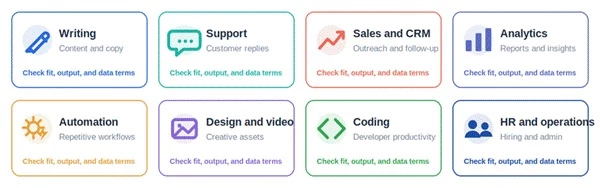
Figure 2: the main categories at a glance. Each category solves a different problem and carries a different caution. Whatever the category, check the same three things: does it fit the job, is the output good enough, and how does it treat your data.
| Category | Best for | Buyer caution |
| Writing AI | Content and copy | Output still needs editing |
| Support AI | Customer replies | Needs an accurate knowledge base |
| Sales AI | Outreach and CRM | Avoid spammy automation |
| Analytics AI | Reports and insights | Needs clean data |
| Automation AI | Repetitive workflows | Test failure handling |
| Design and video AI | Creative assets | Check licensing and quality |
| Coding AI | Developer productivity | Code needs review |
| HR AI | Hiring and operations | Watch bias and compliance |
Before paying for anything, run each shortlisted tool through these questions. The red-flag column is what should make you pause.
| Evaluation factor | Question to ask | Red flag |
| Use-case fit | Does it solve one clear business problem? | Looks impressive but has no clear task |
| Ease of use | Can the team use it without heavy training? | Only one technical person understands it |
| Output quality | Does the result need minor or heavy editing? | Output looks generic or inaccurate |
| Integrations | Does it connect with your current tools? | Requires manual copy-paste everywhere |
| Pricing | Is the cost predictable? | Credit system is confusing |
| Security | Can sensitive data be protected? | Privacy policy is unclear |
| Scalability | Can it grow with the business? | Limits are too low |
| Support | Is help available when something breaks? | No support channel or documentation |
| Compliance | Does it meet your industry's rules? | No clear data-handling terms |
| ROI | Does it save time, cost, or add revenue? | No measurable benefit |
Different categories take different effort and time to get running. Use this to set expectations before you start.
| Tool type | Difficulty | Business team | Setup time | Main outcome |
| AI writing tool | Easy | Marketing or content | 1 to 3 days | Faster content drafts |
| AI chatbot | Medium | Support or sales | 1 to 3 weeks | Faster customer replies |
| AI automation tool | Medium to hard | Operations | 1 to 4 weeks | Fewer manual tasks |
| AI analytics tool | Medium to hard | Management or data team | 2 to 6 weeks | Better reporting and insights |
| AI design or video tool | Easy to medium | Creative or marketing | 1 to 7 days | Faster visual production |
| AI coding assistant | Medium | Development team | 1 to 2 weeks | Faster coding and debugging |
| AI document tool | Medium | Admin, legal, or finance | 1 to 2 weeks | Faster document review |
AI pricing comes in a few shapes, and the sticker price is rarely the full cost. Common models include monthly subscriptions, per-seat pricing, credit-based pricing, usage or API pricing, and enterprise pricing. Then there are the costs that do not show up on the pricing page: hidden add-ons, training time, integration work, and the human review every AI output still needs.
| Cost or benefit area | Example |
| Monthly tool cost | $X per month |
| Team time saved | X hours per week |
| Hourly cost saved | X hours times hourly rate |
| Output improvement | Faster campaigns, fewer delays |
| Extra cost | Editing, training, integration |
| ROI question | Does the saved time and value exceed the total cost? |
This is the part that is easy to skip and expensive to get wrong. Before you trust a tool with anything sensitive, look at where your data is stored, whether it is used to train the vendor's models, access controls and admin permissions, audit logs, encryption, compliance, and whether you can delete your data on request. The more sensitive the data, the more of these you need clear answers to.
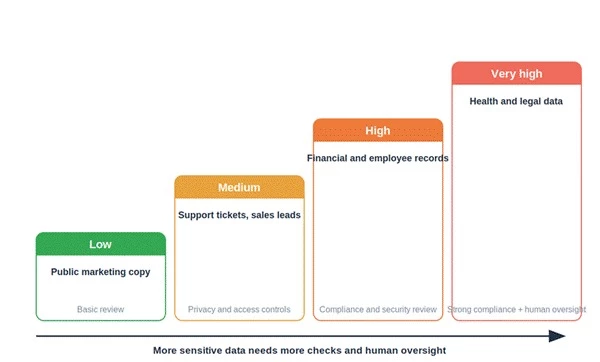
Figure 3: match the checks to the data. Public marketing copy needs a light touch. Customer, financial, employee, health, and legal data sit higher up and need real privacy, compliance, and human oversight before anything goes into a tool.
| Data type | Risk level | Extra check needed |
| Public marketing copy | Low | Basic content review |
| Customer support tickets | Medium | Privacy and access controls |
| Sales leads | Medium | CRM permissions and consent |
| Financial records | High | Compliance and security review |
| Health or legal data | Very high | Strong compliance and human oversight |
| Employee records | High | HR privacy and bias checks |
Never buy on the demo alone. Run a short, structured test on your own work first. A simple workflow:
1. Pick one business use case.
2. Choose two or three shortlisted tools.
3. Use the same input in each tool.
4. Compare the output quality.
5. Track the time saved.
6. Check the integrations.
7. Review pricing and limits.
8. Ask team members to test usability.
9. Check the privacy policy and support docs.
10. Decide based on real workflow results, not marketing.
Even the best tool fails if the team does not actually use it. Adoption is a real part of the decision, not an afterthought. Plan for training, clear usage rules, prompt or workflow templates, an approval step for important outputs, data-sharing rules, human review, sensible access permissions, and a way to measure whether people are using it.
| Adoption factor | Action |
| Training | Give the team a short, practical demo |
| Templates | Create common prompt or workflow templates |
| Rules | Define allowed and restricted use |
| Review | Keep human approval for important outputs |
| Ownership | Assign one person to monitor tool performance |
| Measurement | Track time saved, output quality, and usage |
Most bad AI tool decisions come from the same short list of mistakes. Each has a simple fix.
| Mistake | Result | Better approach |
| Choosing a tool because it is popular | Poor workflow fit | Start with the business problem |
| Buying too many tools | Overlap and wasted cost | Consolidate use cases |
| Ignoring the privacy policy | Data risk | Review terms before uploading data |
| Skipping testing | The paid plan disappoints | Test with real work first |
| Expecting perfect output | Bad content or decisions | Keep human review |
| Ignoring team training | Low adoption | Train users and create templates |
| Choosing only by price | Poor output quality | Compare value, not just cost |
| No success metric | ROI stays unclear | Track time saved or revenue impact |
These are common options to compare, grouped by need, not a ranking. Shortlist two or three per row and test them on your own work before deciding.
| Business need | Tool category | Example tools to compare |
| Blog and marketing content | AI writing | ChatGPT, Jasper, Writesonic, Copy.ai, Claude |
| Grammar and editing | Writing assistant | Grammarly, QuillBot, Wordtune |
| Customer support | AI chatbot or helpdesk | Intercom, Zendesk AI, Freshdesk AI, Tidio |
| Sales outreach | Sales AI | HubSpot AI, Apollo, Lavender, Clay |
| Workflow automation | Automation AI | Zapier AI, Make, n8n |
| Analytics and BI | AI analytics | Power BI, Tableau, Looker, ThoughtSpot |
| Design and video | Creative AI | Canva AI, Runway, Pika, HeyGen, Synthesia |
| Coding | Developer AI | GitHub Copilot, Cursor, Replit AI |
| Meeting notes | Productivity AI | Fireflies, Otter, Fathom |
| Documents and knowledge | Document AI | Notion AI, ChatGPT, Claude, Google Gemini |
Always verify current pricing, features, security policies, and user reviews before choosing any tool. These examples change often, and the right pick depends on your specific workflow.
Some businesses carry more risk and need a stronger review before adopting AI tools:
• Healthcare companies
• Legal firms
• Financial services
• HR teams
• Education platforms handling student data
• Businesses with private customer data
• Enterprise teams with compliance rules
• Businesses using AI for hiring or credit decisions
| High-risk use cases should include human review and compliance checks before any AI output is used to make a decision. |
Run through this before you commit. If you can tick all of these, you have made a sound decision.
| Question | Yes / No |
| Does the tool solve one clear business problem? | [ ] |
| Has the team tested it with real work? | [ ] |
| Is the output good enough after light editing? | [ ] |
| Does it integrate with your current tools? | [ ] |
| Is pricing predictable? | [ ] |
| Are privacy and data terms clear? | [ ] |
| Does the team know when not to use it? | [ ] |
| Is there a human review process? | [ ] |
| Is support or documentation available? | [ ] |
| Is the expected ROI clear? | [ ] |
The smartest AI tool decision is usually not the flashiest one. A business should choose the tool that helps one important workflow first, proves its value in a small test, and can then scale safely. If a tool saves time but creates privacy risk, poor output, or team confusion, it is not the right tool yet.
So pick a real problem, shortlist a few options, test them on actual work, weigh the full cost against the value, check the data terms, and roll out the winner with a little training and a human review step. Do that, and you end up with a tool the team actually uses, not another subscription nobody opens.
Share your thoughts about this article.
Be the first to post a comment!
Software rarely gets removed. It accumulates. A team hits a snag, someone finds...
Deepak Mehra1 month ago

⚑ The short versionAn AI detector returns a probability, not a verdict. Th...
Sakshi Dhingra1 month ago
Picture the last time you called a business after hours. You already know the so...
Pritam Singh1 month ago

Here is the uncomfortable truth about buying an AI chatbot for customer support...
Harpreet Singh1 month ago

Cancelling a ChatGPT subscription takes less than two minutes, once you know whe...
Harpreet Singh1 month ago

AI assistants stopped being optional somewhere in the last two years. Four in fi...
Harpreet Singh2 months ago