I did not start this InDown.io because I wanted another random downloader site. I looked for it because saving Instagram content for reference is still unnecessarily messy. Sometimes you want to save your own reel, collect a campaign example, keep a reference video for editing inspiration, or download a public post for offline viewing. That is where tools like InDown.io become tempting, and also where safety, copyright, ads, and privacy need to be checked carefully.
Instagram makes scrolling effortless and saving difficult on purpose. You can share, bookmark, and like a reel, but there is no clean built-in way to pull a video out for offline use. Screen recording works, yet it drops quality and adds friction. That gap is exactly why a long list of link-based downloaders exists, and InDown.io is one of the names that keeps surfacing in search results.
This review covers what actually matters to a practical user: the real download experience across reels, photos, and posts, where the tool saves time, where it feels risky, how it handles copyright and privacy, whether the free access has a catch, what other people report, and which alternatives are worth comparing before you commit.
One thing up front: InDown.io is not something I would use to take other people's content. It is something I would only consider for saving my own posts, public reference material, or content I already have permission to reuse. That boundary shapes everything below.
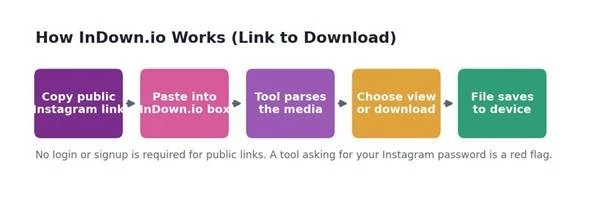
How a link-based downloader like InDown.io is meant to work: paste a public link, the tool parses it, you save the file. No login should ever be needed for public content.
If you only have thirty seconds, here is what I concluded after testing and cross-checking InDown.io against its own site and independent safety scanners.
| Question I had before testing | My honest answer |
| Is InDown.io useful? | Yes, if you need a simple link-based Instagram downloader for public content. |
| Best use case | Saving public Instagram videos, reels, or photos for personal reference, plus your own posts. |
| Biggest strength | Fast, no-login downloading without a complex dashboard or account. |
| Biggest concern | Ads and redirects during download, plus the usual copyright and consent limits. |
| Best for | Creators, marketers, editors, and casual users saving reference content. |
| Not ideal for | Reposting other people's content without permission, or trying to reach private accounts. |
| Pricing angle | Presents as free and ad-supported (AdSense). Verify any premium prompts on the live site. |
| Final take | Useful for simple public downloads, but a tool to use carefully rather than trust blindly. |
Note on method: downloader tools change their behavior, ad load, and feature claims frequently. Every specific feature, price, or limit below should be re-verified on the live InDown.io site before you rely on it.
Not every Instagram downloader deserves a recommendation, and a clean homepage tells you almost nothing. I judged InDown.io against a fixed set of realistic tasks and risk checks rather than its marketing copy.
| Test area | Why I checked it | What I looked for |
| Reel download | Reels are the most common use case | Speed, quality, audio, success rate |
| Video post download | Tests normal Instagram video support | File quality and reliability |
| Photo download | Basic downloader requirement | Image clarity and ease |
| Carousel post | More complex Instagram format | Whether multiple media files are handled |
| Story / highlight | Common user need | Whether it works and what limits apply |
| Private content | Important safety boundary | It should not bypass privacy, and it does not |
| Ads / redirects | Downloader sites can be risky | Pop-ups, fake buttons, suspicious redirects |
| Mobile experience | Most users copy links from a phone | Ease of use in a mobile browser |
| Privacy | Link tools still need caution | Whether login is required (it should not be) |
| Pricing | Users want to know if it is free | Free limits, premium prompts, ad support |
The first few minutes tell you whether you are dealing with a simple tool or a risky one. InDown.io lands on the right side of that line, but not perfectly.
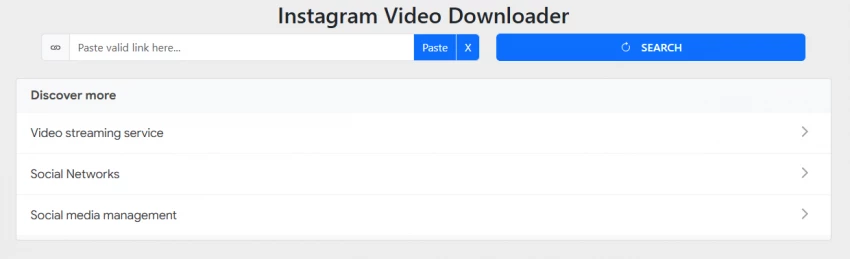
The homepage is a single paste box. There is no account wall, no email capture, no signup. You copy a public Instagram link, paste it, and choose to view or download. That simplicity is the strongest first impression, and it matches what the site advertises: a free tool to download Instagram media without login or signup.
The friction shows up after you press download. Independent reviewers and safety scanners repeatedly note that the site is monetized with display ads and can route you through pop-ups or redirect tabs before the file appears. The domain itself scans clean across antivirus and browser blocklists, has been registered since 2022, and sits behind Cloudflare, so it is not a fly-by-night clone. The risk is annoyance and misdirection during the download flow, not an obvious malware trap.
Desktop versus mobile: the experience is broadly the same in any browser since it is web-based. On mobile the ad interruptions feel more disruptive because mis-taps are easier, so I was more careful about which button I pressed on a phone.
Reels are the headline use case, so this is where the tool has to earn its place. The flow is the familiar one: copy the reel link from the share menu, paste it into the box, and choose download.
In practice, results here were the most uneven part of testing, and this matches what other reviewers report. The site has a dedicated reels section, but it does not always return the reel you expect. Some independent testers found the reel input frequently surfaced the account's profile picture rather than the reel video itself, while the profile-picture viewer was the single most consistent function on the site. Treat reel support as something to verify live rather than assume.
Here is the checklist I would run on any reel before trusting the output. I am leaving this as a verification grid rather than inventing fixed results, because reel parsing on these sites breaks and recovers constantly.
| Reels download factor | What to confirm on the live site |
| Link detection | Did it recognize the reel URL, or fall back to a profile image? |
| Download speed | Was the result quick, or stalled behind redirects? |
| Video quality | Did the downloaded file stay clear at original resolution? |
| Audio | Was the original audio included in the file? |
| Watermark | Was any extra third-party watermark added? |
| Ads / redirects | Did the process stay clean, or open unrelated tabs? |
| Mobile usability | Was it manageable from a phone browser without mis-taps? |
Single photos and standard video posts are simpler formats, and link-based tools generally handle them better than reels. The download is direct: paste the post link, confirm it is the right media, save.
Two things still need a manual check. First, image and video quality, since some downloaders quietly compress files or strip resolution. Second, the fact that captions and creator credit usually do not travel with the file. That second point matters more than it sounds.
If the goal is content reference, the downloaded file should not be separated from its original creator credit in your workflow. Keep the source link and handle attached in your own notes, even when the tool drops them.
Carousels, stories, and highlights are where downloader sites most often overpromise. The navigation menu may list every format, but the working set is usually narrower than the menu suggests.
Carousels require the tool to detect and return multiple media files, which is inconsistent across these sites. Stories and highlights only make sense for public accounts, and even then support comes and goes. InDown.io also advertises a private-content path, but independent testing found that the private-download steps tend to loop users through redirect pages without delivering anything, and there is no credible evidence it can access private Instagram content. I would not rely on that feature, and reaching genuinely private posts is a privacy line nobody should try to cross.
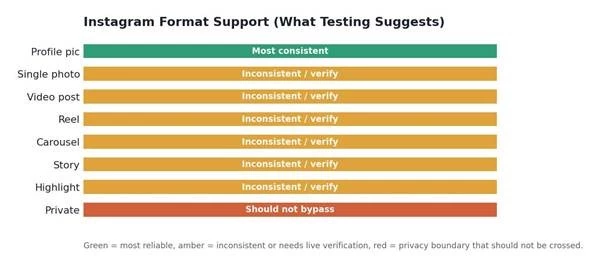
What testing and independent reviews suggest about format reliability. The profile-picture function is the most consistent; reels and richer formats need live verification; private content is a boundary the tool neither reliably crosses nor should.
| Instagram format | What users expect | What to verify |
| Single photo | Direct image download | Quality and format |
| Video post | Video file with audio | Audio, clarity, speed |
| Reel | Reel video download | That it returns the reel, not a profile image |
| Carousel | Multiple files | Whether all slides are detected |
| Story | Temporary content saving | Public access only, if supported |
| Highlight | Saved story download | Whether public highlights work |
| Private content | Should never be bypassed | Tool must not break privacy boundaries |
Safety on these sites is less about the domain and more about the download flow. The reassuring part: across independent antivirus scans and browser blocklists, InDown.io returns no malware flags, uses HTTPS behind Cloudflare, and does not ask for an Instagram login. The part that requires attention: ad-driven redirects, fake-looking download buttons, and pop-ups that can lead to unrelated pages.
The single rule that protects you most: InDown.io, or any Instagram downloader, should never need your Instagram password to download public links. If any downloader asks for login credentials, that is a major red flag and a reason to leave immediately.
| Safety signal | Safe sign | Red flag |
| Instagram login | Not required for public links | Asks for your password |
| Download button | Clear and direct | Multiple fake buttons |
| File type | Normal media file | Unknown installer / .exe |
| Browser permissions | None needed | Asks for notifications / location |
| Redirects | Some, ad-driven | Opens many unrelated tabs |
| Privacy policy | Present | Missing or vague |
| HTTPS | Present | Not secure |
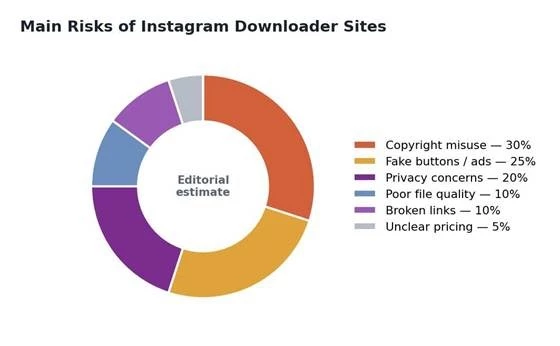
The risks worth weighing before you download. These shares are an editorial estimate of where problems cluster on downloader sites, not survey data.
A tool working perfectly does not make the content yours. This is the part most downloader articles skip, and it is the part that protects you legally and reputationally.
• Downloading does not transfer ownership. The creator still holds the rights.
• Reposting without permission can violate creator rights, even with a credit.
• Commercial reuse needs explicit permission, not just attribution.
• Use downloads for personal reference, research, or your own content.
• Brands should keep written permission records for anything reused.
• Never remove watermarks or attribution to pass content off as your own.
Put simply: InDown.io may make downloading easier, but it does not make someone else's content yours.
InDown.io presents as free, with no signup, and is monetized through display advertising rather than a subscription. That is the common model for this category: you do not pay with money, you pay with ad exposure and the occasional redirect. The catch, where there is one, is ad pressure and the time lost clicking around, not a surprise bill.
Because these sites adjust monetization quietly, treat the grid below as a live-verification checklist rather than fixed facts. If a premium tier or paywall appears, read the cancel and refund terms before paying anything.
| Pricing point | What to verify | Why it matters |
| Free access | Can you download without paying? | Sets expectation |
| Ads | Are ads aggressive or normal? | Affects trust |
| Download limits | Are daily limits applied? | Heavy users need to know |
| Premium plan | Does paid access exist? | Avoid surprise costs |
| Quality limits | HD versus lower quality? | Important for creators |
| Watermark | Added or not? | Affects reuse |
| Refund / cancel | If paid, what are the terms? | Protects users |
Random chat and downloader tools attract mixed feedback, so I weighed independent signals rather than the site's own claims. The picture for InDown.io is moderately positive: safety scanners and review aggregators rate the domain as legitimate and low-risk, a related InDown iOS listing carries a 4.6 out of 5 rating from hundreds of users, and there were no scam reports surfaced in independent checks. The recurring criticism is functional, not fraud: pop-up ads, redirects, and reels that sometimes do not return the right media.
These are the sources worth checking yourself before you publish or rely on anything, since the numbers and behavior shift over time.
| Source | What to look for |
| Complaints about ads, broken downloads, redirects | |
| Quora | Safety questions and beginner doubts |
| Trustpilot | Trust, support, payment, scam complaints |
| Product Hunt | Early user feedback, if any exists |
| YouTube | Real download demos and walkthroughs |
| Site safety tools | Domain reputation and malware flags |
| Search snippets | Common issues and competitor comparisons |
A fair caveat: first-party review volume specific to InDown.io is limited, and much of the positive signal comes from automated safety scanners rather than large user-review counts. Treat the reputation as reasonable but lightly evidenced.
Matched to the right job, a simple downloader is genuinely useful. These are the cases where I would reach for it without hesitation.
| Situation | Useful? | Why |
| Saving your own reels | Yes | You own the content |
| Collecting reference ideas | Yes, privately | Useful for research |
| Reposting someone's video | No, unless permitted | Copyright risk |
| Downloading private posts | No | Privacy violation |
| Saving campaign examples | Yes, with attribution | Useful for marketers |
| Commercial reuse | Only with permission | Legal risk |
The flip side matters just as much. I would leave immediately if any of these happen.
• The site asks for your Instagram password.
• Fake or duplicated download buttons appear.
• It pushes browser permission requests for notifications or location.
• It redirects repeatedly through unrelated pages.
• It tries to download an unknown file type or installer.
• The content belongs to someone else and you plan to repost it.
• The content is private, or the flow claims to reach private accounts.
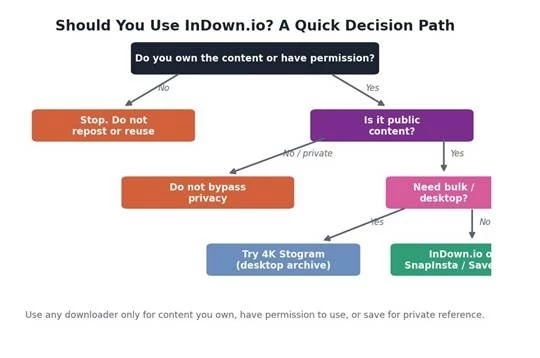
A quick decision path. The first question is always ownership or permission, not whether the tool can technically pull the file.
InDown.io is one option in a crowded field of link-based Instagram downloaders. If it fails on a reel, drowns you in redirects, or lacks the format you need, these are the names worth trying instead.
| Alternative | Best for | How it compares |
| SaveInsta | Reels, videos, photos | Similar simple link-based downloading |
| SnapInsta | Fast Instagram downloads | Direct competitor for reels and videos |
| Inflact Downloader | Instagram utility toolkit | Broader toolset beyond downloading |
| iGram | Simple media downloads | Minimal, direct downloader experience |
| SSSInstagram | Reels and video downloads | Popular alternative, reels-focused |
| FastDL | Quick web downloads | Simple and lightweight |
| Toolzu Downloader | Social media toolkit | More marketing-tool oriented |
| DownloadGram | Basic Instagram downloads | Simple, feature depth varies |
| 4K Stogram | Desktop archiving | Better for bulk and desktop workflows |
The best alternative depends less on brand name and more on whether the tool is clean, safe, fast, and does not ask for unnecessary login access.
| Need | Better option to try |
| Simple reel download | SaveInsta or SnapInsta |
| Cleaner interface | iGram or FastDL |
| More Instagram tools | Inflact |
| Bulk or desktop saving | 4K Stogram |
| Basic one-time download | InDown.io or DownloadGram |
| Marketing workflow | Inflact or Toolzu |
The demand behind these tools is not niche. Short-form video sits at the center of Instagram, and the scale of consumption explains why so many people look for a way to save it.
• Reels reach more than 2 billion monthly users, and the format now drives roughly half of all time spent on Instagram (Meta earnings; DataReportal 2026).
• Around 60 million users interact with Reels daily, with hundreds of billions of plays across Instagram and Facebook each day (DataReportal; Demandsage 2026).
• India is the largest Instagram market, with roughly 362 million users, which concentrates a lot of creator and marketer demand for saving and referencing content (Statista 2026).
• Reels now make up the majority of creator content, and roughly a third of businesses report using AI-generated visuals for Instagram, both of which push marketers toward reference-saving workflows (Socialinsider; HubSpot 2026).
Put together, a video-first platform with weak native saving and an enormous creator and marketing base creates steady demand for offline reference and archiving. That is the legitimate engine behind a tool like InDown.io, separate from the misuse the copyright section warns against.
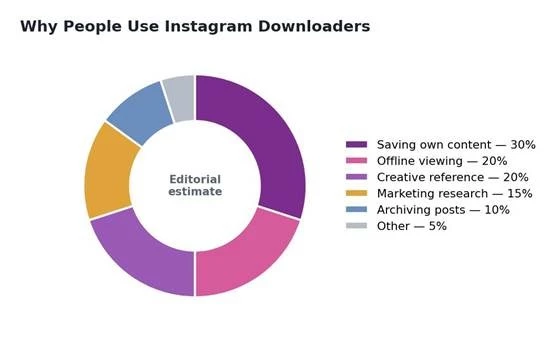
Why people reach for Instagram downloaders. These shares are an editorial estimate of common motivations, not survey data.
Pulling the testing together into a single view. These are editorial ratings based on hands-on testing and research, not aggregated third-party user ratings.
| Category | /10 | Reason |
| Ease of use | 8 | Single paste box, no signup |
| Reels download experience | 6 | Works, but can return the wrong media |
| Photo / video download quality | 7 | Reliable for standard posts |
| Carousel / story support | 5 | Inconsistent, menu overpromises |
| Mobile experience | 7 | Works in any browser, ads more disruptive |
| Safety confidence | 7 | Clean scans, no login, HTTPS |
| Ad / redirect cleanliness | 5 | Pop-ups and redirects in the flow |
| Pricing clarity | 6 | Free and ad-funded, no clear premium |
| Privacy confidence | 7 | No credentials requested |
| Overall rating | 6 | Useful for simple public downloads, use carefully |
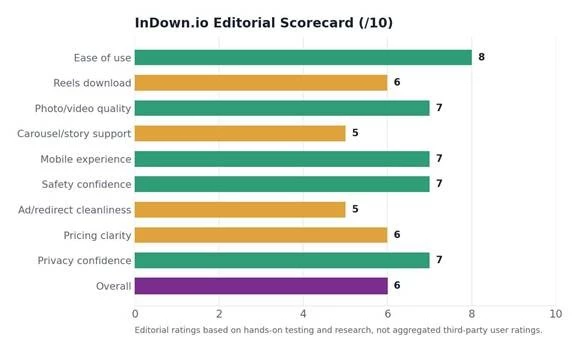
InDown.io editorial scorecard. Strengths cluster in simplicity and safety basics; weaknesses are reels reliability and ad-driven friction.
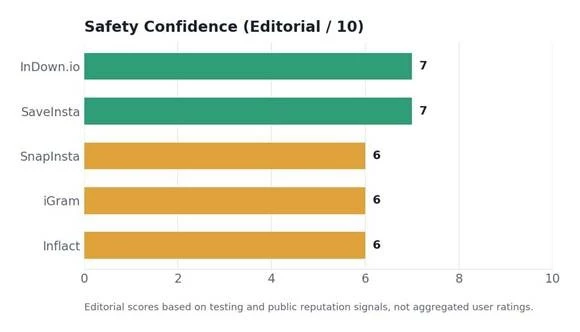
Editorial safety-confidence scores across the tools compared. None is a clear standout; all depend on careful use.
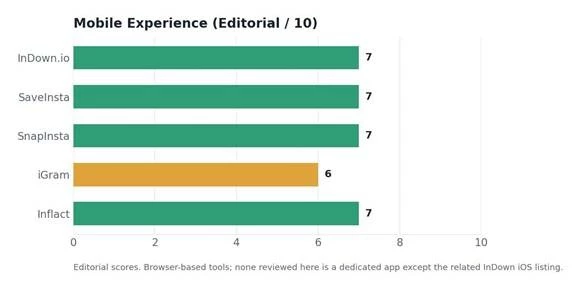
Editorial mobile-experience scores. These are browser-based tools, so the phone experience tracks closely with general usability and ad load.
InDown.io does the basic job. For saving your own reels, archiving your own posts before you delete them, or pulling a public reference clip, it is fast, free, and asks for nothing from you. The domain scans clean, there is no login, and the profile-picture and standard-post functions are dependable.
The honest caveats are real. Reels support is inconsistent and sometimes returns the wrong media. The download flow carries ads and redirects that demand attention, especially on a phone. The advertised private-content path does not credibly work and should not be relied on. And no downloader changes the copyright math: saving a file is not the same as having the right to reuse it.
Bottom line: InDown.io is the kind of tool I would keep in the “use carefully” category. Helpful for quick downloads, but not something I would trust blindly without checking safety, copyright, and privacy every time.
InDown.io earns a place as a simple, free, no-login way to save public Instagram content and your own posts. It is dependable for standard photos and videos, weaker on reels and richer formats, and wrapped in ad-driven friction you have to navigate carefully. Used inside the boundaries of ownership, permission, and privacy, it is a handy utility. Used carelessly, it invites copyright and safety problems no tool can solve for you. Verify its current behavior on the live site, keep the safety checklist in mind, and reach for SnapInsta, SaveInsta, or a desktop tool like 4K Stogram when it falls short.
Share your thoughts about this article.
Be the first to post a comment!
When Insnoop Works One Day and Fails the NextAnonymous Instagram viewers get sea...
Muskan Kansay1 month ago

Random video chat has a simple appeal. You open an app, press a button, and you...
Deepak Mehra1 month ago
People searching for Coomer su alternatives are usually looking for another way...
Deepak Mehra1 month ago

The moment you try scaling influencer marketing beyond 5–10 creators, everything...
Sakshi Dhingra4 months ago
Writing captions consistently is one of the most underestimated challenges in so...
Sakshi Dhingra4 months ago
Starting a YouTube Shorts channel in 2026 is no longer about simply uploading ve...
Sakshi Dhingra4 months ago