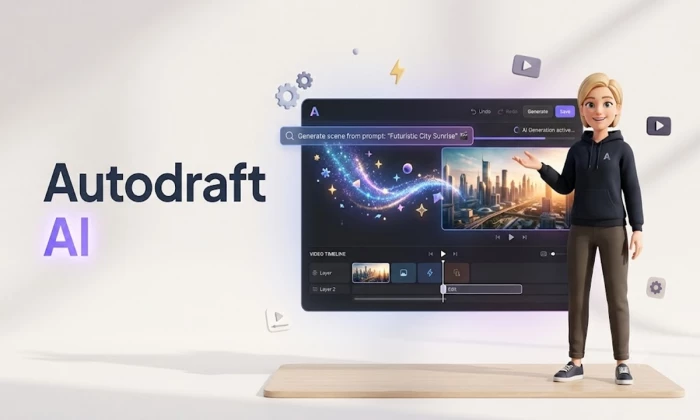
Type a sentence, get a cartoon. That is more or less the promise Autodraft AI makes, and it is a big one. If you have landed here, you probably want a straight answer to a simple question before you sign up: is it actually free, or is the free label just bait for a paywall? The short version is that Autodraft AI does have a genuine free plan, but it behaves more like a test drive than a car you can keep. The rest of this guide unpacks what that means in practice, what the paid tiers really cost, how good the output is, and whether your money is better spent somewhere else.
The quick answer Yes, Autodraft AI is free to start. The free plan gives you roughly 30 credits a month, basic animation tools and HD export, but it stamps a watermark on your work and limits which characters you can use. Paid plans begin at about $15 a month (Starter) and $29 a month (Pro), with annual Pro billing dropping the effective cost to around $19. For any real production work you will need a paid tier, because 30 credits runs out fast. |
One quick note before we go further, because it saves confusion. There are two unrelated products floating around under the AutoDraft name. This article is about autodraft.in, the AI animation and cartoon maker built for YouTubers and storytellers by the Indian company Allbots Technologies. It is not the legal-document drafting tool of a similar name that shows up on some Indian software directories. If you came looking for contract automation, this is the wrong page.
Autodraft AI is a browser-based platform that turns text prompts, sketches, storyboards and flat images into 2D animated videos.
Instead of learning a traditional animation pipeline, you describe what you want and the platform generates the pieces: backgrounds in a consistent style, characters that lip-sync to a voice, background music and sound effects, all stitched together in a built-in editor.
The target user is not a studio animator. It is the solo creator making nursery rhymes, horror-story narrations, explainer videos or kids' content for YouTube, and hoping to monetize without hiring a team.
The company was founded in 2023 by co-founders Sachin and Jay, based in India, around a straightforward thesis: professional animation is too expensive and too technical for most people who want to tell stories with it. Whether the tool fully delivers on that is the interesting part, and we will get to the friction later. First, the facts.
| Aspect | Detail |
| Category | AI 2D animation and cartoon maker |
| Best for | Solo YouTubers, educators, story and explainer channels |
| Company | Allbots Technologies Private Limited (India), founded 2023 |
| Free tier | Yes, ~30 credits/month with watermark |
| Entry paid price | ~$15/month (Starter) |
| Top plan | ~$29/month (Pro), ~$19/month billed annually |
| Max export | Genuine 4K with HDR on premium plans |
| Platforms | Web plus a full-featured mobile app (iOS/Android) |
| Languages (TTS) | English, Spanish, Hindi, French, German, Japanese |
If you only read one table in this article, that is the one. Everything below is really just detail hanging off those rows, so keep them in mind as we look at what you can do, what it costs, and what other people think.
The platform bundles four core capabilities into one interface, and understanding them explains both the appeal and the limits. Here is what each one does and how reliably it does it.
AI character generation. Describe a character in text and pick from 100-plus style templates, or choose from a pre-made library covering different styles, professions and ethnicities. Custom prompts land about 70% of the time, so expect to re-prompt.
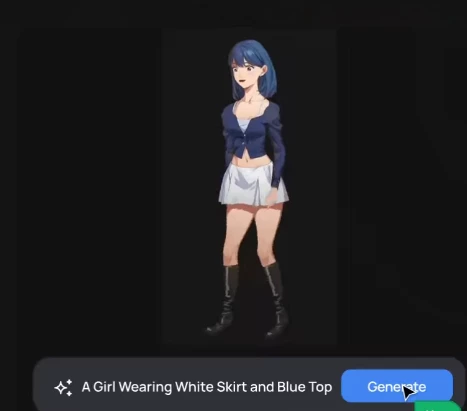
Automatic lip sync. Characters mouth the words automatically when you use the built-in text-to-speech voices. Accuracy drops noticeably once you upload your own audio, and drops further in non-English languages.
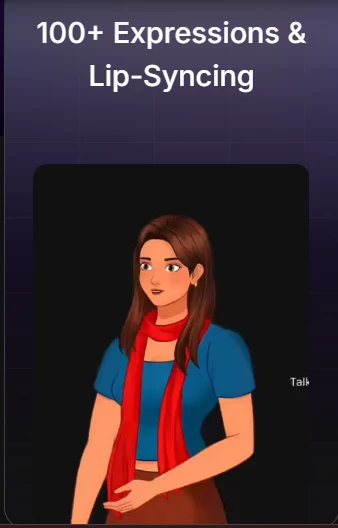
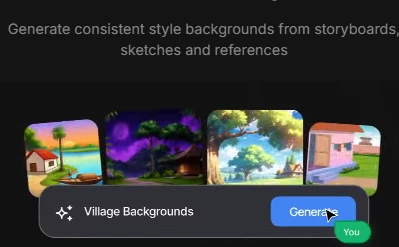
AI background generation. Text prompts create scene backdrops in a consistent style. It is strongest on outdoor and fantasy settings and weaker on indoor or urban scenes, which often need manual cleanup.
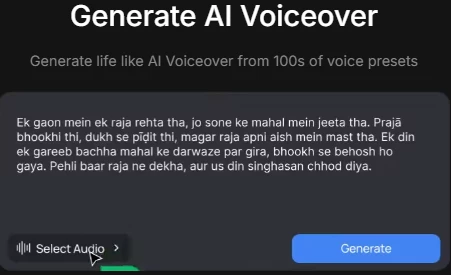
Voice, music and effects. Multi-language TTS across six languages, a library of roughly 200 to 300 background tracks, and AI-generated sound effects round out the audio side.
Genuine 4K export. This is real 4K, not upscaled, with HDR on premium plans. A 60-second 4K clip renders in about four to seven minutes.
Read the community feedback closely and a clear pattern emerges. The tool is genuinely good at producing static visuals, backgrounds, character designs and webtoon-style panels, while the harder animation promises are where people hit friction. The chart below maps that split, scoring each capability on aggregated user sentiment.
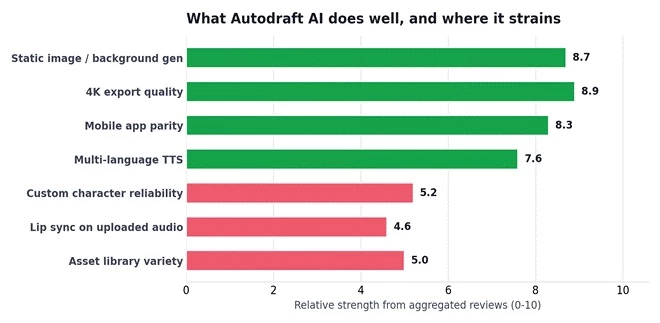
Static generation and export are the strong suit; custom characters and uploaded-audio lip sync are the weak spots.
The practical takeaway: if your channel leans on consistent character art and clean backgrounds with narrated voiceover in English, Autodraft plays to its strengths. If you need precise custom characters every single time or heavy non-English lip sync, budget extra patience.
This is the section you came for, so let us be precise. Autodraft AI runs on a credit-based model across three tiers, where credits are consumed as you generate. Prices are approximate and the vendor has been known to adjust them, so always confirm on the official site before you pay. Here is the current shape of it.
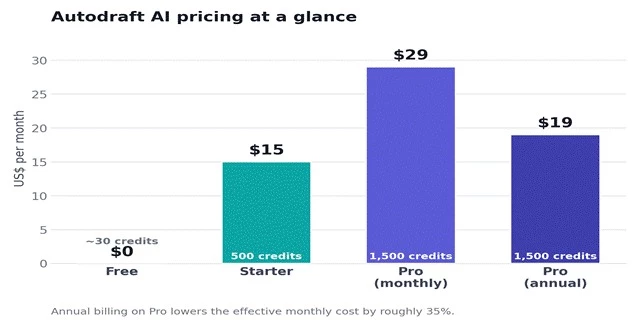
Free to start, $15 Starter, $29 Pro, with annual Pro landing near $19 a month.
| Plan | Price | Credits | What you get |
| Free | $0 | ~30 / month | Basic animation, HD export, limited characters, watermark on output |
| Starter | ~$15/mo | 500 / month | Full character library, 1080p export, text-to-speech, no watermark |
| Pro | ~$29/mo | 1,500 / month | Everything in Starter, plus 4K + HDR export, priority rendering, full AI toolkit |
| Pro (annual) | ~$19/mo | 1,500 / month | Same as Pro, billed yearly for roughly a 35% saving |
So is the free plan enough? Honestly, no, not for real work. Thirty credits disappear after a handful of generations, and the watermark makes anything you export unusable for a serious channel. Treat the free tier as a way to test the interface and see whether the output style suits you, then decide if Starter or Pro is worth it. As a demo it is fine. As a production tool it is not. |
A few honest cautions on the money side. Credits can feel opaque, and heavy users report burning through allocations faster than expected. Several reviewers also mention that pricing has shifted without much warning, so the numbers here are a snapshot rather than a contract. If you want to sanity-check current AI-tool pricing norms, the comparison and review pages at G2 and Product Hunt are useful reference points, and the platform's own pricing page is the final word.
Review coverage is thin but not empty, and the numbers that exist are broadly positive. On G2 the tool holds a 4.6 out of 5 from a small handful of reviews, with a net promoter score around 75. Editor and aggregator scores land a little lower once the mixed feedback is factored in, which is exactly what you would expect from a young product. Here is the spread.
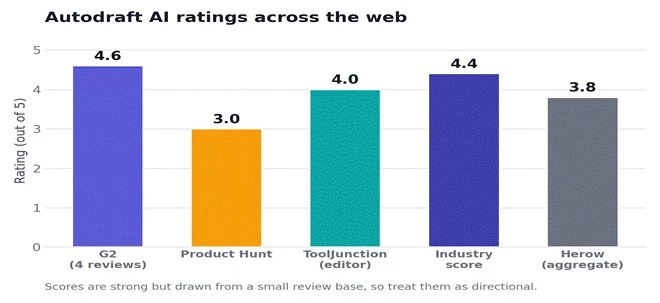
Ratings cluster in the 3.8 to 4.6 range, strong but from a small sample, so read them as directional.
The enthusiastic camp is real. Early adopters describe Autodraft as a genuine time-saver that made professional-looking animation accessible to people with zero design training. The features that come up again and again are the text-to-animated-character tool, the built-in editing, and character consistency across prompts, which is something general image models often fumble. Graphic designers on AppSumo and Product Hunt have praised the pose feature, the refined interface, and notably the hands-on one-to-one support from the team.
The frustrated camp is just as real, and worth taking seriously before you pay. The recurring theme is reliability: some buyers watched the tool stop generating images entirely, with repeated errors, and others waited 20-plus minutes for a single prompt that cheaper tools would return in seconds. The other consistent gripe is the gap between the marketing and the core animation promise. Autodraft shines at static visuals, but the fully-automated text-to-animation experience is bumpier than the pitch suggests.
How to read these reviews Small sample, big variance. The scores are encouraging, but with only a few reviews on each platform, one bad experience swings the average hard. The most reliable signal is the consistency of the qualitative feedback: people love the static art and the support, and they struggle with reliability and true animation. Weight that pattern more than the star number. |
Autodraft AI does not exist in a vacuum. The animated-video market is crowded, and the honest question is not just whether Autodraft is good, but whether it is the right pick versus better-known names. Its headline argument is price. At roughly $15 to $29 a month it sits well below the corporate-grade tools, and it throws in AI character generation and a proper mobile app that several rivals lack.
| Feature | Autodraft | Animaker | Renderforest | Vyond | Powtoon |
| Free tier | Yes | Yes | Yes | No | Yes |
| Entry price / mo | ~$15 | ~$10-12 | ~$15 | ~$58 | ~$20 |
| AI character gen | Yes | Partial | Partial | Yes | No |
| 4K export | Yes | Enterprise | Business | No | No |
| Mobile app | Yes | Partial | Partial | No | Partial |
| Best fit | YouTube creators | Budget explainers | Video + branding | Corporate L&D | Team explainers |
The pattern is clear once you see it side by side. Vyond is the polished, expensive choice for corporate training teams, and its lack of a free tier and mobile app makes it a different kind of product entirely. Animaker and Renderforest compete on budget but gate 4K behind their top plans and treat AI character generation as a partial feature. Autodraft's niche is the solo creator who wants AI characters, 4K, and phone-based editing without paying enterprise prices. Within that niche it is genuinely competitive.
Speed claims are cheap, so here is the more useful number. Real-world testing shows a first project taking about three hours and twenty minutes, because you are learning the workflow as much as building the video. By the third project that drops to roughly an hour and forty-five minutes, and once you are fluent a simple three-minute nursery rhyme comes together in around 45 minutes. The curve is steep at first and then flattens fast.
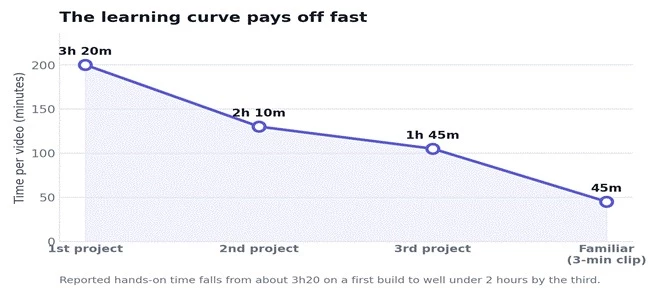
Expect a slow first build, then a sharp drop in production time as the workflow clicks.
That trajectory matters for your decision. If you plan to make one video and quit, the upfront learning cost is annoying. If you are building a channel and will make dozens, the early friction amortizes into a genuinely fast pipeline. Autodraft rewards commitment more than it rewards curiosity.
1. Sign up at autodraft.in and open a new project from the dashboard to launch the editor.
2. Set the background with a text prompt or your own image; lean on outdoor and fantasy prompts where the AI is strongest.
3. Add characters from the library or generate them from text, then place them on the canvas.
4. Animate using the action library, walking, talking, waving, layered with timing on the timeline.
5. Add voice and audio via multi-language TTS or uploaded audio, then drop in music and effects.
6. Export and publish in up to 4K on Pro, then send straight to YouTube or social.
Pulling the threads together, here is the balanced view, the genuine strengths on one side and the real trade-offs on the other. Neither list is padding.
| What works | What to watch |
| Real free tier to test before paying | Free credits run out almost immediately |
| Aggressive $15-29 pricing undercuts corporate tools | Pricing has shifted without warning; credits feel opaque |
| Genuine 4K export with HDR, not upscaled | Custom character generation only ~70% reliable |
| Strong, consistent static art and backgrounds | Core text-to-animation is bumpier than marketed |
| Full-parity mobile app, rare in this category | Some reliability complaints: errors, slow renders |
| Responsive one-to-one team support | Asset library grows repetitive with heavy use |
• Solo YouTubers building animated channels: kids' content, nursery rhymes, explainers, story narrations.
• Educators who need affordable animated explainers without a production team.
• Mobile-first creators who want to build and edit from a phone or tablet.
• Professional animators who need frame-by-frame precision and deep creative control.
• Brand and marketing teams that require strict visual consistency across large campaigns.
• Teams needing collaboration shared workspaces and multi-editor workflows are not the focus here.
Autodraft or otherwise, a few minutes of due diligence saves a wasted subscription. Run through this quick checklist with any AI tool you are weighing up.
| Step | Why it matters |
| Visit the official pricing page | Third-party numbers drift; confirm current tiers and credit limits |
| Use the free tier or trial first | Judge output quality on your own content before paying |
| Search recent reviews | G2, Product Hunt and Reddit surface reliability issues marketing hides |
| Check export and resolution | Make sure the format and quality you need is not locked to a top tier |
| Compare two or three rivals | The category moves fast; the best value shifts every few months |
So, is Autodraft AI free? Yes, to start, and no, if you are serious. The free tier is a real thing but a limited one, useful for kicking the tires and nothing more. The money lives in the $15 Starter and $29 Pro plans, and for the right person that money is well spent.
That right person is a solo creator or educator building an animated YouTube channel who values speed and price over precision. For them, the combination of AI characters, genuine 4K, a full mobile app, and pricing that undercuts the corporate tools is genuinely compelling, provided they go in with clear eyes about the reliability wobbles and the gap between the animation promise and the animation reality.
If you need frame-perfect control, airtight brand consistency, or team collaboration, this is not your tool, and no free plan will change that. But if your goal is to get watchable animated content out the door fast and cheap, Autodraft AI has earned a spot on the shortlist. Test it free, judge the output on your own project, and only then reach for your card.
Share your thoughts about this article.
Be the first to post a comment!

The same tool can be a 4.7 on one site and a 3.9 on another. Here is what is rea...
Nitin1 month ago

Here is the number worth pinning above your budget: in Gartner Digital Markets r...
Deepak Mehra1 month ago

What Artlist AI is in 2026Artlist began as a royalty-free music library. By 2026...
Deepak Mehra1 month ago

Most AI tool failures do not announce themselves. There is no crash, no angry em...
Nitin1 month ago

The best AI image generator in 2026 is Nano Banana 2 for speed, FLUX.2 for photo...
Parveen Verma1 month ago

“Useful” is a slippery word for a coding assistant. A tool can be brilliant at o...
Sakshi Dhingra1 month ago