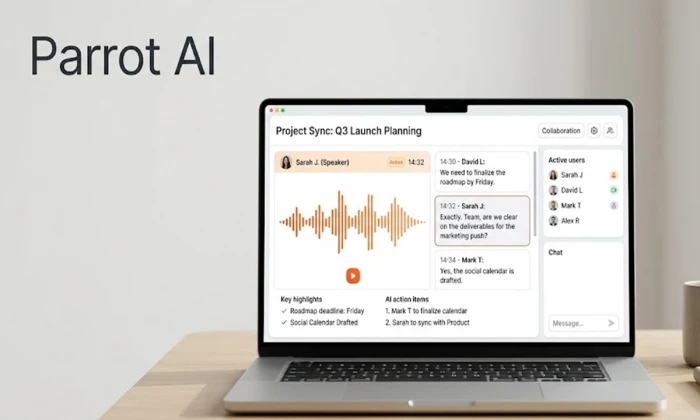
| Short answer: Parrot AI is a capable AI meeting assistant that records, transcribes, and summarizes calls across Zoom, Google Meet, Microsoft Teams, and Webex, then stores everything in a searchable workspace. It holds a 4.8 out of 5 rating on G2 and is SOC 2 Type II, HIPAA, GDPR, and CCPA compliant. The catch is a thin public review pool and a free tier capped at five hours a month, so it suits privacy-conscious teams more than heavy solo users. |
Every team that runs on video calls eventually hits the same wall. The meeting ends, three people remember three different versions of what was agreed, and the one person who took notes typed half of them into a document nobody can find. AI meeting assistants exist to close that gap, and there are now dozens of them competing for the same job. Parrot AI is one of the quieter names in that crowd, which is exactly why it is worth a proper look rather than a quick dismissal.
This review pulls together what the tool does, what real users say across G2, Gartner, and independent directories, how its pricing lines up against the better-known alternatives, and where the gaps are. Wherever the public record is thin, that is stated plainly instead of dressed up, because a confident guess helps nobody who is about to spend money.
| First, a name that causes real confusion. Three different products go by "Parrot AI." This article is about parrot.ai, the business meeting assistant built by a team of security veterans. It is not the celebrity-voice meme generator at tryparrotai.com, and it has nothing to do with Parrot OS, the Linux distribution, or the old Parrot AR.Drone. If you landed here looking for AI voice clips of public figures, this is the wrong Parrot, and the ratings below do not apply to that app. |
At its core, Parrot AI joins your virtual meetings as a bot, captures the audio and video, and turns the conversation into an accurate, timestamped transcript. That much is table stakes for the category. What the company leans on to stand apart is the idea of a collaborative workspace built on top of those recordings, so a call is not just transcribed and forgotten but stored as searchable, reusable knowledge the whole team can draw from later.
The practical workflow looks like this. The assistant auto-downloads and records meetings from Zoom, Teams, Meet, and Webex, produces a full transcript in one of more than thirty-five supported languages, and generates a summary with proposed action items. From there you can pull out a key moment, drop it into an editable page, combine several moments to illustrate a point, and share the result straight into Slack or Jira. A generative AI layer sits over the archive so you can query the content of any past meeting or draft new content from a prompt, rather than scrolling through transcripts by hand.
The table below sets out each capability and whether it is confirmed by the company and independent sources or still unverified. This matters because a lot of directory listings pad their feature lists with things the tool has never claimed.
| Capability | What it means in practice | Status |
| Meeting recording & capture | Auto-joins and records Zoom, Teams, Meet, Webex calls | Confirmed |
| Automatic transcription | Full transcripts, 35+ languages, speaker labels, timestamps | Confirmed |
| AI summaries & action items | Condensed recaps with proposed next steps | Confirmed |
| Searchable meeting archive | Query across every stored conversation | Confirmed |
| AI Chat over meetings | Ask questions or generate content from recordings | Confirmed |
| Shareable clips & pages | Editable highlight pages pushed to Slack or Jira | Confirmed |
| Integrations | Zoom, Webex, Meet, Teams, Slack, Google Drive, Jira | Confirmed |
| Enterprise security & compliance | SOC 2 Type II, HIPAA, GDPR, CCPA | Confirmed |
| Public developer API | Programmatic access for custom builds | Unspecified |
| Native multimodal generation | Creating images or video, not just handling A/V input | Not offered |
Table 1. Parrot AI capabilities, confirmed against the vendor site, G2, and Gartner Peer Insights.
The honest read here is that Parrot AI is a focused tool, not a Swiss Army knife. It does meeting intelligence thoroughly and deliberately stops there. If you were hoping for a single product that also writes marketing copy and generates images, this is not it, and the comparison later in this article makes that boundary clear.
Most meeting assistants treat security as a footnote. Parrot AI treats it as the headline, and that is a genuine differentiator rather than marketing gloss. The product was built by people from the security industry, and it carries SOC 2 Type II, HIPAA, GDPR, and CCPA compliance, which is a serious set of credentials for a tool in this price range. Critically, the company states that customer data is never used to train its AI models, which is the single question most legal and IT teams ask before approving any tool that ingests recorded conversations.
For teams in healthcare, legal, finance, or anywhere client confidentiality is contractual rather than optional, this is often the deciding factor. The assistant can redact confidential details from transcripts and restrict access based on user permissions, so a recorded call full of sensitive information does not become a liability sitting in an unsecured archive. Plenty of cheaper or flashier competitors cannot make the same compliance claims, and that narrows the real shortlist quickly for regulated buyers.
Who this is genuinely built for Regulated teams that record client-facing calls and cannot afford a tool that trains on their data. The compliance stack does more to justify Parrot AI than any single feature, and it is where the product quietly beats louder rivals. |
Parrot AI runs on a freemium model with three published tiers plus a custom enterprise option. The free plan is unusually generous on storage, the paid tiers unlock the volume and AI limits that heavy users hit fast, and the annual billing on both paid plans is what the headline prices assume. Here is the full breakdown as documented across pricing trackers.
| Plan | Price | Recording | AI Chat | Best for |
| Free | $0 | 5 hrs / month | 5 sessions / mo | Trying it out, light note-taking |
| Personal | $24 / month | Unlimited assistant + auto-download, 200 upload hrs | Unlimited | Solo pros with steady call volume |
| Team | $16 / user / mo | Unlimited assistant, 100 pooled upload hrs / user | Unlimited | Growing teams sharing knowledge |
| Enterprise | Custom | Tailored | Tailored | Large orgs, advanced admin needs |
Table 2. Parrot AI pricing tiers. Paid plan prices reflect annual billing; usage caps are per user.
Two things stand out. First, the free tier includes the full transcript engine, all four platform integrations, unlimited storage and sharing, and AI summaries, which is more than several rivals give away. Second, the pricing has an unusual quirk: the Team plan at sixteen dollars per user works out cheaper per seat than the twenty-four dollar Personal plan, so a two-person team pays less each than a lone individual would. If you are a solo user who can plausibly frame yourself as a small team, the math rewards it.
Placed against the wider field, Parrot AI’s entry pricing sits in the middle of the pack rather than at either extreme. The chart below compares starting monthly prices across the tools most buyers cross-shop.
Starting monthly price across meeting assistants
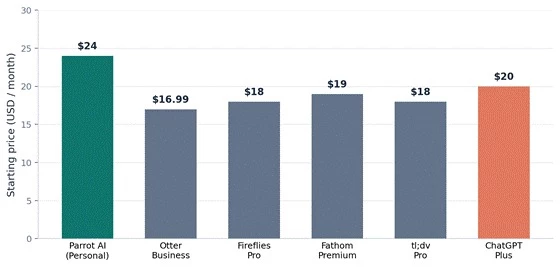
Figure 1. Entry-level paid pricing, USD per month. Parrot AI (teal) sits mid-field; ChatGPT Plus (coral) is shown only as a general-purpose reference point, not a direct competitor. Sources: vendor pricing pages, July 2026.
Price alone rarely decides this category, though. The free tier is where most people first judge whether a meeting assistant is worth adopting, and the allowances vary wildly. Parrot AI gives five hours a month, which is solid but not the most generous, as the next chart shows.
What each free tier gives you per month
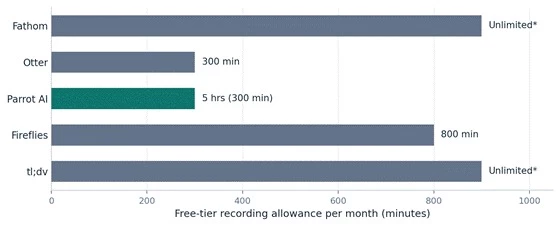
Figure 2. Free-tier recording allowances. Fathom and tl;dv market effectively unlimited free recording, which is their main hook. Parrot AI’s five hours is competitive and pairs with unlimited storage.
This is where the picture gets more honest and more complicated. Parrot AI has genuine, verified reviews, but not many of them, and that thin volume is the most important caveat in this entire article. A tool rated 4.8 across eight reviews is not the same evidence base as one rated 4.5 across two thousand, and any buyer should weigh it accordingly.
On G2, Parrot AI holds a 4.8 out of 5 rating across eight tracked reviews. The recurring praise centres on ease of use, the time it saves, the quality of the integrations, and transcript accuracy. One reviewer described it as having completely changed the way they work and found the platform easy to navigate from the first session, which is the kind of first impression that drives adoption. On the negative side, the same review pool flags recording limitations, a feature set that feels narrow next to bigger suites, and occasional AI inaccuracy, which is the standard complaint across every tool in this category, not a Parrot-specific flaw.
The aggregate rating across independent directories lands at the same 4.8 figure. On Gartner Peer Insights the product is listed and positively described, but carries too few published reviews to generate a reliable star score, and Capterra lists the product without a meaningful body of ratings behind it. The chart below shows where usable ratings actually exist versus where the data is simply too sparse to trust.
Where the ratings are real and where they run thin
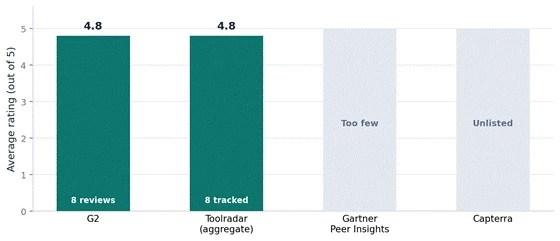
Figure 3. Rating coverage by platform. G2 and directory aggregates give a consistent 4.8, but Gartner and Capterra lack the review volume to score reliably. The scores are strong; the sample size is small.
| Source | What users like | What they flag | Score |
| G2 | Ease of use, time saved, integrations, accuracy | Recording limits, narrow features, occasional AI misses | 4.8 / 5 (8) |
| Toolradar (aggregate) | Automates note-taking, accurate records, easy sharing | Needs clear audio, free-tier limits | 4.8 / 5 (8) |
| Gartner Peer Insights | Has the features teams were hunting for | Not enough reviews to judge | Sparse |
| Capterra | Listed as a transcription solution | No meaningful review body | Sparse |
Table 3. User feedback by source. "Sparse" means the platform lists the product but lacks enough reviews for a dependable score.
The fair conclusion is that everyone who has reviewed Parrot AI seems to like it, but not enough people have reviewed it to call that a settled verdict. That is very different from a tool with a poor reputation. It is a tool with a good but small reputation, and the honest framing is cautious optimism rather than either hype or doubt.
Parrot AI competes in a busy field, and the right comparison is against other meeting assistants, not general chatbots. Otter, Fireflies, Fathom, and tl;dv are the names buyers usually weigh alongside it. The table below maps the core dimensions so you can see where Parrot AI leads and where it trails.
| Dimension | Parrot AI | Otter | Fireflies | Fathom | tl;dv |
| Transcription | Strong | Strong | Strong | Strong | Strong |
| AI summaries | Yes | Yes | Yes | Yes | Yes |
| Searchable archive | Core focus | Yes | Yes | Basic | Yes |
| Compliance depth | SOC2/HIPAA | Partial | Partial | Partial | Partial |
| Free-tier generosity | 5 hrs | 300 min | Limited | Unlimited* | Unlimited* |
| Review volume | Very low | High | High | High | High |
| Aggregate rating | 4.8 | 4.5 | 4.7 | 5.0 | 4.7 |
Table 4. Parrot AI versus the meeting-assistant field. Ratings and review counts as of July 2026.
The pattern is clear. On the actual product, Parrot AI is fully competitive and its compliance stack is arguably best in class at this price. Where it loses is trust-by-volume: Otter, Fireflies, Fathom, and tl;dv each carry hundreds or thousands of reviews, so a nervous buyer has far more evidence to lean on. If your top priority is data security and you are comfortable being an early-ish adopter, Parrot AI is a strong pick. If you want the reassurance of a massive user base and unlimited free recording, Fathom or tl;dv make an easier first move.
| Strengths | Limitations |
| Best-in-class compliance for the price (SOC2 II, HIPAA, GDPR, CCPA) | Very thin public review base makes reputation hard to verify |
| Data never used to train models, a rare and reassuring guarantee | Free tier capped at 5 hours, tight for heavy solo users |
| Generous free storage, sharing, and full transcript engine | Transcription accuracy depends on clean audio, as all rivals do |
| Strong integrations into Slack, Jira, and the four major call platforms | Narrow scope; no image or video generation, purely meetings |
| Genuine 4.8 rating from the users it does have | Public developer API availability is unconfirmed |
Table 5. The balanced ledger, weighted by what actually affects a buying decision.
A few of these deserve unpacking. The compliance strength is not a checkbox, it is the whole reason a regulated team would choose Parrot over a cheaper rival, so it carries more weight than its single row suggests. The thin review base cuts the other way and is the reason to test before committing rather than trust the star rating outright. And the narrow scope is a feature, not a bug, for anyone who already has their writing and design tools sorted and simply wants meetings handled well.
On the security questions that matter most, Parrot AI is transparent and well documented, and its compliance certifications are verifiable rather than merely asserted. Where the public record thins out is on the finer product details: the specific AI models under the hood, exact enterprise pricing, and whether a public developer API exists are not clearly laid out in independent sources. None of that signals a problem, but it does mean an enterprise buyer should confirm the current specifics directly with the vendor before signing, especially on API access and any custom-tier terms.
For any AI tool that records conversations, the standard due diligence still applies. Confirm where your data is stored, who on your team can access it, how long recordings are retained, and what happens to that archive if you cancel. Parrot AI answers most of these well on paper, and its data-handling posture is a strength, but reading the current terms yourself is always the right final step.
4.8 / 5
Based on aggregated G2 and directory ratings across a small verified review pool.
So, is Parrot AI any good? On the evidence, yes, with one honest asterisk. The product is well built, the feature set is focused and complete for what it sets out to do, and the security and compliance credentials genuinely lead the field at this price. The users it has rate it highly and consistently. The only real hesitation is volume: there simply are not many public reviews yet, so its excellent rating rests on a small foundation.
That points to a clear recommendation. If you run a team that records sensitive calls and needs a meeting assistant that will not train on your data, Parrot AI belongs on your shortlist and may well win it. Take the free tier for a proper test drive first, since five hours is enough to judge accuracy and fit on your actual calls. If your priority is instead the reassurance of a huge, battle-tested user base or unlimited free recording, a higher-volume alternative like Fathom, Fireflies, or tl;dv is the safer opening move. Either way, the tool is a credible, security-first option in a crowded market, and it deserves more attention than its quiet profile suggests.
Is Parrot AI free or paid?
Both. There is a genuinely usable free tier with five hours of recording, full transcripts, AI summaries, and unlimited storage per month. Paid plans start at sixteen dollars per user per month on the Team plan or twenty-four dollars per month for the Personal plan, both billed annually.
Is Parrot AI any good for business use?
Yes, and business use is exactly what it is built for. The SOC 2 Type II, HIPAA, GDPR, and CCPA compliance, plus the promise not to train on customer data, make it particularly well suited to regulated teams that record sensitive client calls.
Which platforms does Parrot AI work with?
It integrates with Zoom, Google Meet, Microsoft Teams, and Webex for recording, and pushes highlights and summaries into Slack, Jira, and Google Drive.
Does Parrot AI support multimodal generation?
No. It handles audio and video as input for transcription and analysis, but it does not generate images or video the way a general-purpose creative tool would. Its focus is meeting intelligence.
Share your thoughts about this article.
Be the first to post a comment!

The same tool can be a 4.7 on one site and a 3.9 on another. Here is what is rea...
Nitin1 month ago

Here is the number worth pinning above your budget: in Gartner Digital Markets r...
Deepak Mehra1 month ago

What Artlist AI is in 2026Artlist began as a royalty-free music library. By 2026...
Deepak Mehra1 month ago

Most AI tool failures do not announce themselves. There is no crash, no angry em...
Nitin1 month ago

The best AI image generator in 2026 is Nano Banana 2 for speed, FLUX.2 for photo...
Parveen Verma1 month ago

“Useful” is a slippery word for a coding assistant. A tool can be brilliant at o...
Sakshi Dhingra1 month ago