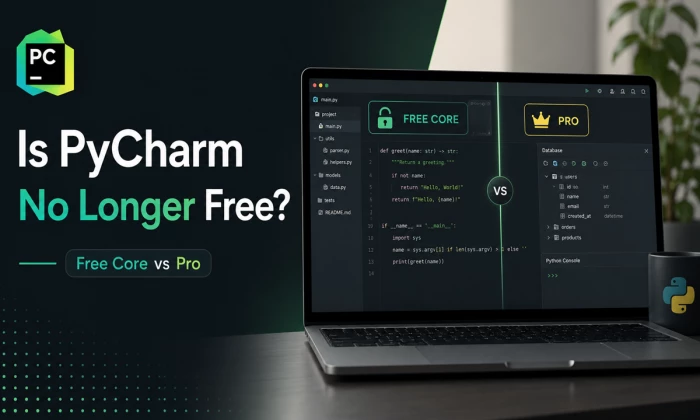
If you have opened your browser in 2026 and typed "is PyCharm still free," you are not alone, and honestly the confusion makes sense. For years the answer was simple: there was a free Community Edition and a paid Professional Edition, and you picked one. That neat split no longer exists, which is exactly why so many developers are second-guessing what they remember. So let me clear it up right away, and then we will walk through the details together.
QUICK ANSWER PyCharm is still free to use. In 2025 JetBrains merged the old Community and Professional editions into one product simply called PyCharm. Its core features, the Python editor, debugger, Git support, and now Jupyter notebooks are free forever. Advanced tools like web frameworks, database support, and remote development sit behind an optional Pro subscription, and every fresh install starts with a 30-day Pro trial. |
PyCharm, built by JetBrains, has been one of the most popular Python IDEs for over a decade. It is the tool a lot of people reach for when a plain text editor stops being enough and they want real code intelligence, debugging, and refactoring in one place. The big story this year is not a new feature, it is the licensing change, so that is where we will start.
Here is the mental model that actually helps. Instead of two downloads, there is now one PyCharm with two levels of access living inside it: a free core tier and a paid Pro tier. You install once and move between them without downloading anything else. The table below lays out how that maps onto the old edition names people still use out of habit.
| Tier | Cost | Key features | Best for |
| Free core (old "Community") | $0 | Python editor, code completion, debugger, refactoring, Git, unit testing, Jupyter notebooks | Students, hobbyists, scripting, learning |
| Pro — Individual | $109 / yr | Everything in core plus web frameworks, database and SQL tools, remote dev, profiling, scientific tools | Freelancers, solo professional devs |
| Pro — Organization | $299 / yr | Same Pro features under a commercial licence, with priority support and central licence management | Company-paid teams, enterprises |
Table 1. PyCharm tiers at a glance. First-year list prices; individual annual rates step down in later years.
One thing worth saying plainly: the word "Enterprise" gets thrown around, but JetBrains does not sell a separate enterprise PyCharm SKU with tiered feature gating. Large teams simply buy Organization (commercial) seats and negotiate volume terms. Any "Enterprise / Teams" analytics dashboard beyond that is unspecified as a standard PyCharm product feature.
Let me walk you through the timeline, because the order of events explains why your memory and reality might not match. The shift happened over a few releases rather than overnight.
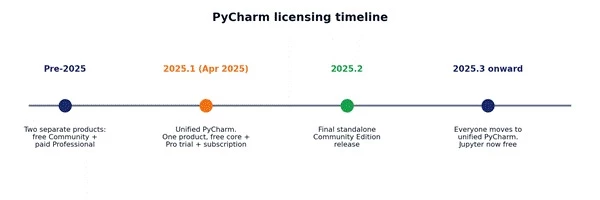
Figure 1. How PyCharm moved from two editions to one unified product across the 2025 releases.
Before 2025: Two products. Free Community Edition for core Python, paid Professional for web, data, and database work. You chose at download time.
PyCharm 2025.1 (April 2025): The unified PyCharm arrived. One product, free core features, an optional Pro subscription, and an instant 30-day Pro trial on every install. Jupyter notebook support moved into the free tier.
PyCharm 2025.2: The last standalone Community Edition release, for anyone who wanted to stay on the old model a little longer.
PyCharm 2025.3 onward: Everyone transitions to unified PyCharm. Settings, plugins, and projects carry over, so the migration is meant to be painless.
A couple of practical notes from digging through the official documentation. If you already own a Pro licence, nothing changes, it keeps working in the unified app. And the open-source core stays on GitHub; you can build a free, Community-equivalent version yourself if you want the purely open-source build.
The free core tier is genuinely capable. This is not a crippled demo, it is the tool a huge number of people ship real code with every day. Here is what lands in your lap at no cost:
• Smart Python editor: syntax highlighting, intelligent code completion, and real-time error checking as you type.
• Visual debugger: breakpoints, step-through execution, and a variable inspector so you stop guessing why something broke.
• Version control: built-in Git and GitHub integration, commit, branch, and review from inside the IDE.
• Refactoring and navigation: safe renames, jump-to-definition, and find-usages across your project.
• Unit testing: run and debug tests with a clear pass/fail view.
• Jupyter notebooks: now free, which used to be a Pro-only perk and is a big deal for data folks.
• Virtual environments: PyCharm sets up and manages venvs so you are not fighting package paths.
Pro is where the "full-stack Python" story comes together. If the free tier is about writing and debugging Python, Pro is about everything that surrounds a professional app, the web layer, the database, the deployment target. Here is the workflow it unlocks:
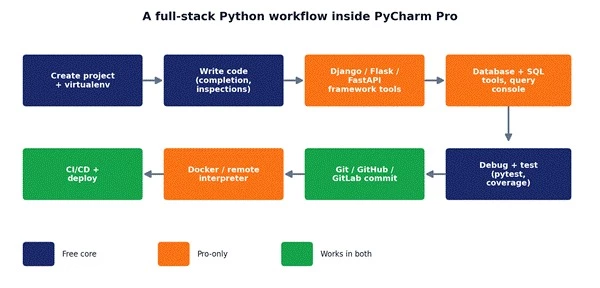
Figure 2. A typical full-stack project loop in PyCharm Pro. Blue steps also exist in the free tier; orange steps are Pro-only.
• Web frameworks: first-class support for Django, Flask, and FastAPI, with template awareness and endpoint tooling.
• Database and SQL tools: connect to your database, browse schemas, and run queries without leaving the IDE.
• Remote development: SSH interpreters, Docker, and remote targets so your dev environment matches production.
• Scientific and data tools: deeper notebook features, Data Wrangler-style dataframe tooling, and scientific libraries.
• Advanced refactoring and profiling: more inspections and a built-in profiler to hunt down slow code.
Let me make this concrete instead of abstract. I recently started a small utility project and deliberately stayed on the free core tier to see how far it would carry me. I created the project, PyCharm set up the virtual environment for me, and I wrote the whole thing with autocomplete and inline inspections catching my typos before I ran anything. Debugging a nasty loop took minutes because I could set a breakpoint and watch the variables change instead of sprinkling print statements everywhere. I committed to GitHub straight from the IDE. At no point did I hit a paywall.
Then the project grew a Django front end and needed a real database, and that is exactly where I switched on the Pro trial. Suddenly I had template completion, a database console to poke at my tables, and a REST client to test endpoints, all in the same window. The jump in speed was noticeable. That is the honest dividing line: core for writing Python, Pro for wiring Python into the wider stack.
1. Open PyCharm and create a new Python project (venv set up for you).
2. Write code with completion and live inspections doing the nagging.
3. Run and debug locally with breakpoints and the variable inspector.
4. Commit and push through the built-in Git integration.
5. (Pro) Add framework tooling, a database connection, or a remote interpreter when the project outgrows plain scripting.
Let us talk actual money, because "it depends" is not helpful when you are trying to budget. The free core tier is $0, full stop. Pro is a subscription, and the price depends on whether you are buying it for yourself or your company. The chart below puts the feature count next to the cost so you can see the trade at a glance.
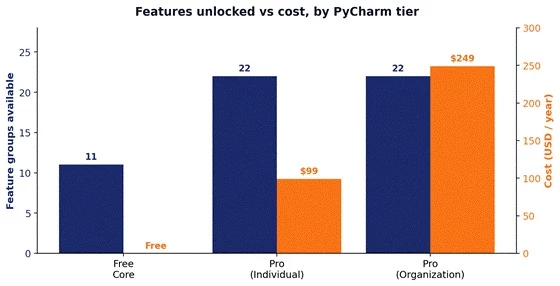
Figure 3. Roughly how many headline capability groups each tier unlocks, plotted against first-year cost.
| Feature | Free core | Pro |
| Code completion & inspections | Yes | Yes |
| Visual debugger | Yes | Yes |
| Git / GitHub integration | Yes | Yes |
| Jupyter notebooks | Yes | Yes |
| Web frameworks (Django/Flask/FastAPI) | No | Yes |
| Database & SQL tools | No | Yes |
| Remote development (SSH/Docker) | No | Yes |
| Profiler & scientific tools | No | Yes |
| Free to use | Yes | No (subscription) |
Table 2. Free core vs Pro, feature by feature.
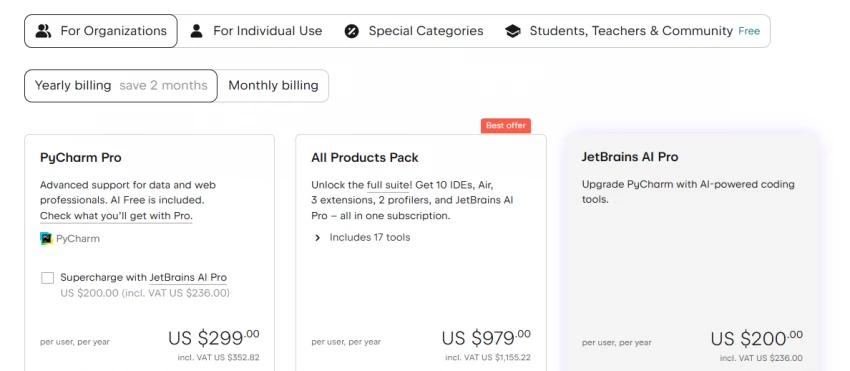
For an individual buying their own licence, PyCharm Pro is about $109 for the first year (roughly $9.90/month if you pay monthly). For a company-paid commercial seat it is about $299 per user per year. Those are the figures on the current JetBrains buy page as of mid-2026.
There is a nice wrinkle for loyal individual subscribers: continuity discounts. If you keep an eligible personal subscription running, the price steps down over time, as the chart shows.
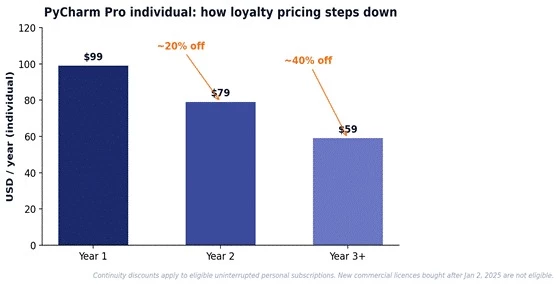
Figure 4. Individual Pro pricing steps down with loyalty discounts. Note: new commercial licences bought after January 2, 2025 are not eligible for these continuity discounts.
Two honest caveats. First, JetBrains AI features are a separate subscription, they are not bundled into Pro, so a fully AI-assisted setup costs more. Second, if you use more than one JetBrains IDE, the All Products Pack, is usually better value than stacking individual licences.
No tool is perfect, so here is the balanced view for each tier.
• Completely free, forever, with no feature nagging.
• Lightweight enough for most scripting and learning.
• Now includes Jupyter, which used to cost money.
• No built-in web framework tooling for Django, Flask, or FastAPI.
• No database console or remote development.
• Full-stack support: web, database, and remote work in one window.
• Profiling and advanced inspections for serious codebases.
• Perpetual fallback licence after 12 months of subscription.
• It is a recurring cost, which stings for hobby use.
• Resource-heavy, older machines can feel the weight.
• Plenty of its features go unused on simple projects.
PyCharm is excellent, but it is not the only option, and pretending otherwise would not be useful. Depending on what you are building, one of these might fit you better.
| Alternative | Free? | Notable features | Best for |
| VS Code | Yes | Lightweight, huge extension ecosystem, strong Python plugin | Students, web devs, mixed-language work |
| Spyder | Yes | Scientific IDE with a MATLAB-like feel | Data scientists, researchers |
| Thonny | Yes | Dead-simple UI built for beginners | First-time learners |
| Neovim + LSP | Yes | Fast, keyboard-driven, endlessly configurable | Terminal power users |
| Sublime Text | Trial | Very fast, minimal editor | Devs who want a lean editor |
Table 3. Popular PyCharm alternatives. Atom is intentionally left out, it was sunset by GitHub and is no longer maintained.
The honest headline here: VS Code is the big rival. It is free and extensible, and for many web and general-purpose developers it is enough. PyCharm earns its keep through deeper Python intelligence, smarter refactoring, and built-in database and framework tooling that VS Code only gets through a pile of extensions.
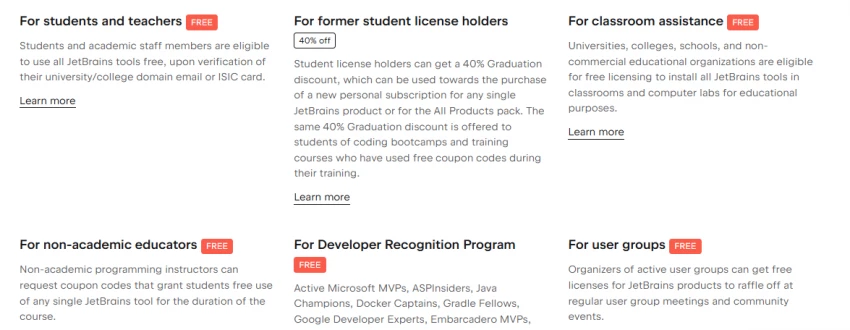
It helps to picture the different people reaching for PyCharm, because the "right" tier is entirely about the job in front of you.
• The student: learning Python and finishing assignments. Free core is plenty — and if they verify with a school email, they get Pro free through the education programme.
• The professional: building Django or Flask apps for clients. Pro pays for itself in saved hours.
• The data scientist: living in Jupyter and dataframes. Free core covers a lot now; Pro adds the heavier data tooling.
• The open-source contributor: juggling multi-module projects with heavy Git use. Free core handles it well.
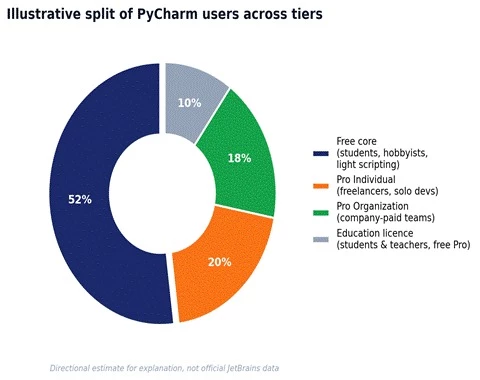
Figure 5. An illustrative split of who sits on which tier. Directional, for explanation — not official JetBrains data.
A tool is only as good as what it plugs into, and PyCharm plugs into a lot. Beyond the JetBrains Marketplace full of plugins, it handles the whole path from your keyboard to production.
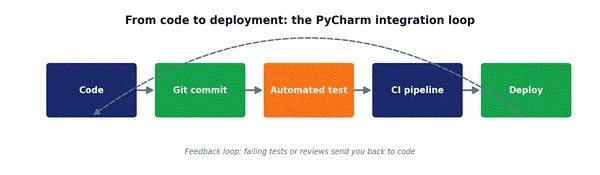
Figure 6. The code-to-deployment loop PyCharm supports, with a feedback path when tests or reviews fail.
• Version control: Git, GitHub, and GitLab out of the box.
• Environments: virtualenv, Docker, and remote interpreters (the last two are Pro).
• CI/CD: fits neatly into pipeline-driven workflows.
• AI clients: newer versions add MCP server support to connect external AI tools like Claude, a nice bridge into modern AI-assisted coding.
So, is PyCharm no longer free? The fear behind that question is understandable, but the answer is reassuring: PyCharm is still free where it counts. The 2025 unification did not take the free tier away, it folded two editions into one cleaner product and even pushed Jupyter into the free side. If you are learning or scripting, you pay nothing.
If you are building full-stack apps or wrangling databases for a living, Pro is a fair deal, especially with the loyalty discounts and the education programme. Start free, lean on the 30-day trial when a project grows, and only pay when the Pro features start saving you real time. That is the whole story.
Is PyCharm free for students?
Yes, and better than free. Students and teachers at accredited institutions get full Pro access at no cost through the JetBrains education programme, usually verified with a school email, ISIC card, or GitHub Student Developer Pack.
Can I use Pro features on a trial?
Yes. Every fresh install of unified PyCharm starts with a 30-day Pro trial that unlocks all advanced features. When it ends, you either subscribe or drop back to the free core tier, and none of your settings are lost.
Which tier is better for web development?
Pro, without much debate. Django, Flask, and FastAPI tooling, plus database and REST tools, all live in Pro. The free core tier can edit web code, but you lose the framework-aware conveniences that make the difference.
Is the free core tier enough for learning Python?
Absolutely. For learning, scripting, and most coursework, the free tier gives you a smart editor, a real debugger, testing, Git, and Jupyter. Most people do not outgrow it until they start building full web apps or connecting to databases.
Can I switch between tiers without losing my settings?
Yes. It is one product now, so moving between free core and Pro is just a matching of licence state. Your projects, plugins, and editor preferences stay exactly where they were.
Share your thoughts about this article.
Be the first to post a comment!
Choosing growth software in 2026 means finding five winners inside a catalog of...
Sakshi Dhingra1 month ago
The short version, for anyone who does not want to read 5,000 wordsCopper is a C...
Sakshi Dhingra1 month ago
If you've spent any time around tax professionals in the United States, you've h...
Harpreet Singh2 months ago
The short versionQuicken sells two entirely separate things. Quicken Classic is...
Harpreet Singh2 months ago
Here is a small confession most security writers avoid making: you probably do n...
Deepak Mehra2 months ago
The photo editing software market has been shaken harder in the past eighteen mo...
Sakshi Dhingra2 months ago