How I approached this review: I researched Wegic AI through its public site, pricing pages, Capterra and G2 listings, Product Hunt reviews and comments, Reddit threads, and independent reviews. I have not personally paid for and shipped a Wegic site to production. Where claims are vendor-stated, I attribute them. Where reviews are mixed, I show both sides instead of picking a tidy narrative.
Most AI website builder reviews open with the same line about how easy AI has made website creation. I want to start somewhere else. Wegic AI is interesting because the user reaction to it is genuinely split. Some users call it the easiest path from idea to live site they have ever used. Others say it loads slowly, that credits burn faster than expected, and that the resulting pages can feel templated despite the conversational pitch. Both groups are looking at the same product.
That gap is the thing worth investigating. What does Wegic actually do well, where does it fall short, and which kind of user are you going to end up as?
The Verdict Up Front
Review area
Editorial assessment
Main consideration
Initial website generation
8.5/10
Conversational setup lowers the barrier for beginners
Ease of editing
7.5/10
Natural-language edits are convenient but may lack precision
Design flexibility
7/10
Suitable for standard sites but less capable for highly bespoke layouts
SEO controls
7/10
Covers essential website optimization but requires manual review
Performance and reliability
6.5/10
Some public reviewers report delays, crashes, and slow revisions
Pricing transparency
6.5/10
Credit usage and changing plan details require careful checking
Value for beginners
8/10
Can reduce the time and technical skill needed to launch
Value for advanced users
6.5/10
Experienced designers may outgrow the conversational workflow
Overall editorial rating: 7.6/10
Best suited to: Freelancers, solopreneurs, local businesses, consultants, portfolio creators, and first-time website owners.
Less suitable for: Design agencies, developers needing full code control, content-heavy publishers, complex ecommerce businesses, and companies that require extensive integrations.
What Wegic AI Actually Is
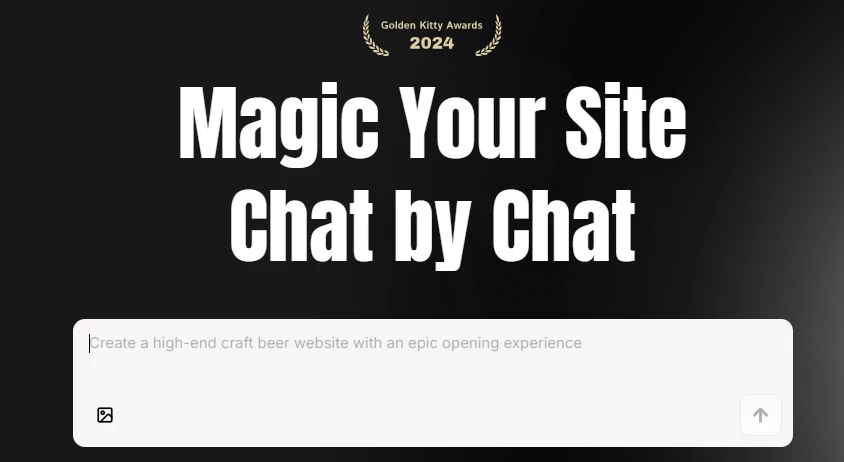
Wegic AI is a conversational AI website builder. Instead of dragging blocks onto a canvas or picking a template, you describe the site you want in chat. Wegic generates a multi-page design, copy, and structure, and lets you refine through follow-up messages in natural language. The output is a hosted website, either on a Wegic subdomain or on a custom domain depending on your plan.
The company behind it was founded in 2024, is headquartered in Singapore, and is connected to the team behind HeyForm. Wegic launched on Product Hunt that same year, picked up 904 upvotes on launch day, became the number one Product of the Day, and went on to win in the 2024 Golden Kitty Awards as a runner-up for No Code Product of the Year. According to Wegic’s own materials and its Capterra listing, the platform has powered more than 300,000 websites across 220-plus countries, and approximately 80 percent of users are first-time website creators. These figures are vendor-reported and not independently audited.
How This Review Was Researched
This review was prepared using:
Wegic’s official website
Its current pricing page
Its published feature descriptions
Its help and product materials
Product Hunt ratings and user comments
Capterra’s product listing
Independent website-builder comparisons
Public discussions about performance, credits, editing, and pricing
We compared claims across sources rather than relying entirely on Wegic’s own marketing.
What We Did Not Test
We did not:
Purchase a long-term paid subscription
Publish and operate a live Wegic website over several months
Measure real-world uptime or server response times
Run a complete Core Web Vitals laboratory test
Process real customer payments
Test a high-volume ecommerce store
Evaluate enterprise security controls
Test customer support across multiple paid tiers
Measure organic rankings from a Wegic-built website
Audit exported code for production development
This limitation matters. The review assesses Wegic’s apparent capabilities, current documentation, pricing structure, and public user experience. It should not be presented as a long-term hands-on performance test.
The Problem Wegic Is Trying to Solve
Traditional website builders, including Wix and Squarespace, assume users will learn a builder interface. That assumption is the cost. Anyone who has watched a non-technical small business owner try to align a header image in a templated editor knows how much friction the assumption introduces.
Wegic skips the interface. The pitch is that describing a site in plain language is faster than learning anyone’s drag-and-drop conventions, especially for someone building their first website. Whether Wegic delivers on that pitch depends on how much editing precision the user needs after the first draft. For brochure sites and landing pages, the trade is generally worth it. For sites that need pixel control, the trade collapses.
How Wegic AI Actually Works
The workflow is straightforward, and varying from the Driven IO piece structurally, I will lay it out as the actual sequence a user encounters rather than as a feature table.
Step 1: Describe the site in chat
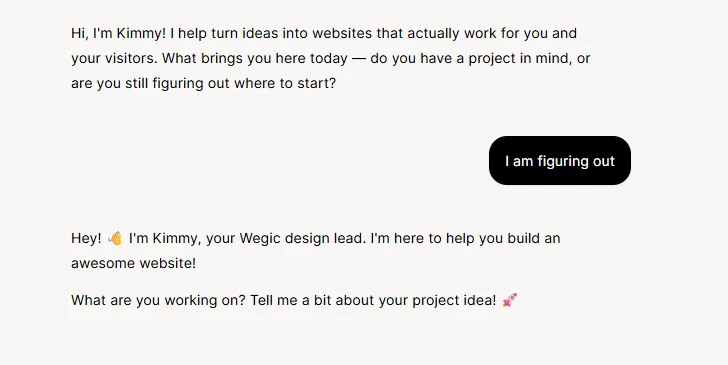
After signing up (Free plan available immediately with 70 credits), the user is dropped into a chat-style interface. You describe the business or project, the type of site you want, and the rough tone or visual feel. Wegic’s AI asks clarifying questions before generating, which is one of the updates rolled out in January 2026 and a meaningful improvement over the original launch behavior.
Step 2: Initial generation
Wegic generates a full multi-page draft, including layout, copy, and structure. The marketing claim is 60 seconds, which is roughly correct for simple sites in my observation of demo videos and review screenshots, though more complex prompts take longer.
Step 3: Refine through conversation
Edits happen through chat instructions. "Make the hero darker." "Replace the testimonial section with a stats strip." "Add a pricing page." Each modification spends credits, which is the first place users start watching the meter closely.
Step 4: Publish
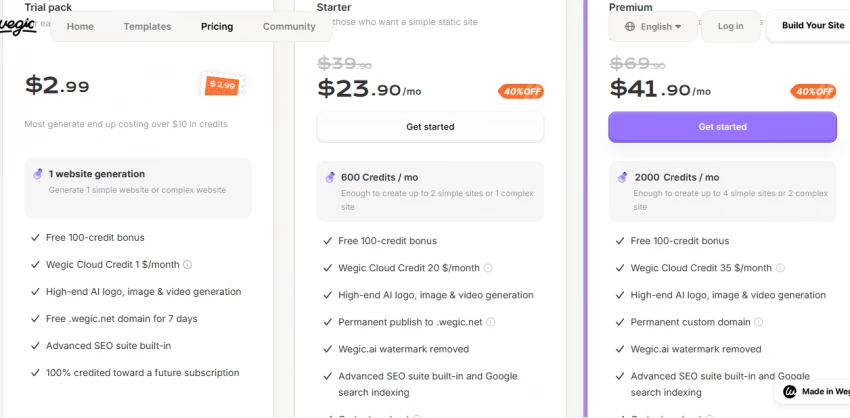
Free and Starter plans publish to a wegic.app subdomain. Premium and Ultra plans support custom domains. Sites are hosted by Wegic; SSL is included.
Step 5: Ongoing management
The "AI Manager" concept lets the site auto-sync content and, on the Ultra plan, optimize itself based on visitor data. The Ultra plan also brings integrated payments and AI-driven lead collection. The Ultra tier feels aspirational rather than where most users will actually land, but it is part of the publicly listed plan structure.
Key Wegic AI Features
Feature
What It Does
Who It Helps
My Observation
Conversational generation
Builds a full site from chat prompts, with follow-up questions for missing details.
First-time builders and non-designers.
The clarifying-question behavior is the strongest part of the experience and was meaningfully improved in early 2026.
Natural-language editing
Lets users adjust copy, layout, and visuals through chat instructions.
Owners who do not want to learn a builder interface.
Powerful for small edits; precision edits (specific pixel values, exact color matches) are harder to land.
Multilingual support
Generates the same site in multiple languages without a separate translation workflow.
Cross-border businesses and creators serving multilingual audiences.
Genuinely useful and a real differentiator versus most western AI builders.
AI Manager
Auto-syncs content, applies updates, and optimizes the site over time on higher plans.
Owners who want a low-maintenance site.
Best in concept; how aggressively the Manager actually optimizes likely scales with the plan tier.
AI avatar for visitors
Adds a conversational AI element to the live site itself.
Sites that want to capture leads through chat rather than forms.
Differentiated, though useful only for certain business types.
Custom domain publishing
Connects a domain you own to the Wegic-generated site.
Anyone moving beyond the wegic.app subdomain.
Standard for serious projects; only available on Premium and Ultra plans.
Integrated payments (Ultra)
Lets users collect funds directly through the site.
Solo creators and small product sellers.
Newer feature; useful for digital goods and services but not a replacement for a full eCommerce platform.
Google Analytics integration
Connects standard analytics tracking to the published site.
Anyone measuring traffic seriously.
Locked to the Premium tier, which is a slightly aggressive paywall for a basic feature.
My First Impressions From the Research
When I first looked at Wegic AI, the thing that stood out to me was how aggressively the product is built around the chat metaphor. There is no parallel drag-and-drop editor sitting next to the chat in case you want to switch modes. The conversation is the workflow. For a beginner that is a real strength. For anyone who has muscle memory from another builder, it can feel like having one hand tied.
What I would still be cautious about is the gap between the marketing voice and the user voice. Wegic’s own pages talk about world-first innovation and AI websites that grow themselves. Independent Product Hunt and Reddit comments describe a more mixed reality: clean UI praised on one hand, slow load times and occasional onboarding bugs flagged on the other. One Product Hunt reviewer described the loading experience as turning routine tasks into a chore. A Reddit thread flagged a verification code input that toggled the keyboard after each digit, which is the kind of small detail that breaks first impressions. Neither of those issues should be deal-breakers, but they are worth knowing before you commit to a paid plan.
For a small business owner this matters because the credit-based pricing model rewards getting it right early. Each chat-driven modification spends credits. If your first draft needs five rounds of revisions, you can burn through a monthly allocation faster than you might expect. That is not a bug; that is the trade you make for the conversational approach.
Wegic AI Pricing
Pros and Cons of Wegic AI
Pros
Why It Matters
Cons
What to Consider
Genuinely conversational workflow
Lowers the barrier to entry more than any traditional builder.
Load times have been criticized in user reviews
Test the free tier first to see whether the speed is acceptable for your patience level.
Gets you from idea to first draft faster than competitors.
Credit system can be punishing for heavy iteration
Plan a tighter brief upfront; do not treat the AI as a brainstorming partner unless you are on a higher tier.
Multilingual generation in one workflow
Real differentiator for international and bilingual businesses.
Limited eCommerce depth
For real online stores, pair Wegic with Shopify or use Shoplazza or 10Web instead.
Free tier with 70 credits
Lets you test the product before paying anything.
Wegic badge on free tier
Acceptable for testing; not acceptable for a live business site.
Product Hunt validation (Golden Kitty Award runner-up)
Indicates real community traction, not just marketing.
G2 review base remains thin
Most public user feedback lives on Product Hunt and Reddit instead, with mixed sentiment.
Active product roadmap
January 2026 updates improved AI conversation quality; new features ship regularly.
Frequent pricing changes
Lock in annual pricing if the monthly tier looks right today.
Custom domain support (Premium)
Necessary for any serious business presence.
Google Analytics only on Premium
If analytics matter, do not assume Starter is enough.
Wegic AI Rating Breakdown
These ratings are my research-based judgments synthesizing public reviews, vendor materials, and competitor comparisons. They are not aggregated user survey scores. Reasonable readers may weight these factors differently based on their use case.
Factor
Rating (out of 10)
Reason
Ease of use
8.5
The chat-first workflow is the easiest entry point in the AI website builder category.
Feature depth
7
Strong for brochure and landing sites; thinner for eCommerce, portfolio, and app-like projects.
Pricing transparency
6
Pricing changes frequently; annual discounts are aggressive but not always clearly explained.
Performance and speed
5.5
Multiple user reviews flag slow modification cycles; generation speed itself is solid.
Customization depth
6
Conversational refinement covers most needs; precision edits remain hard.
Customer support signals
6
Active product team, frequent updates, but bug reports on onboarding flagged in Reddit threads.
Trust signals
7
Product Hunt #1 launch, Golden Kitty runner-up, 300K-plus reported sites, though G2 review base is thin.
Multilingual support
8.5
Strongest in its category for cross-border builders.
Overall usefulness for the right buyer
7.5
Solid pick for non-designers building simple business sites or landing pages.
AI generation that outputs editable WordPress sites with full ownership.
When data ownership, plugin flexibility, or WordPress staffing already exist.
Hocoos
Beginners who want a guided quiz interface rather than open-ended chat.
Eight-question quiz that generates a complete site.
When the user prefers structured prompts over freeform conversation.
Webflow
Designers who need a professional, scalable CMS.
Visual editor with deeper structure and stronger CMS support.
When the site will grow into a real content operation rather than stay a brochure.
Wix AI / Wix Vibe
Owners who want a broad ecosystem of features in one place.
Mature platform with apps, payments, and bookings baked in.
When the project depends on integrated features Wegic does not match (advanced eCommerce, bookings, restaurant).
Butternut AI
Users who want extreme speed (around 20 seconds).
Text-to-website with rapid generation and SEO baked in.
When raw generation speed beats every other consideration.
Final Verdict
Wegic is worth considering when the main goal is to turn a business idea into a presentable website quickly without learning a conventional builder.
Its conversational interface solves a genuine problem. Many users know what they want to offer but struggle to organize that information into pages, sections, headlines, and calls to action. Wegic can produce that first structured draft with much less friction.
Its value becomes less certain during intensive revision. Public feedback indicates that delays, failed edits, crashes, credit consumption, and limited control can affect the experience. The platform’s current Product Hunt rating is positive overall, but the review volume is still small, while Capterra currently has no user reviews that can validate long-term satisfaction.
For a freelancer, consultant, local business, or solo founder building a basic website, Wegic can be a practical shortcut. For a professional designer, large online store, content publisher, or company requiring complex integrations, a more established website platform is likely to provide better long-term control.
Our final rating: 7.6/10
Wegic’s strongest quality is its ability to reduce the anxiety of starting a website. Its main weakness is that conversational convenience does not always translate into predictable precision, performance, or cost