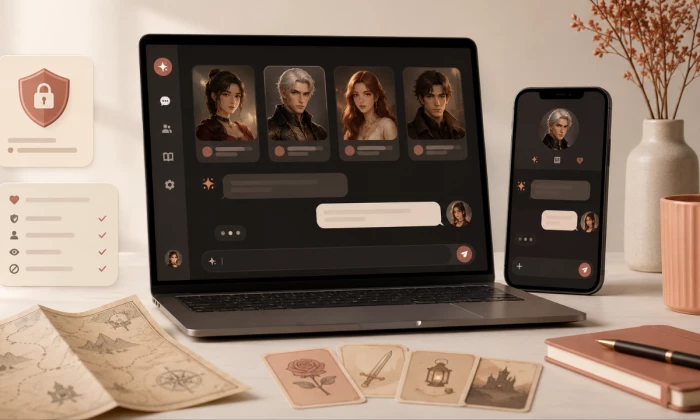
Joyland AI is the kind of platform people usually open out of curiosity. You pick a character, send a message, and see where the conversation goes. That makes it easy to start, but a few things are worth understanding before a long roleplay session or a paid plan. Character quality, privacy, content boundaries, memory, pricing, and emotional dependency all matter, and they matter more the longer you stay.
This is not a hype piece. Joyland AI does some things well and has clear limits, and the platform mixes family-friendly chat with mature, romantic, and adult roleplay, so going in informed is the point. The guide below covers the platform overview, first checks before chatting, character quality, prompting expectations, privacy and age notes, pricing and limits, pros and cons, safer-use tips, alternatives, and a final recommendation.
| How this guide was checked: it draws on Joyland's official website, Terms of Service, Privacy Policy, and Google Play listing, plus public user reviews and a published hands-on review. Anything not clearly stated on the official pages is flagged rather than guessed. |
Joyland AI is an AI character chat and roleplay platform that launched in 2023. The official site describes it as a space for AI roleplay, storytelling, custom AI characters, and personalized conversations, and the Google Play listing positions it as a sandbox for AI characters, anime companions, virtual dating, and text-based adventure-style chats.
In practice, it is built for entertainment, companionship-style chat, roleplay, and creative storytelling. It is not a therapist, a research assistant, or a substitute for real human relationships, and it should not be treated as one. Before using it deeply, it is worth reading the official terms, privacy policy, and subscription details, since these shape what is allowed, how data is handled, and what a plan actually includes.
| Item | Details |
| Tool name | Joyland AI |
| Official website | https://www.joyland.ai/ |
| Main category | AI character chat and roleplay platform |
| Main use | AI roleplay, storytelling, anime companion chat, virtual dating, character creation |
| Best for | Casual roleplay users, fiction writers, anime fans, interactive story users |
| Account required | Yes; an account is auto-created on first use, with email or social login offered |
| Free access | Yes; a free tier with limited daily messages or credits (exact allowance not clearly disclosed on the official page; reported figures vary) |
| Paid plans | Paid tiers exist; third-party reviews commonly report Standard around $9.99/mo and Premium around $19.99/mo |
| Mature content areas | Yes; an SFW/NSFW toggle, with adult content gated behind 18+ age verification and a paid plan |
| Mobile app | Official Android app: Joyland: Chat with AI Character (com.joyland.ai); iOS availability is inconsistent, so verify on the App Store |
| Biggest strength | Easy access to character-driven chat plus rich character creation |
| Biggest limitation | Memory consistency in long chats, plus privacy and content boundaries that need checking |
| Review method | Official sources, app-store listing, and public user feedback, including a published hands-on review |
| Pricing checked date | June 2026 |
Joyland AI looks best suited to entertainment and creative roleplay rather than serious productivity. It can be fun and flexible, but it is worth going in with realistic expectations about AI memory, emotional tone, privacy, and answer reliability.
A short pre-flight list saves frustration later. Run through these before sending real time or money into the platform.
| Check | Reason | Action |
| Age suitability | Character chat here includes mature and romantic themes | Check the official terms and the visible content categories |
| Privacy policy | Chats may involve personal thoughts or sensitive details | Read the data handling and deletion details |
| Pricing limits | Free use has daily limits | Check daily credits, messages, and subscription rules |
| Character type | Not all bots behave the same | Read the character description before chatting |
| Chat memory | Long roleplay depends on memory quality | Test whether the bot remembers details |
| Content boundaries | Some prompts may be blocked or redirected | Check the platform rules before starting |
| Emotional use | Companion-style chats can feel personal | Keep clear boundaries with AI characters |
| Account login | Saved chats depend on account access | Use the correct login method |
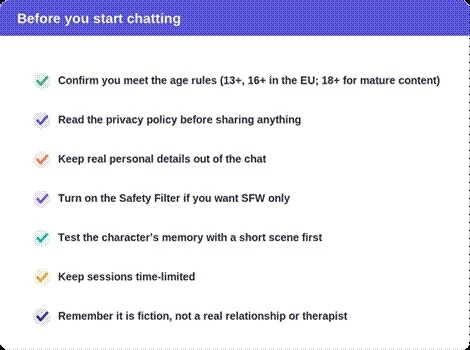
A quick before-you-start checklist for AI character chat.
Once these basics are checked, the next question is whether the chat experience actually feels natural enough to keep using.
Here is what to expect once you start a conversation, and what separates a good session from a frustrating one.
Characters are browsable by category. On the live site these include sections such as Anime, Romance, OC (original characters), RPG, Furry, Game Characters, BL and ABO, Movie and TV, Helpers, VTuber, Cartoon, and Interactive story. Many characters are community-created, and mature or romantic ones can surface even in general feeds, so the Safety Filter and your category choices matter from the first screen.
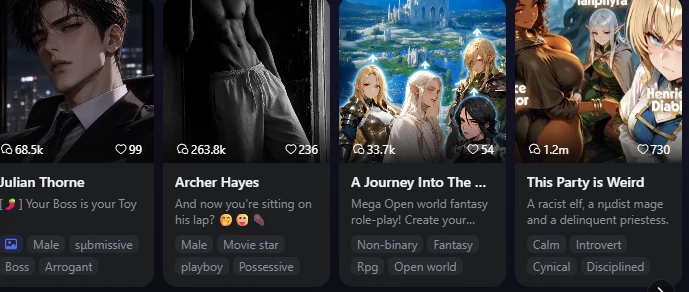
Placeholder for a real screenshot of the character category page.
Read the character profile before starting. The profile usually sets the tone, personality, and roleplay direction, so a quick read tells you whether a bot is built for gentle storytelling, dramatic banter, or something more romantic. This one habit prevents most mismatched chats.
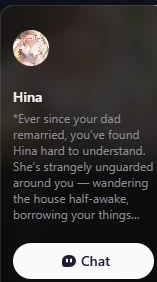
Test memory before committing to a long roleplay. A simple check: after five to seven messages, ask the character to repeat your role, your goal, or an earlier detail. If it forgets, the chat will work better in shorter scenes or with periodic reminders.
As you chat, judge the experience on a few practical points:
Reviewers commonly report fast responses (around two to three seconds) but also occasional repetition in longer chats, which is worth watching for.
The opening prompt shapes the whole session. These samples are safe, non-explicit, and easy to adapt. Copy one and adjust the role, setting, and tone.
| Let's start a short fantasy roleplay. You are a calm village archivist who knows about a missing map. I am a traveler asking for help. Keep the tone mysterious but friendly, avoid overly romantic dialogue, and reply in short paragraphs. |
| Keep the chat focused on adventure and storytelling. Avoid romantic or explicit direction. If the scene becomes intense, shift it back to mystery and character development. |
| Before we continue, summarize my character's goal and the two important clues we discovered so far. |
| Make the next reply more natural and less dramatic. Keep the same scene, but use simpler dialogue and move the story forward. |
| Reply under 120 words and end with one clear choice for my character. |
| User goal | Prompt style | Example |
| Better story roleplay | Role + setting + goal | You are a retired detective in a quiet mountain town... |
| Less romantic tone | Boundary instruction | Keep this focused on friendship and mystery. |
| Better memory | Recap request | Summarize what happened so far. |
| Shorter replies | Word limit | Reply under 100 words. |
| More control | Choice-based ending | End with two options for what I can do next. |
This is the part most people skip and later wish they had not. None of it is meant to scare you off, just to keep the experience on your terms.
Treat the chat box like a public form, not a diary. Avoid sharing:
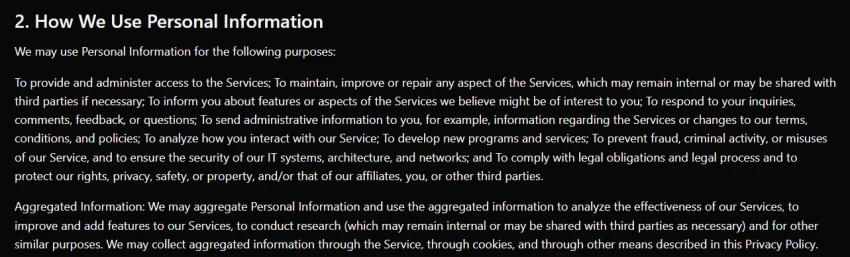
Read Joyland's privacy policy before assuming chats are private, deleted, encrypted, or never reviewed. The policy describes collecting account details and chat content, says data is encrypted, and notes that dialogue text may be converted into anonymized numbers and graphs for academic cooperation; it also states the company does not sell personal information. One thing to weigh: the Google Play data-safety label says the app does not collect or share user data, which does not fully match the privacy policy, and the website discloses advertising and cookie partners. Because of that gap, read the policy directly rather than relying on a single summary.
| Even if a platform describes chats as private, you should still avoid sharing information you would not want stored or processed. How long data is kept after account deletion is not clearly disclosed on the official page at the time of review. |
Character-chat apps can feel personal because they respond warmly and continuously, which is part of the appeal and part of the risk. AI characters can simulate attention, but they are not real relationships, therapists, or crisis-support services.
Joyland includes mature and romantic roleplay categories alongside its general ones. Adult content is gated behind age verification and a paid plan for users 18 and over, and an optional Safety Filter lets you keep things SFW. Check the age rules, the platform policies, and your own comfort level before engaging, and turn on the Safety Filter if you would rather avoid mature content entirely.
| If you feel emotionally dependent on an AI character, or you are using it during a crisis, please reach out to a trusted person or a professional support service instead of relying on a chatbot. A real person, a doctor, or a local crisis line can help in ways an AI cannot. |
Pricing should be confirmed from Joyland's official pricing page, the app store, or the in-app subscription screen. Exact plan prices and credit amounts are not clearly laid out on a public official page, so the figures below come from third-party reviews and app-store listings and are clearly labeled as secondary. Verify the current numbers in-app before paying.
| Plan / access type | Price | Included access | Best for | Limits to check |
| Free access | Free | Limited daily messages or credits, public characters, session-only memory, ads | First-time users | Daily limit varies by source; ads; image credits; memory resets |
| Standard (reported) | ~$9.99/mo* | Reported: no ads, unlimited text chats, monthly credit allotment, mature text for verified adults, more personas | Regular roleplay users | Renewal terms, image-credit caps, regional pricing |
| Premium (reported) | ~$19.99/mo* | Reported: unlimited credits, long-term cross-session memory, more image messages and personas | Heavy users | Cost, whether memory truly persists (test it), refund rules |
| In-app purchase | Verify | Credit packs and subscriptions via Google Play or the App Store | Mobile users | Regional pricing and account sync |
Third-party-reported figures, not confirmed on a public official page at the time of review. A discounted annual option has also been reported. Verify in-app.

Mandatory pricing screenshot placeholder: capture the official plan, price, limits, date, and source.
| Pros | Cons |
| Easy to start AI character chats | Chat quality can vary by character |
| Useful for roleplay and interactive storytelling | Long chats may need memory reminders |
| Lets you explore many different character styles | Mature themes may not suit every user |
| Helpful for fiction prompts and scene practice | Privacy policy should be read before sharing details |
| Mobile app availability helps casual users | Free limits and paid features need checking |
| Character creation can support creative writing | Not a replacement for therapy, real relationships, or professional advice |
The most common letdown with AI character chat is that the first few replies feel engaging, but longer conversations can become repetitive or quietly drop earlier details. With Joyland specifically, a published hands-on review found character memory started slipping after roughly 20 messages, even on the paid Premium tier. Run a memory check before committing to a long roleplay, and plan for shorter scenes or periodic recaps rather than expecting seamless week-to-week continuity.
Many people are surprised by how much the opening prompt changes everything. A vague first message usually leads to generic, wandering roleplay, while a clear role, setting, tone, and boundary makes the conversation feel far more controlled and in-character. A minute spent on the opening prompt often does more for the experience than any setting on the page.
Real, attributable feedback patterns, not invented quotes. Treat them as signals, not proof.
| Source | Feedback theme | Positive signal | Common concern |
| Google Play | Character chat and mobile experience | Users note good privacy framing and personal storylines | Memory and forgetting complaints; ratings vary by version and region |
| Joyland official site | Platform positioning | Confirms roleplay, storytelling, and custom-character focus | Official claims should still be tested |
| Joyland Terms | Rules and user responsibilities | Useful for safety and policy context, including age rules | Many users do not read the terms before chatting |
| Reddit and forums | Real user expectations | Helpful on memory, filters, and pricing | Some report heavier filtering and navigation issues; do not treat rumours as facts |
| User reviews can show patterns, but one review does not prove that every user will have the same experience. Reported app-store ratings for Joyland have been mixed and vary by source, so check the current listing. |
If Joyland is not the right fit, several platforms cover similar ground. Adult-oriented options are noted plainly and should be approached with age-safety in mind.
| Alternative | Best for | Strong point | Weak point |
| Character.AI | Large character discovery | Huge character ecosystem | More moderated; no adult mode |
| Janitor AI | Custom roleplay communities | Flexible character setup | Setup quality varies |
| Replika | AI companion-style chat | Companion app experience | Less focused on story roleplay |
| Chai | Casual mobile character chat | Quick mobile chats | Quality varies by bot |
| Talkie AI | Character chat with a social, mobile feel | Visual character experience | Can feel entertainment-heavy |
| CrushOn AI | Adult-oriented roleplay users | Less restricted roleplay style | Not suitable for all users; age-safety needed |
| SpicyChat AI | Mature character chat | Large mature roleplay category | Strong age-safety caution needed |
| Kajiwoto | Custom AI companions | Personal character creation | Smaller ecosystem |
| Botify AI | Celebrity and character-style chat | Easy casual chatting | May feel less story-focused |
Joyland AI may suit:
• Roleplay fans
• Anime character chat users
• Fiction writers testing scenes
• Interactive story users
• Casual AI companion chat users
• Users who like creating custom characters
• Users testing dialogue and character personalities
• Users who understand privacy and emotional boundaries
Joyland AI may not be suitable for:
• Start with a non-sensitive prompt.
• Avoid sharing personal information.
• Read the character description first.
• Set content boundaries clearly.
• Test memory with short scenes.
• Keep sessions time-limited.
• Do not treat AI messages as real emotional commitment.
• Check pricing before long usage.
• Save useful story outputs outside the app if allowed.
• Stop using the app if it affects your mood, sleep, or real relationships.
Joyland AI is worth exploring for people who enjoy character-driven conversations and interactive stories, but it should be approached with clear expectations. It is not a therapist, a research assistant, or a guaranteed long-memory writing partner. Before a long chat, check the character profile, the privacy policy, the pricing limits, and your own comfort level with the platform's content style.
It is better for entertainment and creative roleplay than for factual help, and it may suit fiction writers and roleplay fans more than anyone looking for emotional support, accuracy, or business privacy. The safest approach is to start with short, non-sensitive chats, run a quick memory test, and keep personal details out of the conversation before deciding whether to use it deeply or pay for a plan.
Is Joyland AI safe?
Joyland AI can be safe for casual use, but users should avoid sharing private details like real names, addresses, passwords, or personal problems.
Does Joyland AI allow NSFW chat?
Joyland AI has mature and romantic chat areas, but access may depend on age rules, filters, app settings, and platform policies.
What is Joyland AI used for?
Joyland AI is used for AI character chat, roleplay, storytelling, anime-style conversations, virtual companions, and custom character interactions.
Can I create my own character on Joyland AI?
Yes, Joyland AI allows users to create custom AI characters with names, personalities, backgrounds, and conversation styles.
Is Joyland AI better than Character.AI?
Joyland AI may be better for roleplay-focused users, while Character.AI is better for users who want a larger public character library and stronger moderation.
Share your thoughts about this article.
Be the first to post a comment!

Most AI tool failures do not announce themselves. There is no crash, no angry em...
Nitin1 day ago

How this assessment was carried outFindings come from primary sources: the publi...
Deepak Mehra1 day ago

Joyland AI won its audience on one promise: an anime character library that keep...
Deepak Mehra2 days ago
Character AI logs around twenty million monthly active users who spend close to...
Deepak Mehra3 days ago

“Useful” is a slippery word for a coding assistant. A tool can be brilliant at o...
Sakshi Dhingra3 days ago

WSUP AI built much of its early appeal around a simple promise: users could star...
Pritam Singh4 days ago