
I’ve tested dozens of AI art tools, from Midjourney and Flux to Leonardo and Runway, but none of them changed my workflow the way Krea AI did.
Not because it's perfect, in fact, it has obvious flaws, but because Krea approaches creativity fundamentally differently.
It doesn’t behave like an “image generator.”
It behaves like a living creative playground, where your ideas appear and evolve as fast as you think them.
Here is my complete breakdown based entirely on my own testing, supported by insights from real users on Trustpilot, Reddit, and several reputable AI review platforms like Fritz, TimesOfAI, and AIixx.
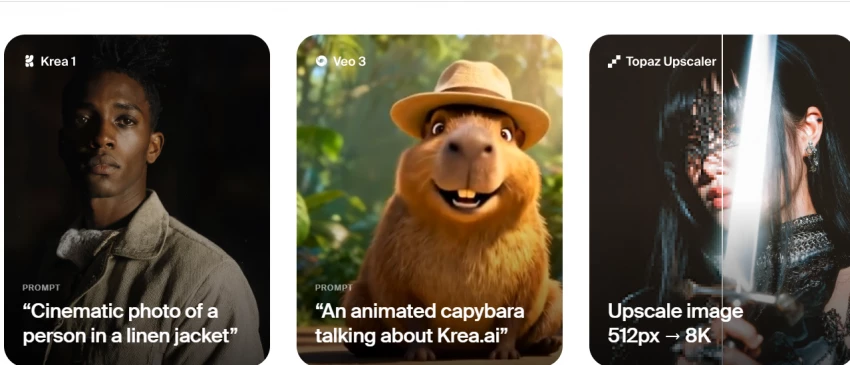
When I opened Krea Canvas for the first time, I expected the usual AI workflow — type a prompt, wait for a render.
But Krea doesn’t work that way.
As soon as I typed a few words, the image started forming instantly, without any render delay.
If I erased a word, the output changed.
If I dragged an object or doodled a shape, the entire composition rebalanced itself in real time.
This felt less like using an AI tool and more like collaborating with a hyper-fast designer sitting inside the interface.
I tested prompts like:
“product photos with matte lighting”
“minimalist poster with geometric layout”
“fashion editorial lighting on model close-up”
Every modification updated instantly, letting me visually “think on the canvas” instead of mentally guessing what the AI would produce.
This real-time responsiveness became the backbone of how I used Krea afterward, it fundamentally changed the way I brainstorm visuals.
After a few hours, I realized Krea shines not at producing final artwork, but at helping me shape ideas.
This is where it genuinely outperforms Midjourney, Stable Diffusion, or Flux.
I used Krea most effectively for:
When I didn’t know what I wanted yet, Krea helped me discover it.
Instead of writing 5 different prompts and waiting each time, I simply adjusted the canvas live.
During a branding exercise, I used Krea to generate 12 visual variations within minutes — something that would take 1–2 hours using Midjourney.
I imported old AI images and used Krea’s style-shift, lighting adjustments, and generative modifications to transform them.
This ability to start with something imperfect and sculpt it forward is what makes Krea feel like a hybrid between Photoshop and AI.
The deeper I went, the more I realized Krea’s strength isn’t intelligence, it’s speed. And that speed changes the way I create.
After extensive testing, these were the strengths that consistently stood out:
Every tweak updates instantly.
No AI tool — not even Midjourney v6 or Flux — gives this level of creative agility.
I could produce:
As a creator, this felt liberating.
I used Krea’s editing tools to:
Unlike Photoshop generative fill, this felt more fluid and less manual.
When I enhanced my Flux and MJ images using Krea Enhance, the results were consistently cleaner and sharper than the originals.
Faces became more defined, lighting became more crisp — though occasionally too sharp, which matches what reviewers on Fritz and AIixx also observed.
I created:
If you run a content-heavy account or manage brand assets, Krea becomes a time-saving machine.
Even with all this speed and flexibility, Krea has limits, and I ran into them pretty quickly once I tried pushing image quality.
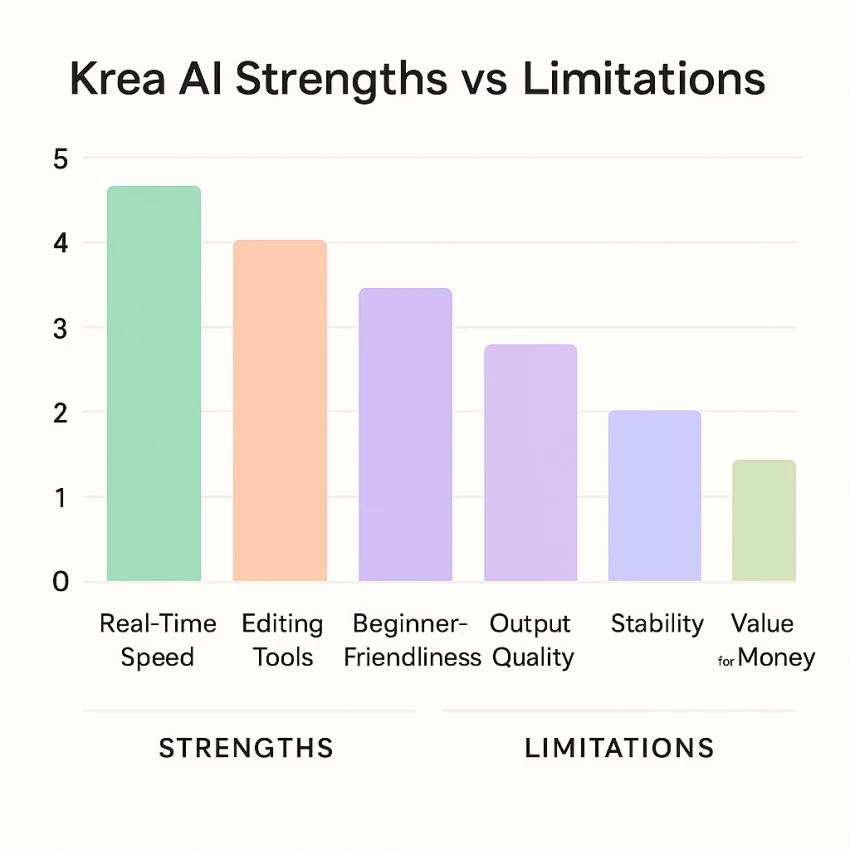
This section is the most important because it’s what determines whether Krea can replace your current tools.
I tried comparing identical prompts across both tools:
Krea produced:
Midjourney produced richer, more emotional, more stylized results.
If your goal is art, Krea won’t replace Midjourney yet.
Krea crashed three times in one afternoon during video generation.
Other users on Trustpilot mentioned the same.
It’s clear Krea is still evolving.
I ran out of credits quickly.
Many features are locked.
Upscaling and HD outputs require upgrading.
If you're serious about creation, free tier won’t last you more than 1–2 days.
I tested this extensively, and here is the honest truth:
Krea cannot remove backgrounds cleanly.
You can regenerate backgrounds, but not isolate objects with transparency.
This forced me to switch to remove.bg or Photoshop for cutouts.
Once I acknowledged these shortcomings, my expectations shifted from “replace Midjourney” to “speed up my workflow.” And suddenly, Krea made perfect sense.
There is a simple way to understand the relationship between them:
After working with both side by side, here’s how I personally use them now:
Krea didn’t replace Midjourney for me.
It replaced my brainstorming time.
And honestly — that is even more valuable.
Here are my personal ratings based on hands-on use (not marketing claims):
| Category | My Rating | Real Reason |
| Real-Time Generation | ⭐⭐⭐⭐⭐ | Nothing else matches this speed. |
| Image Editing | ⭐⭐⭐⭐ | Fluid, intuitive, beginner-friendly. |
| Output Quality | ⭐⭐⭐ | Good but not premium-level. |
| Artistic Control | ⭐⭐⭐ | Still unpredictable vs MJ. |
| Ease of Use | ⭐⭐⭐⭐ | Extremely simple interface. |
| Stability | ⭐⭐ | Crashes during heavy tasks. |
| Free Plan | ⭐⭐ | Works only for light exploration. |
| Overall Experience | ⭐⭐⭐⭐ | A brilliant but imperfect creative engine. |
After using Krea AI thoroughly, here is my honest takeaway:
Krea is not your main art generator.
Krea is your creative accelerator.
It speeds up:
Krea doesn’t compete with Midjourney in artistic detail.
It competes in how fast you can get ideas out of your head and onto the screen.
And in that category?
Krea is the fastest tool I’ve ever used.
Be the first to post comment!

Why I looked into Leeco AI in the first placeOver the past few years, I have not...
Sakshi Dhingra13 hours ago
When I first came across Skipit, I approached it with a bit of skepticism. The A...
Sakshi Dhingra2 days ago
I didn’t start exploring Dzine AI because I was chasing the latest AI trend. I d...
Sakshi Dhingra3 days ago
The positioning of Promptchan within the AI ecosystem is often misunderstood. Wh...
Sakshi Dhingra1 week ago

A Personal Moment That Made Me Care About Online Coupons AgainA few months ago,...
Parveen Verma1 week ago

Choosing the right software used to be straightforward. You compared features, c...
Suraj Malik2 weeks ago