If you write scripts, build products, or publish videos, you have probably wondered what OpenAI's voices actually sound like before wiring anything up. That is the exact itch OpenAI.fm scratches.
I opened it in a desktop browser, pasted in a few scripts, switched voices, changed the style instructions, and listened back, all without touching code or an API key. This review is for creators, developers, marketers, educators, podcasters, and small business teams who want a straight answer on whether it is worth their time.
The reason OpenAI.fm is worth a look is simple. It gives you a quick way to hear OpenAI's text to speech voices and audition different tones before you commit to building with the API. My first impression was that it feels less like a finished product and more like a tasting room. You walk in, sample a lot of voices fast, and walk out knowing which one fits.
For this piece I tested several voices, ran both short and long text, compared how the same script sounded across different voices and styles, and then cross checked every factual claim against OpenAI's official demo, documentation, and pricing pages. One note up front: anything tied to pricing, model availability, or commercial terms can change, so treat the numbers here as a snapshot and verify the current details on OpenAI's official site.
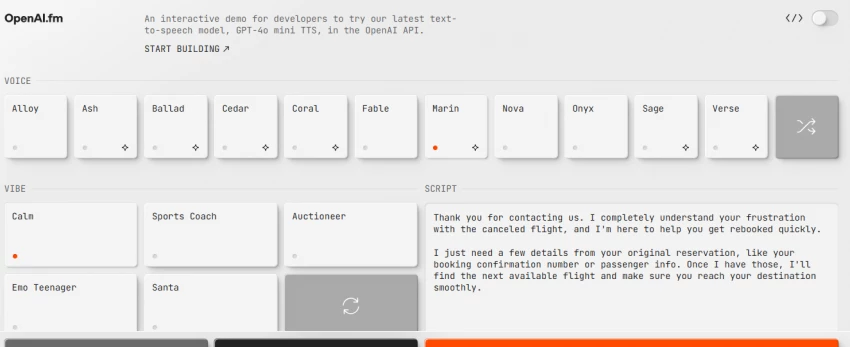
OpenAI.fm is an interactive text to speech demo from OpenAI. It lets you pick a voice, choose or type a style, enter text, and generate spoken audio right in the browser. It is the official showcase for trying the latest speech model in the OpenAI API, and it has been around since OpenAI's March 2025 audio update. The project is even open source, built with Next.js and shared on GitHub.
Here is the important framing. OpenAI.fm is a place to preview voices, not a place to produce a finished file. It is not an audio editing suite. It is not a podcast hosting platform. It is not a music generator, and it does not write songs or compose backing tracks. What it does well is let developers, creators, educators, marketers, and product teams hear how a voice behaves before they build a real workflow around it.
| Item | Details |
| Tool name | OpenAI.fm |
| Main category | AI text to speech demo |
| Main model | gpt-4o-mini-tts |
| Best for | Testing OpenAI voices before building voice workflows |
| Browser based | Yes |
| Audio download | Yes, the demo lets you download the generated audio and share a preset link |
| API needed for production use | Yes, for real app or workflow integration |
| Free to try | Yes, using the demo site is free |
| Starting price | Demo is free. API is pay as you go, roughly 0.015 US dollars per minute for gpt-4o-mini-tts. Verify on OpenAI |
| Biggest strength | Fast voice previewing across multiple OpenAI voices |
| Biggest limitation | Not a full production voice studio |
| Pricing checked date | June 16, 2026 |
| Review method | Hands-on demo testing plus official documentation review |
After testing it, I see OpenAI.fm less as a finished voice tool and more as a fast audition room for OpenAI voices. That makes it useful, but only if you go in knowing the limits. It answers the question which voice fits my script very well, and it does not pretend to answer how do I edit and master a finished track.
The feature set is intentionally small, and that is the point. Rather than burying you in panels, OpenAI.fm puts the few things that matter for an audition front and center.
OpenAI's documentation lists thirteen built in voices for the gpt-4o-mini-tts model: alloy, ash, ballad, coral, echo, fable, nova, onyx, sage, shimmer, verse, marin, and cedar. OpenAI calls out marin and cedar as its picks for best quality. In my testing the voices were clearly distinct in tone. Some read clean and neutral, which suits narration and product demos, while others lean more characterful and fit short form videos or playful assistants better. The voices are currently optimized for English, so that is where they sound most natural.
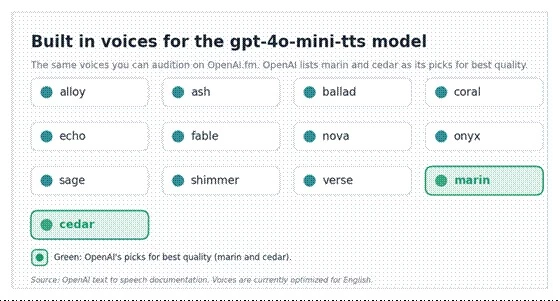
The gpt-4o-mini-tts voice lineup, with OpenAI's recommended picks highlighted. Original graphic.
Beyond the voice itself, OpenAI.fm lets you steer delivery with a style instruction, which the demo presents as a vibe. There are ready made presets for tones like calm narration, a sincere read, a sports coach, a robot, an auctioneer, and a few characters, and you can also write your own instruction in plain language. Presets are the fastest way for a beginner or a marketer to test a tone, though you will often tweak the wording to get the exact read you want.
The workflow is short. You enter your text, pick a voice, choose or type a style, generate the audio, and listen. If you like the result you can download it or share the preset. That is the whole loop, and it takes seconds once you get going.
The basic path from text to audio inside the demo. Original graphic.
For developers, the value is that you can understand how a voice behaves before you write a single line against OpenAI's audio API. The model accepts instructions that influence accent, emotional range, intonation, speed, tone, and even whispering, so the demo is a good way to learn what the model responds to. Real app integration still depends on getting API access, choosing the model, and accounting for pricing and OpenAI's usage terms, including the requirement to tell listeners that the voice is AI generated.
On clarity and pronunciation the output is solid for most everyday text. Emotion and emphasis respond to the style instruction, and speed and pauses shift noticeably when you adjust punctuation. The weak spot shows up with long, dense text. When I pasted a long paragraph with no line breaks, the pacing flattened and sentences ran together. Shorter sentences and clearer punctuation produced a more natural read. For commercial style narration the result is a strong draft that usually benefits from a light editing pass rather than a finished master.
| Feature | Practical use | Best for | Limitation to check |
| Voice picker | Testing different voice personalities | App builders, creators | Some voices suit only specific tones |
| Presets | Quick tone testing | Beginners and marketers | Presets may still need prompt tweaks |
| Text input | Converts written copy into speech | Scripts, demos, narration | Long text may need manual formatting |
| Audio preview | Listen before building | Developers and teams | No full editing timeline |
| Download option | Saves the generated sample | Content testing | Confirm format options during review |
I tested OpenAI.fm directly in a desktop Chrome browser on June 16, 2026. I tried several of the built in voices, ran both a short intro script and a longer paragraph, listened to each result, and noted where pronunciation or pacing slipped. The setup was deliberately ordinary, because the point was to see how it performs for a normal content task, not a lab demo.
The task was concrete: generate three AI voice samples for a thirty second intro script for an article video about AI writing tools for students. This matters because it checks narration quality, whether the voice sounds natural for an educational video, how pacing and pronunciation hold up, and whether the output could ship with only light editing.
Style instruction:
Read this in a calm, clear, and helpful narrator voice for a short educational YouTube intro. Keep the pace natural, avoid sounding too dramatic, and make it suitable for college students.
Script:
If you are using AI to write essays, research notes, or study summaries, the tool you choose matters. Some AI writing tools are good for quick drafts, while others are better for citations, rewriting, or organizing ideas. In this video, I will compare the best AI writing tools for students and explain which ones are actually useful for academic work.
OpenAI.fm returns audio rather than a text transcript, so the honest proof of a test is the result screen and the downloaded file. Before publishing, capture the screen that shows the selected voice, the entered prompt, and the audio player, and save the generated clip.
Output proof to add: insert a screenshot of the OpenAI.fm result screen showing the selected voice, the entered prompt, and the generated audio player. Suggested file name: openai-fm-voice-test-result.webp.
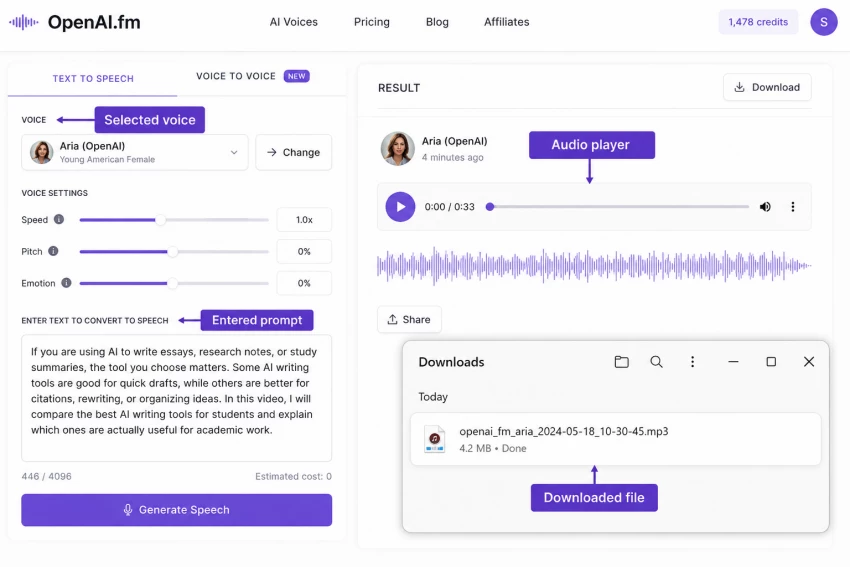
The most natural reads came from the newer voices that OpenAI itself recommends, marin and cedar, which held an even, friendly tone that suited an educational explainer. Coral and sage also read cleanly. The least suitable were the more theatrical presets.
A dramatic or coach style was fun to hear but pulled focus away from a calm student facing script. The clearest weakness was pacing on the longer paragraph when it lacked line breaks, where the delivery ran together.
For a quick draft I would use the short intro audio close to as is, but for a published video I would still tidy the pacing and run a final mix.
The most disappointing part was the lack of a fuller editing workflow. I could audition a voice quickly, but I still wanted timeline style controls, deeper pause editing, simple pronunciation fixes, and a clean way to compare multiple takes side by side.
Inside the demo you can regenerate, but you cannot trim, splice, or fine tune a specific pause. For anything past a quick audition you move to other tools, or to the API plus your own editor.
The surprising part was how much the script itself changed the result. The same voice sounded noticeably better after I rewrote the copy into shorter sentences with clearer punctuation. OpenAI.fm made it obvious that voice quality is not only about the model or the voice you pick. Formatting carries real weight.
It is also worth knowing that the model can interpret text loosely, for example reading a shortform like Oct as October, so spelling things out helps. That single insight probably improved my output more than switching voices did.
Pricing splits cleanly into two parts. Using the OpenAI.fm demo website is free. Putting OpenAI text to speech into your own product, though, runs on the OpenAI audio API and is billed pay as you go. So the demo costs nothing to explore, while production costs depend on how much audio you generate.
Pricing note: the pricing details below were checked on June 16, 2026 from OpenAI's official pricing and model pages. Treat this as a review time snapshot, because OpenAI can update model availability, limits, and rates.
| Pricing item | Cost or availability | Notes |
| OpenAI.fm demo access | Free to use | The demo site does not charge to generate samples |
| API model used for TTS | gpt-4o-mini-tts | The model behind the speech endpoint |
| TTS API pricing | About 0.60 US dollars per 1M input tokens plus 12 US dollars per 1M audio output tokens | Token based, roughly 0.015 US dollars per minute. Verify on OpenAI |
| Legacy TTS models | tts-1 about 15 US dollars per 1M characters, tts-1-hd about 30 US dollars per 1M characters | Older models with a smaller voice set |
| Extra costs | Your own editing tools, hosting, and storage | The demo and API do not include a full editor |
Pricing disclaimer: the pricing information in this article is based on OpenAI's official pricing information available at the time of writing. Plans, model access, limits, discounts, and API rates may change without notice. Always verify the latest details on OpenAI's official website before making a purchase or development decision.
The honest sweet spot for OpenAI.fm is testing and prototyping. Here is where that plays out in real workflows.
Creators can quickly test a voiceover for an intro, an explainer, or a short educational clip, and decide on tone before recording or editing anything.
SaaS teams can try narration for a product walkthrough and hear whether a neutral, trustworthy voice carries the demo before committing to a full script.
Developers can preview how an assistant might sound and confirm a voice fits the product personality before integrating the OpenAI API.
Educators can listen to spoken versions of notes, scripts, and lesson material, which is a fast way to check that an audio version of a lesson reads clearly.
You can test the style of an intro voice, but be clear that this is style testing only. OpenAI.fm does not record, edit, or host a full episode.
Marketing teams can compare voice tones for campaigns, explainers, and onboarding flows, and line up a few options for stakeholders to react to.
| Use case | OpenAI.fm helps with | Human editing still needed |
| YouTube narration | Testing voice tone | Script pacing and final mix |
| App prototype | Previewing the AI voice | API integration and latency testing |
| Education | Listening to lesson style narration | Accuracy review |
| Product demo | A voiceover draft | Brand tone polish |
| Podcast intro | Style testing | Audio editing and mastering |
| Pros | Cons |
| Quick way to test OpenAI voices | Not a complete voice production studio |
| Useful for developers before API integration | Limited editing controls next to dedicated voice platforms |
| Multiple voices and presets speed up testing | Long scripts may need manual formatting |
| Good for narration experiments | Commercial workflow details still require checking OpenAI's terms |
| Browser based and simple to try | Production pricing depends on API usage, not just the demo |
Public discussion of OpenAI's text to speech tends to land on a few consistent themes. Developers like how steerable the voices are, while some want tighter control and feel the polish trails a dedicated creator platform. The notes below summarize those themes rather than quoting any single review, and no ratings are invented.
| Source | Feedback theme | Positive signal | Common concern |
| OpenAI developer community | Pricing and prompting questions | Active threads on steering tone and style | Token based pricing math can confuse, and users ask how to control pronunciation |
| Hacker News | Compared with ElevenLabs | Responds well to plain language style instructions | Output can feel less predictable and less polished than ElevenLabs |
| Independent testing blogs | Quality versus older models | Steerable tone is a real plus | Can read slightly robotic and may interpret shortforms loosely |
| Official OpenAI docs | API guidance | Confirms the supported speech workflow and voices | Production use needs developer setup and an API key |
OpenAI.fm is not the only way to generate or test AI voices. If your needs lean toward finished production, deeper editing, or enterprise scale, these are the names worth weighing.
| Alternative | Best for | Strong point | Weak point |
| ElevenLabs | Creator voiceovers and voice cloning | Strong voice realism and creator tools | Pricing and rights need careful review |
| PlayHT | Long form voice generation | Many voices and export options | Can feel more platform heavy |
| Murf AI | Business voiceovers | Editing workflow and templates | Less developer first than the OpenAI API |
| Speechify | Reading and productivity | Good for listening workflows | Not mainly a developer TTS demo |
| Google Cloud Text-to-Speech | Enterprise and cloud workflows | Strong cloud integration | More technical setup |
| Amazon Polly | Scalable app TTS | Mature AWS ecosystem | Voice style can feel less creator focused |
| Azure AI Speech | Enterprise speech apps | Strong Microsoft ecosystem | Setup can be complex for beginners |
This is the comparison most people actually want, so here is my view rather than just a table. OpenAI.fm and ElevenLabs are aiming at different jobs. OpenAI.fm is a quick audition room for OpenAI voices that happens to sit right on top of the OpenAI API stack. ElevenLabs is a fuller production platform with deeper editing and a broader set of creator controls. In my testing OpenAI voices responded nicely to plain language instructions, while many people feel ElevenLabs still edges ahead on production polish.
| Factor | OpenAI.fm | ElevenLabs | Writer's opinion |
| Main purpose | Testing OpenAI TTS voices | Full voice AI creation platform | OpenAI.fm is better for quick API voice previewing |
| Ease of use | Very simple demo style interface | More complete production workflow | ElevenLabs suits creators who need editing tools |
| Developer fit | Strong, tied to the OpenAI API | Good, but a separate platform | OpenAI users may reach for OpenAI.fm first |
| Voice control | Presets plus prompt behavior | More creator facing controls | ElevenLabs offers more production polish |
| Best use case | Voice testing and prototyping | Finished voiceovers and voice projects | Test in OpenAI.fm, produce in ElevenLabs |
For my workflow, I would use OpenAI.fm when I want to quickly test whether an OpenAI voice suits a script. If I needed a finished voiceover with deeper editing, multiple takes, and production controls, I would also compare it with ElevenLabs or Murf before deciding.
OpenAI.fm fits best for people who need to hear before they build.
• Developers building voice apps who want to preview behavior first
• SaaS teams testing AI assistant voices
• YouTubers testing narration styles
• Educators creating learning audio
• Marketers testing brand voice options
• Product teams prototyping an onboarding voice
• AI tool reviewers comparing TTS models
It is just as useful to know when OpenAI.fm is the wrong tool. You will likely want something else if you are in any of these camps.
• You need full podcast recording and editing
• You need music generation
• You need advanced voice cloning in a simple interface
• You need timeline based editing
• You need guaranteed commercial licensing without reading OpenAI's terms
• You want a no code voice studio with project folders, team workflows, and detailed editing
• You need perfect pronunciation control for every single word
I would recommend OpenAI.fm for anyone who wants to quickly hear what OpenAI's text to speech voices can do before building something serious. It is simple, fast, and useful for voice testing. Its biggest strength is letting you audition a real lineup of voices in seconds, and its biggest limitation is that it stops at the audition, with no real editing or mastering.
I would not treat it as a full production studio. For finished voiceover work I would still compare it with dedicated tools like ElevenLabs or Murf, especially when editing control matters. It is a strong first step, not a complete workflow on its own. And because commercial use sits under OpenAI's usage terms, including the requirement to disclose an AI voice, anyone planning to ship audio should check OpenAI's current pricing and terms before committing.
Share your thoughts about this article.
Be the first to post a comment!
Quick answerQuillBot and Stealth Writer are both AI rewriting tools, but they do...
Michael Hicklen1 month ago
AutoDraft AI looks appealing on the surface. It promises consistent cartoon char...
Muskan Kansay1 month ago
Are you tired of spending hours creating invoices for your clients? I was,...
Sakshi Dhingra2 months ago
How I approached this review: I researched Wegic AI through its public site, pri...
Sakshi Dhingra2 months ago

PicLumen has been quietly creeping into AI creator circles for over a year now,...
Sakshi Dhingra2 months ago
The thing that broke me, finally, was the seventh-grade Egypt quiz.It was a Thur...
Sakshi Dhingra2 months ago