
Pica AI pricing is not only about the monthly fee. The real question is how many useful images, face swaps, headshots, enhancements, or video-based outputs a user can create before credits, speed limits, watermarks, or quality issues start affecting the workflow. A plan that looks cheap on the pricing page can feel expensive if every good result costs several retries.
This article explains the Pica AI free plan, the paid monthly plan, annual billing, the credit system, review-based pricing concerns, refund and payment terms, and which type of user should or should not pay for it. All figures come from the official pricing page and third-party pricing snapshots, and both can change, so live verification is part of the advice.
Pica AI may be worth paying for if the user regularly needs face swaps, photo enhancement, AI headshots, avatar-style images, or watermark-free results.
The free plan is better for light testing, not serious daily use, because third-party pricing snapshots show limited daily credits and temporary image-saving limits.
The annual plan appears cheaper per month, but it should only be chosen if the user already knows the tool produces usable results for their needs.
The biggest caution: users should check credits, renewal rules, refund policy, payment platform, and commercial-use terms before upgrading.
| Plan | Listed price | Credits | Main features | Best for | Main limitation |
| Free | $0 | 4 limited credits/day according to SaaSworthy | Basic access, limited usage, image saving for 24 hours | Trying the tool casually | Too limited for regular creation |
| Monthly | $10/month | Around 1,000 credits/month | Fast processing, watermark-free output, HD/4K-style photo output, iPhone app access | Casual creators and marketers | Value depends on credit usage and output quality |
| Annual | $59.99/year | Around 8,000 credits/year | Similar paid features with lower effective monthly cost | Regular users who already like the tool | Higher upfront payment and less flexibility |
Pricing, credits, and plan features can change. The live Pica AI pricing page and checkout screen should be checked before subscribing.
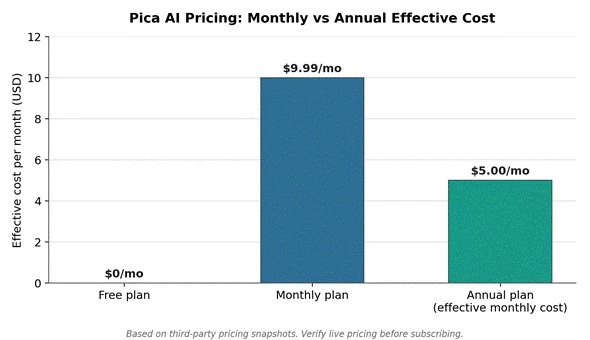
Figure 1. Effective monthly cost comparison across Pica AI plans. The annual figure is the yearly price divided by 12, based on the SaaSworthy pricing snapshot.
The annual plan appears cheaper when divided by 12 months, but that saving only matters if the user already knows they will use Pica AI regularly. For new users, the safer path is to test the free plan or short-term paid access before committing to annual billing.
Like most AI image tools, Pica AI charges through a credit system rather than unlimited usage. Different tasks can consume different amounts of processing, so a face swap, an AI headshot, an image enhancement, or a video-based output may not carry the same cost or the same value to the user. This is why the headline monthly price is only half of the pricing story.
A plan with 1,000 credits is only good value if the following conditions hold:
• The generated results are usable
• The tool does not require too many retries
• Output quality matches the user's use case
• Watermark-free export is included
• The user understands how credits expire or renew
• The user knows whether unused credits roll over or disappear
A low monthly price can become expensive if users need many retries to get one usable result. That is why credit value should be judged by usable outputs, not only by the number of credits shown on the plan page.
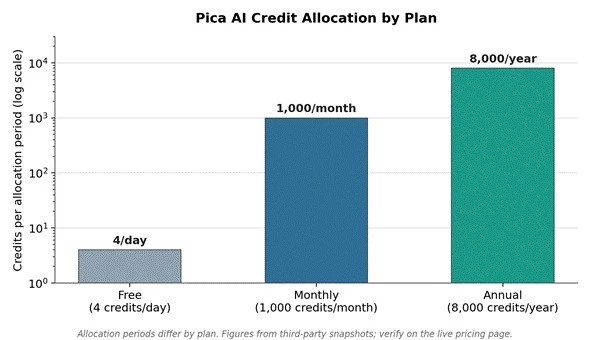
Figure 2. Credit allocation by plan, shown on a logarithmic scale because the free plan allocates credits per day while paid plans allocate per month or per year. Figures come from third-party snapshots.
This chart should not be read as a direct quality comparison. More credits only matter when the outputs are useful. If a user needs multiple retries for every face swap or headshot, the real value of each plan becomes lower.
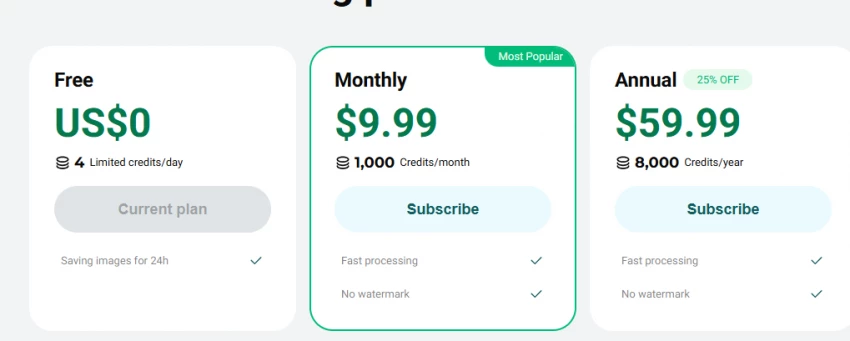
The free plan works as a low-risk entry point. It includes 4 limited credits per day and saves images for only 24 hours, which shapes what it is realistically good for.
The free plan is useful for:
It is not ideal for:
The monthly plan makes sense for users who need more regular access but do not want a long-term commitment. Third-party pricing sources place it around $9.99 or $10 per month for roughly 1,000 credits per month. SaaSworthy lists the $9.99 monthly plan with fast processing, watermark-free output, HD to 4K photos, and iPhone app access, while TechJockey lists pricing starting at $10 for 1,000 credits per month with fast processing, watermark-free output, HD to 3K+ photos, and iPhone app access.
The annual plan appears cheaper on a monthly basis because $59.99 per year works out to roughly $5 per month, about half the monthly rate. That gap is the main selling point, but annual billing should be recommended only after the user has already tested:
• Face swap quality on their own photos
• Photo enhancer output on real source images
• Headshot generation quality
• Credit usage speed under normal workload
• Refund and cancellation rules
• Whether the tool fits their workflow overall
Annual pricing looks attractive on paper, but it is not automatically the best option. If a tool does not produce the desired result, a cheaper monthly equivalent still becomes wasted money.
The table below connects the main Pica AI features to the pricing question, because each feature carries a different concern depending on whether the user is on the free or paid tier.
| Feature | Why it affects pricing value | Free user concern | Paid user concern |
| Face swap | Main reason many users try Pica AI | Limited attempts | Quality must be realistic enough |
| Photo enhancer | Useful for old, blurry, or low-quality images | May not test enough images | HD/4K output should be checked |
| AI headshots | Can replace basic profile photo tools | Free credits may run out quickly | Results must look professional, not artificial |
| Watermark-free export | Important for social media and marketing | Usually limited or unavailable | Confirm before paying |
| Fast processing | Saves time for frequent users | Free users may face slower output | Paid speed should justify price |
| Mobile app access | Useful for casual editing | App pricing may differ | App Store/Google Play billing rules apply |
| Refund policy | Important if output quality disappoints | Not always relevant | Check eligibility before buying |
Review evidence for Pica AI is split across platforms, and the split itself is informative. Review patterns show a much stronger picture on the Apple App Store than on Trustpilot, which suggests experiences vary by use case and expectation.
A developer response on the App Store gives useful credit information: a weekly package provides 400 credits, and top-up credits can cost as low as $0.002 per credit at the maximum discount.
If a paid user spends credits but receives unusable images, the plan feels more expensive than the advertised price.
| Review theme | What users praise | What users complain about | Pricing lesson |
| Face swap/photo output | Some users say results look realistic and fun | Some say images look artificial or unusable | Test output before paying annually |
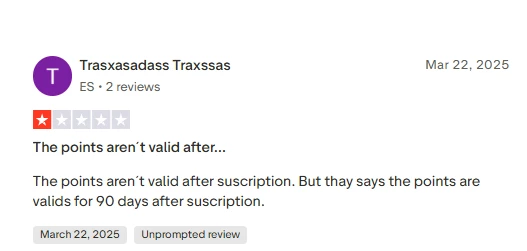
| Credits | Developer response explains weekly credits and top-up cost | Some users complain about points/credits validity | Understand expiry and renewal rules |
| Speed | Paid plans mention fast processing | One Trustpilot complaint mentions slow rendering and speed-up pressure | Speed affects real value |
| Support | One positive review praises support | Other reviews complain support did not solve issues | Support matters for paid users |
| Billing/payment | Multiple payment methods exist | Some users mention payment or debit concerns | Check billing route before buying |
Review evidence should not be treated as final proof because review platforms can show extreme positive or negative experiences. However, repeated pricing-related complaints are useful warning signals.

Pica AI's Terms of Service state that app payments may be processed through the Apple App Store or Google Play, while website payments may be processed through Stripe, PayPal, or DukPay. This matters more than it first appears, because billing questions and refund requests may depend on where the purchase was made. App-related billing or refund issues may need to go through Apple or Google rather than directly through Pica AI.
The Pica AI refund policy says users who subscribed or bought credits through the Pica AI website can request refunds through the in-service refund request feature or the feedback page. Eligibility is not automatic; Pica AI reviews each request according to the policy.
Before paying, users should check:
• Is the purchase through the website, Apple App Store, or Google Play?
• Is the plan weekly, monthly, or annual?
• How many credits are included?
• Do unused credits expire?
• Are watermarks removed?
• Are images saved permanently or temporarily?
• Is commercial use allowed?
• How do cancellations work?
• What is the refund window?
• What happens if output quality is poor?
The better value depends on how many credits a user actually needs and how confident they are in the output quality. The table below maps common user types to the plan that carries the least risk.
| User type | Best plan | Reason |
| First-time user | Free | Enough to check interface and basic output |
| Casual fun user | Free or short monthly use | Face swaps and fun edits may not need annual billing |
| Social media creator | Monthly | More credits and watermark-free output may be useful |
| Blogger/marketer | Monthly first, annual later | Test quality before using it for regular visuals |
| AI headshot user | Monthly | Better than annual unless repeated headshots are needed |
| Heavy creator | Annual only after testing | Cheaper effective cost, but only if outputs are reliable |
| Business user | Check terms before paying | Commercial rights and usage rules matter |
Pica AI pricing is reasonable for users who need simple AI photo tools, face swaps, photo enhancement, AI headshots, and watermark-free creative outputs. The monthly plan is the safer paid option because it gives more room to evaluate quality without committing for a full year.
The annual plan looks cheaper per month, but it should only be chosen after confirming that Pica AI produces usable results for the user's exact needs. Review evidence is mixed enough that users should avoid paying annually before checking credit usage, output quality, cancellation rules, refund terms, and commercial-use rights.
Best practical recommendation:
• Start with the free plan.
• Upgrade monthly only if the results are usable.
• Choose annual only after regular use proves the tool is worth keeping.
Is Pica AI free?
Yes, a free plan exists. According to the SaaSworthy snapshot, it includes 4 limited credits per day and saves images for only 24 hours, so it works for testing rather than regular use.
Does Pica AI remove watermarks on paid plans?
Pricing directories list watermark-free output as a paid-plan feature. Users should still confirm this on the live pricing page and checkout screen before paying.
Can Pica AI be used for commercial images?
Commercial-use rights should not be assumed. Users planning client work, marketing, or resale should check the Terms of Service and any license wording before paying.
Share your thoughts about this article.
Be the first to post a comment!

The same tool can be a 4.7 on one site and a 3.9 on another. Here is what is rea...
Nitin1 month ago

Here is the number worth pinning above your budget: in Gartner Digital Markets r...
Deepak Mehra1 month ago

What Artlist AI is in 2026Artlist began as a royalty-free music library. By 2026...
Deepak Mehra1 month ago

Most AI tool failures do not announce themselves. There is no crash, no angry em...
Nitin1 month ago

The best AI image generator in 2026 is Nano Banana 2 for speed, FLUX.2 for photo...
Parveen Verma1 month ago

“Useful” is a slippery word for a coding assistant. A tool can be brilliant at o...
Sakshi Dhingra1 month ago