PicLumen has been quietly creeping into AI creator circles for a while now, and the interesting thing is that it has changed quite a bit even since I first started testing it.
That matters because AI image generators age ridiculously fast.
A pricing table can be correct one month and outdated the next. A model that felt new during your first test can be buried under five newer options a few weeks later. PicLumen is very much that kind of product.
I originally set aside roughly two weeks to use it like an actual working tool rather than something I would open once, generate a pretty picture with, and forget about. I tried realistic portraits, anime artwork, line art, image-to-image generation, inpainting, outpainting, and the editing tools around them.
Since then, I have gone back through the platform again to check what has changed, particularly around its free plan, Lumens, commercial usage, newer models, and the increasingly large video side of the platform.
The short answer is still fairly positive.
PicLumen gets a surprising amount right, occasionally produces the kind of small AI mistake that makes you stare at an image twice, and remains one of the easier ways to experiment with several image-generation models without immediately committing to an expensive subscription.
There is one thing I would change from my earlier impression, though.
The free plan is still useful, but it now has clearer limits than it did before. Basic users currently receive 10 free Lumens each day, while commercial usage and broader Relax Mode access depend on the plan you are paying for.
That makes the current PicLumen slightly less “everything is free forever” and slightly more of a proper creative platform with a usable free entry point.
My quick verdict, for anyone in a hurry
If you want the answer in one paragraph: PicLumen is the rare AI image generator that gives you serious functionality for free, treats commercial usage fairly under its license terms, and quietly competes with paid platforms on output quality. Its weaknesses are real, particularly around consistent character generation and free-tier wait times during peak hours, but the strengths outweigh them for casual creators, marketers, anime enthusiasts, and anyone who wants a no-friction sandbox. I would happily recommend it as a primary tool to most readers, and as a secondary tool even to those locked into Midjourney or Adobe Firefly.
Why PicLumen even ended up on my testing list
I will be honest, I was skeptical for the first hour. The AI image generator space is so crowded right now that any platform claiming to be the next big thing usually turns out to be a thin wrapper around a hosted open-source model.
First, the volume of reviews on Trustpilot kept climbing every time I checked back, with the latest count now sitting above four thousand three hundred reviewers and a 4.9 out of 5 average score. That is not a number you see often for a tool barely older than a toddler.
Second, a press release from openPR mentioned that PicLumen reached over forty-five thousand daily image generations within the first months of launch, and that was before the platform added FLUX, Pony Diffusion, Kontext, and the new GPT Image 2 integration.
Third, the tool was being called the 'free version of Midjourney' in various corners of YouTube and Discord, which is usually marketing hyperbole, but I wanted to find out where it sits in reality.
My goal was simple: spend roughly two weeks treating PicLumen like a working tool rather than a curiosity. I tested it on a mid-range laptop, on a phone running the Naivideo iOS app (the company's mobile branding for its video tools), and through the Android app for a few sessions to keep things fair. The tests included photorealistic portraits, anime characters, line art for a stylized blog header, image-to-image transformations, inpainting on a stock photo, and outpainting an existing image into a wider canvas. I deliberately mixed brilliant and lazy prompts to see how the platform handled both.
Two weeks in, my honest gut reaction was: I cannot believe how much of this is free.
The afternoon I sat down and actually started testing
First impressions matter more than reviewers like to admit, so here is the literal sequence of what happened. I landed on piclumen.com, was greeted by a banner showing GPT Image 2 ('4K images with near-perfect text rendering'), Seedance 2.0, and Seedream 5.0 Lite all sitting on the same studio.
I clicked 'Try' on Seedream 5.0 Lite, was prompted to either sign in or start without an account, and within about ninety seconds I had my first image. The fact that I could generate something usable without making an account is, frankly, rare. Most competitors gate that behind email verification at minimum.
The studio interface follows a familiar three-pane logic: model selector on the left, a prompt box in the middle, and the resulting images on the right, with options to vary, upscale, inpaint, replace, or expand each one. Once I signed in, I got the standard ten daily Lumens (PicLumen's name for credits), plus a sign-up bonus that put me at twenty credits to start. Each generation typically costs between one and four Lumens depending on model and resolution, and the so-called Relax Mode lets you keep generating in an unlimited queue, even after credits run out, if you are willing to wait a little longer for each batch.
My first serious test was a photorealistic portrait of a fictional jazz musician. I used the PicLumen Realistic V2 model. Six seconds later (on a paid quick-queue, since I had topped up Lumens during testing), I got back two images. Both were sharp, both had natural lighting, and one of them placed the saxophone in the wrong hand. That single detail captures the experience quite well: PicLumen will get you eighty to ninety percent of the way to a publishable image faster than almost anything else in its price bracket, and the remaining ten percent will sometimes need a manual fix in the inpainting tool.
Looking under the hood: models, tools, and the studio itself
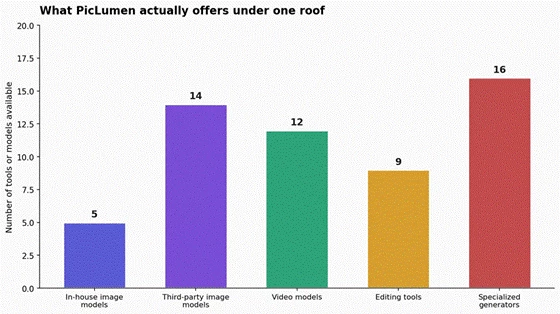
PicLumen's biggest underrated strength, in my opinion, is the sheer breadth of models you can access from a single account. According to the studio's own model directory, you get five in-house image models, more than a dozen third-party image models, a separate roster of video models, and a stack of utility tools sitting around them. Here is the count I ended up with after combing through the official model pages.
On the image side, the in-house line-up that I tested includes PicLumen Realistic V2 for photorealism, PicLumen Anime V2 for manga and anime art, PicLumen Lineart V1 for clean black-and-white outlines, PicLumen Art V1 for the more painterly outputs, and FLUX.1-schnell for fast text-aware generation. The third-party model menu is where things get genuinely interesting. You can flip between Nano Banana, Nano Banana 2, Seedream 4.0, Seedream 4.5, Seedream 5.0 Lite, Midjourney, Qwen, GPT-4o, GPT Image 1.5, GPT Image 2, ChatGPT Images 2.0, Grok Imagine, Pony Diffusion V6, and Qwen Image 2.0, all from the same dropdown. The fact that this much capability lives behind one login is, by itself, a strong differentiator.
The model line-up at a glance
Model/type
Best for
My take after testing
PicLumen realistic models
Portraits and realistic scenes
Strong lighting and generally believable faces
PicLumen anime models
Anime and manga-style artwork
One of my favorite areas of the platform
PicLumen line-art tools
Outlines and illustration bases
Useful when you want something to continue editing
FLUX-based generation
General prompting and speed
Good balance between usability and prompt control
Pony Diffusion
Anime, fantasy and character-heavy artwork
More specialized, but useful in the right niche
Third-party premium models
Different creative styles and higher-end generation
The variety is one of PicLumen's strongest advantages
The exact menu keeps changing, which is why I would avoid choosing PicLumen because one particular model happens to be available today.
The more important point is that its subscription page currently lists access to prominent third-party models and systems, including Midjourney and GPT-Image-2 on paid tiers.
Then there are the editing tools.
These ended up being more useful than I expected.
PicLumen currently offers tools around image replacement, expansion/outpainting, upscaling, colorization, background removal, image-to-image transformations, pose generation, clothing changes and several more specialized visual tasks.
I used the replacement workflow on a portrait where I wanted the jacket changed without rebuilding the entire image.
That is exactly the kind of small job where an AI editor can either save you ten minutes or waste twenty.
In my test, the result landed closer to the first category.
The image extender was another feature I found genuinely practical.
Turning a vertical or square image into a wider blog banner sounds easy until the AI starts inventing walls, trees, furniture, hands or random architecture around the original composition.
PicLumen handled my test images well enough that I could see myself using the workflow for article headers and social graphics rather than simply playing with it once.
Pricing, lumens, and the part everyone secretly cares about
PicLumen uses Lumens as its credit system.
Basic users currently receive 10 free Lumens every day. The company says those Lumens can be used for image and video generation, while users with heavier requirements can subscribe or buy additional Lumens.
The paid structure now runs through Lite, Standard, Pro, and Elite plans.
Plan comparison at the time of writing
Plan
Monthly price
Included Lumens
What stood out to me
Basic
Free
10 daily free Lumens
Best for testing PicLumen and light personal use
Lite
$7.59/month
750/month
Limited commercial licensing and access to more models
Standard
$24.99/month
2,500/month
Faster generation, full commercial licensing and unlimited image Relax Mode for PicLumen models
Pro
$49.99/month
6,000/month
Turbo generation, more concurrent tasks and broader licensing
Elite
From $179.99/month
High-volume allocations
Designed more for power users and production-heavy workflows
Those are the monthly prices currently displayed by PicLumen; annual billing reduces the effective monthly rate. For example, the current annual rates are $6.09 per month for Lite, $19.99 for Standard and $37.49 for Pro.
There is another important change here.
Relax Mode is not simply an unlimited free-generation loophole.
PicLumen's current pricing FAQ says Standard, Pro, and Elite subscribers get unlimited image generation in Relax Mode for PicLumen models, while Lite receives limited access. Video generation in Relax Mode is currently available to Pro and Elite subscribers.
So yes, PicLumen is still genuinely free to try.
No, I would no longer describe the free Basic plan as unlimited.
And if you start generating regularly, you will probably understand the paid plans much faster than somebody reading the pricing page for the first time.
The commercial-use detail you should not skip
PicLumen currently ties commercial rights to subscription level.
Basic users do not receive commercial-use rights. Lite receives a limited commercial license, Standard receives full commercial licensing, Pro adds extension rights, and Elite includes business-level licensing.
That matters if you are generating images for clients, advertisements, paid campaigns, product listings, book covers, commercial websites or anything else tied directly to business use.
It also does not mean “commercial license” magically removes every copyright or trademark issue.
PicLumen's current terms explicitly say users are responsible for ensuring their output does not infringe third-party rights.
That is a much more useful way of looking at the license than simply saying, “Yes, you can use AI images commercially.”
Trustpilot, Product Hunt, and what reviewers say about it
I went deep into third-party reviews while writing this piece, because my own opinion is one data point and I wanted to weigh it against thousands of others.
The headline numbers are striking. Trustpilot currently shows PicLumen at 4.8 out of 5 stars across more than four thousand three hundred reviewers, an aggregation that Scamadviser also cites in its trust report, where it pulls the same Trustpilot figures. Product Hunt rates PicLumen at a perfect 5.0 based on 15 reviews, and the reviewers on that platform skew toward power users who care about workflow, model selection, and customer support response time.
G2 has the brand listed but, at the time of my review, did not yet have enough reviews to display category-level insights, which is fairly standard for an AI image tool that launched in mid-2024. Capterra does not host a major review thread for the platform either, which suggests that the bulk of community feedback has accumulated on Trustpilot and Product Hunt rather than B2B review networks.
Reading through the actual review text gives a more textured picture than the star averages alone. On Trustpilot, the words that come up most often are 'easy', 'free', 'fast', 'realistic', 'inspiring', and (notably) 'supportive', referring to the customer support team.
A Vlad Dracul review on Product Hunt called out something that I saw echoed across multiple comments: a subscription was auto-renewed by accident, the user contacted support expecting nothing, and got a full refund within four days. That is the kind of detail you cannot fake in a forum-grown review pool. Trustpilot reviews summarized by the platform's own AI even highlight that customers describe PicLumen as a 'super app' and the 'best' AI tool they have tried, with strong praise for prompt accuracy and the variety of art styles.
Not everything is glowing, of course. The criticism is consistent and worth listing plainly. Several users on Trustpilot and Product Hunt note that prompts are followed loosely at times, particularly when asking for very specific compositions.
The most common functional complaint I saw, mirrored in a Firmsuggest editorial review, is that maintaining the same character across multiple images is difficult unless you use the dedicated character-reference feature with one of the supported models like Art V1 or FLUX.1-schnell. Some reviewers on AIToolsSet also flag that premium features sit firmly behind a paywall, which is fair commentary even if the free tier itself remains generous. And a handful of users mention that during very busy hours, the free queue feels slow, which is consistent with my own Relax Mode testing.
Common themes across review platforms
What reviewers love
What reviewers criticize
Free tier with unlimited Relax Mode
Character consistency across multiple images
Customer support response times (often under 24 hours)
Loose prompt adherence on highly specific compositions
Variety of models, especially anime and realistic
Free queue slowdowns during peak hours
Commercial usage included in license
Premium-only batch sizes and concurrency
Active community with challenges and inspiration hub
Limited B2B presence on G2 and Capterra so far
Fast generation in paid quick-queue
Region-dependent pricing displays can confuse buyers
Where PicLumen genuinely impressed me during testing
Three things stood out as I worked through my test prompts, and they are the things I keep coming back to when I think about whether I would tell a friend to install it. The first is the anime and illustration model. I ran the same anime prompt through PicLumen Anime V2 and Pony Diffusion V6, and then through two paid platforms that I will not name here for fairness, and PicLumen consistently produced cleaner faces and more readable backgrounds. The model directory description on the official Pony Diffusion V6 page mentions strong prompt comprehension for anthro and humanoid styles, and that is exactly what I observed.
The second is the editing pipeline. AI Replace and the new FLUX.1 Kontext editor let you describe an edit in plain English and apply it without manually masking. I took an existing portrait and asked it to change the jacket color from black to forest green, keeping the texture intact. It worked on the first attempt, which is unusual. The image extender (outpainting) also handled a complicated outdoor scene without leaving an obvious seam. For anyone doing thumbnails, social-media banners, or content marketing visuals, the editing toolkit alone is worth opening an account for.
The third, and the one that surprised me most, is the community side. PicLumen's Explore and Hub sections function almost like a Pinterest for AI art, with curated tutorials on prompt engineering, model-usage walkthroughs, and themed challenges where creators compete for visibility. The official tutorial library covers everything from making a 'viral Korean baseball trend video with AI' to building dreamcore-style content with Seedance 2.0. Some of these articles are clearly platform-promoted, but a fair number are practical guides that taught me techniques I now use in other tools. Whether you treat the community as an inspiration source or as an actual feedback channel, it adds value that pure utility tools do not.
Areas that still felt half-baked during my testing
PicLumen is not perfect, and I would lose credibility pretending otherwise. The single biggest weakness I encountered is character consistency. If you want the same person, with the same hair, in the same outfit, across five different scenes, you will fight the tool. The character-reference feature does help, especially with Art V1 and FLUX.1-schnell, but it does not match the consistency I get from specialized character pipelines elsewhere. For storyboarding, narrative comics, or a brand mascot that must look identical across thirty pieces of marketing, PicLumen is still not the strongest option.
The free tier wait time is the second issue. Relax Mode is unlimited, which is fantastic, but during peak hours the queue can stretch beyond what feels casual. If you are someone who batches a hundred generations in an evening, you will want to upgrade just to remove that friction. The third issue is more cosmetic but worth flagging: pricing varies across the official site, the iOS App Store listing, and certain regional pages. This is normal for a globally distributed app, but it does mean prospective buyers should double-check the price they see at checkout before subscribing.
Finally, the platform is genuinely image-and-video focused, which means it does not solve adjacent problems like text generation, audio, or full asset libraries. If you are looking for a single tool to replace your entire creative stack, this is not it. PicLumen is best understood as a powerful specialist that plays well alongside other tools, not as a do-everything platform.
Areas that still felt half-baked during my testing
The biggest one remains character consistency.
If you generate one character once, PicLumen can make something impressive.
If you need that person to keep the exact face, hairstyle, outfit, body proportions and visual identity across a sequence of very different scenes, the difficulty increases quickly.
Some newer models and reference-based workflows are clearly improving this area, but I still would not choose PicLumen solely because I needed thirty perfectly consistent panels of one recurring character.
Prompt precision is the second issue.
PicLumen often understands the overall scene extremely well.
It is the smaller instructions where things can start slipping.
Tell it you want a woman standing beside a blue car on a rainy street and you will probably get exactly that.
Tell it the woman must hold a particular object in her left hand, the car door needs to be open, one specific word must appear on a sign behind her, and the camera needs to sit at a precise angle, and suddenly you are giving the model several opportunities to ignore you.
That problem is obviously not unique to PicLumen.
It is simply something you should expect.
The credit structure is the third issue.
Ten free Lumens per day is perfectly useful if you are experimenting.
It feels much smaller when you start testing multiple premium models, generating images repeatedly, and moving into video.
That is probably intentional.
PicLumen gives you enough access to understand the product, while heavier workflows naturally push you toward Lite, Standard or Pro.
The final issue is almost the opposite problem.
PicLumen now has so much inside it that new users can end up spending time deciding which model to use before they have even written the prompt.
That was not much of a problem when the platform was smaller.
It is becoming one now.
Comparing it honestly to the bigger names in the space
The comparison I get asked about most is PicLumen versus Midjourney, and the second is PicLumen versus Adobe Firefly. Here is how I would frame it after my testing. Midjourney still produces the most aesthetically distinctive outputs in many style categories, particularly cinematic and stylized portraits, but it locks generation behind a paid subscription and a Discord-first or web-app workflow that some users find awkward. PicLumen gives away most of what Midjourney charges for, runs a friendlier browser interface, and matches output quality often enough that the gap is narrower than the price difference would suggest.
Adobe Firefly's selling point is integration with the broader Adobe ecosystem, plus its enterprise-grade commercial safety story. If you are deep into Photoshop, that integration is hard to beat. PicLumen does not try to compete with Adobe on that axis. It competes on access, breadth of models, and the price of entry. For independent creators, marketers, and small teams who do not already live inside Creative Cloud, PicLumen is the more pragmatic choice.
Side-by-side feel after using all three
Dimension
PicLumen
Midjourney
Adobe Firefly
Free usage
Unlimited Relax Mode plus daily Lumens
Paid only
Limited monthly generative credits
Number of models
20+ across in-house and third-party
House style with model variants
Adobe-built models only
Editing toolkit
Replace, Inpaint, Upscale, Extend, Kontext
Mostly variations and remix
Strong, deeply integrated with Photoshop
Commercial licensing
Included on free and paid tiers
Paid plans only
Built around safe commercial use
Community
Built-in Explore, Hub, challenges
Discord-centric community
Smaller, more enterprise-focused
Workflow
Browser studio plus mobile apps
Web app and Discord
Inside Adobe apps
PicLumen is not trying to dethrone Midjourney. It is trying to make image generation feel like a utility rather than a subscription.
My final verdict after a fortnight of daily use
After two weeks, I kept the app installed on my phone and pinned the tab on my laptop. That is the simplest review summary I can offer. PicLumen earned its place in my workflow because it solved real problems without asking me to commit to a paid plan upfront, and when I did upgrade to test the paid tier I felt the difference immediately in batch size, queue speed, and concurrent jobs.
The platform is rare in this category for delivering on both 'genuinely free' and 'genuinely capable' at the same time.
I would suggest installing it if you are a content creator producing thumbnails, social posts, and blog visuals on a budget; a marketer who needs occasional concept art and stylized banners; an anime or illustration fan who wants a creative outlet without joining a paid Discord; a small business owner exploring AI for product imagery; or a curious general user who wants to see what the current state of AI image generation actually feels like.
I would suggest looking elsewhere if your work depends on perfect character consistency at scale, if you need deep integration with a specific creative suite like Adobe, or if you require an enterprise-grade commercial safety story with formal indemnification.
On a numerical basis, my overall rating sits at 8.4 out of 10.
The free tier, model breadth, editing toolkit, and customer support carry the score. The character-consistency gap and queue patience tax at peak hours hold it back from a higher mark. Considering the platform launched in July 2024 and has already grown to over four thousand reviewers averaging 4.9 stars on Trustpilot, the trajectory matters. If PicLumen keeps shipping at this pace, it will be very hard to ignore in 2026 and beyond.
For now, my recommendation is straightforward: open piclumen.com, spend a free afternoon with it, and form your own view. The risk is essentially zero, and the upside is that you might find your new default image generator without paying a cent for the privilege.




_1748330537_1779701123.webp)
_1748330867_1779701150.webp)