Most AI projects start with a model someone found on GitHub, Hugging Face, or a demo page. The harder part begins right after that discovery. Installing dependencies, picking a GPU, loading model weights, keeping an inference server alive, handling timeouts, and paying for compute without wasting money are the unglamorous steps between a working notebook and a shipped feature. Replicate sits in exactly that gap.
Rather than another AI marketplace to browse, Replicate is closer to a model execution layer. It lets a builder run image, video, audio, language, or custom machine learning models through an API before committing to a full infrastructure setup.
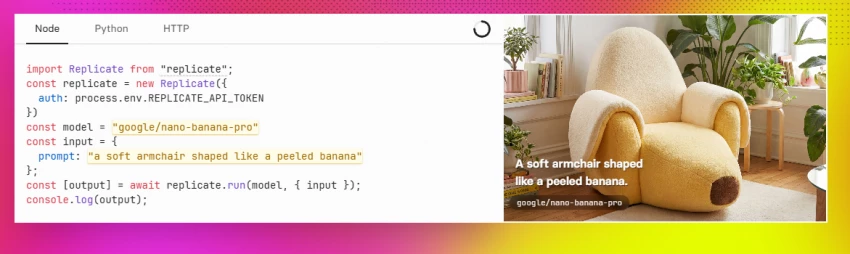
Replicate's own description centers on running and fine-tuning models, deploying custom models, and calling them through an API with a single line of code, while the platform handles API servers, CUDA, GPUs, batching, model weights, and the surrounding infrastructure. Its documentation makes the same point a different way: models can run through a cloud API without the user needing to understand machine learning or manage their own servers.
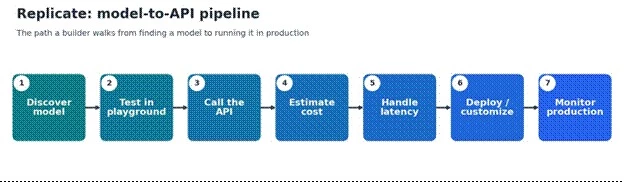
Every later section follows the same path a developer actually walks, from finding a model to deciding whether to stay on Replicate or self-host. The diagram and table below are the map; the rest of the guide expands each stage in turn.
| Stage | Developer question | Replicate role | Cost / quality check |
| Discover | Which model solves the problem? | Browse public and official models | Check the model page, examples, and pricing |
| Test | Does the output look usable? | Run it in the playground or via API | Test the same prompt or input several times |
| Connect | Can the app call it reliably? | Use the Python, Node, or HTTP API | Watch latency and error rates |
| Price | Is it affordable at scale? | Usage-based model billing | Estimate cost per user or per action |
| Stabilize | Will the API change or cold boot? | Official models and deployments help | Prefer stable APIs for production |
| Customize | Is a custom model needed? | Fine-tuning or custom model deployment | Check hardware and training cost |
| Scale | Can it handle product traffic? | Deployments, hardware choice, min and max instances | Measure throughput and idle cost |
| Decide | Stay on Replicate, or self-host? | Compare with GPU clouds and model APIs | Replicate may not be cheapest at high utilization |
Replicate behaves like a searchable model layer rather than a single model. The catalog spans community-contributed open-source models, Replicate's own official models, and some proprietary models, covering text-to-image, image-to-video, large language models, audio for speech, transcription, and music, vision models for analysis, segmentation, and detection, plus embeddings, utility models, and custom models a team uploads itself. Replicate has stated that thousands of open-source models were contributed by its community, and its catalog now spans tens of thousands of production-ready models. Discovery usually starts on a model's page, where example inputs, outputs, and pricing give a quick read on fit before a single line of code is written.
| Model type | Example use case | Replicate fit |
| Text-to-image | Product mockups, art, thumbnails | Strong |
| Image-to-video | Social clips, creative experiments | Strong, though cost can rise |
| LLMs | Chat, reasoning, text tasks | Useful; compare token pricing |
| Audio / speech | Voice, transcription, music experiments | Good for API testing |
| Vision models | Image analysis, segmentation, detection | Useful for product prototypes |
| Custom ML model | Internal model behind an API | Strong when a team wants managed deployment |
The single biggest reliability decision on Replicate is official versus community models. Official models are maintained by Replicate, kept always on, priced by predictable metrics, and held to a stable API. Replicate maintains more than 100 of them and designs them to avoid cold starts and unexpected API changes. Community models can be excellent, cheaper, or more specialized, but their behavior varies: cold boots are more likely, versions and hardware can change, and the model owner controls maintenance.
| Factor | Official models | Community / public models |
| API stability | Stronger | Can vary by model or version |
| Pricing | More predictable (per image, token, or second) | Often based on runtime and hardware |
| Cold starts | Lower concern, kept warm | More likely |
| Maintenance | Replicate-maintained | Depends on the model owner |
| Best for | Production apps and stable workflows | Experimentation and niche models |
| Risk | Less model variety | More variability |
| Note: For a side project, a community model may be perfectly fine. For a customer-facing app, official models usually deserve the first look. |
In most products, customers should never see which model runs behind a feature; they should see a clean result. The practical value of Replicate is that the model becomes an API call, reachable from Node, Python, raw HTTP, notebooks, or a backend workflow, so the model can sit quietly behind the product. A single run of an official model can be as short as a few lines:
import Replicate from "replicate"; const replicate = new Replicate(); const output = await replicate.run( "owner/model-name", { input: { prompt: "a short prompt" } } ); |
For longer-running predictions, webhooks return the result once it is ready instead of holding a request open, and the deployments API adds production controls such as hardware selection and instance limits. The integration path matters less than the fact that the same model can be reached the same way from very different stacks.
| Integration path | Best for | Notes |
| Node.js | Web apps, Next.js, Vercel projects | Comfortable for SaaS and front-end builders |
| Python | ML workflows, notebooks, backend scripts | Natural for AI and ML developers |
| HTTP API | No-code tools and automation platforms | Flexible for Zapier, n8n, or a custom backend |
| Webhooks | Long-running predictions | Useful when outputs take time to generate |
| Deployments API | Production control | Better for scaling and hardware changes |
Replicate pricing is usage-based rather than a flat subscription. For many public models, the bill follows how long the model runs and which hardware it uses, billed by the second.
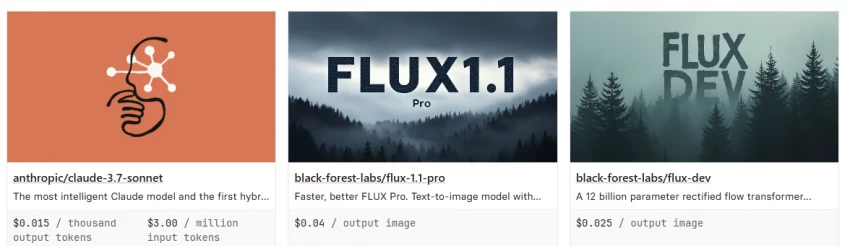
Official models often use predictable metrics instead: per output image, per second of generated video, or per input and output token.
Replicate's own pricing examples include Flux image models priced per output image, language models priced by tokens, and video models priced by the second of generated output. Public models charge only for active processing time, while private deployments are usually billed for setup and idle time as well, which is the detail that surprises teams later.
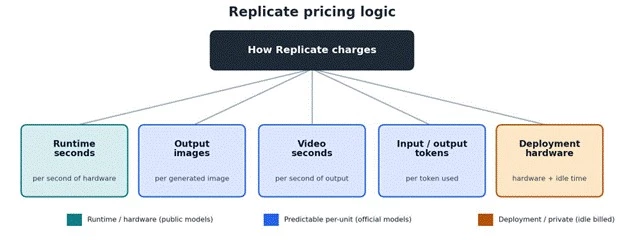
| Pricing style | Means | Example cost question |
| Per runtime second | Pay for how long the hardware runs | How long does each prediction take? |
| Per output image | Fixed cost per generated image | How many images does each user generate? |
| Per video second | Cost grows with the length of generated video | How long are the generated clips? |
| Per token | Language-model style pricing | How large are the prompts and responses? |
| Deployment hardware | Cost tied to selected hardware and minimum instances | Are GPUs idle or fully used? |
Mapping those styles onto real product features makes the scaling risk concrete.
| Product feature | Cost driver | Scaling risk |
| AI avatar generator | Number of images per user | Bulk generations become expensive |
| Video generator | Seconds of output video | Long clips can spike the bill |
| LLM chatbot | Input and output token volume | Long context raises cost |
| Image enhancer | Runtime per image | Batch uploads need estimates |
| Custom API model | Hardware, runtime, and deployment settings | Idle instances may keep costing |
| Note: Per-unit rates change, so the live model page is the only reliable source on launch day. Any cost example should be re-checked against current pricing before a feature goes out. |
A rough unit-economics check prevents most pricing surprises. The core formula stays simple:
cost per user action = model unit price × average units per action
Running that against the feature's heaviest realistic usage, not its lightest, is what keeps a launch budget honest.
| Use case | Unit to track | Example calculation |
| Image generator | Images per user | 10 images × price per image |
| Video generator | Seconds of video | 5 clips × 4 seconds × price per video second |
| LLM endpoint | Input and output tokens | input tokens + output tokens, each at the model rate |
| Image upscaling | Prediction runtime | runtime seconds × hardware price |
| Custom model | Runtime plus minimum instances | prediction cost + idle deployment cost |
| Note: Example figures above are illustrative only. Current per-unit rates should be read from the live model page, since they change without notice. |
A model that works once in a playground can still feel slow inside a real app. Cold boots, model loading time, GPU availability, queueing, output size, and hardware choice all shape what a user actually experiences. The fix is rarely a single setting; it is testing under realistic load.
| Problem | User sees | Developer checks |
| Cold start | First request feels slow | Official models or warm deployments |
| Long generation | The wait feels too long | Model speed and output length |
| Queueing | Predictions arrive late | Traffic patterns and hardware choice |
| Expensive hardware | The feature gets costly | T4 versus A100 or H100 testing |
| API changes | The app breaks | Official models or pinned stable versions |
| Failed prediction | Empty output or an error state | Retry logic and fallbacks |
| Note: A Replicate demo is not the same as a Replicate production feature. The product team should measure latency, retry behavior, and cost before launch. |
Replicate is not only a way to run other people's models. Developers can package and deploy their own models, choose hardware, create versions, and manage deployments. Replicate's custom-model documentation recommends starting GPU-accelerated models on an Nvidia T4 for development, then moving to stronger hardware such as A100s or H100s through deployments later, without changing the calling code. Hardware can be changed through the web or the API, and because changing hardware on a public model can affect other users, popular public models are often better served through a private deployment.
| Need | Replicate option | Practical note |
| Use an existing public model | Run the model API | Fastest starting point |
| Fine-tune an image model | Fine-tuning workflow | Good for custom styles or subjects |
| Deploy a private model | Custom model deployment | Useful for proprietary workflows |
| Control hardware | Deployment settings | Better cost and performance tuning |
| Stable production endpoint | Deployments API | Avoids some public-model uncertainty |
| Update versions | Model versions | Test before switching production traffic |
Replicate's model-creation docs note a limit of 1,000 models per account and recommend using a single model with new versions for most purposes, rather than creating a separate model for every change. For most teams, versioning one model is cleaner to maintain and easier to roll back than scattering work across many models.
Replicate is honestly priced, but it is not the cheapest option for every workload. Its economics shine when usage is unpredictable, early-stage, experimental, or spiky, because there is nothing to pay for when no requests are running. They become less favorable when a model runs constantly, traffic is predictable, and a team can manage cheaper dedicated GPU infrastructure on its own.
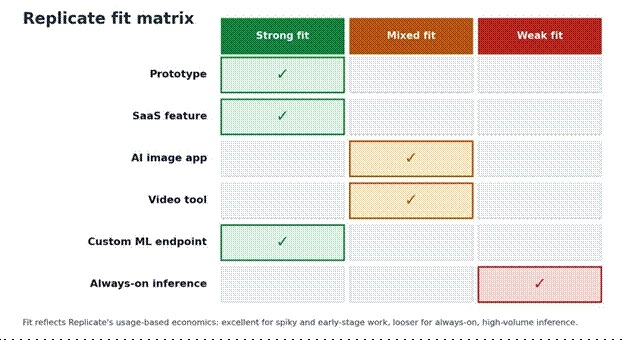
| Scenario | Replicate fit | Reason |
| Weekend prototype | Excellent | No infrastructure to set up |
| Early SaaS feature | Strong | Test demand before buying GPUs |
| Viral one-off tool | Strong | Pay only when requests happen |
| Daily low-volume API | Strong | Usage-based billing fits well |
| High-volume image generation | Mixed | Cost per generation can add up |
| Always-on inference | Mixed to weak | Dedicated GPUs may become cheaper |
| ML team with infra skills | Depends | More control may be cheaper elsewhere |
| Enterprise needing SLAs or contracts | Compare, contact sales | Support, compliance, and reliability need checks |
The useful way to compare Replicate is by intent, not by a generic list. The real question behind most alternatives is whether a team wants a model API now or wants to manage infrastructure itself, and that single choice points toward very different platforms.
| If the goal is | Compare Replicate with | Reason |
| Model marketplace APIs | Hugging Face, Fal, Together AI | Similar model-access direction |
| Fast LLM inference | Groq, Together AI, Fireworks AI | Stronger LLM-specific focus |
| Image or video model APIs | Fal, Runware, Stability AI, OpenAI, Google | Often faster or more specialized |
| GPU rental and control | RunPod, Lambda, Vast.ai, Spheron | More infrastructure control |
| Serverless custom ML | Modal, Baseten, Beam | More app and deployment engineering |
| Enterprise ML serving | AWS SageMaker, Vertex AI, Azure ML | Enterprise cloud ecosystems |
| Note: Replicate is best compared against one question: a model API now, or managed infrastructure later? |
The scores below summarize Replicate across the workflow stages covered in this guide, each paired with the reason behind it.
| Scoring note: These are editorial workflow scores based on public documentation, pricing structure, and developer use-case fit. They are not public user review scores. |
| Category | Score | Reason |
| Model discovery | 4.6 / 5 | Thousands of models plus strong browsing and playground value |
| API simplicity | 4.5 / 5 | Python, Node, and HTTP access make testing fast |
| Beginner developer friendliness | 4.2 / 5 | Easier than managing GPU infrastructure |
| Pricing predictability | 3.5 / 5 | Official models are clearer; runtime models need testing |
| Production stability | 3.8 / 5 | Official models and deployments help, but testing is required |
| Custom model deployment | 4.2 / 5 | Useful for teams that want API-hosted models |
| High-volume cost efficiency | 3.0 / 5 | Usage pricing can become expensive at scale |
| Overall builder usefulness | 4.3 / 5 | Strong for prototypes, early products, and model-backed features |
Before a Replicate-backed feature ships, the following checks separate a promising demo from a dependable feature.
| Test | Target |
| Run the same input 5 to 10 times | Check output consistency |
| Measure cold start time | See the first-request delay |
| Measure average runtime | Estimate real cost |
| Test a worst-case input | Avoid surprise failures |
| Compare an official versus a community model | Check the stability trade-off |
| Test cheaper hardware | Avoid overpaying |
| Add timeout and retry logic | Protect the user experience |
| Track cost per user action | Know the unit economics |
| Check the model license | Avoid commercial-use issues |
| Confirm API version stability | Avoid breaking production |
Replicate is at its best when a builder wants to move fast from model curiosity to a working API. It removes a large amount of early friction: model weights, GPUs, CUDA, server setup, batching, and deployment plumbing. That makes it especially well suited to prototypes, early SaaS features, image and video experiments, and custom model APIs a small team wants hosted for them.
The platform still deserves to be tested like infrastructure rather than treated like magic. Cost can move quickly with video length, image volume, token usage, hardware runtime, and production traffic, and private deployments bill for idle time as well as active work. Official models stay more predictable, while community models usually need more testing. For always-on, high-volume workloads, dedicated GPU infrastructure or a specialized inference provider may end up cheaper. The Cloudflare acquisition adds one more reason to keep an eye on roadmap and pricing over time.
Reach for Replicate when speed, model variety, and API simplicity matter most.
Reach for an alternative when long-term cost, full control, or always-on inference becomes the bigger priority.
Share your thoughts about this article.
Be the first to post a comment!

The same tool can be a 4.7 on one site and a 3.9 on another. Here is what is rea...
Nitin1 month ago

Here is the number worth pinning above your budget: in Gartner Digital Markets r...
Deepak Mehra1 month ago

What Artlist AI is in 2026Artlist began as a royalty-free music library. By 2026...
Deepak Mehra2 months ago

Most AI tool failures do not announce themselves. There is no crash, no angry em...
Nitin2 months ago

The best AI image generator in 2026 is Nano Banana 2 for speed, FLUX.2 for photo...
Parveen Verma2 months ago

“Useful” is a slippery word for a coding assistant. A tool can be brilliant at o...
Sakshi Dhingra2 months ago