The first time I realized something was wrong with my content was late at night while preparing an article for publication.
The research was solid. The structure was clean. I had spent hours refining the ideas and making sure the arguments flowed logically. But when I ran the article through an AI detection tool out of curiosity, the result stopped me cold. The system highlighted large sections of the text and labeled them as “likely AI-generated.”
That moment was frustrating because the article was not purely AI-written. I had used AI tools to assist with outlining and drafting, but most of the editing and refinement had been done manually. Yet the detection result made the writing appear suspicious.
If you work in content creation today, you probably recognize this situation. Writers increasingly rely on AI tools to accelerate research and drafting, but the internet has simultaneously developed systems designed to detect AI-generated writing. This creates a strange paradox where writers use AI to improve productivity but then must prove their work still feels human.
While trying to solve that problem, I repeatedly encountered the same tool mentioned across several AI directories and software review websites: SafeWrite AI.
Some platforms described it as an AI humanizer. Others called it an AI rewriting engine designed to reduce AI detection scores. The descriptions were vague enough that I decided to test the tool myself.
What follows is my experience exploring SafeWrite AI and how it compares with other humanizing tools currently circulating online.
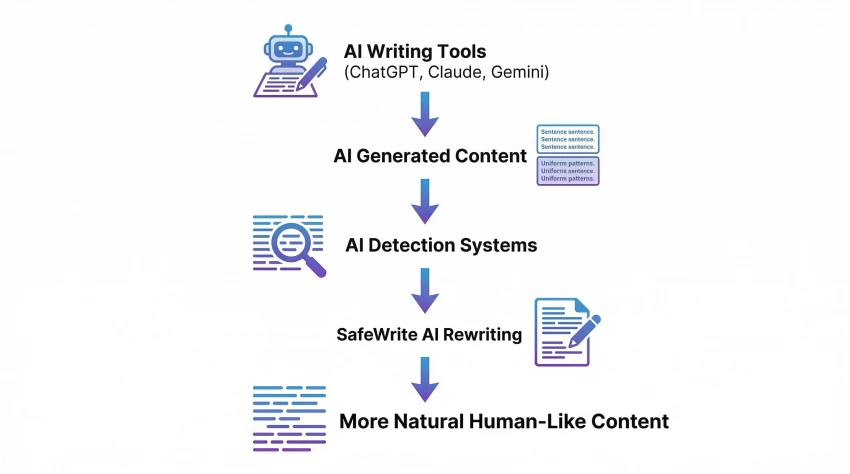
SafeWrite AI exists because modern AI writing systems produce text that often follows predictable linguistic patterns. Language models generate sentences based on probabilities, which means they tend to produce grammatically clean but statistically recognizable phrasing.
AI detection tools attempt to identify these patterns. They look for signals such as consistent sentence rhythm, uniform complexity levels, and statistical regularities that differ slightly from natural human writing.
SafeWrite AI attempts to modify these patterns. Instead of generating new content from scratch, the tool rewrites existing text in ways that introduce variation into sentence structure, word choice, and phrasing.
In theory, this process makes AI-assisted content appear more organic.
That theory sounded reasonable, but theory and practice are not always the same thing.
When I first opened SafeWrite AI, the interface immediately reminded me of many rewriting tools. The process was straightforward. I pasted text into the editor, clicked the rewrite function, and waited for the tool to generate an altered version of the content.
To properly test the system, I decided to use three different writing samples.
The first sample was a technical article about artificial intelligence trends. The second was a conversational blog post. The third was a research-style explainer with long paragraphs and complex sentences.
The results were interesting.
In the technical article, SafeWrite AI changed sentence structures noticeably. Some short sentences became longer explanatory statements. In other cases, the tool reversed sentence order or replaced phrases with slightly more conversational wording.
The changes were not dramatic enough to distort the meaning of the article, but they did alter the rhythm of the writing. The rewritten text felt less uniform than the original AI-assisted version.
That difference may seem subtle, but sentence rhythm is one of the signals AI detectors often analyze.
One strength that became clear during testing was SafeWrite AI’s ability to maintain the integrity of the original content. Many rewriting systems distort ideas when they attempt to humanize text, often replacing precise terminology with vague alternatives or rearranging sentences in ways that alter the meaning of the paragraph. During my tests, SafeWrite AI generally avoided that problem. The core message of the article remained intact even after the rewriting process, which is particularly important when working with research-based or technical writing where accuracy matters more than stylistic experimentation.
Another advantage is accessibility. The platform is easy to use and does not require a complicated setup process or advanced technical knowledge. Writers can simply paste text into the interface, run the rewriting function, and review the output almost immediately. In practice, this makes the tool convenient for quick editing passes when reviewing AI-assisted drafts. Instead of manually restructuring dozens of sentences, the system attempts to introduce variation automatically, which can save time during the editing stage of a writing workflow.
I also noticed that SafeWrite AI performs reasonably well when handling longer passages of text. Some rewriting tools struggle with large blocks of content and tend to produce repetitive or mechanical modifications across the entire document. SafeWrite AI, by contrast, appeared to introduce different adjustments across separate paragraphs. In some sections it changed sentence order, while in others it modified phrasing or inserted more conversational transitions. That variation helps break the predictable rhythm often found in AI-generated writing.
This change in rhythm is more important than it might initially appear. Many AI detection systems rely partly on identifying patterns in sentence length, grammatical structure, and phrasing repetition. When a piece of content follows extremely consistent linguistic patterns, it becomes easier for detection systems to classify it as machine-generated. By introducing structural variation, SafeWrite AI attempts to reduce those recognizable patterns, which may help content appear more natural when analyzed by certain detection models.
Another strength that stood out during testing was speed. The rewriting process typically completed within seconds, even for relatively long passages. For writers who regularly review AI-assisted drafts, this speed makes it practical to run multiple iterations of the same content and compare the results. In some cases, running the rewriting function more than once produced slightly different versions of the same paragraph, allowing me to choose the phrasing that felt most natural.
Despite those strengths, the tool has several limitations that became more noticeable the longer I worked with it. The most obvious issue is occasional awkward phrasing. While the rewritten text usually remains grammatically correct, certain sentences feel slightly unnatural when read carefully. This often happens when the system replaces words or rearranges clauses without fully considering how the sentence flows within the surrounding paragraph. The meaning remains intact, but the tone sometimes feels subtly mechanical.
Another limitation involves the depth of rewriting. In some paragraphs, SafeWrite AI makes substantial changes to sentence structure and phrasing. In other sections, the modifications are minimal, leaving large portions of the original text nearly unchanged. This inconsistency suggests that the rewriting system may rely partly on pattern-based substitutions rather than deeper contextual language understanding. As a result, some parts of the text become noticeably more varied, while others remain very close to the original input.
During longer tests, I also noticed that SafeWrite AI does not always improve narrative flow. If the original text contains logical gaps or weak transitions between ideas, the rewriting process does not repair those structural problems. The system focuses on altering language patterns rather than reorganizing arguments or clarifying explanations. In other words, it modifies how sentences are written, but it does not fundamentally improve how ideas are developed.
Another practical limitation is that SafeWrite AI cannot transform poor content into strong writing. If the original article lacks clarity, depth, or coherent structure, the rewritten version will usually inherit those same weaknesses. The tool does not add new insights, strengthen arguments, or correct factual inaccuracies. It operates primarily at the surface level of language rather than the deeper level of reasoning and narrative structure.
Because of these limitations, SafeWrite AI works best as a supplementary editing step rather than a primary writing solution. Writers who already have well-structured content may find it useful for introducing stylistic variation into AI-generated drafts. However, relying on the tool as a complete replacement for careful human editing would likely lead to uneven results.
In practice, the most effective workflow I found involved using SafeWrite AI to generate a rewritten draft and then reviewing the output manually. By editing the revised version and smoothing out awkward phrases, it becomes possible to combine the speed of automated rewriting with the nuance of human judgment.
After spending time experimenting with SafeWrite AI, I came away with a mixed but realistic impression.
The tool is neither a miracle solution nor a useless gimmick. It sits somewhere in the middle.
For writers who occasionally rely on AI drafting tools, SafeWrite AI can help introduce variation into machine-generated text. In some cases, this may reduce the likelihood of triggering AI detection systems.
However, the tool does not eliminate the need for thoughtful editing. Human judgment still plays the most important role in producing natural writing.
In many ways, SafeWrite AI functions best as a refinement tool rather than a full writing assistant.
After testing SafeWrite AI across different types of content and comparing it with other rewriting tools, I would give it a score of 7 out of 10.
The platform provides a functional way to restructure AI-generated text and introduce more natural variation into sentence patterns. At the same time, it does not consistently produce writing that feels completely human, and it should not be treated as a guaranteed solution for avoiding AI detection.
For writers experimenting with AI-assisted workflows, SafeWrite AI may serve as a helpful additional editing step. But like most AI tools, its effectiveness ultimately depends on how carefully the user reviews and refines the final output.
Before forming my own opinion about the tool, I also looked at how SafeWrite AI is rated across different software directories and AI tool listing platforms. These platforms collect feedback from users who have tested the tool in real-world writing workflows, which provides a broader perspective beyond individual experience.
| Platform | Rating |
| Capterra | 4.3 / 5 |
| SoftwareAdvice | 4.2 / 5 |
| AI Tool Directories (average) | ~4.0 / 5 |
| Startup / AI Listing Platforms | ~4.1 / 5 |
Across most platforms, SafeWrite AI tends to receive moderately positive feedback. Users frequently mention that the tool is useful for restructuring AI-generated content and introducing variation into sentence patterns. However, reviews also highlight some of the same limitations observed during testing, particularly around occasional awkward phrasing and inconsistent rewriting depth.
Overall, the platform’s ratings across review sites suggest that SafeWrite AI is generally considered a helpful supplementary writing tool rather than a complete solution for fully humanizing AI-generated content.
| Tool | Strength | Limitation |
| SafeWrite AI | Preserves the original meaning while adjusting sentence structure and phrasing to make AI text appear more natural. | Occasionally produces awkward phrasing and inconsistent rewriting depth across paragraphs. |
| Undetectable AI | Strong at altering AI detection patterns and restructuring content significantly. | Aggressive rewriting may distort tone or meaning of the original text. |
| QuillBot | Reliable for paraphrasing sentences and improving grammar in smaller sections of text. | Longer passages can still appear mechanical or AI-like. |
| StealthWriter AI | Performs deeper contextual rewriting compared with many basic paraphrasers. | Large contextual changes may alter the intended meaning of the content. |
| Humanizer Pro Tools | Introduces conversational phrasing and structural variation in AI-generated writing. | Output quality can vary depending on paragraph complexity and length. |
After spending time testing SafeWrite AI with different types of content, my overall impression is that it works best as a refinement tool rather than a complete solution. It can introduce useful variation into AI-generated text and sometimes lower detection signals, but it still requires human editing to sound truly natural. In my workflow, it felt more like a supporting assistant during the editing stage rather than something that can fully replace thoughtful rewriting by a writer.
Be the first to post comment!

Vheer AI is interesting not just because of what it does, but because of what it...
Parveen Verma3 hours ago

Why I looked into Leeco AI in the first placeOver the past few years, I have not...
Sakshi Dhingra2 days ago

When I first came across Skipit, I approached it with a bit of skepticism. The A...
Sakshi Dhingra4 days ago

I didn’t start exploring Dzine AI because I was chasing the latest AI trend. I d...
Sakshi Dhingra5 days ago

The positioning of Promptchan within the AI ecosystem is often misunderstood. Wh...
Sakshi Dhingra1 week ago

A Personal Moment That Made Me Care About Online Coupons AgainA few months ago,...
Parveen Verma2 weeks ago