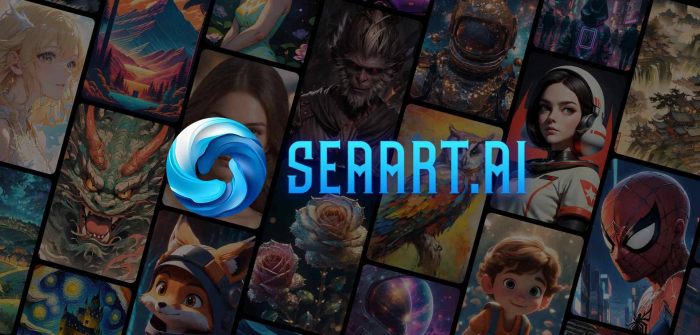
SeaArt AI is an AI art generation platform that lets users create images, animations, and characters using text prompts, image editing tools, and more creative controls. It’s especially popular with:
● anime and stylized artwork creators
● hobby artists exploring AI art
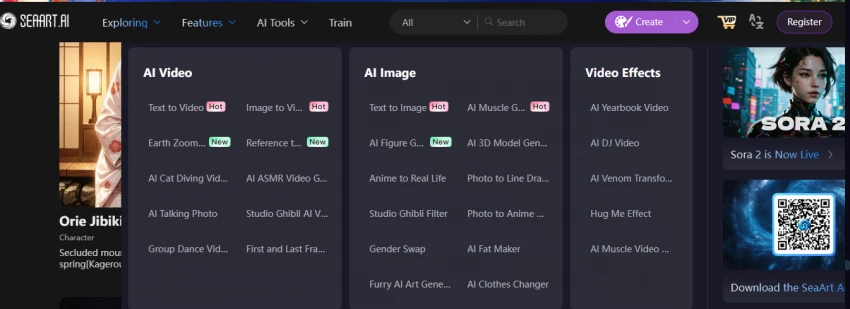
What it does:
You type a description like “a cute anime cat riding a rainbow skateboard at sunset” and the AI creates a picture that matches it.
What it does:
You upload a photo or drawing, then tell SeaArt what to change, for example:
● change background
● change colors
● make the image look like a painting
Good for:
Fixing photos, exploring styles, or tweaking artwork without skill.
What it does:
SeaArt lets you teach the system your own style by feeding it examples.
Example:
If you draw a character and want the AI to create many pictures in your style, you can train it so the AI learns that look.
Good for:
Creators, character designers, and people making series of similar art.
What it does:
You can make short videos that move or animate using AI, like a gif with motion.
SeaArt has a section where users share:
● prompts (descriptions used to make art)
● their favorite creations
● styles and tips
Why it helps:
You can copy or remix ideas from others instead of starting from scratch.
What it does:
Some users can interact with characters that talk back like chatbots.
Example:
You create a fantasy character and then have a chat with them for fun or story writing.
SeaArt AI uses a hybrid pricing model involving:
�� Daily Stamina resets daily and allows image/video generation
�� Credits bought separately, don’t expire and are used when stamina runs out.
| Plan | Monthly Price | Approx. Daily Stamina | Notes |
| Free | ₹0 | ~150 | Basic usage, limited features |
| Beginner | ₹430.17 | ~300 | Fast queue, more generations |
| Standard | ₹1212.37 | ~1800 | Watermark-free, video tools |
| Professional | ₹1885.91 | ~4000 | Higher limits, multi-task |
| Master | ₹4714.78 | ~12000 | Maximum capacity |
Here’s what real users are saying across platforms:
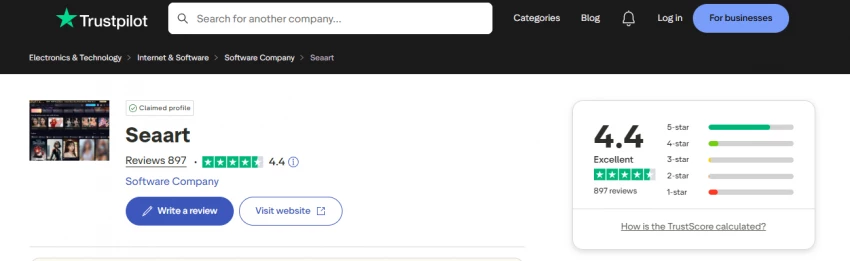
● 4.4 / 5 overall score from ~897 reviews.
● 73% of reviewers gave 5★, 12% 4★, while 11% gave 1★. (Trustpilot)
Positive themes:
● Good variety of creative tools
● Fun and engaging for hobbyists
● Some users enjoy image and video generation
Constructive / Negative themes:
● Slower generation at times
● UI can be confusing
● Some features don’t work as expected for everyone.
Tip: Trustpilot shows many positive reviews but also many critical ones, including allegations of billing issues
Reddit discussions reveal mixed to strongly negative sentiments from active users:
Subscription & Billing Issues
● Users claim automatic charges and difficulty cancelling trials or subscriptions. (Reddit).
Censorship & Content Policy
● Creators’ content getting blocked, blurred, or deleted unexpectedly, including previously acceptable art.
● Sudden policy/technical changes leading to frustration.
Quality Fluctuations
● Some users say model quality degrades over time, with worse faces/outputs after updates.

● A few users attest to ongoing creativity and returned access after updates.
● Beginners sometimes enjoy the variety and features.
Safety & Trust Considerations
● SeaArt has a low trust score (39/100) citing unclear information or potential risks.
Important: A low scan score doesn’t prove fraud, but it suggests caution when providing personal/payment data.
✔ Generous free usage if you’re experimenting
✔ Fun and creative for casual users
✔ Strong anime & stylized art capabilities
✘ If you dislike unclear billing or hard subscription cancellation
✘ If you expect professional stability (consistent outputs)
✘ If policy changes or content censorship may affect your workflow
If you’re exploring AI art tools beyond SeaArt AI, here are some popular options with different strengths:
What it does:
Generates high-quality, stylized images from text prompts with a focus on artistic and cinematic visuals.
Strengths:
● Excellent for concept art, fantasy, and detailed illustrations
● Community-driven Discord workspace for prompt sharing and support
Considerations:
● Subscription-based, no free tier beyond a trial
● Best suited for users who enjoy experimenting with prompts rather than video or custom training
What it does:
Text-to-image AI capable of photorealistic and creative outputs. Supports inpainting (editing part of an image).
Strengths:
● Very intuitive and beginner-friendly
● High quality for professional-looking visuals
● Strong integration in platforms like ChatGPT (image generation)
Considerations:
● Free credits per month, then paid usage
● Focuses on images, not videos
What it does:
Open-source AI model for generating highly customizable images from text and images.
Strengths:
● Supports custom models and styles
● Can run locally for privacy and unlimited generation
● Huge community with pre-trained models and tools
Considerations:
● Requires more technical knowledge for advanced features
● UI can vary depending on the platform
What it does:
AI creative suite for image, video, and animation generation. Offers text-to-image, inpainting, and video tools.
Strengths:
● Strong video generation options
● Beginner-friendly with many templates
● Collaborative features for teams
Considerations:
● Paid plans for advanced features
● Free tier is limited in daily generation
What it does:
Focuses on blending and evolving images using AI. Great for characters, portraits, and landscapes.
Strengths:
● Allows fine-grained control over facial features, colors, and styles
● Easy to combine images for new variations
Considerations:
● More niche for portraits/characters than general AI art
● Limited video or animation features
SeaArt AI is feature-rich and fun for many users, especially those exploring AI artwork and character generation. However, actual user experiences vary widely, with a strong base of positive reviews mixed with recurring complaints about billing transparency, subscription handling, and policy enforcement from community forums and real user feedback.
Be the first to post comment!

Why I looked into Leeco AI in the first placeOver the past few years, I have not...
Sakshi Dhingra12 hours ago
When I first came across Skipit, I approached it with a bit of skepticism. The A...
Sakshi Dhingra2 days ago
I didn’t start exploring Dzine AI because I was chasing the latest AI trend. I d...
Sakshi Dhingra3 days ago
The positioning of Promptchan within the AI ecosystem is often misunderstood. Wh...
Sakshi Dhingra1 week ago
A Personal Moment That Made Me Care About Online Coupons AgainA few months ago,...
Parveen Verma1 week ago

Choosing the right software used to be straightforward. You compared features, c...
Suraj Malik2 weeks ago