AI avatar video tools have quickly become one of the fastest-growing categories in the creator economy. Platforms like Synthesia and Vidnoz promise something that would have sounded impossible just a few years ago: generate a professional video presenter simply by typing a script.
Instead of cameras, lighting setups, or recording studios, these platforms rely on artificial intelligence to generate realistic digital presenters that speak your script in multiple languages.
Over the past several months, I spent time testing both platforms across different scenarios, marketing videos, training tutorials, social media content, and simple explainer videos.
At first glance, the two tools look very similar. Both generate AI presenters, support multiple languages, and allow users to produce videos from scripts.
However, once I actually started using them, the differences became obvious.
Some tasks Synthesia handled extremely well, while Vidnoz performed better in other areas, particularly when speed and accessibility mattered.
In this article, I’ll share exactly what I experienced while testing both tools and explain when each platform works best.
| Feature | Synthesia | Vidnoz |
| AI Avatar Quality | Very realistic | Good but less natural |
| Languages | 140+ | 100+ |
| Ease of Use | Simple but structured | Extremely beginner friendly |
| Templates | Limited | Large template library |
| Free Plan | No | Yes |
| Pricing | ~$18/month starter | Free + paid upgrades |
| Best For | Training and business videos | Quick marketing or social content |
From my experience, Synthesia focuses more on professional presentation videos, while Vidnoz prioritizes fast video generation for creators and marketers.
To make the comparison fair, I tested both tools using similar scripts across three different scenarios:
During testing, I evaluated each platform based on:
This allowed me to see how both tools performed under similar conditions.
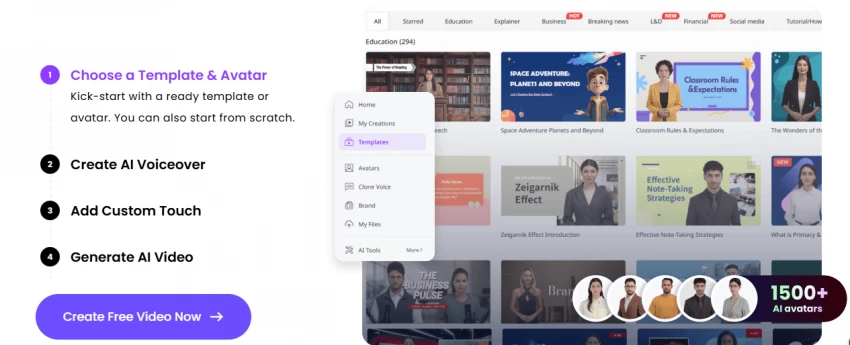
The first thing I noticed when using Synthesia was how polished everything felt. The interface looks clearly designed with businesses in mind.
The workflow is simple but structured. I entered my script, selected an avatar, chose a language, and the platform generated a video with synchronized voice and facial animation.
What impressed me most was the realism of the avatars. Compared with many AI presenters I have tested, Synthesia avatars look much closer to real people.
Lip synchronization works very well, and the pacing of speech feels natural.
I created a training-style video explaining a software feature, and the final result genuinely looked like something that could be used inside a company training module.
From my experience, Synthesia works extremely well for structured communication videos such as:
These types of videos benefit from Synthesia’s polished avatars and professional tone.
While the platform produces impressive results, it also has a few drawbacks.
The editing environment feels somewhat rigid. It functions more like a slide presentation builder rather than a flexible video editor.
Another limitation is the lack of a free plan. Users must subscribe before generating full videos.
Pricing generally starts around $18 per month, though enterprise plans with additional features can cost significantly more.
After extensive testing, I would rate Synthesia:
9/10 for business and training videos
However, for quick marketing content or social media videos, it sometimes feels slightly heavy.
Vidnoz surprised me in several ways.
When I first opened the platform, I expected a simple avatar generator. Instead, I found a large collection of templates and presenters designed specifically for marketing videos.
The biggest advantage became obvious immediately: Vidnoz offers a free plan, which makes it extremely accessible.
I tested Vidnoz by generating a promotional video for a fictional product, and the entire process took just a few minutes.
The platform provides many ready-made templates designed for social media content, which made video generation faster compared with Synthesia.
Vidnoz performs particularly well for:
If your priority is speed rather than cinematic realism, Vidnoz produces videos extremely quickly.
Despite its accessibility, Vidnoz does have some weaknesses.
The most noticeable difference compared with Synthesia is avatar realism. Some avatars appear slightly artificial, particularly in longer videos.
Voice synchronization works well but occasionally feels less natural than Synthesia.
Editing tools are also simpler, which can limit more complex video production workflows.
After testing Vidnoz across several projects, I would rate it:
7.5/10 overall
However, considering it offers a free plan, the platform performs surprisingly well.
| Feature | Synthesia | Vidnoz |
| AI Avatar Library | Large professional avatar collection | Large template-driven library |
| Languages | 140+ supported | Around 100+ |
| Custom Avatars | Available on premium plans | Limited customization |
| Templates | Business presentation layouts | Marketing-focused templates |
| Voice Options | High-quality AI voices | Multiple AI voices |
| Collaboration | Team collaboration tools | Basic sharing |
| Ease of Use | Professional workflow | Extremely beginner-friendly |
From my perspective, Synthesia offers more refined professional tools, while Vidnoz focuses on simplicity.
| Platform | Avatar Realism | Lip Sync Accuracy | Voice Naturalness |
| Synthesia | Very realistic | Excellent | Very natural |
| Vidnoz | Good | Good | Slightly synthetic |
If realism is the main priority, Synthesia clearly performs better.
My experience matched many of the opinions shared across review platforms.
Users frequently praise Synthesia for its professional quality and reliability in business environments.
Vidnoz, on the other hand, receives positive feedback for accessibility and speed.
Many reviewers describe the comparison as a trade-off between quality and convenience.
| Use Case | Best Tool |
| Corporate training videos | Synthesia |
| Educational presentations | Synthesia |
| Social media marketing videos | Vidnoz |
| Quick promotional content | Vidnoz |
| Professional business communication | Synthesia |
After months of testing both tools, my conclusion is fairly simple.
Synthesia works best when professional presentation quality matters.
Vidnoz works best when speed, simplicity, and affordability matter.
If you are producing business presentations or training videos, Synthesia is the stronger choice.
If you want to generate quick marketing videos without spending money, Vidnoz is the easier option.
Both tools demonstrate how rapidly AI video technology is evolving, and competition in this space will likely become even stronger in the coming years.
Be the first to post comment!

As a content creator, managing a diverse range of video content is a daily chall...
Sakshi Dhingra3 days ago

The first time I realized something was wrong with my content was late at night...
Sakshi Dhingra5 days ago
Vheer AI is interesting not just because of what it does, but because of what it...
Parveen Verma5 days ago

Why I looked into Leeco AI in the first placeOver the past few years, I have not...
Sakshi Dhingra1 week ago
When I first came across Skipit, I approached it with a bit of skepticism. The A...
Sakshi Dhingra1 week ago

I didn’t start exploring Dzine AI because I was chasing the latest AI trend. I d...
Sakshi Dhingra1 week ago